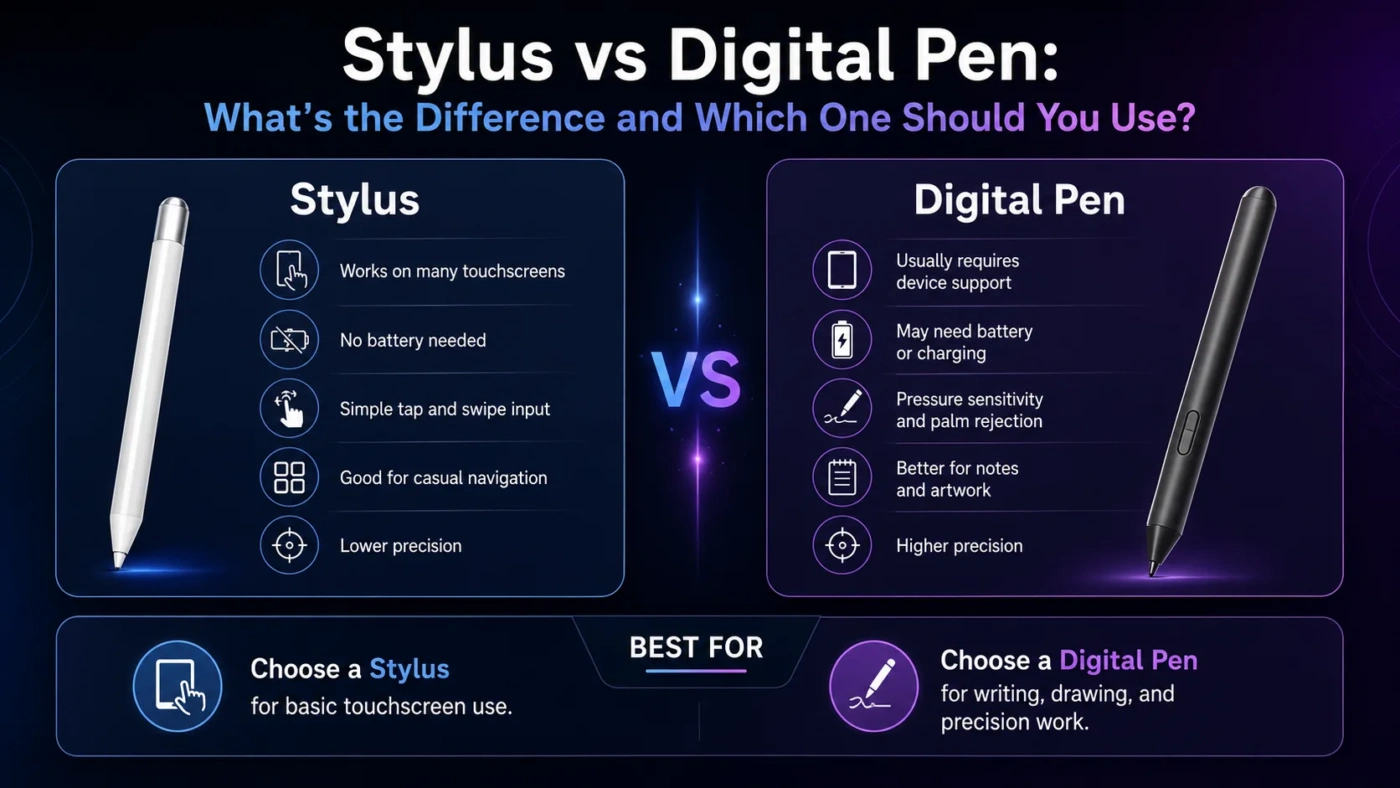
A stylus is the broader, simpler tool: any pen-shaped accessory used to touch, tap, draw, or write on a screen. A digital pen is usually the smarter version, built for pressure sensitivity, palm rejection, tilt detection, shortcut buttons, charging, and close integration with a tablet, laptop, or display. Choose a basic stylus if you mostly tap, scroll, annotate lightly, or want a low-cost accessory. Choose a digital pen if you write notes often, sketch, edit images, teach, design, or need a pen that feels closer to paper.
- Main Differences
- Stylus
- Digital Pen
- How Each One Works
- What A Stylus Offers
- What A Digital Pen Offers
- Score Comparison For Daily Use
- Choose A Stylus If
- Choose A Digital Pen If
- Real Use Differences
- Writing Notes
- Drawing And Illustration
- School And Study
- Office And Business Use
- Travel And Portability
- Price And Long-Term Value
- Decision Tree
- Compatibility And Setup
- Common Misunderstandings
- Best Choice By User Type
- Useful Terms
- Compare More Options
- FAQ
- Is A Stylus The Same As A Digital Pen?
- Can I Use A Digital Pen On Any Touchscreen?
- Is A Stylus Good For Taking Notes?
- Do Digital Pens Need Charging?
- Which Is Better For Drawing?
- Which One Should I Choose?
| Feature | Stylus | Digital Pen |
|---|---|---|
| Best For | Basic tapping, scrolling, casual notes, simple drawing | Handwriting, illustration, design, annotation, creative work |
| Screen Support | Often works on many capacitive touchscreens | Usually works only with supported devices or pen systems |
| Pressure Sensitivity | Usually absent | Common on active models |
| Palm Rejection | Limited or unavailable | Often supported when paired with compatible hardware |
| Battery Or Charging | Basic models do not need power | May need charging or a replaceable battery |
| Precision | Good enough for taps and simple marks | Better for fine lines, handwriting, and detailed control |
| Setup | Usually no setup | May require pairing, device support, or app settings |
| Price Range | Usually cheaper | Usually costs more, especially with advanced features |
| Best Choice | Better for casual use and low budgets | Better for serious writing, drawing, and professional work |
Main Differences
A stylus is a general input tool. It can be as simple as a rubber-tipped pen that imitates a finger on a touchscreen. A digital pen is more advanced because it communicates with the device, the screen layer, or the operating system. That communication is what allows features such as pressure levels, tilt angle, hover detection, palm rejection, and programmable buttons.
The difference becomes obvious when you move from tapping to writing or drawing. A simple stylus can select icons and make basic marks, but it often feels less precise. A digital pen can recognize lighter and heavier strokes, reject accidental palm touches, and give smoother line control in compatible apps.
Stylus
A stylus is better when the task is simple. It is easy to carry, usually inexpensive, and often works without charging. For browsing, signing forms, using public kiosks, or keeping fingerprints off a screen, a basic stylus can be enough.
Digital Pen
A digital pen is better when the pen must behave like a real writing or drawing tool. It can support handwriting, sketching, annotation, classroom work, design apps, and creative workflows with more control.
How Each One Works
What A Stylus Offers
A stylus is useful when simplicity matters more than advanced control. Many basic styluses are passive, meaning they do not need batteries, pairing, firmware updates, or special settings. You can use them for touchscreen navigation, casual doodling, menu selection, simple annotations, and keeping the screen cleaner.
The trade-off is that a basic stylus usually cannot tell how hard you press. It may also struggle with palm rejection, fine detail, and angled strokes. For short tasks, that may not matter. For long handwriting sessions or drawing, the limits become easier to notice.
What A Digital Pen Offers
A digital pen is designed for more controlled input. Depending on the model and device, it may support pressure sensitivity, palm rejection, tilt response, low-latency writing, hover previews, eraser functions, magnetic charging, and shortcut buttons.
This makes it a better fit for students taking handwritten notes, teachers marking PDFs, designers sketching ideas, artists drawing, office users reviewing documents, and anyone who wants a screen to feel more like a notebook. The main drawback is compatibility. A digital pen is often tied to a certain tablet, laptop, display, or pen protocol.
Score Comparison For Daily Use
Choose A Stylus If
Choose A Digital Pen If
Real Use Differences
Writing Notes
For short notes, either option can work. For longer handwriting, a digital pen is usually more comfortable because palm rejection lets you rest your hand on the screen. Pressure sensitivity is less important for plain notes, but low latency and accurate tracking make writing feel smoother.
Drawing And Illustration
A digital pen is the better choice for drawing. Pressure sensitivity changes line thickness. Tilt can help with shading. Shortcut buttons can switch tools faster. A basic stylus can draw simple shapes, but it does not give the same control for detailed sketches or art apps.
School And Study
Students who only highlight PDFs or tap through apps can use a basic stylus. Students who take handwritten notes every day will usually benefit from a digital pen. The difference is not only accuracy; it is also comfort during longer sessions.
Office And Business Use
For signatures, forms, and occasional annotations, a stylus may be enough. For reviewing documents, marking presentations, teaching remotely, or working across note apps, a digital pen offers better workflow support.
Travel And Portability
A passive stylus is easier to keep in a bag because it has no battery. A digital pen may need charging, a magnetic slot, or a case. However, if the digital pen attaches to the device and charges magnetically, it can still be very convenient.
Price And Long-Term Value
A basic stylus is usually the cheaper option. It makes sense when your needs are light and the tool is not central to your workflow. Losing or replacing it is also less painful.
A digital pen often costs more because it includes sensors, electronics, charging hardware, and device-specific support. The higher price can be worth it if you write, annotate, teach, sketch, or edit often. If you use pen input every day, the better comfort and control can matter more than the upfront cost.
Decision Tree
Compatibility And Setup
Compatibility is one of the biggest differences. A passive stylus usually works with many capacitive touchscreens because it acts like a finger. A digital pen may need a supported display digitizer, Bluetooth pairing, a specific operating system feature, or a matching pen generation.
For example, two tablets can both support touch but still use different pen systems. A digital pen may also support only some features on certain devices. It might write, but not support pressure. It might pair, but not support shortcuts. This is why checking the exact device model matters.
Common Misunderstandings
| Misunderstanding | More Accurate View |
|---|---|
| All styluses are digital pens. | A digital pen is a type of advanced stylus, but many styluses are simple passive tools. |
| Any pen works with any tablet. | Basic styluses are more universal; digital pens often require exact device support. |
| Pressure sensitivity matters for everyone. | It matters most for drawing, design, and expressive handwriting. It is less important for basic tapping. |
| A more expensive pen always feels better. | Fit depends on the screen, app, pen tip, latency, palm rejection, and how you use it. |
| A stylus is only for artists. | Styluses can also help with forms, signatures, note apps, accessibility, and cleaner screen use. |
Best Choice By User Type
| User Type | Better Choice | Reason |
|---|---|---|
| Casual Tablet User | Stylus | Simple touch control is enough for browsing, tapping, and light use. |
| Student | Digital Pen | Better for handwritten notes, PDF marking, and long study sessions. |
| Artist Or Designer | Digital Pen | Pressure, tilt, and precision make creative work easier. |
| Office Worker | Depends | A stylus is enough for signatures; a digital pen is better for document review and presentations. |
| Budget Buyer | Stylus | Lower cost and no charging make it practical for occasional use. |
| Teacher Or Presenter | Digital Pen | Annotation, screen writing, and shortcut controls can improve live explanation. |
Useful Terms
Compare More Options
FAQ
Is A Stylus The Same As A Digital Pen?
No. A stylus is a broad term for a pen-like screen input tool. A digital pen is usually a more advanced stylus with electronic features such as pressure sensitivity, palm rejection, buttons, or device pairing.
Can I Use A Digital Pen On Any Touchscreen?
Usually not. Digital pens often need a compatible device, screen technology, or pen protocol. A passive stylus is more likely to work across many touchscreens, but it will not offer advanced pen features.
Is A Stylus Good For Taking Notes?
A stylus can work for short notes, but a digital pen is better for regular note-taking. Palm rejection, smoother tracking, and better precision make a noticeable difference during longer writing sessions.
Do Digital Pens Need Charging?
Many digital pens need charging or a battery, but not all use the same method. Some charge magnetically, some use USB, and some use replaceable batteries. Basic passive styluses usually do not need power.
Which Is Better For Drawing?
A digital pen is better for drawing because it can support pressure sensitivity, tilt, palm rejection, and app shortcuts. A basic stylus is fine for simple sketches but less suitable for detailed creative work.
Which One Should I Choose?
Choose a stylus if you want a simple, low-cost tool for general touchscreen use. Choose a digital pen if you write, draw, annotate, teach, design, or need accurate control on a compatible device.