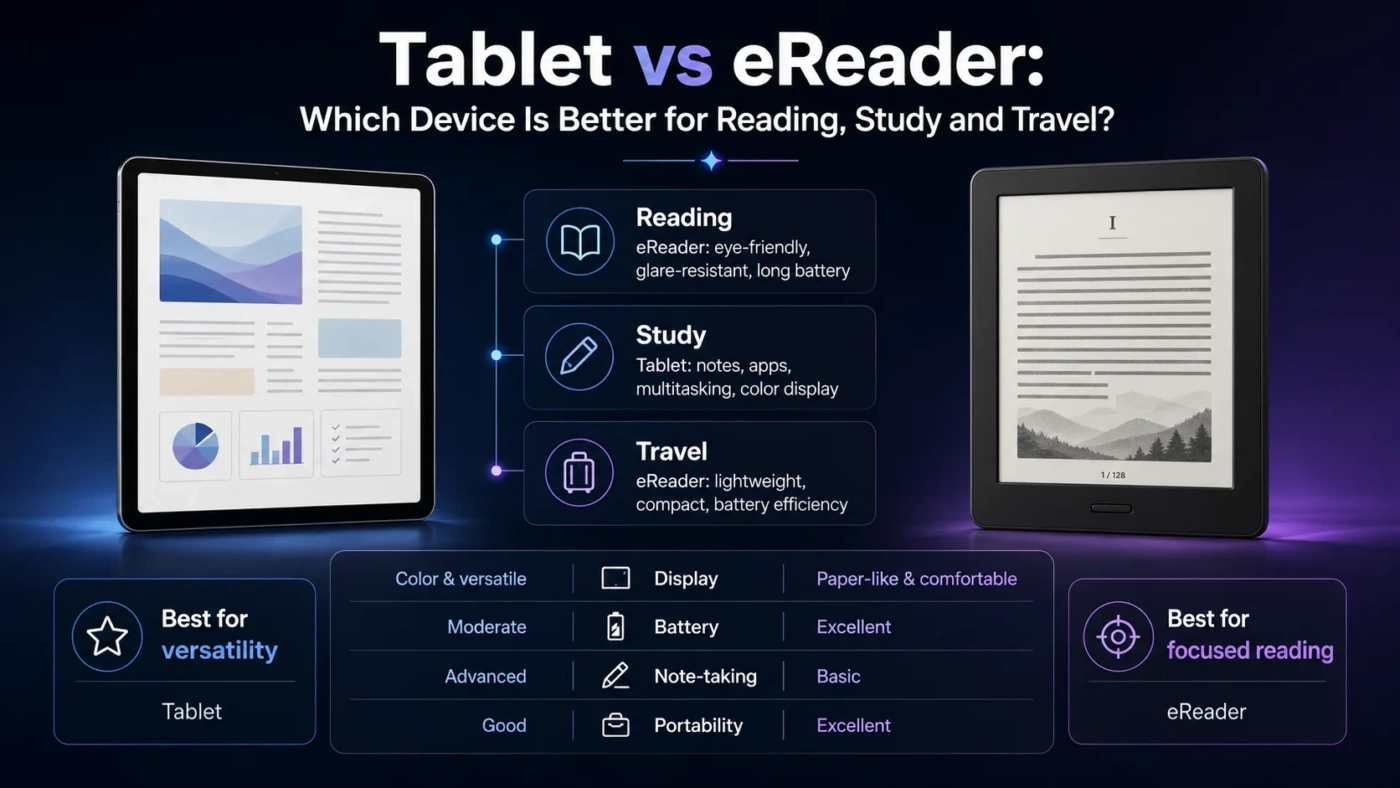
Tablets and eReaders can both display books, articles, PDFs, and study material, but they are built for different habits. Choose a tablet if you want one device for reading, apps, video, browsing, notes, email, games, and creative work. Choose an eReader if your main goal is comfortable long-form reading with fewer distractions, longer battery life, and a screen that feels closer to paper.
- Main Differences
- Tablet
- eReader
- Screen Comfort And Reading Feel
- Price And Value
- Choose A Tablet If
- Choose An eReader If
- Daily Use
- Battery Life And Portability
- Notes, Study, And Work
- Common Misunderstandings
- Best Choice By User Type
- Glossary
- Compare More Options
- FAQ
- Is A Tablet Better Than An eReader For Books?
- Is An eReader Worth It If I Already Have A Tablet?
- Which Is Better For PDFs?
- Which Is Better For Kids?
- Can An eReader Replace A Tablet?
| Feature | Tablet | eReader |
|---|---|---|
| Best For | Mixed use: reading, video, web, apps, notes, work | Focused book reading, travel reading, low-distraction reading |
| Screen Type | Color LCD, OLED, or mini-LED depending on model | Usually E Ink, designed to mimic printed paper |
| Eye Comfort | Good for short sessions, but bright screens can feel tiring over time | Usually better for long reading sessions, especially with front lighting |
| Battery Life | Often measured in hours or a day of active use | Often lasts days or weeks depending on use |
| Color Content | Excellent for magazines, comics, textbooks, charts, and video | Best for text; color E Ink exists but is less vivid than tablet screens |
| PDF Reading | Usually better, especially for large, colorful, or fixed-layout PDFs | Acceptable for simple documents; small screens can make PDFs awkward |
| Distractions | More notifications, apps, tabs, and entertainment temptations | More focused, with fewer interruptions |
| Portability | Portable but heavier than most dedicated eReaders | Usually lighter and easier to hold for long periods |
| Writing And Notes | Strong for handwritten notes, typing, drawing, and annotation | Some models support notes, but features are more limited |
| Long-Term Value | Better if it replaces several devices or daily tasks | Better if it helps you read more often and stay focused |
Main Differences
A tablet is a general-purpose computer with a touchscreen. It can be a reading device, but reading is only one of its jobs. An eReader is a dedicated reading device. Its software, screen, battery, and size are usually tuned around books rather than apps.
Tablet
A tablet gives you flexibility. You can read an ebook, watch a lecture, mark up a PDF, join a video call, browse the web, and use productivity apps. It is the stronger choice when your reading is mixed with work, study, media, or research.
eReader
An eReader gives you focus. It is easier to hold, easier to use outdoors, and usually more comfortable for long reading sessions. It is the stronger choice when you want books without the constant pull of other apps.
Screen Comfort And Reading Feel
The screen is the biggest difference. Most tablets use bright color displays that refresh quickly and work well for video, scrolling, animation, and interactive apps. eReaders usually use E Ink screens, which reflect light more like paper and only use power heavily when the page changes.
If you read for ten or fifteen minutes at a time, a tablet may feel perfectly fine. If you read for hours, especially at night or while traveling, an eReader often feels easier on attention and comfort.
Price And Value
Tablets usually cost more because they include faster processors, color displays, cameras, speakers, app stores, and more storage options. eReaders are often cheaper, although premium models with larger screens, waterproofing, stylus support, or color E Ink can cost much more than basic models.
Price note: Exact prices change by brand, storage size, screen size, region, and sales. A low-cost tablet may compete with a mid-range eReader, but the better value depends on what you actually use every week.
Choose A Tablet If
A tablet is the better choice if reading is only one part of what you want to do. It works well for students, professionals, creators, families, and anyone who wants one portable screen for many tasks.
Choose An eReader If
An eReader is the better choice if your main goal is to read more comfortably and more often. It removes many of the habits that make tablets distracting: notifications, games, videos, browser tabs, and app switching.
Daily Use
In daily use, tablets feel faster and more flexible. You can jump between a browser, notes app, ebook app, video, calendar, and cloud files. That flexibility is useful, but it also changes the reading experience. A tablet invites multitasking.
eReaders feel slower, but that is part of their appeal. Page turns, menus, and typing may not feel as smooth as a tablet. In return, the device stays focused on reading. For many people, that slower pace makes it easier to stay with a book.
Battery Life And Portability
Battery life is one of the clearest wins for eReaders. A tablet may need charging after a day of active use, especially with video, gaming, browsing, or high brightness. An eReader can often last far longer because E Ink uses much less power during static reading.
Portability also favors eReaders. They are usually lighter and easier to hold in one hand. Tablets can still be portable, but larger models may become tiring during long reading sessions, especially without a stand or case.
Notes, Study, And Work
For study and work, tablets are usually stronger. They handle split-screen reading, cloud documents, handwritten notes, typed notes, screenshots, research tabs, and video lessons. If your reading is connected to assignments, meetings, reports, or creative work, a tablet gives you more room to act on what you read.
Some eReaders support highlighting, dictionaries, simple notes, and stylus input. That can be enough for book notes and light annotation. Still, they usually cannot match a tablet for file handling, app choice, speed, and multitasking.
Common Misunderstandings
Best Choice By User Type
| User Type | Better Choice | Reason |
|---|---|---|
| Casual Book Reader | eReader | Comfortable for books, simple to use, and less distracting. |
| Student | Tablet | Better for PDFs, notes, web research, school apps, and mixed study tasks. |
| Frequent Traveler | eReader | Lightweight, long battery life, and easy to read in bright places. |
| Comic Or Magazine Reader | Tablet | Color screens and fast zooming make visual pages easier to enjoy. |
| Professional Reader | Tablet | Better for reports, markups, presentations, file sharing, and multitasking. |
| Night Reader | eReader | Front-lit E Ink can feel calmer for long sessions than a bright tablet display. |
| Family Device Buyer | Tablet | More useful for video, learning apps, browsing, games, and shared household tasks. |
Glossary
Compare More Options
FAQ
Is A Tablet Better Than An eReader For Books?
Not usually. A tablet can read books, but an eReader is usually more comfortable for long text reading because it is lighter, calmer, and easier to use in bright light.
Is An eReader Worth It If I Already Have A Tablet?
Yes, if you read often and want fewer distractions. If you only read occasionally, your tablet may be enough.
Which Is Better For PDFs?
A tablet is usually better for PDFs, especially large files, textbooks, reports, diagrams, and documents that need zooming or annotation.
Which Is Better For Kids?
A tablet is more versatile for learning apps, video, and interactive content. An eReader is better if the goal is focused book reading with fewer distractions.
Can An eReader Replace A Tablet?
Only for reading-focused use. An eReader cannot fully replace a tablet for web browsing, video, apps, work, drawing, or general productivity.
Best overall choice: Choose a tablet if you want one flexible device for reading and everyday digital tasks. Choose an eReader if you mainly want to read books comfortably, carry a large library, avoid distractions, and charge less often.