Air cooling and liquid cooling both solve the same problem: moving heat away from the CPU so the computer can stay stable, quiet, and fast. The better choice depends on the processor, case size, noise preference, budget, and how much maintenance you want to accept. For most everyday gaming, office, school, and creator PCs, a good air cooler is the easier value pick. For hotter CPUs, compact cases with the right radiator space, heavy rendering, long gaming sessions, or a clean showcase build, liquid cooling can make more sense.
- Air Cooling vs Liquid Cooling: The Main Difference
- What Is Air Cooling?
- How Air Cooling Works
- Strengths Of Air Cooling
- Weaknesses Of Air Cooling
- What Is Liquid Cooling?
- How Liquid Cooling Works
- Strengths Of Liquid Cooling
- Weaknesses Of Liquid Cooling
- Performance Comparison
- For Everyday Use
- For Gaming
- For Rendering, Streaming, And Heavy Workloads
- For Overclocking
- Noise Comparison
- Why Air Cooling Can Be Quieter
- Why Liquid Cooling Can Be Quieter
- The Noise Detail Many Buyers Miss
- Maintenance And Lifespan
- Air Cooler Maintenance
- Liquid Cooler Maintenance
- Installation And Compatibility
- Air Cooling Fit Checks
- Liquid Cooling Fit Checks
- Price And Value Comparison
- Real-World Use Cases
- Choose Air Cooling For A Simple Gaming PC
- Choose Liquid Cooling For A Hot High-End CPU
- Choose Air Cooling For A Work PC That Must Be Easy To Maintain
- Choose Liquid Cooling For A Clean Glass-Panel Build
- Choose Air Cooling For Long-Term Ownership
- Choose Liquid Cooling For Tight CPU Socket Areas
- Common Misunderstandings
- Liquid Cooling Does Not Remove The Need For Airflow
- Air Cooling Is Not Only For Cheap Builds
- A 120mm AIO Is Not Automatically Better Than A Tower Cooler
- Lower Temperature Does Not Always Mean More Speed
- Liquid Cooling Is Not Maintenance-Free
- Air Coolers Can Still Be Quiet
- When Air Cooling Is The Better Choice
- When Liquid Cooling Is The Better Choice
- Air Cooling vs Liquid Cooling For Different Buyers
- The Better Choice For Most Builds
- Final Buying Checklist
| Feature | Air Cooling | Liquid Cooling |
|---|---|---|
| Best For | Most mainstream desktops, gaming PCs, work PCs, and value-focused builds | High-heat CPUs, overclocking, showcase builds, and cases with good radiator support |
| Cooling Method | Heatpipes move heat into metal fins, then fans push air through the heatsink | A pump moves coolant from the CPU block to a radiator, then fans move heat out |
| Typical Price Range | About $20–$130, depending on size and fan quality | About $70–$300+ for most AIO units; custom loops cost more |
| Performance Ceiling | Strong for low, mid-range, and many high-end CPUs when the case has good airflow | Usually better at the high end, especially with 280mm or 360mm radiators |
| Noise Profile | No pump noise; fan noise depends on heatsink size and fan speed | Can be quiet under load, but pump hum may be audible in quiet rooms |
| Reliability | Very simple: usually only the fan can wear out | More parts: pump, tubes, radiator, coolant, seals, and fans |
| Maintenance | Dust cleaning and occasional thermal paste replacement | Dust cleaning, pump monitoring, radiator cleaning, and possible replacement after years of use |
| Installation | Usually simpler, but large towers may block RAM or side panels | More mounting steps; radiator position, tube routing, and case clearance matter |
| Case Compatibility | Depends on CPU cooler height and RAM clearance | Depends on radiator size, fan thickness, tube length, and mounting location |
| Visual Style | Functional, compact, or large tower look | Cleaner CPU socket area; often preferred for glass-panel builds |
| Risk Level | Low; failure usually means higher temperatures, not a messy repair | Low with quality AIOs, but pump failure or leaks are possible |
| Better Default Choice | Yes, for most users | Yes, for high-heat or appearance-focused builds |
Air Cooling vs Liquid Cooling: The Main Difference
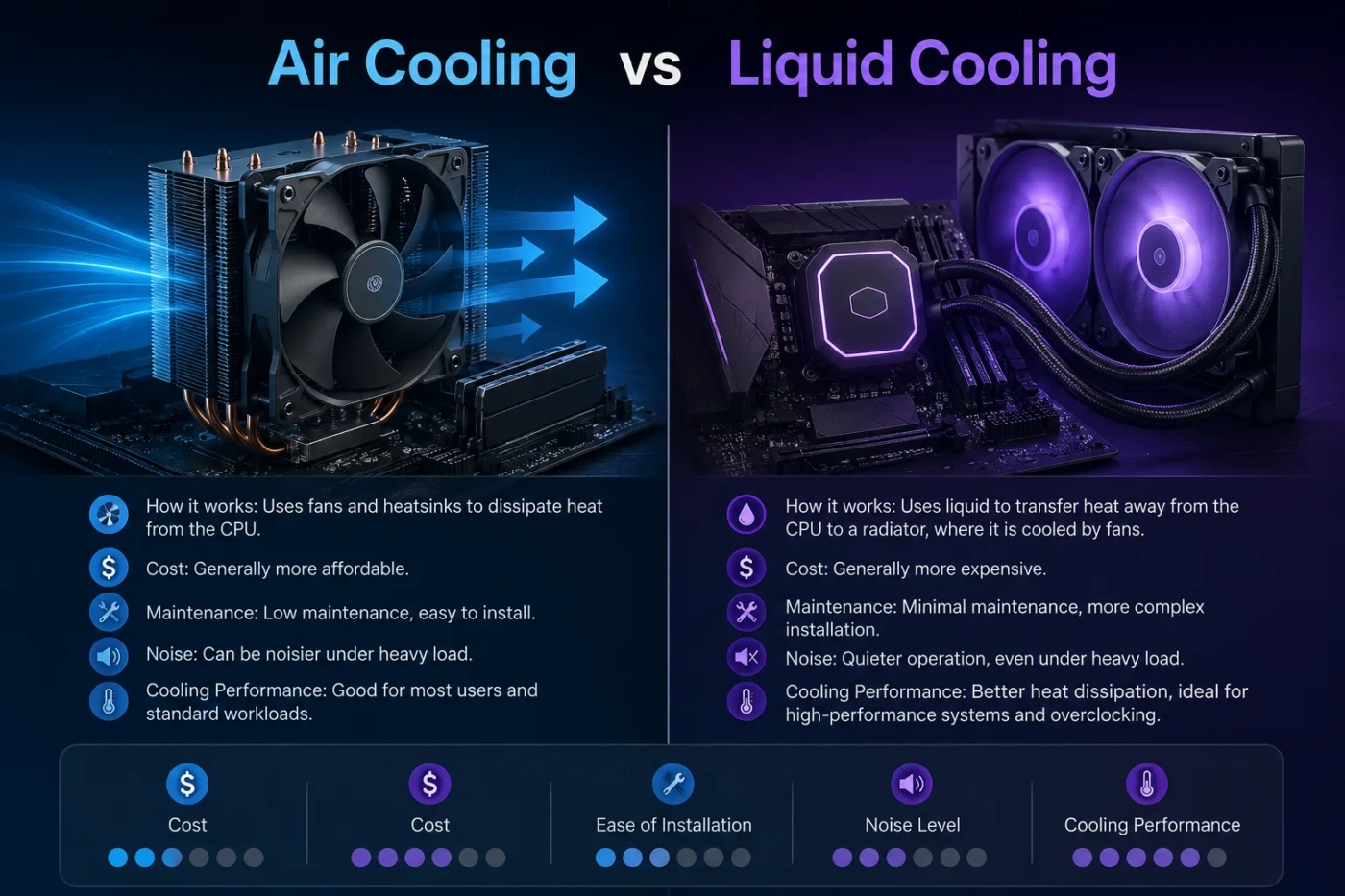
The main difference is how heat travels away from the CPU. Air cooling uses a metal heatsink, heatpipes, and one or more fans. Liquid cooling uses a cold plate, pump, coolant, tubes, radiator, and fans.
Both still rely on air at the final step. Even a liquid cooler must move heat from the radiator into the room. That means case airflow still matters. A liquid cooler is not magic; it simply moves the heat to a different place before fans remove it.
For a normal desktop PC, the difference is less about “air versus water” and more about heat load, radiator size, cooler quality, case airflow, and noise target.
What Is Air Cooling?
Air cooling is the traditional CPU cooling method. A cooler sits directly on the processor with thermal paste between the CPU heat spreader and the cooler base. Heat moves into copper heatpipes, spreads through aluminum fins, and leaves the heatsink as the fan pushes air across it.
How Air Cooling Works
- The CPU produces heat during gaming, rendering, compiling, browsing, or multitasking.
- Thermal paste fills tiny gaps between the CPU and cooler base.
- Heatpipes carry heat upward into the fin stack.
- The fan pushes warm air away from the heatsink.
- Case fans move that warm air out of the case.
Small air coolers are fine for efficient processors. Large tower coolers with multiple heatpipes and 120mm or 140mm fans can handle much hotter CPUs. Dual-tower air coolers are often close to liquid coolers in real use, especially when the CPU is not pulling extreme power for long periods.
Strengths Of Air Cooling
- Lower cost: Good air coolers often cost less than good liquid coolers.
- Simple design: There is no pump, coolant, or tubing.
- Long service life: A fan can be replaced without replacing the whole cooler.
- Easy troubleshooting: If temperatures rise, dust, fan speed, mounting pressure, or paste are the usual checks.
- No pump noise: Quiet builds often benefit from fewer moving parts.
Weaknesses Of Air Cooling
- Large tower coolers can cover RAM slots.
- Some models may not fit narrow cases because of height limits.
- The area around the CPU socket can look crowded.
- Very high CPU power can push air coolers near their comfort limit.
- Heat stays near the motherboard area until case airflow removes it.
What Is Liquid Cooling?
Liquid cooling uses a fluid loop to move heat away from the CPU. In a common AIO liquid cooler, the pump and cold plate sit on the processor. Coolant carries heat through tubes to a radiator, where fans move air across the radiator fins.
Most PC users mean AIO liquid cooling when they say liquid cooling. AIO stands for all-in-one. It arrives sealed from the factory and is meant to be installed without filling liquid. A custom loop is different: it can include a separate pump, reservoir, fittings, tubing, CPU block, GPU block, and one or more radiators.
How Liquid Cooling Works
- The CPU transfers heat into a cold plate.
- The pump moves coolant through the loop.
- The heated coolant travels to the radiator.
- Radiator fans push or pull air through the fins.
- The cooled liquid returns to the CPU block.
Radiator size matters. A 120mm AIO is usually not a strong value compared with a good air cooler. A 240mm unit can be a balanced choice. A 280mm or 360mm AIO gives more surface area, which can help with hotter CPUs and lower fan speeds.
Strengths Of Liquid Cooling
- Higher top-end cooling: Large radiators can handle more heat than many air coolers.
- Cleaner CPU area: The motherboard socket area looks less crowded.
- Better fit in some layouts: A radiator may fit where a tall tower cooler would not.
- Strong sustained performance: Useful for long CPU-heavy tasks.
- Showcase appeal: Many AIOs match glass-panel cases and RGB builds.
Weaknesses Of Liquid Cooling
- Higher price for the same basic job.
- Pump noise can be noticeable in a quiet room.
- More parts can fail over time.
- Installation takes more planning.
- Radiator placement can affect temperatures and noise.
Performance Comparison
Performance depends on the CPU’s heat output, not only the cooler type. A low-power processor may show little difference between air and liquid cooling. A high-power CPU running long workloads may benefit from a larger liquid cooler.
For Everyday Use
For web browsing, office work, streaming, light photo editing, school work, and general multitasking, air cooling is usually enough. The CPU is not under full load all day, so a mid-range tower cooler can keep temperatures controlled without much noise.
For Gaming
Gaming does not always push the CPU as hard as rendering or heavy compiling. Many gaming PCs run well with a good air cooler, especially when the case has clean front intake and rear/top exhaust.
Liquid cooling can still help in gaming builds when the CPU is hot, the case supports a large radiator, or the user wants lower fan speed during long sessions. It also helps if the case has limited clearance for a tall air tower but has space for a front or top radiator.
For Rendering, Streaming, And Heavy Workloads
Long CPU-heavy workloads are where liquid cooling starts to pull ahead. Video rendering, 3D rendering, code compilation, data work, and CPU-based production tasks can hold the processor near high power for long periods. A larger radiator gives the cooler more surface area, which can reduce temperature spikes and fan speed.
That said, a premium air cooler can still be a smart choice for many workstations. If the CPU is not at the very top of the heat range, air cooling may offer the best mix of cost, reliability, and low upkeep.
For Overclocking
Liquid cooling is usually the better fit for manual overclocking and high power limits. A 280mm or 360mm AIO can offer more thermal headroom than most air coolers. Custom loops can go further, especially if cooling both CPU and GPU, but they cost more and need more care.
For mild tuning, undervolting, or using stock boost settings, air cooling remains very competitive.
Noise Comparison
Noise is not as simple as “liquid is quieter” or “air is quieter.” Both can be quiet or loud depending on fan size, fan curve, case airflow, radiator density, pump speed, and cooler quality.
Why Air Cooling Can Be Quieter
Air coolers have no pump. This matters in quiet rooms, studio spaces, bedrooms, and office setups. A large air cooler with 140mm fans can move a good amount of air at low RPM. That often means smooth, low-frequency fan noise rather than a small high-speed fan sound.
Why Liquid Cooling Can Be Quieter
A large radiator spreads heat across a wide surface. With a 280mm or 360mm AIO, the fans may not need to spin as fast under heavy CPU load. This can make liquid cooling quieter during long renders or heavy gaming, as long as the pump is not loud.
The Noise Detail Many Buyers Miss
Liquid coolers add one extra sound source: the pump. Some pumps are quiet. Some make a faint hum, buzz, or ticking sound. In a loud gaming room this may not matter. In a silent workspace, it can be more noticeable than fan noise.
Maintenance And Lifespan
Air cooling wins on low maintenance. Dust cleaning and thermal paste replacement are the main tasks. If a fan fails, you can usually replace the fan and keep using the heatsink.
AIO liquid coolers are sealed, so users do not normally refill them. Still, they have more possible wear points. Pumps can fail, coolant can slowly permeate through tubing over years, and radiator fins collect dust. Many AIO coolers can last several years, but they are not as mechanically simple as air coolers.
Air Cooler Maintenance
- Clean dust from the heatsink fins and fan blades.
- Check that the fan spins freely.
- Replace thermal paste when temperatures rise or after removing the cooler.
- Confirm the mounting bracket is still tight after moving the PC.
Liquid Cooler Maintenance
- Clean dust from radiator fins.
- Check pump noise and pump speed in BIOS or software.
- Watch for sudden temperature jumps.
- Make sure tubes are not sharply bent.
- Replace the unit if pump behavior, cooling performance, or age becomes a concern.
Installation And Compatibility
Compatibility can decide the winner before performance does. A great cooler is not useful if it does not fit your case, motherboard, RAM, or radiator mounts.
Air Cooling Fit Checks
- CPU socket: The mounting kit must match the motherboard socket.
- Cooler height: The case must support the tower height.
- RAM clearance: Tall memory heat spreaders can interfere with large air coolers.
- PCIe clearance: Very wide coolers can sit close to the graphics card on some boards.
- Case airflow: Intake and exhaust fans help the cooler work properly.
Liquid Cooling Fit Checks
- Radiator size: Check whether the case supports 120mm, 240mm, 280mm, or 360mm radiators.
- Radiator thickness: Fans plus radiator can hit the motherboard, RAM, or case top panel.
- Tube length: Tubes must reach the CPU block without tight bends.
- Mounting position: Top mounting is often clean; front mounting can work well if airflow is planned.
- Pump orientation: Avoid layouts that trap air in the pump area.
Price And Value Comparison
Air cooling usually gives better value per dollar. A good budget tower cooler can be enough for many CPUs, while high-end air coolers often cost less than premium AIO liquid coolers.
Liquid cooling costs more because it includes a pump, radiator, tubing, cold plate, coolant, fans, and often lighting or a display. The extra cost can be worth it when the CPU is hot enough to benefit, the case layout favors a radiator, or the build style matters.
Value Rule: If the CPU is mid-range and the case has good airflow, spend the saved money from air cooling on a better graphics card, more storage, quieter case fans, or a higher-quality power supply. If the CPU is high-end and runs hot under long loads, a larger AIO can be worth the extra cost.
Real-World Use Cases
Choose Air Cooling For A Simple Gaming PC
Air cooling is the better default for a balanced gaming computer. It is affordable, reliable, easy to clean, and quiet when paired with a good case. A single-tower or dual-tower cooler can handle many gaming CPUs without the added cost of liquid cooling.
Choose Liquid Cooling For A Hot High-End CPU
If your processor regularly runs near high package power, liquid cooling becomes more attractive. A 280mm or 360mm AIO can keep heavy loads under better control than many compact air coolers.
Choose Air Cooling For A Work PC That Must Be Easy To Maintain
For a computer used for office work, school, accounting, writing, coding, or light editing, air cooling is practical. It is easier to inspect and less likely to need full replacement because one part wore out.
Choose Liquid Cooling For A Clean Glass-Panel Build
If the PC is also a visual project, liquid cooling can create a cleaner look around the CPU socket. The radiator moves the largest cooling surface to the top or front of the case, leaving the motherboard area more open.
Choose Air Cooling For Long-Term Ownership
If you plan to keep the same cooler across several builds, air cooling has a strong advantage. Many air coolers can be reused with new mounting kits, and fan replacement is simple.
Choose Liquid Cooling For Tight CPU Socket Areas
Some compact motherboards or cases make large air towers awkward. If the case supports a radiator but not a tall cooler, an AIO may fit better. Always check measurements before buying.
Common Misunderstandings
Liquid Cooling Does Not Remove The Need For Airflow
A liquid cooler still uses fans. The radiator needs fresh air and a path for warm air to leave the case. Poor airflow can make a liquid cooler louder and warmer than expected.
Air Cooling Is Not Only For Cheap Builds
High-end air coolers can handle powerful CPUs and run quietly. They are not outdated. For many users, they are the more sensible premium choice because they are simple and durable.
A 120mm AIO Is Not Automatically Better Than A Tower Cooler
Small liquid coolers often lose their advantage because the radiator has limited surface area. A good tower air cooler can beat or match many 120mm AIO units while costing less.
Lower Temperature Does Not Always Mean More Speed
Modern CPUs adjust speed based on power, temperature, workload, and motherboard settings. Better cooling can help maintain boost clocks, but it will not turn a low-end CPU into a high-end one.
Liquid Cooling Is Not Maintenance-Free
AIO units are sealed, but sealed does not mean no care. Radiators collect dust, pumps age, and performance can change over time. It is still easier than a custom loop, but it is not as simple as a metal heatsink and fan.
Air Coolers Can Still Be Quiet
A large air cooler with quality fans and a sensible fan curve can be very quiet. Many noisy air-cooled PCs are noisy because of poor case airflow, aggressive BIOS fan settings, or a small stock cooler.
When Air Cooling Is The Better Choice
Pick air cooling if you want the best mix of price, reliability, and ease of ownership. It is the safer default for most people building or upgrading a desktop PC.
- You use a low-power or mid-range CPU.
- You want fewer parts that can fail.
- You prefer easy cleaning.
- You care about long-term value.
- Your case has enough cooler height.
- You do not need an ultra-clean CPU socket look.
- You want quiet operation without pump noise.
Best match: everyday users, gamers, students, office users, quiet PC builders, budget-conscious buyers, and anyone who wants a cooler that is easy to own for years.
When Liquid Cooling Is The Better Choice
Pick liquid cooling when your CPU heat output, case layout, workload, or visual goal makes the extra cost worthwhile. It is not needed for every build, but it can be the right choice in the right system.
- You use a high-end CPU that runs hot under long loads.
- You render, stream, compile, or process heavy tasks often.
- You want a 280mm or 360mm radiator setup.
- Your case supports radiators better than tall tower coolers.
- You prefer a cleaner motherboard area.
- You plan to tune power limits or overclock.
- You accept pump noise risk and eventual replacement.
Best match: high-performance gaming PCs, creator workstations, overclocked builds, glass-panel systems, compact cases with radiator support, and users who value appearance along with thermal headroom.
Air Cooling vs Liquid Cooling For Different Buyers
| User Type | Better Choice | Why It Fits |
|---|---|---|
| Budget Gamer | Air Cooling | Lower cost and enough cooling for most gaming CPUs |
| Quiet Office User | Air Cooling | No pump noise, simple fans, easy dust cleaning |
| High-End Gaming PC Builder | Liquid Cooling | Useful for hot CPUs and clean case layouts |
| Video Editor Or 3D Artist | Liquid Cooling | Better suited for long CPU-heavy sessions when radiator size is large enough |
| First-Time Builder | Air Cooling | Fewer mounting decisions and easier troubleshooting |
| Showcase PC Builder | Liquid Cooling | Cleaner CPU area and more styling options |
| Long-Term Reliability Buyer | Air Cooling | Fan replacement is easier than replacing a full AIO |
| Overclocker | Liquid Cooling | More thermal headroom with larger radiators |
The Better Choice For Most Builds
For most people, air cooling is the better choice. It is cheaper, easier to install, easier to maintain, and reliable over a long period. A good tower air cooler is more than enough for many gaming and productivity PCs.
Choose liquid cooling if your CPU runs hot for long periods, your case is designed around radiator mounting, you want the cleaner look, or you plan to push the system harder than stock settings. In that case, skip tiny liquid coolers when possible and look at 240mm, 280mm, or 360mm radiator options that fit your case properly.
Decision Shortcut: If you want the most practical answer, buy a good air cooler. If you know your CPU is hot, your case supports a large radiator, and you are comfortable with pump-based cooling, buy a liquid cooler.
Final Buying Checklist
- Check your CPU socket before choosing any cooler.
- Match the cooler to the CPU’s real heat output, not only the model name.
- For air cooling, check cooler height and RAM clearance.
- For liquid cooling, check radiator size, thickness, tube routing, and mounting position.
- Do not overspend on cooling if the rest of the PC needs upgrades more.
- Use a sensible fan curve instead of running fans at full speed all the time.
- Clean dust regularly; both cooling types depend on airflow.
If you want a dependable cooler with strong value, choose air cooling. If you want more thermal headroom for a hot CPU and a cleaner-looking build, choose liquid cooling. The right answer is the one that fits your case, workload, budget, and comfort with maintenance.