HDMI 2.0 and HDMI 2.1 can look almost identical from the outside, but they are not aimed at the same type of setup. HDMI 2.0 is still enough for many TVs, streaming boxes, Blu-ray players, office monitors, and 4K 60Hz use. HDMI 2.1 is the better choice when you want 4K at 120Hz, variable refresh rate gaming, higher bandwidth for modern consoles, eARC audio, or more room for future display upgrades.
- HDMI 2.0 vs 2.1: Which Should You Choose?
- Main Differences Between HDMI 2.0 And HDMI 2.1
- Bandwidth
- Resolution And Refresh Rate
- Gaming Features
- Audio And eARC
- Cable Requirements
- What Is HDMI 2.0?
- Where HDMI 2.0 Still Works Well
- What Is HDMI 2.1?
- Where HDMI 2.1 Makes More Sense
- When HDMI 2.0 Is The Better Choice
- Choose HDMI 2.0 If You Use A 4K 60Hz TV
- Choose HDMI 2.0 For Basic Office And Laptop Use
- Choose HDMI 2.0 If Your Devices Are Older
- When HDMI 2.1 Is The Better Choice
- Choose HDMI 2.1 For PS5 And Xbox Series X
- Choose HDMI 2.1 For A 120Hz Or 144Hz TV
- Choose HDMI 2.1 For eARC Audio
- Choose HDMI 2.1 If You Are Buying A New Main TV
- Real-World Performance Differences
- Movies And Streaming
- Gaming
- PC Monitors
- Home Theater Receivers
- Price And Value Comparison
- Common Misunderstandings About HDMI 2.0 And HDMI 2.1
- “An HDMI 2.1 Cable Upgrades Any TV”
- “Every HDMI 2.1 Port Is The Same”
- “HDMI 2.0 Is Bad For Gaming”
- “All 8K TVs Need A New Cable For Everything”
- “More Expensive HDMI Always Means Better Picture Quality”
- Device-By-Device Buying Advice
- For A Streaming Device
- For A PS5 Or Xbox Series X
- For A Gaming PC
- For A Soundbar
- For A Projector
- For A Work Monitor
- How To Check What You Actually Need
- HDMI 2.0 vs 2.1 For Different Users
- Best For Casual Viewers
- Best For Console Gamers
- Best For PC Gamers
- Best For Home Theater Audio
- Best For Budget Setups
- Best For New TV Buyers
- Final Decision: HDMI 2.0 Or HDMI 2.1?
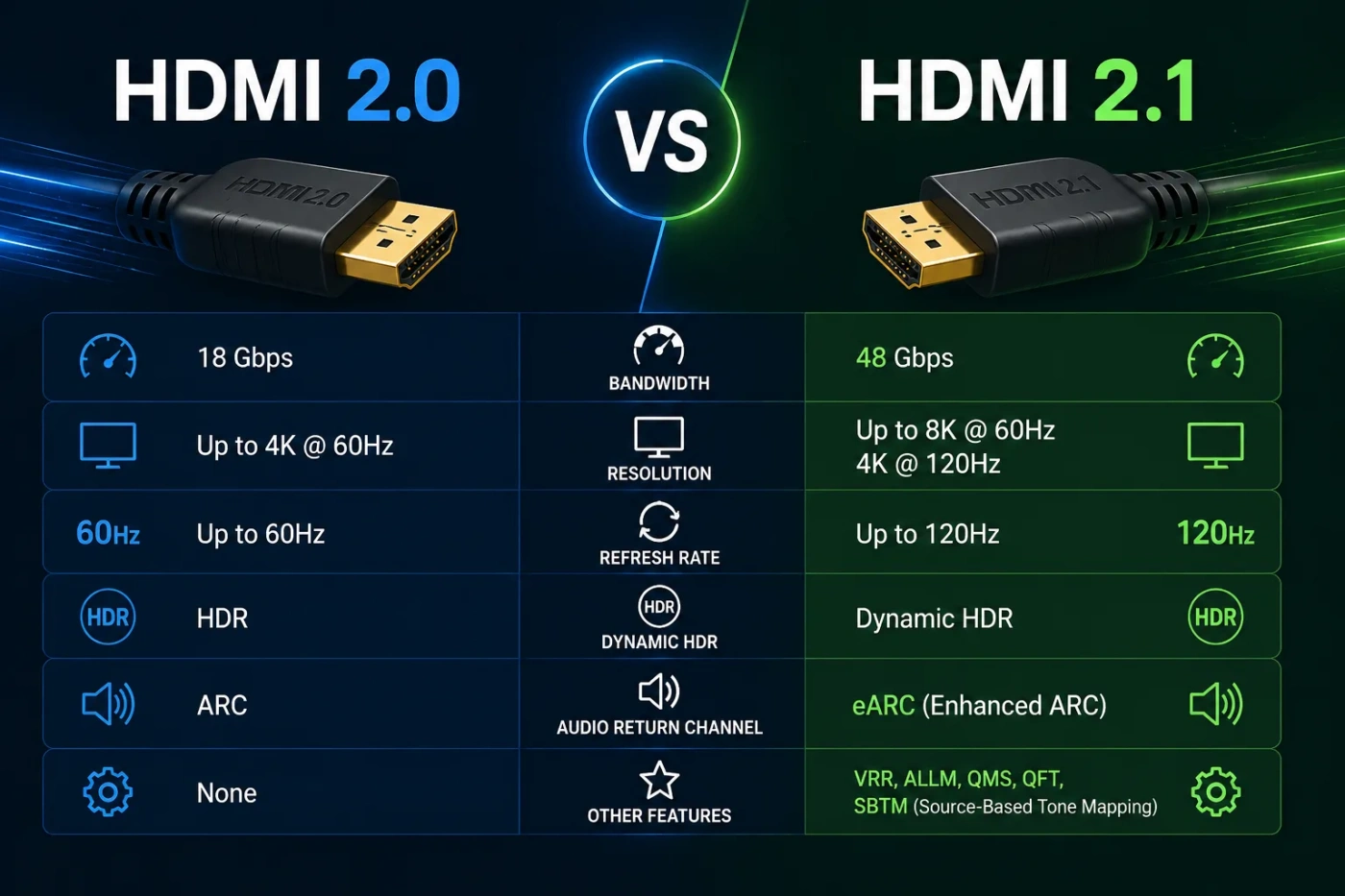
| Feature | HDMI 2.0 | HDMI 2.1 |
|---|---|---|
| Maximum Bandwidth | Up to 18Gbps | Up to 48Gbps |
| Best Common Use | 4K TV, streaming, standard home theater, 4K 60Hz gaming | PS5, Xbox Series X, high-refresh gaming, 8K displays, premium sound systems |
| 4K Refresh Rate | Up to 4K 60Hz in typical consumer use | Up to 4K 120Hz when both devices and cable support it |
| 8K Support | Not practical for normal 8K setups | Designed for 8K 60Hz support with the right equipment |
| Gaming Features | Good for 60Hz gaming; limited support for newer gaming features | Supports features such as VRR, ALLM, QFT, and higher refresh rates |
| Audio Return | ARC support on compatible devices | eARC support on compatible devices for higher-quality audio passthrough |
| Cable Type To Look For | Premium High Speed HDMI Cable | Ultra High Speed HDMI Cable |
| HDR Handling | Supports HDR formats within bandwidth limits | Better suited to high-bandwidth HDR, 4K 120Hz HDR, and Dynamic HDR setups |
| Best Value Choice | Best if your TV or monitor is 4K 60Hz | Best if you are buying new gaming or home theater gear |
| Main Buying Risk | Buying it for a setup that later needs 4K 120Hz | Assuming every “HDMI 2.1” port supports every HDMI 2.1 feature |
HDMI 2.0 vs 2.1: Which Should You Choose?
Choose HDMI 2.0 if your setup is built around 4K 60Hz, regular streaming, a standard TV, a cable box, a Blu-ray player, or a monitor that does not go beyond 60Hz at 4K. It is still a sensible option for many living rooms and basic work setups.
Choose HDMI 2.1 if you use a PlayStation 5, Xbox Series X, gaming PC, 4K 120Hz TV, 120Hz monitor, 8K TV, or soundbar/receiver that benefits from eARC. It gives you more bandwidth and access to features that HDMI 2.0 was not built to handle well.
The simple rule: if your screen is 4K 60Hz, HDMI 2.0 is usually enough. If your screen is 4K 120Hz or you care about VRR, eARC, or newer console features, HDMI 2.1 is the safer pick.
Main Differences Between HDMI 2.0 And HDMI 2.1
Bandwidth
The biggest technical difference is bandwidth. HDMI 2.0 supports up to 18Gbps. HDMI 2.1 raises that ceiling to 48Gbps. This extra capacity matters when the signal carries more pixels, more frames per second, higher color depth, HDR data, and uncompressed audio.
For a normal 4K 60Hz TV signal, HDMI 2.0 can do the job. For 4K 120Hz with HDR, HDMI 2.1 has the headroom that modern gaming and premium displays often need.
Resolution And Refresh Rate
HDMI 2.0 is strongly associated with 4K at 60Hz. That means the screen can refresh 60 times per second at 4K resolution. For movies, streaming, TV shows, YouTube, and most casual gaming, this is fine.
HDMI 2.1 is better for 4K at 120Hz and higher-end display modes. A 120Hz signal can make fast motion feel smoother, especially in racing games, shooters, sports games, and fast camera movement. The difference is most noticeable when the source device and the display both support it.
Gaming Features
HDMI 2.1 is the better standard for gaming because it can support features such as:
- VRR — Variable Refresh Rate helps reduce screen tearing and uneven motion.
- ALLM — Auto Low Latency Mode can switch the TV into a low-lag mode when gaming starts.
- QFT — Quick Frame Transport can help reduce latency in supported setups.
- QMS — Quick Media Switching can reduce the blank-screen delay when changing frame rates.
- 4K 120Hz — useful for current consoles, gaming PCs, and newer TVs.
HDMI 2.0 is not bad for gaming. It is still good for 1080p, 1440p, and 4K 60Hz play. The difference appears when you want smoother motion, lower latency features, or console modes that need more bandwidth.
Audio And eARC
HDMI 2.0 devices may support ARC, which sends audio from a TV back to a soundbar or AV receiver. This is enough for many simple soundbar setups.
HDMI 2.1 adds eARC, short for Enhanced Audio Return Channel. eARC can carry higher-bitrate audio formats and is better suited to Dolby Atmos, DTS:X, and uncompressed multichannel audio when the TV, soundbar, receiver, and settings all support it.
If your sound setup is just TV speakers or a basic soundbar, HDMI 2.0 may be fine. If you have a newer soundbar, AV receiver, or surround system, HDMI 2.1 with eARC is often worth having.
Cable Requirements
For HDMI 2.0, look for a Premium High Speed HDMI Cable. For HDMI 2.1, look for an Ultra High Speed HDMI Cable. The label matters more than gold-plated marketing terms or thick packaging.
A short, certified cable is usually the best value. For long cable runs, especially across a room or through a wall, HDMI 2.1 can be more sensitive to cable quality. In those cases, a certified active or fiber HDMI cable may be better than a random long copper cable.
What Is HDMI 2.0?
HDMI 2.0 is a digital audio and video standard commonly used on TVs, monitors, projectors, media players, game consoles, laptops, and AV receivers. It was built for the 4K era and remains common on many devices.
Its main strength is simple: it handles 4K 60Hz well. That makes it a good fit for streaming movies, watching TV, using a standard 4K monitor, and connecting devices that do not need 120Hz video.
Where HDMI 2.0 Still Works Well
- 4K streaming devices such as media boxes and TV sticks
- Standard 4K TVs with 60Hz panels
- Office monitors and productivity displays
- Older game consoles
- Most Blu-ray and set-top box setups
- Casual PC or console gaming at 60Hz
HDMI 2.0 is not outdated for basic use. It becomes limiting only when the device, screen, or content needs more bandwidth than it can provide.
What Is HDMI 2.1?
HDMI 2.1 is a newer HDMI standard designed for higher bandwidth and newer display features. It is most useful when you want smoother gaming, higher refresh rates, advanced audio passthrough, and more room for newer screen technology.
The headline upgrade is 48Gbps bandwidth, but the real value depends on what the device supports. A TV, monitor, soundbar, console, or receiver can have HDMI 2.1 labeling without supporting every HDMI 2.1 feature. That is why the spec sheet matters.
Where HDMI 2.1 Makes More Sense
- PlayStation 5 and Xbox Series X setups
- 4K 120Hz TVs and monitors
- Gaming PCs connected to TVs
- 8K TVs
- High-end soundbars and AV receivers with eARC
- Home theater systems that need better audio passthrough
- New display purchases where long-term compatibility matters
HDMI 2.1 is not only for gamers, but gaming is where many people notice the difference first.
When HDMI 2.0 Is The Better Choice
HDMI 2.0 is the better choice when your current setup does not need the extra bandwidth of HDMI 2.1. It is also the better value if you are not planning to upgrade your display soon.
Choose HDMI 2.0 If You Use A 4K 60Hz TV
If your TV is limited to 60Hz at 4K, HDMI 2.1 will not magically make it a 120Hz display. The screen panel, HDMI port, source device, and cable all have to support the same mode.
For Netflix, Disney+, YouTube, live TV, Blu-ray, and general streaming, HDMI 2.0 is usually enough.
Choose HDMI 2.0 For Basic Office And Laptop Use
If you connect a laptop to a monitor for email, documents, browser tabs, spreadsheets, or video calls, HDMI 2.0 is often fine. A 4K 60Hz desktop is smooth enough for most productivity work.
For high-refresh monitors, check the monitor’s HDMI limit. Some monitors support high refresh rates only through DisplayPort, even when they also include HDMI.
Choose HDMI 2.0 If Your Devices Are Older
An older streaming box, receiver, console, or TV may not support HDMI 2.1 features. In that case, an HDMI 2.1 cable will still work in many setups, but you will not gain 4K 120Hz, VRR, or eARC unless the hardware supports those features.
When HDMI 2.1 Is The Better Choice
HDMI 2.1 is the better choice when you are buying new gear, gaming at higher refresh rates, or building a home theater system that uses eARC. It gives you more flexibility, especially when several devices share the same TV or receiver.
Choose HDMI 2.1 For PS5 And Xbox Series X
Modern consoles can use HDMI 2.1 features on compatible TVs and monitors. The most common reason is 4K 120Hz gaming. Not every game runs at that mode, but when it does, HDMI 2.1 is the standard you want.
HDMI 2.1 also helps with VRR support, which can make frame rate changes feel smoother. This is useful when a game cannot hold a locked frame rate at all times.
Choose HDMI 2.1 For A 120Hz Or 144Hz TV
If your TV has a 120Hz panel and supports HDMI 2.1 input, use HDMI 2.1 for your main gaming device. This lets the TV receive higher-refresh 4K signals instead of being limited to 4K 60Hz.
Some TVs have only one or two HDMI 2.1 ports. If one port is also used for eARC, plan your connections carefully. A console, gaming PC, soundbar, and receiver may compete for the same ports.
Choose HDMI 2.1 For eARC Audio
If you use a soundbar or AV receiver and want higher-quality audio passthrough from the TV, HDMI 2.1 with eARC is a better fit. This is especially useful when apps run directly on the TV and audio needs to travel back to the sound system.
Make sure the TV port is labeled eARC and that the soundbar or receiver supports eARC too. One compatible cable cannot fix a missing feature on the device itself.
Choose HDMI 2.1 If You Are Buying A New Main TV
If you are buying a new main TV for gaming, sports, movies, and long-term use, HDMI 2.1 is usually the better target. Even if you do not use all of its features on day one, it leaves more room for newer consoles, graphics cards, receivers, and media devices.
Real-World Performance Differences
Movies And Streaming
For movies and streaming, the difference between HDMI 2.0 and HDMI 2.1 is often small. Most streaming video is 24fps, 30fps, or 60fps, so HDMI 2.0 can handle normal 4K streaming without trouble.
HDMI 2.1 becomes more useful if your setup also includes eARC audio, high-bitrate local media, or a home theater receiver that needs more advanced passthrough.
Gaming
Gaming is where HDMI 2.1 has the clearest advantage. A 4K 120Hz signal needs more bandwidth than HDMI 2.0 can normally provide. VRR and ALLM also matter more in games than in movies or office work.
If you play story games at 4K 60Hz, HDMI 2.0 can still feel good. If you play fast games and want smoother motion, HDMI 2.1 is the better choice.
PC Monitors
For PC users, the answer depends on the ports. Many gaming monitors rely on DisplayPort for their highest refresh rates. Some HDMI ports on monitors are limited even when the panel itself is fast.
Before buying a cable or adapter, check the monitor’s supported modes by port. A monitor may support 144Hz through DisplayPort but only 60Hz or 120Hz through HDMI.
Home Theater Receivers
Receivers add one more layer. To get HDMI 2.1 benefits, the console or PC, receiver, TV, and cable must all support the feature you want. One older receiver in the middle can limit the whole chain to HDMI 2.0 behavior.
If you are upgrading a home theater setup, check whether the receiver supports 4K 120Hz passthrough, VRR passthrough, and eARC. Do not rely only on the HDMI version number.
Price And Value Comparison
For short cables, HDMI 2.1 does not need to be expensive. A certified Ultra High Speed HDMI cable is often available for a low everyday price, and paying much more does not guarantee a better picture. Digital HDMI signals either meet the required mode or they usually show obvious problems such as flickering, black screens, dropouts, or failed 4K 120Hz output.
As a value rule, avoid both extremes:
- Do not buy the cheapest unverified cable for a demanding 4K 120Hz setup.
- Do not pay luxury prices for a short cable just because the packaging sounds premium.
For a short HDMI 2.0 setup, a certified Premium High Speed cable is enough. For a short HDMI 2.1 setup, a certified Ultra High Speed cable is the better buy. For long cable runs, budget more carefully because signal quality becomes harder to maintain.
Common Misunderstandings About HDMI 2.0 And HDMI 2.1
“An HDMI 2.1 Cable Upgrades Any TV”
A cable cannot add missing features to a TV, monitor, console, receiver, or soundbar. If your TV only supports 4K 60Hz, an HDMI 2.1 cable will not unlock 4K 120Hz.
“Every HDMI 2.1 Port Is The Same”
Not every HDMI 2.1 port supports the same bandwidth or feature set. Some products may support eARC but not 4K 120Hz. Others may support 4K 120Hz on only one or two ports. Always check the port labels and product specs.
“HDMI 2.0 Is Bad For Gaming”
HDMI 2.0 is still fine for many games. It can handle 4K 60Hz, and that is enough for many players. HDMI 2.1 matters when you want 120Hz, VRR, or a more advanced console/TV pairing.
“All 8K TVs Need A New Cable For Everything”
An 8K TV can still show 4K and 1080p content with older HDMI devices. You need HDMI 2.1 bandwidth when the source sends a high-bandwidth 8K or 4K 120Hz signal. The content, device, port, and cable all matter.
“More Expensive HDMI Always Means Better Picture Quality”
For normal cable lengths, a certified cable that supports the required bandwidth is the sensible target. Once the cable carries the signal correctly, spending more does not make colors richer or motion smoother by itself.
Device-By-Device Buying Advice
For A Streaming Device
HDMI 2.0 is usually enough for a 4K streaming stick or media box. Most streaming content does not need 4K 120Hz. If your TV and soundbar use eARC separately, that is a different part of the setup.
For A PS5 Or Xbox Series X
HDMI 2.1 is the better choice. Use an Ultra High Speed HDMI cable and connect the console to a TV port that supports 4K 120Hz. Then enable the right video settings on both the console and TV.
For A Gaming PC
HDMI 2.1 is best when connecting a PC to a 4K 120Hz TV. For a monitor, compare HDMI and DisplayPort support before choosing. The fastest mode may be available through DisplayPort instead of HDMI.
For A Soundbar
If the soundbar and TV support eARC, use the eARC-labeled HDMI port. HDMI 2.1 is helpful here because eARC is one of the features many buyers look for in newer audio setups.
For A Projector
Many projectors still work well with HDMI 2.0, especially for 4K 60Hz movies. HDMI 2.1 is better for gaming projectors that support high refresh rates or for setups where long cable runs require careful cable selection.
For A Work Monitor
HDMI 2.0 is usually enough for 4K 60Hz office use. HDMI 2.1 is useful if the monitor supports high refresh rates through HDMI and you plan to use it for gaming as well as work.
How To Check What You Actually Need
Before buying a cable, TV, monitor, receiver, or adapter, check these four things:
- Display limit: Does the TV or monitor support 4K 120Hz, VRR, or eARC?
- Source limit: Does the console, PC, streaming box, or player output the mode you want?
- Port limit: Does that exact HDMI port support the feature, or only another port?
- Cable limit: Is the cable certified for Premium High Speed or Ultra High Speed use?
The lowest-capability part of the chain sets the limit. A powerful console connected to a 4K 60Hz TV behaves like a 4K 60Hz setup. A 4K 120Hz TV connected through an older receiver may also be limited by that receiver.
HDMI 2.0 vs 2.1 For Different Users
Best For Casual Viewers
Pick HDMI 2.0 if you mostly watch streaming apps, cable TV, YouTube, and movies on a 4K 60Hz TV. You will not see much benefit from HDMI 2.1 unless your audio setup needs eARC or you plan to upgrade soon.
Best For Console Gamers
Pick HDMI 2.1 if you use PS5 or Xbox Series X with a 120Hz TV. It gives you access to the display modes and gaming features that make those consoles more flexible.
Best For PC Gamers
Pick HDMI 2.1 for a gaming PC connected to a modern TV. For a monitor, compare HDMI 2.1 with DisplayPort before buying. Many PC monitors still give their best refresh rate through DisplayPort.
Best For Home Theater Audio
Pick HDMI 2.1 with eARC if your soundbar or receiver supports higher-quality audio return from the TV. This is useful for Dolby Atmos, DTS:X, and cleaner TV-to-audio-system routing.
Best For Budget Setups
Pick HDMI 2.0 if every device in your setup is limited to 4K 60Hz or lower. Put the saved money toward a better display, soundbar, or certified cable instead of chasing a version number you cannot use.
Best For New TV Buyers
Pick HDMI 2.1 if you are buying a new main TV and plan to keep it for years. Even if you only use streaming today, HDMI 2.1 ports make the TV easier to pair with newer consoles, PCs, and audio devices later.
Final Decision: HDMI 2.0 Or HDMI 2.1?
Buy or keep HDMI 2.0 when your setup is simple: 4K 60Hz TV, streaming device, basic soundbar, older console, office monitor, or standard home entertainment use. It still does that job well.
Choose HDMI 2.1 when your setup is performance-focused: 4K 120Hz gaming, PS5, Xbox Series X, gaming PC, 8K TV, eARC soundbar, AV receiver, or a new TV you want to keep for several years.
The best choice is not the newer number by default. The best choice is the one that matches your screen, source device, ports, cable length, and the features you will actually use. For most 4K 60Hz users, HDMI 2.0 is enough. For modern gaming and higher-end home theater, HDMI 2.1 is the better standard to build around.