Choosing between DDR4 and DDR5 is less about picking the “better” memory type in isolation and more about matching RAM to your motherboard, CPU, budget, workload, and upgrade plan. DDR5 is the newer standard with higher bandwidth, better scaling, lower operating voltage, and newer platform support. DDR4 is the mature option with lower entry cost, wide availability, and strong real-world performance for many everyday PCs. For most new builds, DDR5 is the smarter long-term choice. For an older or budget-focused system, DDR4 can still make more sense.
- DDR4 vs DDR5: The Main Difference
- What Is DDR4?
- Where DDR4 Still Makes Sense
- What Is DDR5?
- Where DDR5 Stands Out
- Performance Comparison: Speed, Bandwidth, And Latency
- Speed And Bandwidth
- Latency
- Real-World Feel
- Gaming: Should You Choose DDR4 Or DDR5?
- Choose DDR4 For Gaming If
- Choose DDR5 For Gaming If
- Compatibility: You Cannot Mix DDR4 And DDR5
- Price And Value: Which Gives More For The Money?
- Budget Priority
- Long-Term Priority
- Technical Differences That Matter
- Module Channels
- Operating Voltage
- Power Management
- On-Die ECC
- Capacity Scaling
- Common Misunderstandings About DDR4 And DDR5
- “DDR5 Is Always Faster In Every Task”
- “DDR4 Is Outdated And Useless”
- “Higher MT/s Always Means Better Performance”
- “DDR5 On-Die ECC Means Full ECC Protection”
- “One Stick Is Fine Because DDR5 Has Two Subchannels”
- When You Should Choose DDR4
- DDR4 Is The Better Pick For
- When You Should Choose DDR5
- DDR5 Is The Better Pick For
- DDR4 vs DDR5 For Laptops
- DDR4 vs DDR5 For Creators And Professional Work
- Practical Capacity Targets
- Buying Checklist Before You Decide
- Which One Should You Choose?
| Feature | DDR4 | DDR5 |
|---|---|---|
| Best For | Budget builds, older systems, office PCs, mid-range gaming | New PC builds, high-end gaming, creation work, heavy multitasking, long-term upgrades |
| Typical Standard Speed | Commonly 2133–3200 MT/s under standard profiles | Starts around 4800 MT/s and scales much higher on newer platforms |
| Bandwidth | Lower bandwidth, still enough for many daily tasks | Higher bandwidth, helpful for data-heavy workloads |
| Latency Behavior | Often lower CAS latency numbers | Higher CAS numbers, but higher transfer rates can offset much of the delay |
| Voltage | Typically 1.2V | Typically 1.1V for standard operation |
| Module Design | One 64-bit channel per standard DIMM | Two 32-bit subchannels per standard DIMM for better data handling |
| Power Management | Handled mainly by the motherboard | Uses an on-module PMIC on many desktop modules |
| Error Handling | Regular consumer DDR4 usually has no on-die ECC | Includes on-die ECC, but this is not the same as full system ECC memory |
| Compatibility | Requires a DDR4 motherboard and supported CPU memory controller | Requires a DDR5 motherboard and supported CPU memory controller |
| Physical Fit | Cannot be installed in a DDR5 slot | Cannot be installed in a DDR4 slot |
| Price And Value | Often cheaper for upgrades to existing systems | Better value for many new systems when motherboard and CPU already support it |
| Upgrade Path | Limited future platform support | Better fit for newer CPUs and future memory upgrades |
DDR4 vs DDR5: The Main Difference
The main difference between DDR4 and DDR5 is memory bandwidth. DDR5 can move more data per second, which helps when the processor needs fast access to large amounts of information. That matters in tasks such as video editing, 3D rendering, compression, large spreadsheets, code compilation, virtual machines, AI-assisted workloads, and some modern games.
DDR4 is not slow just because DDR5 exists. A well-configured DDR4 system with enough capacity can still feel fast in web browsing, office work, streaming, light editing, and many games. The difference becomes more visible when the rest of the system is modern enough to use the extra bandwidth.
The other major difference is platform direction. Newer desktop and laptop platforms are moving toward DDR5. That means DDR5 is usually the better pick when buying a new motherboard, CPU, and RAM together. DDR4 is mainly attractive when you already own a DDR4 system or want the lowest practical build cost.
What Is DDR4?
DDR4 stands for Double Data Rate 4. It is the memory standard that powered many desktop PCs, laptops, workstations, and servers for years. It replaced DDR3 and became known for good stability, wide compatibility, and reasonable pricing.
In practical terms, DDR4 is a mature RAM type. Motherboards, BIOS support, memory kits, and troubleshooting knowledge are widely available. If you are upgrading an older PC, DDR4 is often the only compatible option unless you replace the motherboard and CPU as well.
Where DDR4 Still Makes Sense
- Existing DDR4 systems: Adding more DDR4 RAM can be cheaper than rebuilding the whole PC.
- Budget gaming: A good DDR4 kit can still support smooth gaming when paired with a capable CPU and GPU.
- Office and home use: Browsing, documents, video calls, email, and streaming rarely need DDR5-level bandwidth.
- Used or older parts: DDR4 platforms can offer low-cost value when buying secondhand or discounted components.
What Is DDR5?
DDR5 stands for Double Data Rate 5. It is the newer generation of system memory for current PCs, laptops, servers, and workstations. DDR5 was designed to deliver higher transfer rates, better bandwidth scaling, improved efficiency, and larger memory capacities over time.
DDR5 changes more than the speed number on the product box. A standard DDR5 desktop module is split into two 32-bit subchannels, while a standard DDR4 module uses one 64-bit channel. This helps DDR5 handle smaller data requests more efficiently, especially when many tasks are active at the same time.
DDR5 also brings on-die ECC and updated power handling. The phrase on-die ECC can be misunderstood, though. It helps the memory chip correct certain internal errors, but it does not replace full ECC memory used in workstations and servers that need end-to-end error protection.
Where DDR5 Stands Out
- New PC builds: DDR5 is the better fit for newer CPUs and motherboards.
- High-bandwidth work: Creation apps, rendering, compression, simulations, and large datasets can benefit.
- Heavy multitasking: More bandwidth helps when many apps are open and active.
- Longer upgrade path: DDR5 platforms are better aligned with current and future hardware.
Performance Comparison: Speed, Bandwidth, And Latency
DDR5 is faster on paper, but RAM performance is not only about the advertised MT/s number. You also need to look at latency, CPU support, memory controller behavior, motherboard quality, BIOS tuning, capacity, and whether the software can use extra bandwidth.
Speed And Bandwidth
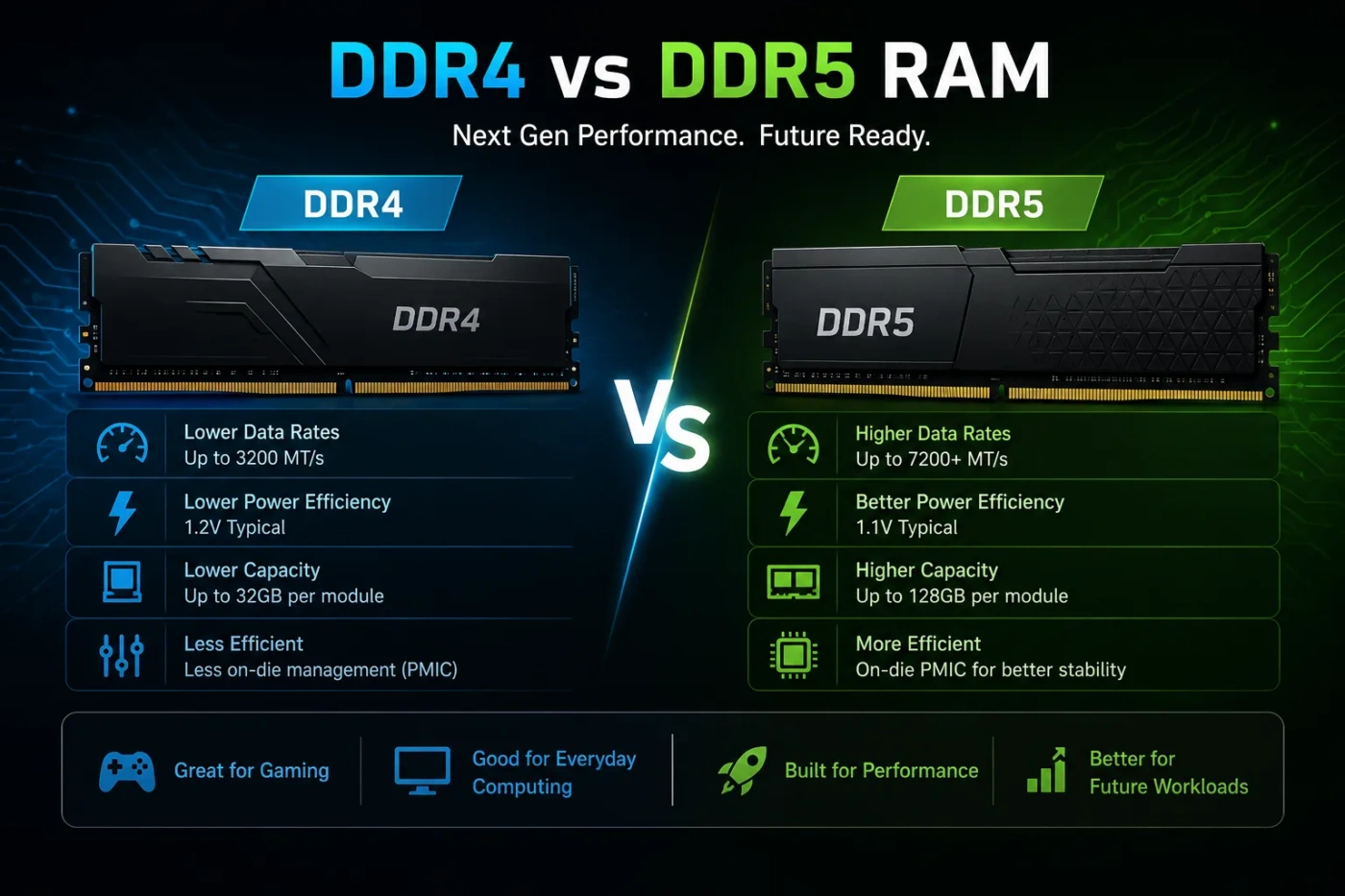
DDR4 commonly appears in speeds such as 2666 MT/s, 2933 MT/s, and 3200 MT/s under standard profiles, with faster enthusiast kits available. DDR5 starts at higher transfer rates, often around 4800 MT/s and above, with many consumer kits running far higher through memory profiles.
This makes DDR5 stronger when the workload is bandwidth-hungry. For example, moving large files in memory, rendering scenes, running multiple virtual machines, or working with large creative projects can benefit more from DDR5 than basic browsing or light document editing.
Latency
DDR4 often has lower CAS latency numbers, such as CL16 or CL18 on common performance kits. DDR5 kits may show higher numbers, such as CL36 or CL40, especially on entry-level modules. That does not automatically mean DDR5 feels slower.
CAS latency numbers must be read together with transfer rate. A DDR5 kit may have a higher CL value but still deliver strong real-world performance because it transfers more data per second. For gaming and daily use, the difference can be small unless the CPU, game engine, and graphics card setup are sensitive to memory behavior.
Real-World Feel
For normal use, both DDR4 and DDR5 can feel fast if the system has enough capacity. A PC with 32GB of DDR4 may feel smoother than a PC with only 8GB of DDR5 because running out of memory forces the system to use much slower storage as backup.
Capacity comes first. Speed comes after that. For most users, 16GB is the practical minimum for a modern general-use PC, while 32GB is a better target for gaming, content creation, multitasking, and long-term comfort.
Gaming: Should You Choose DDR4 Or DDR5?
For gaming, DDR5 can improve performance, but the gain depends heavily on the game, resolution, CPU, GPU, and memory kit. At lower resolutions where the CPU works harder, fast DDR5 may show clearer benefits. At higher resolutions, the graphics card often becomes the main limit, so RAM differences may shrink.
DDR4 still works well for many gaming PCs. A system with a strong GPU, a good CPU, and 32GB of DDR4 can deliver smooth gameplay in many titles. DDR5 is better for a new gaming build, but DDR4 can still be a smart upgrade path if you already own a DDR4 motherboard.
Choose DDR4 For Gaming If
- You already have a DDR4 motherboard and compatible CPU.
- You want to spend more of the budget on the graphics card.
- You play esports titles, older games, or GPU-limited games.
- You can buy a good 16GB or 32GB DDR4 kit at a low price.
Choose DDR5 For Gaming If
- You are building a new PC from the motherboard up.
- You want a newer platform with better upgrade options.
- You play CPU-sensitive games or simulation-heavy titles.
- You plan to keep the system for several years.
Compatibility: You Cannot Mix DDR4 And DDR5
DDR4 and DDR5 are not interchangeable. They use different electrical designs and different slot layouts. Even if the modules look similar, the notch position is different, so you cannot install DDR4 into a DDR5 slot or DDR5 into a DDR4 slot.
Your motherboard decides which memory type you can use. Some CPU generations may support both DDR4 and DDR5 in theory, but the motherboard will support only one memory type. Before buying RAM, check the exact motherboard model, CPU support list, and memory support page.
Practical rule: If you are only upgrading RAM, buy the type your current motherboard already supports. If you are building a new PC, choose the RAM type after choosing the CPU and motherboard platform.
Price And Value: Which Gives More For The Money?
DDR4 usually wins when the goal is a low-cost upgrade. If your system already uses DDR4, adding more memory can be one of the cheapest ways to improve everyday smoothness. Moving from 8GB to 16GB or from 16GB to 32GB often helps more than chasing higher RAM speed.
DDR5 usually wins when buying a new platform. The memory itself may cost more depending on capacity and speed, but the better upgrade path can make it the stronger value over time. Many newer CPUs and motherboards are designed around DDR5, so buying DDR4 for a brand-new build can limit future options.
Budget Priority
If every dollar matters, DDR4 can free up money for a better CPU, GPU, SSD, monitor, or power supply. That may improve the whole system more than buying DDR5 while cutting corners elsewhere.
Long-Term Priority
If you want a PC that stays relevant longer, DDR5 is the better direction. It gives you access to newer motherboards, newer CPUs, higher future RAM speeds, and larger memory kits as prices change.
Technical Differences That Matter
Module Channels
DDR4 desktop memory uses one 64-bit channel per standard DIMM. DDR5 splits the module into two 32-bit subchannels. This does not mean one DDR5 stick magically becomes the same as a full dual-stick setup, but it does help the module handle memory access in a more flexible way.
Operating Voltage
DDR4 commonly runs at 1.2V under standard operation. DDR5 commonly runs at 1.1V under standard operation. The difference sounds small, but it matters in laptops, compact systems, and servers with many memory modules.
Power Management
DDR4 relies more on motherboard-side power regulation. DDR5 moves more power management onto the memory module through a PMIC. This helps support higher speeds and cleaner power delivery, though it can also add heat and complexity to the RAM module itself.
On-Die ECC
DDR5 includes on-die ECC, which helps correct certain errors inside the memory chip. This is useful for chip reliability, especially as memory density rises. Still, consumer DDR5 with on-die ECC should not be confused with full ECC RAM used in professional systems that need stronger data integrity.
Capacity Scaling
DDR5 is built for larger capacities over time. This matters for workstations, servers, and users who need 64GB, 96GB, 128GB, or more. DDR4 can still provide enough capacity for many home and gaming PCs, but DDR5 has a better path for larger kits.
Common Misunderstandings About DDR4 And DDR5
“DDR5 Is Always Faster In Every Task”
DDR5 has more bandwidth, but not every app needs it. Basic browsing, email, streaming, and simple office work may feel almost the same on DDR4 and DDR5 when both systems have enough RAM and a good SSD.
“DDR4 Is Outdated And Useless”
DDR4 is older, but it is not useless. It still works well for many PCs. The better question is whether it fits your system and budget. For an existing DDR4 build, more DDR4 RAM can be a sensible upgrade.
“Higher MT/s Always Means Better Performance”
Transfer rate matters, but it is not the only detail. Timings, CPU memory controller quality, motherboard support, BIOS settings, dual-channel configuration, and workload type also affect performance.
“DDR5 On-Die ECC Means Full ECC Protection”
This is a common mistake. On-die ECC helps inside the memory chip. Full ECC memory protects data more broadly across the memory path and requires proper CPU, motherboard, and memory support.
“One Stick Is Fine Because DDR5 Has Two Subchannels”
DDR5’s two subchannels improve module behavior, but using two matched sticks can still help bandwidth on many desktop systems. For most builds, a 2-stick kit remains the safer choice than a single stick when performance matters.
When You Should Choose DDR4
Choose DDR4 if you are upgrading a system that already uses DDR4 and the rest of the PC still meets your needs. This is especially true if your main issue is low memory capacity. Moving from 8GB to 16GB or 32GB can make a PC feel much smoother without replacing the motherboard.
DDR4 is also a good choice for budget desktops where the goal is practical performance, not the newest platform. If the money saved on RAM and motherboard lets you buy a better GPU or SSD, DDR4 may give the better real-world result.
DDR4 Is The Better Pick For
- Low-cost upgrades to existing PCs
- Older motherboards that do not support DDR5
- Basic office and home systems
- Budget gaming builds using discounted parts
- Users who need more capacity more than higher bandwidth
When You Should Choose DDR5
Choose DDR5 if you are building a new PC with a newer motherboard and CPU. It gives you better bandwidth, better scaling, and a stronger upgrade path. It also makes more sense for users who plan to keep the same system for years and upgrade parts later.
DDR5 is also the better fit for demanding workloads. If you edit high-resolution video, run virtual machines, work with large creative files, compile code often, or use heavy productivity apps, DDR5 gives the system more memory bandwidth to work with.
DDR5 Is The Better Pick For
- New desktop builds
- Newer laptops and workstations
- High-end gaming systems
- Video editing, rendering, compression, and large project files
- Users who want a longer upgrade path
- Systems planned around 32GB, 64GB, or higher capacity
DDR4 vs DDR5 For Laptops
For laptops, the choice is usually made by the laptop model, not by the buyer after purchase. Many thin laptops use soldered memory, meaning you cannot replace it later. In that case, capacity matters even more.
If you are choosing between two laptops, DDR5 or LPDDR5-style memory can help with bandwidth and efficiency, but do not ignore the full machine. CPU, cooling, SSD speed, screen quality, battery size, and memory capacity all matter. A laptop with 16GB of DDR5 may be less useful for heavy work than one with 32GB of DDR4 if your apps need more memory.
DDR4 vs DDR5 For Creators And Professional Work
For creators, DDR5 is usually the better option when building new. Video editing, photo batch processing, 3D rendering, CAD work, audio production with large sample libraries, and multitasking across creative apps can all benefit from more bandwidth and higher capacity options.
That said, the first priority is still enough RAM. A creator working with large files should not choose a small DDR5 kit over a larger DDR4 kit if capacity becomes the limit. Once capacity is sufficient, DDR5’s speed and bandwidth become more useful.
Practical Capacity Targets
- 16GB: Basic use, light gaming, school work, office work
- 32GB: Modern gaming, heavier multitasking, light-to-moderate creation work
- 64GB: Video editing, large design files, virtual machines, professional multitasking
- 128GB or more: Heavy workstation use, large datasets, advanced rendering, server-like workloads
Buying Checklist Before You Decide
Before buying DDR4 or DDR5, check these points:
- Your motherboard memory type
- Your CPU memory support
- Maximum supported RAM capacity
- Recommended memory speeds for your platform
- Number of RAM slots
- Whether the laptop memory is upgradeable or soldered
- Whether you need 16GB, 32GB, 64GB, or more
- Whether a 2-stick kit is better for your build
Which One Should You Choose?
Choose DDR4 if you already have a DDR4 PC, want a low-cost upgrade, or need more RAM without replacing the rest of the system. It is still a good fit for everyday use, many gaming PCs, school work, office tasks, and budget builds.
Choose DDR5 if you are building a new PC, buying a newer laptop, planning a high-end gaming setup, or working with memory-heavy apps. It gives you higher bandwidth, newer platform support, and a better path for future upgrades.
The simplest decision is this: upgrade with DDR4 when your current system already uses DDR4; choose DDR5 when starting fresh with modern hardware. That rule avoids wasted money, compatibility mistakes, and performance expectations that do not match real use.