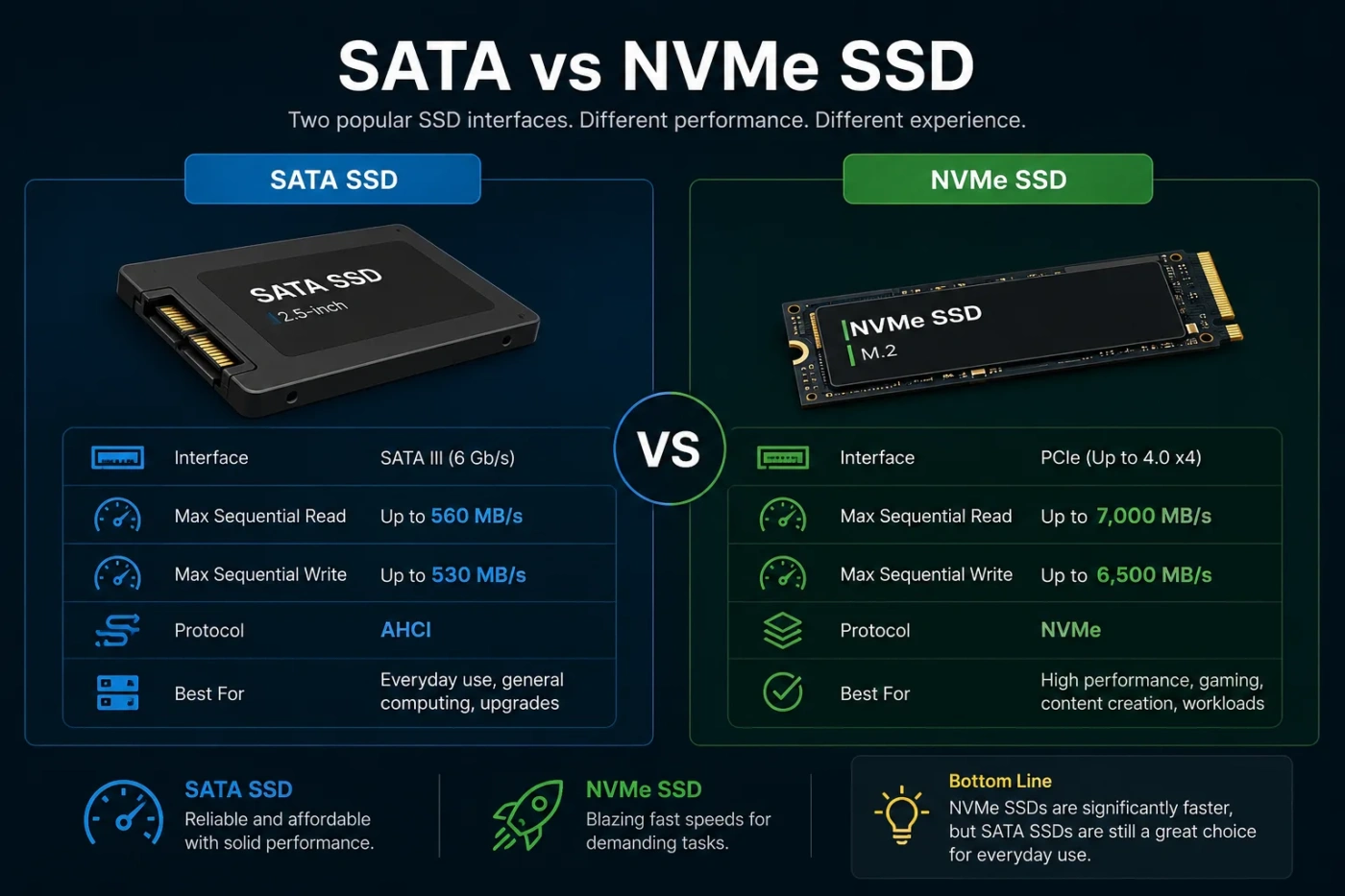
SATA vs NVMe SSD is mostly a choice between compatibility and speed. SATA SSDs are still useful for older laptops, desktop upgrades, storage expansion, and budget builds. NVMe SSDs are the better pick for modern PCs, gaming systems, creative workstations, and anyone who moves large files often. If your device supports NVMe and the price gap is small, NVMe is usually the smarter choice. If your device only has a 2.5-inch SATA bay or you need affordable extra storage, SATA still makes sense.
- SATA vs NVMe SSD: The Main Difference
- What Is A SATA SSD?
- Where SATA SSDs Still Work Well
- What Is An NVMe SSD?
- Where NVMe SSDs Stand Out
- Performance Comparison: What You Actually Notice
- Boot Time And App Launching
- File Transfers
- Gaming
- Content Creation
- Multitasking And Heavy Workloads
- Compatibility: The Part Many Buyers Miss
- Check These Before Buying
- SATA vs NVMe SSD For Price And Value
- Do Not Buy On Speed Alone
- When Should You Choose A SATA SSD?
- SATA Is The Better Choice If:
- When Should You Choose An NVMe SSD?
- NVMe Is The Better Choice If:
- Common Misunderstandings About SATA And NVMe
- “M.2 Always Means NVMe”
- “NVMe Always Makes A PC Feel Much Faster Than SATA”
- “A SATA SSD Is Outdated And Useless”
- “The Fastest NVMe Drive Is Always The Best”
- “SATA And NVMe Use The Same Cable”
- SATA vs NVMe SSD By Use Case
- Capacity Matters More Than Many People Expect
- Heat And Cooling Differences
- For Laptops
- For Desktops
- Endurance And Reliability
- Decision Section: Which One Should You Choose?
- Best Choice For Most People
- Best Choice For Older Computers
- Best Choice For Gamers
- Best Choice For Creators
- Best Choice For Extra Storage
- Final Buying Checklist
| Feature | SATA SSD | NVMe SSD |
|---|---|---|
| Best For | Older laptops, basic desktops, secondary storage, budget upgrades | Modern PCs, gaming, video editing, large file transfers, demanding workloads |
| Interface | Serial ATA, usually through a 2.5-inch drive connection | PCIe lanes, usually through an M.2 slot |
| Protocol | AHCI, originally designed around hard drives | NVMe, designed for flash storage |
| Typical Sequential Speed | Up to about 500–550 MB/s in real use | Often 3,000–7,000+ MB/s, with high-end drives going higher |
| Random Responsiveness | Fast compared with hard drives, but limited by SATA and AHCI | Usually better for heavy multitasking, game asset loading, and large project files |
| Installation Style | 2.5-inch drive with SATA data and power cables, or less commonly M.2 SATA | Small M.2 stick installed directly on the motherboard or laptop slot |
| Cable Management | Needs cables in desktops | No SATA cable needed for M.2 NVMe drives |
| Heat | Usually runs cool | Can run warmer, especially PCIe 4.0 and PCIe 5.0 models |
| Laptop Battery Impact | Often efficient for light use | Efficient at idle, but high-performance models may draw more power under load |
| Price And Value | Good for cheap capacity, especially as secondary storage | Often better speed per dollar in modern systems when prices are close |
| Main Limitation | Speed ceiling is much lower | Requires compatible hardware and may need cooling |
| Simple Verdict | Choose it when compatibility or low cost matters most | Choose it when your system supports it and you want the faster drive |
SATA vs NVMe SSD: The Main Difference
The main difference is not just the shape of the drive. It is the connection method and storage protocol.
A SATA SSD uses the SATA interface and the AHCI protocol. SATA was widely used for hard drives, optical drives, and later 2.5-inch SSDs. It is reliable and widely compatible, but it has a speed ceiling that modern flash memory can easily reach.
An NVMe SSD uses the NVMe protocol over PCIe lanes. This gives the drive a much wider path to the processor. That is why NVMe drives can offer far higher sequential speeds, lower latency, deeper command queues, and better performance in demanding storage tasks.
For normal daily use, both feel much faster than a hard drive. For heavy file work, gaming libraries, editing timelines, virtual machines, and modern workstations, NVMe has a clear advantage.
What Is A SATA SSD?
A SATA SSD is a solid-state drive that connects through the Serial ATA interface. Most consumer SATA SSDs come in a 2.5-inch form factor, similar in size to many laptop hard drives. They use SATA data and power connectors in desktop PCs, while many older laptops have a direct 2.5-inch drive bay.
SATA SSDs became popular because they made older computers feel much faster without requiring a new motherboard. Replacing a mechanical hard drive with a SATA SSD can improve boot time, app launching, system responsiveness, and file access.
Where SATA SSDs Still Work Well
- Upgrading an older laptop that has a 2.5-inch drive bay
- Adding affordable storage to a desktop PC
- Storing photos, documents, music, backups, and media libraries
- Building a quiet, low-cost home office computer
- Keeping older hardware useful without a full rebuild
The main limit is speed. A good SATA SSD usually reaches around 500–550 MB/s in sequential reads, which is near the practical ceiling of SATA III. That is still fast for daily use, but it is far below what modern NVMe drives can do.
What Is An NVMe SSD?
An NVMe SSD is a solid-state drive that uses the Non-Volatile Memory Express protocol. Most consumer NVMe drives use the M.2 form factor and connect through PCIe lanes on the motherboard.
NVMe was designed for flash storage, not spinning hard drives. It supports many more commands at once than AHCI, reduces storage latency, and allows the drive to communicate more efficiently with the CPU. This matters most when the system is reading and writing many files, handling large media projects, loading game assets, or running multiple demanding tasks.
Where NVMe SSDs Stand Out
- Editing 4K or 8K video files
- Moving large folders, archives, and project files
- Gaming on a modern desktop or laptop
- Running virtual machines or developer environments
- Using high-speed external enclosures with USB4 or Thunderbolt
- Building a new PC where the motherboard already supports M.2 NVMe
NVMe drives come in different generations. A PCIe 3.0 NVMe drive is already much faster than SATA. PCIe 4.0 drives are faster again, and PCIe 5.0 models can reach very high speeds, although they may cost more and run warmer.
Performance Comparison: What You Actually Notice
Benchmark numbers can make NVMe look many times faster than SATA, and in raw transfer speed that is true. The real question is where the difference shows up in daily use.
Boot Time And App Launching
Both SATA and NVMe SSDs make a computer feel much faster than a hard drive. Moving from a hard drive to SATA is a huge jump. Moving from SATA to NVMe is usually smaller for basic tasks such as opening a browser, launching office apps, or starting the operating system.
If your work is mostly web browsing, email, documents, streaming, and light photo storage, a SATA SSD can still feel quick.
File Transfers
This is where NVMe pulls ahead. Large file transfers, project folders, video clips, compressed archives, and game installations can finish faster on NVMe, especially when both the source and destination are fast enough.
A SATA SSD is limited by the SATA interface. An NVMe drive has much more bandwidth available, so it can move large files at several times the speed of SATA in ideal conditions.
Gaming
For gaming, NVMe can reduce load times, improve asset streaming, and help with modern storage features on supported systems. The difference between SATA and NVMe is not always dramatic in every game, but NVMe is the better fit for a new gaming PC.
Game size also matters. Modern games can take up a lot of storage, so capacity is still important. A fast 1 TB or 2 TB NVMe drive is often a better primary gaming drive than a smaller high-end model that fills up too quickly.
Content Creation
Video editors, photographers, designers, 3D artists, and audio producers benefit more from NVMe than casual users. Large project files, cache files, preview renders, raw footage, and scratch disks can all stress storage speed.
For creative work, NVMe is usually the better primary drive. SATA can still work well as a secondary drive for finished exports, archived projects, and local backups.
Multitasking And Heavy Workloads
NVMe drives handle multiple storage requests more efficiently. That helps when you run virtual machines, databases, development tools, game launchers, cloud sync apps, and large downloads at the same time.
SATA SSDs are still responsive, but they do not have the same headroom. Under heavier loads, the difference between SATA and NVMe becomes easier to feel.
Compatibility: The Part Many Buyers Miss
The easiest mistake is assuming that every M.2 drive is NVMe. That is not true.
M.2 is a form factor, not a speed guarantee. Some M.2 drives use SATA. Some use NVMe. Some motherboard M.2 slots support both, while others support only one type.
Check These Before Buying
- Drive bay or slot: Does your device have a 2.5-inch SATA bay, an M.2 slot, or both?
- Protocol support: Does the M.2 slot support NVMe, SATA, or both?
- Physical size: Common M.2 sizes include 2242, 2260, 2280, and 22110. Many consumer drives are 2280.
- PCIe generation: A PCIe 4.0 NVMe drive can work in many PCIe 3.0 slots, but it will run at PCIe 3.0 speeds.
- Heatsink clearance: Some laptops and small PCs do not have space for tall heatsinks.
- Boot support: Older motherboards may not boot from NVMe without firmware support.
If you are upgrading an older laptop, SATA may be the only simple option. If you are building or upgrading a modern desktop, NVMe is usually easier and cleaner because it mounts directly on the motherboard.
SATA vs NVMe SSD For Price And Value
SSD prices change often, so the better value depends on capacity, brand, NAND type, endurance rating, warranty, and current discounts. Still, the pattern is easy to understand.
SATA SSDs can be a good value when you need cheap storage and your speed needs are modest. They are especially useful as secondary drives for photos, media, documents, and game libraries.
NVMe SSDs often offer better performance for a small price difference, especially at common capacities such as 1 TB and 2 TB. If an NVMe drive costs only a little more than a SATA drive, choose NVMe for a modern system.
Do Not Buy On Speed Alone
The fastest advertised drive is not always the best choice. Look at the full drive profile:
- Capacity
- Endurance rating
- Warranty length
- Controller quality
- NAND type, such as TLC or QLC
- DRAM cache or Host Memory Buffer support
- Thermal behavior
- Real workload, not only peak read speed
For many users, a balanced NVMe SSD with good endurance is better than an extreme-speed model that costs more, runs hotter, and provides little benefit in normal use.
When Should You Choose A SATA SSD?
Choose a SATA SSD when your system is older, your budget is tight, or you mainly need reliable storage rather than top speed.
SATA Is The Better Choice If:
- Your laptop only has a 2.5-inch SATA drive bay
- Your desktop motherboard has no M.2 NVMe slot
- You want a simple hard drive replacement
- You need affordable storage for backups or media
- Your daily tasks are browsing, office work, streaming, and light file storage
- You already have a fast main drive and only need extra internal storage
A SATA SSD is also a safe upgrade for many older computers. If the machine currently uses a hard drive, even a basic SATA SSD can make it feel much more usable.
When Should You Choose An NVMe SSD?
Choose an NVMe SSD when your system supports it and you want faster storage for current software, large files, and heavier tasks.
NVMe Is The Better Choice If:
- You are building a new PC
- Your laptop has an NVMe-compatible M.2 slot
- You want the best primary drive for Windows, macOS, or Linux
- You play modern games and want faster loading potential
- You edit video, photos, music, or large design files
- You run virtual machines, coding tools, or databases
- You frequently copy large files
- The price is close to a SATA SSD of the same capacity
For most modern buyers, NVMe is the default choice. It gives more speed headroom, cleaner installation, and better long-term usefulness.
Common Misunderstandings About SATA And NVMe
“M.2 Always Means NVMe”
No. M.2 only describes the physical shape. An M.2 drive can be SATA or NVMe. Always check the exact drive type and your motherboard or laptop slot support before buying.
“NVMe Always Makes A PC Feel Much Faster Than SATA”
Not always. If you are moving from a hard drive, both SATA and NVMe feel fast. If you are moving from SATA to NVMe for simple browsing and office work, the improvement may be modest.
NVMe matters more when you push storage harder.
“A SATA SSD Is Outdated And Useless”
No. SATA SSDs are still useful for older devices, secondary storage, quiet desktop builds, and budget upgrades. They are simply not the fastest option anymore.
“The Fastest NVMe Drive Is Always The Best”
No. A very fast PCIe 5.0 NVMe drive may need better cooling, cost more, and offer little extra value for light use. Capacity, endurance, and consistency often matter more than peak speed.
“SATA And NVMe Use The Same Cable”
Usually no. A 2.5-inch SATA SSD uses SATA data and power connections. An M.2 NVMe SSD plugs directly into an M.2 slot and does not use a SATA cable.
SATA vs NVMe SSD By Use Case
| Use Case | Better Choice | Why It Makes Sense |
|---|---|---|
| Old Laptop Upgrade | SATA SSD | Many older laptops support 2.5-inch SATA drives but not NVMe. |
| New Desktop Build | NVMe SSD | Modern motherboards usually support M.2 NVMe, and the speed advantage is worth having. |
| Basic Office PC | SATA Or NVMe | SATA is enough, but NVMe is better if the price gap is small. |
| Gaming PC | NVMe SSD | Better fit for large games, faster installs, and newer storage features. |
| Video Editing | NVMe SSD | Large media files and cache workloads benefit from higher bandwidth. |
| Photo Storage | SATA Or NVMe | NVMe is better for active editing; SATA is fine for archives. |
| Backup Drive | SATA SSD | Speed is less important than capacity, reliability, and cost. |
| Virtual Machines | NVMe SSD | Better random performance helps when many files are accessed at once. |
| External Portable SSD | Depends On The Enclosure | NVMe needs a fast USB, USB4, or Thunderbolt enclosure to show its speed advantage. |
Capacity Matters More Than Many People Expect
Do not choose a smaller NVMe drive if it means you will run out of space quickly. A full SSD can slow down, and constantly moving files around becomes annoying.
For most modern users, 1 TB is a comfortable starting point. A 2 TB drive is better for gaming, video work, large photo libraries, and creative projects. A smaller 250 GB or 500 GB drive can still work for basic systems, but it leaves less room for updates, apps, and files.
A practical setup can look like this:
- NVMe SSD: operating system, apps, active games, current projects
- SATA SSD: media library, older games, backups, finished files
This mix gives you speed where it matters and capacity where it is useful.
Heat And Cooling Differences
SATA SSDs usually run cool because they do not push as much bandwidth. NVMe drives, especially high-end PCIe 4.0 and PCIe 5.0 models, can produce more heat under heavy load.
When an NVMe drive gets too hot, it may reduce speed to protect itself. This is called thermal throttling. It does not mean the drive is bad; it means the drive needs better airflow, a motherboard heatsink, or a model better suited to the device.
For Laptops
Choose an NVMe drive that fits the laptop’s thermal design. Thin laptops may not be ideal for very hot, high-performance drives. A cooler, efficient NVMe model can be better than a top-speed model.
For Desktops
Use the motherboard’s M.2 heatsink if available. Make sure the drive is not trapped under a hot graphics card without airflow.
Endurance And Reliability
Both SATA and NVMe SSDs can be reliable when you buy a decent model and use it normally. The interface alone does not decide reliability.
Pay attention to endurance ratings, warranty length, and the type of NAND flash. TLC drives are often preferred for balanced performance and endurance. QLC drives can offer good capacity for the price, but they may slow down more during long sustained writes.
For general use, either SATA or NVMe can last for years. For heavy writing, such as video scratch disks, production workloads, or frequent large transfers, choose a drive with a stronger endurance rating.
Decision Section: Which One Should You Choose?
Choose NVMe SSD if your device supports it and you are buying a primary drive. It is faster, cleaner to install, better suited to modern software, and usually the better long-term choice when prices are close.
Choose SATA SSD if you are upgrading older hardware, filling a 2.5-inch drive bay, adding secondary storage, or trying to get the most capacity for a lower cost.
Best Choice For Most People
For a modern laptop or desktop, pick an NVMe SSD with enough capacity. A balanced 1 TB or 2 TB NVMe drive is a better everyday choice than chasing the highest advertised speed.
Best Choice For Older Computers
Pick a 2.5-inch SATA SSD. It is simple, compatible, and can make an older machine feel much faster than it did with a hard drive.
Best Choice For Gamers
Pick an NVMe SSD, preferably with enough capacity for your main game library. It is the better fit for modern gaming systems, faster installs, and future-ready storage features.
Best Choice For Creators
Pick an NVMe SSD for active projects and use SATA only for storage, archives, or backups. Video editing, large photo catalogs, and production files benefit from faster storage.
Best Choice For Extra Storage
Pick SATA if you want affordable internal storage and speed is not the main concern. Pick NVMe if the extra drive will hold active games, editing projects, or large files you open often.
Final Buying Checklist
- Check whether your system supports 2.5-inch SATA, M.2 SATA, M.2 NVMe, or more than one type.
- Choose enough capacity before chasing peak speed.
- For a modern primary drive, prefer NVMe when the price difference is small.
- For an older laptop or desktop, SATA is often the safest upgrade.
- For gaming and creative work, NVMe is the better long-term pick.
- Check heat, heatsink clearance, warranty, and endurance before buying.
- Remember that M.2 does not automatically mean NVMe.
If you want the simplest rule: use NVMe for a modern main drive, use SATA for older systems or affordable extra storage. That choice covers most buyers without overpaying for speed they will not use.