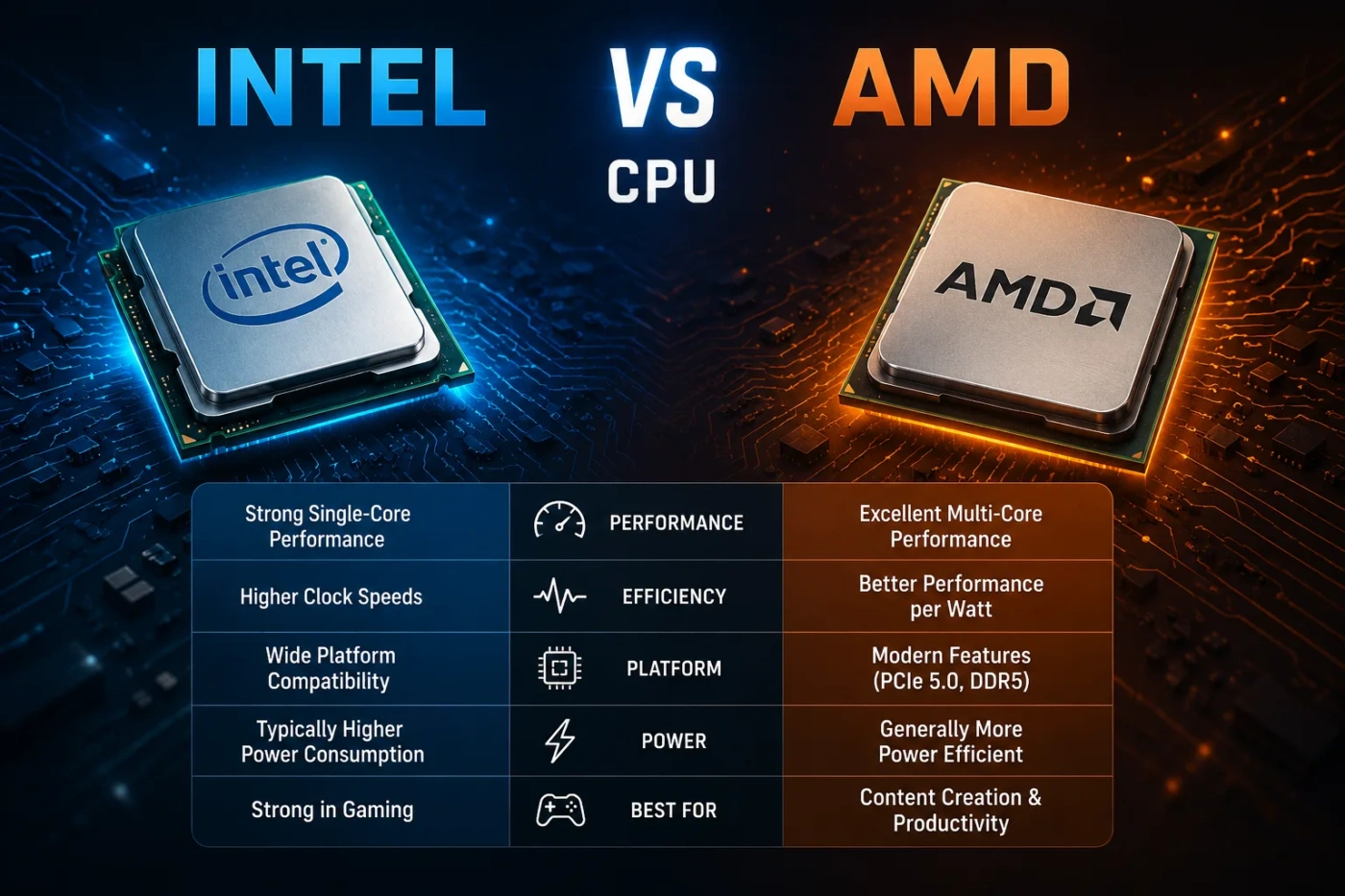
Choosing between an Intel CPU and an AMD CPU is not about picking the “better brand.” It is about matching the processor to your games, software, budget, motherboard, cooling, upgrade plans, and power limits. Intel and AMD both make excellent desktop and laptop processors, but they often win in different situations. AMD is usually the easier pick for gaming-focused desktop builds, especially with Ryzen X3D chips. Intel can still make sense for certain creator workloads, strong single-core responsiveness, broad laptop availability, and systems that benefit from Quick Sync, Thunderbolt support, or Intel’s hybrid core design.
- Intel Vs AMD CPU: The Main Difference
- What Is An Intel CPU?
- Where Intel Feels Strong In Real Use
- What Is An AMD CPU?
- Where AMD Feels Strong In Real Use
- Performance Comparison: Gaming, Work, And Daily Use
- Gaming Performance
- Productivity Performance
- Daily Use
- Intel Vs AMD For Gaming
- Intel Vs AMD For Work And Content Creation
- Platform And Upgrade Path
- Intel Platform Notes
- AMD Platform Notes
- Power, Heat, And Cooling
- Price And Value Comparison
- Intel Vs AMD Laptop CPUs
- When You Should Choose Intel
- Choose Intel If You Need Quick Sync
- Choose Intel If The Full System Deal Is Better
- Choose Intel If Your Software Prefers It
- Choose Intel If You Want Certain Platform Features
- When You Should Choose AMD
- Choose AMD If Gaming Comes First
- Choose AMD If You Want A Longer Desktop Upgrade Path
- Choose AMD If Efficiency Matters
- Choose AMD If You Want Strong Ryzen 9 Multicore Performance
- Common Misunderstandings About Intel And AMD CPUs
- “More Cores Always Means More FPS”
- “Clock Speed Tells The Whole Story”
- “Intel Is Always Hot And AMD Is Always Cool”
- “AMD Is Only For Gamers”
- “Intel Is Only For Office PCs”
- Which One Should You Choose?
- Best Practical Buying Advice
| Feature | Intel CPU | AMD CPU |
|---|---|---|
| Best Overall Fit | Mixed-use PCs, many laptops, video workflows, office systems, and some creator builds | Gaming desktops, upgrade-friendly builds, efficient systems, and many value-focused PCs |
| Gaming Performance | Strong on many chips, but current high-end desktop gaming is often challenged by AMD X3D models | Often the stronger choice for gaming when choosing Ryzen 7 or Ryzen 9 X3D processors |
| Productivity Performance | Good in rendering, encoding, development, multitasking, and apps that use hybrid cores well | Very strong in rendering, compiling, creative apps, and heavily threaded workloads on Ryzen 9 chips |
| Architecture Style | Often uses a hybrid layout with Performance cores and Efficient cores | Uses Zen cores with SMT on most Ryzen chips; X3D models add extra cache for gaming |
| Cache Advantage | Good cache design, but less specialized for cache-sensitive gaming than X3D models | 3D V-Cache can improve frame rates and 1% lows in many games |
| Power Efficiency | Varies by generation and power limits; high-end chips can need strong cooling | Often strong performance per watt, especially with Ryzen 7000, Ryzen 9000, and X3D chips |
| Integrated Graphics | Common on many mainstream CPUs; useful for troubleshooting and media features | Modern Ryzen desktop CPUs usually include basic Radeon graphics, while Ryzen G-series chips are better for iGPU gaming |
| Video Encoding | Intel Quick Sync is a real advantage for many editors and streamers | Good media support, but many buyers still choose Intel when Quick Sync is part of their workflow |
| Upgrade Path | Depends heavily on socket generation, such as LGA1700 or LGA1851 | AM5 has been attractive for users who want a longer desktop upgrade path |
| Motherboard Cost | Can be affordable on older platforms, but newer platforms may raise total build cost | B650 and B850-style AM5 boards often give a good balance of features and upgrade room |
| Overclocking | K-series chips and Z-series boards are the usual route | Unlocked Ryzen chips, Precision Boost Overdrive, EXPO memory tuning, and X3D limits vary by model |
| Typical Price Range | Mainstream desktop CPUs can range from budget chips under $150 to high-end models around $500–$600+ | Mainstream desktop CPUs can range from budget chips under $150 to high-end Ryzen 9 and X3D models around $450–$700+ |
| Simple Recommendation | Choose Intel if your apps favor Intel features, you want a specific laptop, or Quick Sync matters | Choose AMD if gaming, efficiency, socket longevity, or X3D cache is your main priority |
Intel Vs AMD CPU: The Main Difference
The main difference is how each company approaches performance. Intel often focuses on a hybrid design, combining fast Performance cores with smaller Efficient cores on many modern chips. This can work well for multitasking, background tasks, encoding, and everyday responsiveness when the operating system schedules work correctly.
AMD focuses on strong Zen cores, high efficiency, and cache-heavy options. Ryzen X3D processors add 3D V-Cache, which gives the CPU more fast-access memory close to the cores. In many games, this helps with smoother frame pacing, better 1% lows, and higher FPS when the graphics card is not the limit.
For a desktop buyer, the simplest split is this:
- Gaming-first build: AMD Ryzen X3D is usually the safer pick.
- Video editing with Quick Sync: Intel may be the better fit.
- Long upgrade path: AMD AM5 is often more appealing.
- Prebuilt or laptop shopping: compare the exact model, not only the brand.
- Heavy rendering or compiling: compare Ryzen 9 against Core Ultra 7/Core Ultra 9 or Core i7/Core i9 chips in your exact software.
What Is An Intel CPU?
An Intel CPU is a processor made by Intel for desktops, laptops, workstations, mini PCs, and servers. In consumer PCs, Intel’s familiar product lines include Core i3, Core i5, Core i7, Core i9, and newer Core Ultra processors.
Modern Intel desktop processors often use a split-core layout:
- P-cores: larger, faster cores designed for demanding work such as games, editing, rendering, and foreground apps.
- E-cores: smaller cores designed for background tasks, parallel workloads, and efficiency-minded multitasking.
- Thread Director: Intel’s scheduling technology that helps Windows place work on the right cores.
- Quick Sync: Intel’s media engine, often useful for video editing, streaming, transcoding, and timeline playback.
Intel’s newer Core Ultra desktop chips also bring more attention to AI acceleration, NPUs, newer connectivity, and platform features. That does not mean every user needs an NPU in a desktop CPU. For most gamers, GPU performance still matters more. For certain AI-assisted software, video tools, and future local workloads, it may become more useful.
Where Intel Feels Strong In Real Use
Intel can feel fast in daily PC use because many chips offer strong single-thread performance, high boost clocks, and responsive foreground performance. The platform can also be attractive for users who need Quick Sync, broad motherboard options, Thunderbolt support on selected boards, or a specific laptop design.
Intel also has a wide presence in business laptops, office desktops, mini PCs, and OEM systems. That matters because many buyers do not build their own PC. They compare full machines from Dell, HP, Lenovo, ASUS, Acer, MSI, and other brands. In that case, the cooling system, memory configuration, battery size, and power limits can matter as much as the CPU badge.
What Is An AMD CPU?
An AMD CPU is a processor made by AMD for desktops, laptops, workstations, servers, and gaming systems. In consumer PCs, AMD’s main line is Ryzen, including Ryzen 3, Ryzen 5, Ryzen 7, Ryzen 9, Ryzen X3D, Ryzen G-series APUs, and Ryzen AI laptop chips.
AMD’s current desktop strength comes from the Zen architecture, high core efficiency, SMT, AM5 platform support, and 3D V-Cache on selected models. Ryzen X3D chips are especially popular among gamers because many games respond well to large cache.
AMD desktop CPUs often appeal to users who want:
- High gaming performance without extreme power draw.
- AM5 motherboard longevity for easier future upgrades.
- Strong Ryzen 9 multicore performance for rendering, compiling, and creator work.
- Good thermal behavior when paired with a sensible cooler.
- Better value when an older Ryzen chip drops in price.
Where AMD Feels Strong In Real Use
AMD feels especially strong in gaming desktops because X3D chips can deliver high FPS while staying efficient. The benefit is not only peak frame rate. In many CPU-sensitive games, extra cache can help reduce dips, improve frame pacing, and make gameplay feel smoother.
AMD also works well for users who build a PC once and upgrade the processor later. A good AM5 motherboard can often support several CPU tiers, from a Ryzen 5 to a Ryzen 7 X3D or Ryzen 9, depending on BIOS support and power delivery.
Performance Comparison: Gaming, Work, And Daily Use
Gaming Performance
For a gaming PC, AMD Ryzen X3D is usually the first place to look. A chip such as a Ryzen 7 X3D model can beat more expensive CPUs in many games because games often care more about cache, latency, and per-core behavior than raw core count.
Intel is still capable for gaming. A good Core i5, Core i7, Core Ultra 5, or Core Ultra 7 can run modern games smoothly when paired with the right GPU. But if your main question is “Which CPU gives me the best gaming value at the high end?”, AMD X3D usually has the cleaner argument.
Practical note: at 1440p and 4K, the graphics card often becomes the limit. A faster CPU still matters for competitive games, simulation games, strategy games, high-refresh monitors, and strong 1% lows, but it may not transform performance if your GPU is already the bottleneck.
Productivity Performance
For productivity, the answer depends on the software. Rendering, code compiling, compression, 3D work, CAD, video editing, and simulation do not all use the CPU the same way.
- Blender, V-Ray, Corona, compiling, and heavy multitasking: Ryzen 9 and high-core Intel chips can both perform well. Compare exact models.
- Adobe Premiere Pro, DaVinci Resolve, streaming, and transcoding: Intel Quick Sync can be useful, especially with H.264, H.265, and some mixed-codec workflows.
- Photoshop and light creator work: single-core speed, memory speed, and responsiveness matter more than simply having many cores.
- Engineering and CAD: some tasks prefer fast single-thread performance, while simulation and rendering can use more cores.
A Ryzen 9 is often a strong choice for CPU-heavy creator workloads. Intel can still be the smarter buy if your software uses Quick Sync well, if the full system price is lower, or if your work benefits from Intel’s platform features.
Daily Use
For browsing, office work, streaming, study, light editing, and general home use, both Intel and AMD are more than fast enough. In this category, do not overpay for a flagship CPU. Spend money on enough RAM, a fast SSD, a quiet cooler, and a better screen.
A Ryzen 5, Core i5, Core Ultra 5, or even a modern lower-tier chip can feel fast in everyday use. The difference between Intel and AMD becomes more noticeable when you game, render, edit video, stream, or run demanding apps for long sessions.
Intel Vs AMD For Gaming
If your PC is mainly for games, AMD has the cleaner path: choose a Ryzen X3D chip that fits your budget, then pair it with the best GPU you can afford. The extra cache helps in many titles, especially games that are sensitive to memory latency and CPU scheduling.
Choose AMD for gaming when:
- You play competitive titles at high refresh rates.
- You want strong 1% lows and smoother frame pacing.
- You play simulation, MMO, strategy, or open-world games that lean on the CPU.
- You want high performance without chasing extreme power draw.
- You plan to keep the AM5 motherboard and upgrade later.
Choose Intel for gaming when:
- The Intel CPU is much cheaper in your local market.
- You are buying a prebuilt with better total specs for the price.
- You also stream, edit, or transcode video and can use Quick Sync.
- You prefer a specific Intel laptop with stronger cooling, screen, battery, or GPU configuration.
Intel Vs AMD For Work And Content Creation
For work, do not decide by brand alone. Decide by application. Some creator apps use many cores. Some use only a few. Some lean on GPU acceleration. Some benefit from Intel’s media engine. Some prefer AMD’s cache or core efficiency.
| Workload | Better Fit | Reason |
|---|---|---|
| Video Editing | Intel or AMD | Intel can win when Quick Sync matters; AMD can win when CPU rendering and general performance matter more |
| Streaming | Intel, AMD, or GPU-Based | Many users now use GPU encoders, but Intel Quick Sync remains useful in some setups |
| 3D Rendering | Often AMD Ryzen 9 or High-End Intel | Core count, power limits, cooling, and software scaling decide the winner |
| Software Development | Model-Specific | Large compiles like more cores; daily coding likes fast single-thread performance and enough RAM |
| CAD And Engineering | Model-Specific | Single-thread speed matters in modeling; simulation and rendering may use more cores |
| Office And Browser Work | Either | RAM, SSD, display, and laptop cooling often matter more than the CPU brand |
Platform And Upgrade Path
The CPU is only one part of the platform. Motherboard socket, chipset, BIOS support, memory type, PCIe lanes, USB ports, networking, Wi-Fi, Thunderbolt, storage slots, and cooler compatibility all affect the real value.
Intel Platform Notes
Intel platforms can be very feature-rich, especially on higher-end motherboards. You may see strong I/O, good memory support, many USB options, and Thunderbolt on selected boards. The downside is that Intel socket changes can make long-term upgrades less predictable.
If you buy Intel, check:
- Socket type, such as LGA1700 or LGA1851.
- Chipset support for overclocking, especially if buying a K-series CPU.
- BIOS support for the exact processor.
- Power delivery quality on the motherboard.
- Cooler compatibility and mounting hardware.
AMD Platform Notes
AMD’s AM5 platform is one of its strongest selling points for desktop buyers. A user can often start with a Ryzen 5 and later move to a Ryzen 7 X3D or Ryzen 9 without replacing the entire system, as long as the motherboard supports the newer chip through BIOS updates.
If you buy AMD, check:
- AM5 motherboard BIOS support.
- DDR5 memory speed and EXPO compatibility.
- VRM quality if upgrading to Ryzen 9 later.
- PCIe 5.0 support if you care about next-generation storage or GPUs.
- Cooler clearance and case airflow.
Power, Heat, And Cooling
Power draw matters because it affects noise, cooler cost, motherboard stress, and room heat. A CPU that looks faster in a short benchmark may not be the better choice if it needs a more expensive cooler and runs louder under real workloads.
AMD Ryzen chips, especially many non-X and X3D models, often offer strong efficiency. Intel chips can also run well when power limits are tuned, but some high-end Intel processors can draw much more power when motherboard settings allow aggressive boosting.
For most buyers:
- Budget gaming PC: a good air cooler is usually enough.
- Ryzen X3D gaming build: focus on case airflow and sensible boost behavior.
- High-end Intel Core i7/Core i9 or Core Ultra 9: use a stronger air cooler or liquid cooler, depending on the model and workload.
- Silent PC: choose an efficient CPU before spending more on cooling.
Price And Value Comparison
CPU value is not just the processor price. You should compare the full platform cost:
- CPU price
- Motherboard price
- RAM cost
- Cooler cost
- Power supply needs
- Upgrade potential
- Resale value
Intel can be a better value when discounted, especially on older Core i5 and Core i7 chips or prebuilt desktops. AMD can be a better value when a Ryzen 5, Ryzen 7, or Ryzen X3D chip gives you more gaming performance on a motherboard that still has upgrade room.
As a general shopping pattern, budget CPUs may sit under $150, strong midrange CPUs often land around $180–$350, and high-end consumer chips often sit around $450–$700 or more depending on supply, region, and demand. Do not judge value by MSRP alone. A discounted previous-generation chip can be smarter than a newer chip with a small performance gain.
Intel Vs AMD Laptop CPUs
Laptops need a different comparison. A desktop CPU can be judged more directly because cooling and power are easier to control. In a laptop, the same CPU name can perform differently depending on chassis thickness, fan design, power limits, memory configuration, and battery settings.
Intel laptops often have wide availability, strong media features, good business options, and many designs with Thunderbolt. AMD laptops often offer strong battery life, good integrated graphics on many models, and efficient performance in thin-and-light machines.
When comparing Intel and AMD laptops, check:
- The exact CPU model, not only “Core Ultra 7” or “Ryzen 7.”
- RAM capacity and whether it is soldered.
- SSD size and upgrade options.
- Cooling reviews for that laptop model.
- Battery size in watt-hours.
- Screen quality, brightness, resolution, and refresh rate.
- Whether you need USB4, Thunderbolt, HDMI, or extra monitor support.
For laptops, the best answer is often not “Intel or AMD.” It is the laptop with the better screen, cooling, battery, keyboard, ports, and GPU for your budget.
When You Should Choose Intel
Choose an Intel CPU if your use case matches Intel’s strengths instead of buying it only because the brand is familiar.
Choose Intel If You Need Quick Sync
Intel Quick Sync can be useful for video editors, streamers, and users who transcode media. If your workflow uses H.264, H.265, AV1, or mixed media timelines and your software takes advantage of Intel’s media engine, Intel can save time and make editing smoother.
Choose Intel If The Full System Deal Is Better
Sometimes the better CPU choice is the better total machine. If an Intel laptop or prebuilt desktop gives you a stronger GPU, more RAM, a better display, and better cooling for the same price, it may beat an AMD option in real use.
Choose Intel If Your Software Prefers It
Some business, engineering, media, or niche professional tools can perform better on a specific Intel CPU. If the computer earns money, check benchmarks for your actual software before buying.
Choose Intel If You Want Certain Platform Features
Intel systems may be attractive if you want Thunderbolt on a specific motherboard or laptop, Intel business features, broad OEM support, or a known hardware setup used in your workplace.
When You Should Choose AMD
Choose an AMD CPU when the goal is strong gaming performance, efficiency, platform longevity, or high multicore output from Ryzen 9 models.
Choose AMD If Gaming Comes First
For a high-end gaming desktop, Ryzen X3D is often the easiest recommendation. The extra cache can help with frame rates, frame pacing, and CPU-heavy games. This is especially useful if you have a fast GPU and a high-refresh monitor.
Choose AMD If You Want A Longer Desktop Upgrade Path
AM5 is a strong reason to buy AMD. A good motherboard can give you room to move from a lower-tier Ryzen chip to a faster Ryzen 7 X3D or Ryzen 9 later. That can reduce future upgrade cost.
Choose AMD If Efficiency Matters
If you care about lower heat, quieter fans, and strong performance per watt, AMD is often appealing. This matters in compact cases, quiet builds, summer temperatures, and PCs that run long workloads.
Choose AMD If You Want Strong Ryzen 9 Multicore Performance
Ryzen 9 chips are strong choices for rendering, compiling, multitasking, and creator work. They also pair well with gaming if you choose the right model, especially X3D versions for users who want both gaming and production performance.
Common Misunderstandings About Intel And AMD CPUs
“More Cores Always Means More FPS”
More cores help in rendering, compiling, streaming, and multitasking. Games do not scale the same way. Many games prefer faster cores, lower latency, and more cache. That is why an 8-core X3D CPU can beat a higher-core CPU in gaming.
“Clock Speed Tells The Whole Story”
A 5.7 GHz CPU is not automatically faster than a 5.2 GHz CPU. Architecture, IPC, cache, memory latency, power limits, and software behavior all matter. Clock speed is only one part of performance.
“Intel Is Always Hot And AMD Is Always Cool”
This is too simple. High-end CPUs from either brand can run hot if pushed hard. Cooling depends on power limits, motherboard settings, case airflow, cooler quality, voltage behavior, and workload type.
“AMD Is Only For Gamers”
AMD is strong in gaming, but Ryzen 9 and Threadripper-class chips are also used for rendering, development, 3D work, and professional tasks. The X3D models get the gaming attention, but they are not the whole AMD lineup.
“Intel Is Only For Office PCs”
Intel still offers strong creator, business, laptop, and enthusiast options. The right Intel system can be very fast, especially when the software benefits from Intel-specific media features or a well-tuned hybrid core design.
Which One Should You Choose?
| User Type | Better Choice | Why |
|---|---|---|
| Competitive Gamer | AMD Ryzen X3D | High FPS, strong 1% lows, and cache benefits in many CPU-sensitive games |
| Casual Gamer | Either | A good midrange Intel or AMD CPU is enough; spend more on the GPU |
| Video Editor | Intel or AMD | Intel may help with Quick Sync; AMD Ryzen 9 can be strong for CPU-heavy work |
| Streamer | Depends On Encoder | GPU encoding, Quick Sync, and software settings matter more than brand alone |
| Student Or Office User | Either | Choose based on laptop quality, battery life, RAM, SSD, and price |
| Quiet PC Builder | Often AMD | Many Ryzen chips offer strong performance with lower heat output |
| Budget Builder | Best Deal Wins | Compare CPU, motherboard, RAM, and cooler together |
| Upgrade-Focused Builder | AMD AM5 | Better chance of upgrading later without replacing the motherboard |
| Business Laptop Buyer | Model-Specific | Security, ports, warranty, keyboard, battery, and dock support matter heavily |
Best Practical Buying Advice
If you are building a gaming desktop, start with AMD Ryzen X3D unless an Intel deal is clearly better. If you are building a creator PC, compare the exact CPUs in the apps you use. If you are buying a laptop, compare the full laptop instead of treating Intel and AMD as simple labels.
Use this simple decision path:
- Pick AMD Ryzen X3D for a gaming-first desktop.
- Pick AMD Ryzen 9 for a strong mix of production work, multitasking, and high-end desktop performance.
- Pick Intel Core Ultra or Core i7/Core i9 if Quick Sync, specific software behavior, platform features, or a better prebuilt deal matters.
- Pick either brand for everyday use if the rest of the system is better: RAM, SSD, cooling, screen, GPU, and warranty.
- Do not overspend on the CPU if your graphics card, memory, or storage is the real limit.
For most buyers, the best Intel vs AMD CPU decision is not emotional. It is practical. Choose Intel when its media features, laptop options, or platform advantages match your needs. Choose AMD when gaming performance, efficiency, AM5 upgrades, or X3D cache gives you more value. The right CPU is the one that makes your actual PC faster, quieter, and easier to keep for several years.