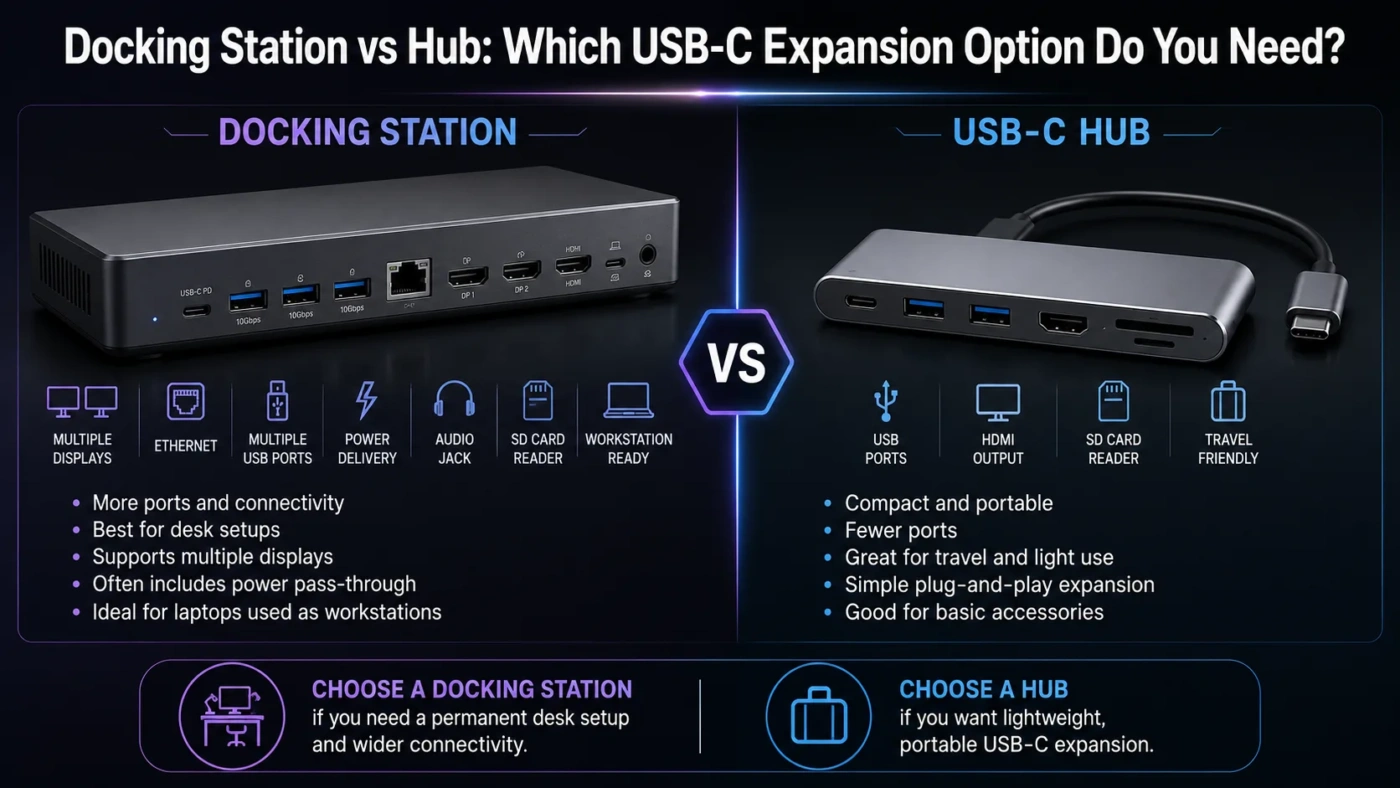
Adocking station and a hub both expand the ports on a laptop, tablet, or small desktop, but they are built for different levels of use. Choose a hub if you mainly need a simple, portable way to add USB, HDMI, SD card, or Ethernet ports for light daily work. Choose a docking station if you want a more permanent desk setup with monitor support, charging, Ethernet, audio, and multiple accessories connected through one cable.
- Main Differences
- What A Docking Station Offers
- What A Hub Offers
- Choose A Docking Station If
- Choose A Hub If
- Setup And Daily Use
- Performance And Speed
- Price And Long-Term Value
- Docking Station Value
- Hub Value
- Common Misunderstandings
- Best Choice By User Type
- Compatibility Checklist
- Where Each Option Fits Best
- Compare More Options
- FAQ
- Is A Docking Station Better Than A Hub?
- Can A Hub Charge A Laptop?
- Can A Hub Support Two Monitors?
- Do I Need Thunderbolt For A Docking Station?
- Which Is Better For A MacBook?
- Which Should Most People Buy?
| Feature | Docking Station | Hub |
|---|---|---|
| Best Use | Full desk setup with monitors, keyboard, mouse, storage, network, and charging | Adding a few extra ports while traveling, studying, or working casually |
| Typical Size | Larger, often designed to stay on a desk | Small, lightweight, and easy to carry |
| Power Delivery | Often supports higher laptop charging through USB-C or Thunderbolt | May support pass-through charging, but power limits vary |
| Monitor Support | Better for one or more external displays, depending on laptop and dock specs | Usually fine for one display, but multi-monitor support can be limited |
| Connection Type | Commonly USB-C, Thunderbolt, or brand-specific connectors | Usually USB-C or USB-A |
| Desk Cable Management | Cleaner; one cable can connect the laptop to many devices | Useful, but may still leave more cables around the laptop |
| Port Variety | More ports and better spacing for permanent accessories | Fewer ports, usually focused on common essentials |
| Price | Usually costs more | Usually cheaper |
| Best Choice | Best for office desks, creators, power users, and home workstations | Best for students, travelers, light users, and simple port expansion |
Main Differences
A docking station is closer to a desktop expansion base. It is made for a fixed work area where your laptop becomes the center of a larger setup. A hub is closer to a compact port splitter. It gives you extra connections when your device does not have enough ports.
The biggest real-world difference is not only the number of ports. It is how the device fits into your routine. A docking station makes sense when you repeatedly connect the same monitor, keyboard, mouse, charger, storage drive, and network cable. A hub makes sense when you only need one or two extra ports from time to time.
What A Docking Station Offers
A docking station gives your laptop a more desktop-like setup. It may include HDMI, DisplayPort, USB-A, USB-C, Ethernet, audio, SD card slots, and power delivery in one unit. Many docking stations are designed to sit on a desk and stay connected to your monitor, keyboard, mouse, speakers, charger, and other accessories.
The main benefit is convenience. Instead of plugging in several cables every time you sit down, you connect one cable to the laptop. This is especially useful for remote workers, office users, designers, programmers, finance users, and anyone who moves between laptop mode and desk mode every day.
Compatibility Note: A docking station can only deliver the features supported by your laptop, cable, and connection standard. A USB-C port does not always mean Thunderbolt support, high-watt charging, or dual-display output. Always check the laptop’s port specs before buying a dock.
What A Hub Offers
A hub is a compact device that adds extra ports to a laptop, tablet, or desktop. Common hub ports include USB-A, USB-C, HDMI, Ethernet, SD card, microSD card, and sometimes pass-through charging. Hubs are popular because many modern laptops have fewer built-in ports than older models.
A hub is usually the better fit when you need flexibility rather than a full workstation. It works well for connecting a projector, reading a memory card, using a wired mouse, adding a flash drive, or plugging into Ethernet at a hotel, classroom, office, or conference room.
Choose A Docking Station If
Choose A Hub If
Setup And Daily Use
With a docking station, the setup is more planned. You choose where it sits, connect your permanent accessories, route the cables, and use the laptop as the main computer when you sit at the desk. This is the better experience if you use the same workspace often.
With a hub, the setup is lighter. You connect the hub only when needed, use the required port, and remove it when done. It is more flexible, but less tidy for a full-time desk because the hub usually hangs near the laptop and may not handle as many devices comfortably.
Performance And Speed
Performance depends on the connection standard. A Thunderbolt docking station can support faster data transfer, stronger display output, and better accessory handling than a basic USB hub. However, a basic dock connected to a limited USB-C port will not magically create high-end performance.
For simple tasks such as connecting a mouse, keyboard, flash drive, or single HDMI display, many hubs work well. For high-resolution monitors, fast external SSDs, wired network work, creative editing, or many devices at once, a docking station is usually the safer choice.
Important: USB-C shape alone does not tell the full story. Some USB-C ports support display output and charging, while others only support data. Thunderbolt and USB4 can offer stronger capabilities, but the laptop, dock, cable, and monitor must all support the needed features.
Price And Long-Term Value
A hub is usually cheaper because it has fewer ports, smaller power requirements, and a simpler design. For a student, traveler, or casual laptop user, that lower cost can be the better value.
A docking station usually costs more, but it can be worth it when it replaces daily cable plugging, supports a cleaner desk, improves monitor setup, and keeps work accessories ready. The value comes from saved time and fewer connection hassles, not just the port count.
Docking Station Value
Best when the device stays on a desk and supports a complete workstation. Higher cost makes sense when you use it every workday.
Hub Value
Best when you need affordable, portable port expansion. Lower cost makes sense when your connection needs are occasional.
Common Misunderstandings
| Misunderstanding | Reality |
|---|---|
| A hub and a docking station are the same thing. | They overlap, but a dock is usually built for a fuller desk setup, while a hub is usually made for portable port expansion. |
| Any USB-C dock will work perfectly with any USB-C laptop. | USB-C ports can differ in charging, display output, data speed, and Thunderbolt or USB4 support. |
| A docking station always supports two monitors. | Some do, some do not. The laptop graphics system, operating system, dock, cable, and monitor setup all matter. |
| A hub is always slow. | Many hubs are fast enough for everyday accessories. Limits appear more often with high-resolution displays, fast drives, or many devices at once. |
| Pass-through charging means full-speed laptop charging. | Charging wattage varies. Some hubs reserve power for their own operation, so the laptop may receive less than the charger’s full rating. |
Best Choice By User Type
| User Type | Better Choice | Reason |
|---|---|---|
| Student | Hub | Portable, affordable, and enough for projectors, USB drives, and SD cards. |
| Remote Worker | Docking Station | Better for a daily home office with monitor, keyboard, mouse, webcam, and Ethernet. |
| Traveler | Hub | Small size and simple connections are more useful on the move. |
| Designer Or Video Editor | Docking Station | Better fit for high-resolution displays, external drives, wired network, and many accessories. |
| Office Desk User | Docking Station | Keeps the desk ready and reduces repeated cable plugging. |
| Casual Laptop User | Hub | A simple hub is often enough for occasional HDMI, USB, or Ethernet needs. |
Compatibility Checklist
Before buying either option, match the adapter to your actual device. The right choice depends less on the label and more on the ports, power, display needs, and accessories you plan to use.
- Check whether your laptop port supports display output.
- Check whether the adapter supports your monitor resolution and refresh rate.
- Check charging wattage if you want one-cable power.
- Check whether you need USB-A, USB-C, HDMI, DisplayPort, Ethernet, audio, or SD card slots.
- Check cable quality, especially for Thunderbolt, USB4, high-resolution monitors, and fast storage.
- Check operating system support if you use Windows, macOS, ChromeOS, Linux, or a tablet.
Where Each Option Fits Best
A docking station fits best when your laptop often works like a desktop computer. It is the stronger option for a home office, work desk, multi-monitor setup, wired network, and users who dislike reconnecting several cables every day.
A hub fits best when your laptop is still mostly used as a laptop. It solves missing-port problems without turning your workspace into a fixed setup. For many people, a good hub is enough until their monitor, charging, and accessory needs become more demanding.
Compare More Options
FAQ
Is A Docking Station Better Than A Hub?
A docking station is better for a full desk setup, multiple accessories, charging, Ethernet, and stronger display needs. A hub is better for simple, portable port expansion.
Can A Hub Charge A Laptop?
Some hubs support pass-through charging, but not all of them do. Even when charging is supported, the wattage may be lower than the laptop’s normal charger.
Can A Hub Support Two Monitors?
Some hubs can support more than one monitor, but this depends on the hub, laptop, operating system, cable, and display standard. For multi-monitor work, a docking station is usually the safer starting point.
Do I Need Thunderbolt For A Docking Station?
No, but Thunderbolt can help if you need faster data, stronger display support, or a higher-end workstation setup. Many basic docking stations also work over USB-C, as long as the laptop supports the required features.
Which Is Better For A MacBook?
A hub is often enough for simple USB, HDMI, or SD card needs. A docking station is better for a desk setup, but monitor support can vary by MacBook model and chip generation, so display limits should be checked before buying.
Which Should Most People Buy?
Most casual users should buy a hub first because it is cheaper and easier to carry. Users with a fixed desk, external monitor, keyboard, mouse, charger, and Ethernet should buy a docking station instead.