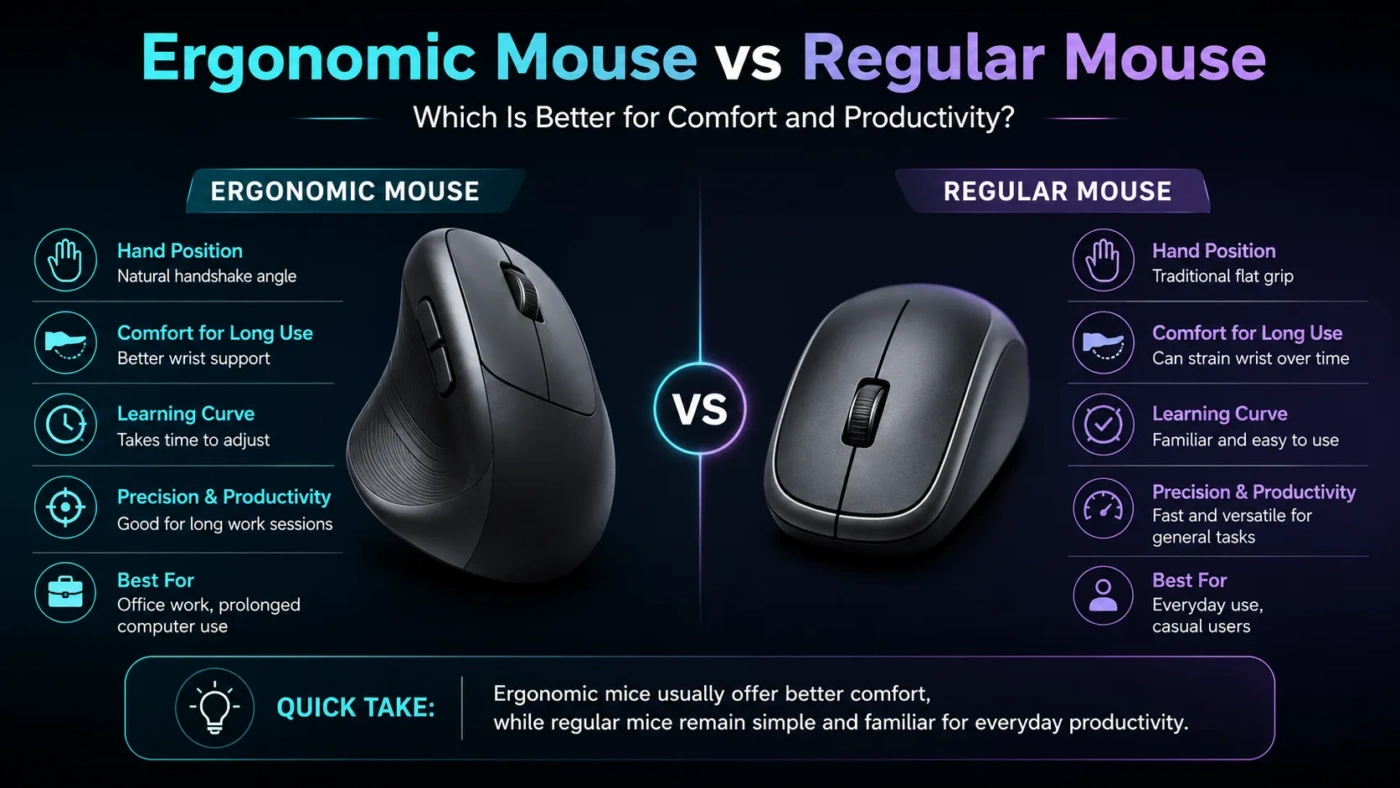
An ergonomic mouse is usually the better choice if comfort, wrist position, and long work sessions matter most. A regular mouse is usually better if you want a familiar shape, lower cost, easy portability, and simple everyday use. The right choice depends less on which one is “better” overall and more on how long you use a mouse, what kind of work you do, and whether your hand or wrist feels strained after repeated use.
- Main Differences
- What An Ergonomic Mouse Offers
- What A Regular Mouse Offers
- Comfort And Hand Position
- Speed, Accuracy, And Control
- Price And Long-Term Value
- Choose An Ergonomic Mouse If
- Choose A Regular Mouse If
- Decision Path
- Best Choice By User Type
- Common Misunderstandings
- Ergonomic Does Not Mean Perfect For Everyone
- A Regular Mouse Is Not Automatically Bad
- More Expensive Does Not Always Mean More Comfortable
- Changing The Mouse May Not Fix The Whole Setup
- Useful Terms
- Where Each Option Fits Best
- Ergonomic Mouse
- Regular Mouse
- FAQ
- Is An Ergonomic Mouse Better Than A Regular Mouse?
- Does An Ergonomic Mouse Help With Wrist Pain?
- Are Vertical Mice Hard To Use?
- Is A Regular Mouse Better For Gaming?
- Which Mouse Should Most People Choose?
- Compare More Options
| Feature | Ergonomic Mouse | Regular Mouse |
|---|---|---|
| Main Purpose | Designed to reduce awkward hand, wrist, and forearm positions | Designed for familiar, general computer control |
| Hand Position | Often more vertical or shaped to support a neutral grip | Usually flatter, with the palm facing downward |
| Comfort During Long Use | Often better for long office, design, or productivity sessions | Comfortable for short or moderate use, but may feel tiring over time |
| Learning Curve | May take a few days to feel natural | Feels familiar immediately for most users |
| Precision | Good for office work; shape may affect fast gaming or fine control at first | Predictable for gaming, browsing, schoolwork, and everyday tasks |
| Portability | Can be bulkier, especially vertical models | Usually smaller and easier to carry |
| Price Range | Often costs more, especially with wireless features | Available from very cheap to premium |
| Best Fit | Office users, remote workers, designers, programmers, and anyone with repeated discomfort | Casual users, students, gamers, travelers, and budget buyers |
Main Differences
The main difference is hand posture. A regular mouse usually keeps the hand flatter on the desk, which can rotate the forearm inward. An ergonomic mouse tries to reduce that rotation by changing the shape, angle, grip, or button placement.
That does not mean every ergonomic mouse is automatically comfortable. Hand size, grip style, desk height, mouse sensitivity, and work habits all matter. A mouse that feels great for one person can feel awkward for another.
What An Ergonomic Mouse Offers
An ergonomic mouse is shaped to support the hand in a less strained position. Some models are vertical, some are angled, some use a trackball, and some simply add better palm support than a basic mouse.
The goal is not to make the mouse look unusual. The goal is to reduce repeated small movements that can become uncomfortable during long computer sessions. For people who work at a desk all day, that difference can be noticeable.
What A Regular Mouse Offers
A regular mouse is the standard computer mouse most people already know. It is usually flatter, widely available, easy to replace, and offered in many sizes, prices, and feature sets.
For casual browsing, schoolwork, light office tasks, and gaming, a regular mouse can be perfectly fine. Many users do not need a special shape if they use the mouse for short periods or take regular breaks.
Comfort And Hand Position
Comfort is the biggest reason to choose an ergonomic mouse. A regular mouse often works well at first, but long sessions can make some users notice wrist tension, forearm fatigue, or pressure near the base of the palm.
An ergonomic mouse can help by changing the way the hand rests on the desk. Vertical mice, for example, place the hand closer to a handshake position. This can feel more natural for some people, especially during repetitive office work.
Speed, Accuracy, And Control
A regular mouse usually feels faster at first because most users already know the shape. Gamers, designers, and people who make tiny pointer movements may prefer the predictable feel of a familiar mouse.
An ergonomic mouse can still be accurate, but the shape may require adjustment. Vertical models can feel slower during the first few days. Trackball models can feel even more different because the thumb or fingers move the pointer instead of the whole hand.
For office work, browsing, spreadsheets, email, and general productivity, the difference in speed usually becomes small after practice. For competitive gaming, a lightweight regular gaming mouse often remains the safer choice.
Price And Long-Term Value
Regular mice are usually cheaper and easier to find. A basic regular mouse may be enough for a shared computer, classroom setup, travel bag, or occasional laptop use.
Ergonomic mice often cost more because of their shape, sensors, wireless features, extra buttons, or specialty design. The higher price can make sense if the mouse is used every workday. Paying more for comfort is easier to justify when the device affects hours of daily work.
Choose An Ergonomic Mouse If
Choose A Regular Mouse If
Decision Path
Best Choice By User Type
| User Type | Better Choice | Reason |
|---|---|---|
| Office Worker | Ergonomic Mouse | Long daily use makes comfort and hand position more important. |
| Student | Regular Mouse | Lower cost, portability, and simple use usually matter more. |
| Programmer | Ergonomic Mouse | Repeated desk use benefits from a more comfortable shape. |
| Casual User | Regular Mouse | Short sessions do not always need a specialty mouse. |
| Competitive Gamer | Regular Mouse | Lightweight shape, speed, and familiar control are often more important. |
| Designer Or Editor | Depends On Workflow | Comfort matters, but precision and muscle memory also matter. |
| Remote Worker | Ergonomic Mouse | A home desk setup can benefit from comfort-focused accessories. |
| Traveler | Regular Mouse | Smaller size and easier packing make regular mice more practical. |
Common Misunderstandings
Ergonomic Does Not Mean Perfect For Everyone
An ergonomic mouse can be more comfortable, but only if the size, angle, and grip match the user. A large vertical mouse may feel wrong for small hands, while a tiny ergonomic mouse may not support larger hands well.
A Regular Mouse Is Not Automatically Bad
Many people use regular mice comfortably for years. The problem is not the category itself. The problem appears when the mouse shape, desk setup, posture, or usage time creates repeated strain.
More Expensive Does Not Always Mean More Comfortable
Premium materials, wireless charging, silent clicks, or extra buttons can be useful, but they do not guarantee better ergonomics. Fit matters more than the feature list.
Changing The Mouse May Not Fix The Whole Setup
A better mouse can help, but desk height, chair position, keyboard placement, monitor distance, and break habits also affect comfort. A comfortable workstation works as a system.
Useful Terms
Where Each Option Fits Best
Ergonomic Mouse
Best for a fixed desk, long work sessions, productivity tasks, and users who want a more relaxed hand position. It is the stronger choice when comfort is a daily priority.
Remote Work
Long Sessions
Comfort Focus
Regular Mouse
Best for simple use, gaming, travel, shared computers, school use, and lower budgets. It is the safer choice when familiarity and convenience matter most.
Travel
Budget
Casual Use
FAQ
Is An Ergonomic Mouse Better Than A Regular Mouse?
It is better for users who spend long hours at a desk or feel discomfort with a regular mouse. For short sessions, gaming, travel, or basic use, a regular mouse may be the better choice.
Does An Ergonomic Mouse Help With Wrist Pain?
It may help some users by improving hand and forearm position, but it is not a guaranteed solution. Ongoing pain should be taken seriously, and the full desk setup should also be checked.
Are Vertical Mice Hard To Use?
They can feel unusual at first, but many users adjust within a few days. The adjustment is usually easier for office tasks than for fast gaming or detailed creative work.
Is A Regular Mouse Better For Gaming?
Often, yes. Many gamers prefer regular gaming mice because they are lightweight, fast, familiar, and available with high-quality sensors and customizable buttons.
Which Mouse Should Most People Choose?
Choose an ergonomic mouse if you work long hours at a desk or notice strain after mouse use. Choose a regular mouse if you want a simple, low-cost, portable, and familiar option for everyday tasks.