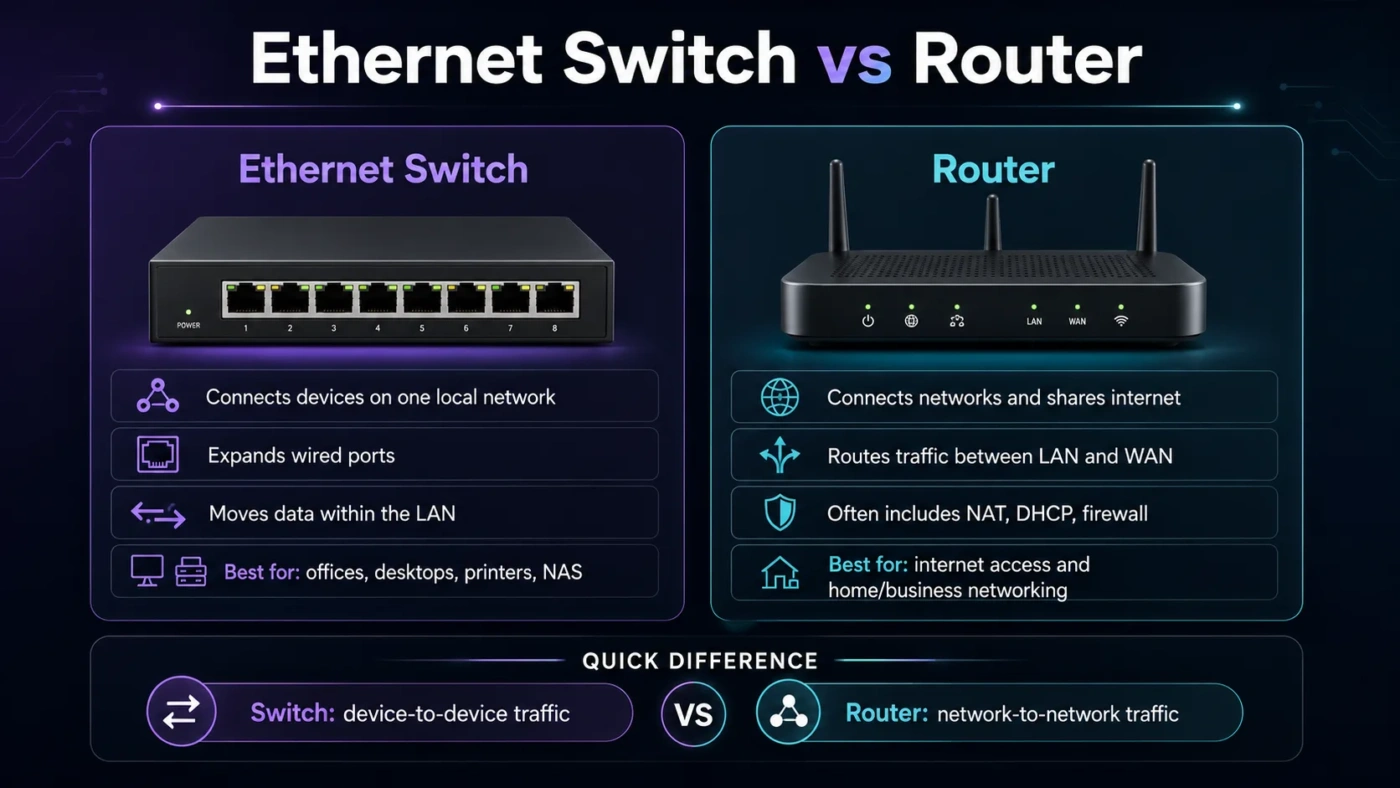
An Ethernet switch and a router often sit close to each other in a home or office network, but they solve different problems. A router connects your local network to another network, usually the internet. An Ethernet switch expands the wired side of that local network so more devices can communicate through Ethernet. If you already have internet and only need more wired ports, a switch is usually the right add-on. If you need to share an internet connection, manage IP addresses, use Wi-Fi, or separate one network from another, you need a router.
- Ethernet Switch vs Router: The Main Difference
- What Is an Ethernet Switch?
- Unmanaged Switches
- Managed Switches
- PoE Switches
- What Is a Router?
- How They Work in a Real Network
- Performance Differences That Matter
- Local Speed
- Internet Speed
- Latency
- Bandwidth Sharing
- When Should You Choose an Ethernet Switch?
- You Should Pick a Switch If:
- When Should You Choose a Router?
- You Should Pick a Router If:
- Do You Need Both?
- Common Misunderstandings
- A Switch Does Not Replace a Router for Internet Access
- A Router Is Not Always Better Than a Switch
- More Ports on a Router Are Not Always Needed
- Wi-Fi Problems Are Not Fixed by a Basic Switch Alone
- Managed Switches Are Not Always Necessary
- Price and Value Considerations
- Ethernet Switch vs Router for Home Use
- Ethernet Switch vs Router for Office Use
- Ethernet Switch vs Router for Gaming
- Ethernet Switch vs Router for Streaming and Smart TVs
- Ethernet Switch vs Router for NAS and File Sharing
- Which One Should You Choose?
- Best Choice by User Type
| Feature | Ethernet Switch | Router |
|---|---|---|
| Main Job | Connects multiple wired devices inside the same local network | Connects different networks, such as your home network and the internet |
| Best For | Adding more Ethernet ports for PCs, TVs, consoles, printers, cameras, or access points | Sharing an internet connection, managing traffic, assigning IP addresses, and running Wi-Fi |
| Network Layer | Usually Layer 2, using MAC addresses | Layer 3, using IP addresses |
| Internet Access | Does not normally provide internet by itself | Provides internet access to devices through WAN and LAN connections |
| Typical Ports | 5, 8, 16, 24, or more Ethernet ports | One WAN port plus several LAN ports, depending on the model |
| Wi-Fi Support | No Wi-Fi in a standard Ethernet switch | Common on home routers and many small office routers |
| IP Address Handling | Usually does not assign IP addresses | Usually runs DHCP to assign local IP addresses |
| Security Functions | Basic models offer little security control; managed models may support VLANs and port settings | Often includes firewall, NAT, guest network, parental controls, VPN, and access rules |
| Setup Difficulty | Unmanaged switches are plug-and-play | Needs internet, Wi-Fi, password, DHCP, and security settings |
| Performance Focus | Fast local wired communication between devices | Traffic routing, internet sharing, network control, and WAN performance |
| Typical Home Use | Expanding wired ports when the router has too few LAN ports | Main network device connected to the modem or fiber terminal |
| Choose It When | You need more Ethernet connections on an existing network | You need internet sharing, Wi-Fi, routing, firewall, or a new network |
Ethernet Switch vs Router: The Main Difference
The cleanest way to separate them is this: a switch connects devices within one network, while a router connects networks to each other. Your laptop, desktop PC, smart TV, game console, printer, NAS, and security camera can all connect to a switch. The switch passes local data between them without needing to send every packet through the internet.
A router sits at the edge of the network. It connects your local devices to the wider internet through a WAN connection. It also keeps track of IP addresses, sends traffic to the right destination, and often protects the local network with a firewall. In most homes, the “router” is actually a combined device: router, Ethernet switch, Wi-Fi access point, firewall, and DHCP server in one box.
This is why people often confuse the two. When you plug a cable into the back of a home router, you are usually plugging into its built-in switch section. That does not mean every switch is a router. It means many consumer routers include switching ports for convenience.
What Is an Ethernet Switch?
An Ethernet switch is a wired networking device that lets multiple devices communicate inside a local area network. It uses Ethernet cables and forwards data based on MAC addresses. In simple use, you connect one cable from your router to the switch, then connect your wired devices to the remaining switch ports.
For example, a router may have only three or four usable LAN ports. If you want to wire a desktop PC, smart TV, game console, network printer, NAS, and Wi-Fi access point, those ports disappear fast. An 8-port or 16-port Ethernet switch solves that problem without replacing the router.
Unmanaged Switches
An unmanaged switch is the easiest type. You plug it into power, connect one port to the router, then connect your devices. There is usually no web panel, no VLAN setup, and no traffic policy to configure. For most home users, this is enough.
- Good for simple wired expansion
- Low setup effort
- Usually affordable
- Works well for TVs, consoles, PCs, printers, and basic office desks
Managed Switches
A managed switch gives more control. It may support VLANs, link aggregation, port mirroring, Quality of Service, remote monitoring, PoE settings, and per-port rules. This matters more in offices, studios, schools, workshops, and advanced home networks.
Choose a managed switch when you want to separate devices into groups, monitor traffic, manage cameras, prioritize voice traffic, or power devices such as access points and IP cameras through Ethernet.
PoE Switches
A PoE switch can send both data and electrical power through the Ethernet cable. This is useful for ceiling-mounted Wi-Fi access points, security cameras, VoIP phones, and some smart home equipment. It reduces the need for separate power adapters near each device.
When comparing PoE models, look at the PoE budget, not just the port count. A switch may have eight PoE-capable ports but not enough total power to run eight high-power devices at once.
What Is a Router?
A router connects your local network to another network. In most homes and small offices, that other network is the internet. The router receives traffic from your devices, decides where it should go, and sends it through the WAN connection. It also receives incoming traffic and sends it back to the correct local device.
Routers commonly handle several jobs at once:
- Routing: Moving traffic between your local network and outside networks
- NAT: Letting many local devices share one public internet address
- DHCP: Assigning local IP addresses automatically
- Firewall: Blocking unwanted inbound traffic by default
- Wi-Fi: Providing wireless access when built-in radios are included
- Network Controls: Guest network, parental controls, VPN, DNS settings, and device limits
A router is not only about internet speed. It also affects Wi-Fi coverage, latency, device management, security options, and how well your network behaves when many devices are active.
How They Work in a Real Network
A common home setup looks like this:
Internet line → modem or fiber terminal → router → Ethernet switch → wired devices
The modem or fiber terminal brings the internet connection into the building. The router shares that connection and creates the local network. The Ethernet switch expands the number of wired ports. Your wired devices then connect to the switch, while wireless devices connect through the router’s Wi-Fi or through separate access points.
In a small office, the setup may be similar but larger:
Internet → business router/firewall → managed switch → desks, printers, access points, phones, cameras, servers
Here, the switch may handle many local Ethernet connections while the router or firewall manages internet access, VPN, and network rules.
Performance Differences That Matter
Local Speed
An Ethernet switch is often the better tool for fast local communication. If you transfer large files between a desktop PC and a NAS, the data can stay inside the wired local network. A Gigabit switch can support 1 Gbps per port, while 2.5G, 5G, and 10G switches can support faster local transfers when your devices and cables also support those speeds.
A router may also have fast LAN ports, but its main job is not to multiply wired ports. If local wired performance is your issue, adding a good switch can be more useful than buying a router with more features you do not need.
Internet Speed
Your router matters more for internet speed. The router’s WAN port, CPU, NAT performance, firmware, Wi-Fi standard, and security features can affect how much of your paid internet speed reaches your devices.
A basic switch will not turn a slow internet plan into a faster one. It can give devices a cleaner wired connection, but your internet speed still depends on your service plan, modem, router, cabling, and network traffic.
Latency
For gaming, video calls, and remote work, Ethernet usually gives steadier latency than Wi-Fi. A switch can help by letting more devices use wired connections. The router still matters because it handles the path to the internet, NAT, firewall rules, and sometimes traffic priority.
If your gaming PC is far from the router and you have a wired path available, connecting it through a switch is usually better than relying on weak Wi-Fi.
Bandwidth Sharing
Switches are built to handle local traffic between multiple wired devices. Good switches use full-duplex communication, so devices can send and receive data at the same time. Routers focus more on directing traffic between local and external networks.
When many wired devices are active, a switch gives you more physical ports and a cleaner layout. The router continues to control access to the internet.
When Should You Choose an Ethernet Switch?
Choose an Ethernet switch when your main problem is not enough wired ports. This is the most common reason, and it is often the correct answer.
You Should Pick a Switch If:
- Your router already works, but it has too few Ethernet ports.
- You want to wire several devices in one room.
- You need stable connections for gaming, streaming, office work, or file transfers.
- You have a NAS, printer, desktop PC, TV, or console that benefits from Ethernet.
- You are adding wired Wi-Fi access points around the building.
- You need PoE for cameras, VoIP phones, or ceiling access points.
- You want local device-to-device traffic to stay fast and reliable.
For a simple home setup, an unmanaged Gigabit switch is usually enough. For newer PCs, NAS devices, or multi-gig internet plans, a 2.5G switch may offer better long-term value. For advanced layouts with VLANs, cameras, guest networks, or traffic monitoring, a managed switch makes more sense.
When Should You Choose a Router?
Choose a router when you need to connect your local devices to the internet or manage how the network behaves. A switch cannot replace the main router in a typical home network.
You Should Pick a Router If:
- You are setting up a new internet connection.
- You need Wi-Fi for phones, laptops, tablets, or smart devices.
- Your current router is too slow for your internet plan.
- Your Wi-Fi coverage is poor or unstable.
- You need better security controls, guest Wi-Fi, parental controls, VPN, or DNS filtering.
- You need to separate networks, such as home, guest, office, or IoT devices.
- You want better traffic handling for gaming, calls, streaming, and work devices.
A router is also the better choice when your old device is outdated, overheats, drops connections, or lacks modern Wi-Fi support. Replacing the router can improve both wired and wireless network behavior, but only when the router is the weak point.
Do You Need Both?
Many networks need both. The router is the main controller, and the switch expands wired access. This combination is normal, not excessive.
Use this simple rule:
- Need internet sharing or Wi-Fi? Get a router.
- Need more Ethernet ports? Add a switch.
- Need both better control and more ports? Use a router plus a switch.
For example, if your living room has a TV, game console, streaming box, and media PC, you can run one Ethernet cable from the router to that area and connect it to a small switch. Then all those devices can use wired Ethernet without running four long cables back to the router.
Common Misunderstandings
A Switch Does Not Replace a Router for Internet Access
A standard Ethernet switch does not usually assign IP addresses, perform NAT, or protect your network from unwanted inbound traffic. If you connect a basic switch directly to a modem, most home internet connections will not work properly for multiple devices.
A Router Is Not Always Better Than a Switch
A router does more jobs, but that does not make it the better tool for every job. If all you need is more wired ports, buying another router can create double NAT, DHCP conflicts, confusing Wi-Fi settings, or network separation problems. A switch is cleaner for port expansion.
More Ports on a Router Are Not Always Needed
Some people replace a working router just because it has too few LAN ports. A switch is usually the cheaper and cleaner solution. Keep the router if it handles your internet and Wi-Fi well, then add a switch where you need more wired connections.
Wi-Fi Problems Are Not Fixed by a Basic Switch Alone
A switch helps wired devices. It does not improve wireless coverage by itself. To improve Wi-Fi, you may need a better router, mesh system, or wired access points connected through a switch.
Managed Switches Are Not Always Necessary
Managed switches are useful, but they are not required for every home. If you do not plan to use VLANs, port control, link aggregation, or traffic monitoring, an unmanaged switch keeps the setup simpler.
Price and Value Considerations
Prices vary by port count, speed, PoE support, and management features. In general, a small unmanaged Gigabit switch is one of the most affordable network upgrades. A router usually costs more because it includes routing hardware, Wi-Fi radios, security features, firmware, and sometimes app-based management.
Think in terms of the problem you are solving:
- Low-cost wired expansion: 5-port or 8-port unmanaged Gigabit switch
- More wired rooms or many desk devices: 8-port or 16-port switch
- Security cameras or access points: PoE switch with enough power budget
- Slow Wi-Fi or weak coverage: better router, mesh system, or access points
- Fast internet plan: router with suitable WAN/LAN speed and enough processing power
- NAS and large file transfers: 2.5G or 10G switch if your devices support it
Do not pay for advanced router features when your real issue is port shortage. Also, do not buy a switch when your old router is the reason your internet drops or your Wi-Fi cannot cover the house.
Ethernet Switch vs Router for Home Use
For most homes, the router comes first. It connects to the internet, creates the local network, runs Wi-Fi, and gives devices their IP addresses. The switch comes later when wired devices outgrow the router’s available LAN ports.
A good home example:
- Router near the modem or fiber terminal
- One Ethernet cable to a TV area
- Small switch behind the TV stand
- TV, console, streaming device, and media box connected to the switch
This setup keeps streaming and gaming devices off crowded Wi-Fi while using only one long cable from the router area.
Ethernet Switch vs Router for Office Use
In offices, switches become more important because more wired devices need stable connections. Desktops, printers, VoIP phones, access points, cameras, and local servers often connect through one or more switches.
The router or firewall still handles internet access, VPN, routing, and security rules. The switch handles the dense local wiring. In many offices, the router is not expected to provide every physical Ethernet port. That job belongs to the switch.
For office use, a managed or smart managed switch may be worth it because it can support VLANs, port labels, monitoring, and traffic control. This helps separate staff devices, guest access, phones, and cameras without creating a messy network.
Ethernet Switch vs Router for Gaming
For gaming, the best setup is usually a wired Ethernet connection to the router or to a switch that connects back to the router. A switch is useful if several gaming devices are in the same room.
Choose a switch if:
- Your console or gaming PC is near other wired devices.
- You want stable local Ethernet instead of Wi-Fi.
- Your router has no free LAN ports.
Choose a router upgrade if:
- Your internet connection drops.
- Your router struggles with many devices.
- You need better QoS or traffic priority options.
- Your Wi-Fi gaming performance is unstable and wiring is not possible.
A switch can reduce Wi-Fi dependence, but it cannot fix a weak internet plan or an overloaded router.
Ethernet Switch vs Router for Streaming and Smart TVs
Smart TVs, streaming boxes, and media players often benefit from wired Ethernet because it avoids Wi-Fi congestion. A small switch behind the entertainment unit is a practical solution when multiple devices need wired access.
Use a switch for the TV area if the router is working well but ports are limited. Upgrade the router if streaming issues happen across both wired and wireless devices, especially when several people use the network at the same time.
Ethernet Switch vs Router for NAS and File Sharing
A NAS benefits from a switch because local file transfers can move directly across the wired network. If your PC and NAS both support Gigabit Ethernet, a Gigabit switch is fine for normal backups and media access. If both support 2.5G or 10G, a faster switch can reduce transfer times.
The router still matters for remote access, port forwarding, VPN, and security. For local file sharing, the switch often has the larger effect on day-to-day wired performance.
Which One Should You Choose?
Choose an Ethernet switch if your network already has a working router and you simply need more wired connections. It is the cleaner choice for adding Ethernet ports, wiring multiple devices in one room, connecting access points, or improving local device-to-device performance.
Choose a router if you need to create or control the network itself. That includes internet sharing, Wi-Fi, firewall protection, DHCP, guest networks, VPN settings, parental controls, and traffic rules. A router is the main decision-maker in a typical home or small office network.
For many users, the best answer is not switch or router. It is router first, switch when needed. The router connects and manages the network. The switch expands it. If you remember that order, the choice becomes much easier.
Best Choice by User Type
| User Situation | Better Choice | Reason |
|---|---|---|
| You have a modem but no network setup | Router | You need internet sharing, IP assignment, firewall, and possibly Wi-Fi |
| Your router works but has no free LAN ports | Ethernet Switch | A switch adds wired ports without replacing the router |
| You want better Wi-Fi coverage | Router or Access Points | A switch alone does not create wireless coverage |
| You have several devices near the TV | Ethernet Switch | One cable can feed a small switch for multiple wired devices |
| You are setting up cameras or ceiling access points | PoE Switch | It can send power and data through Ethernet |
| Your internet speed is held back by old hardware | Router | The router handles WAN speed, NAT, firewall, and traffic flow |
| You transfer large files to a NAS | Ethernet Switch | A faster local switch can improve wired file transfers |
| You need guest network, VPN, or parental controls | Router | These controls are normally handled by the router |
If you are still unsure, look at the cable path. If the device connects between your internet line and your home network, it should be a router. If the device connects after the router to give more wired devices a place to plug in, it should be an Ethernet switch.