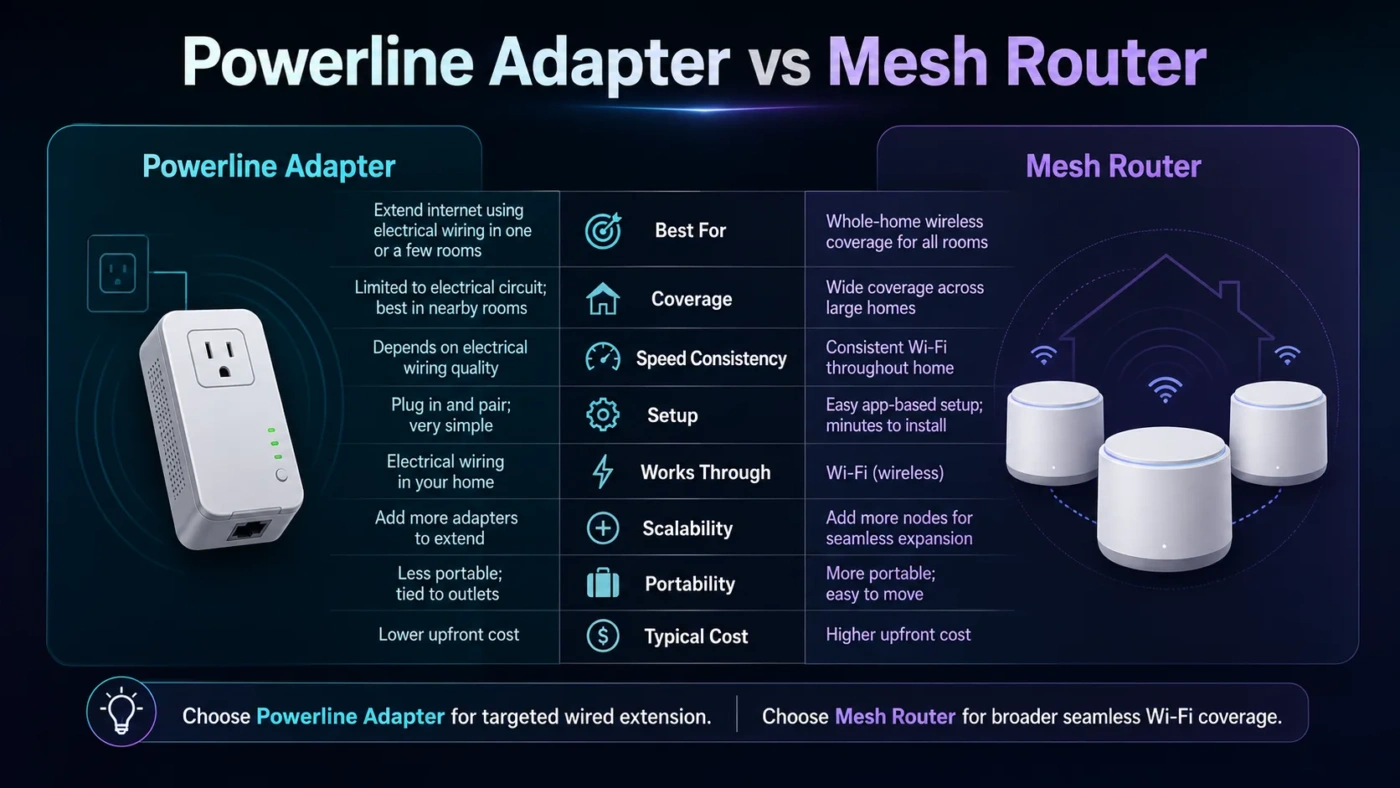
Powerline adapters and mesh routers solve the same household problem from different directions: weak internet in the rooms your main router does not reach well. A powerline adapter sends network data through your home’s electrical wiring, while a mesh router system spreads Wi-Fi through several connected nodes. If you want the simplest decision: choose a mesh router for whole-home wireless coverage, and choose a powerline adapter when one fixed device needs a steadier wired-style connection in a difficult room.
- Main Difference Between Powerline Adapters and Mesh Routers
- What Is a Powerline Adapter?
- What Is a Mesh Router?
- Powerline Adapter vs Mesh Router: Speed
- Powerline Adapter vs Mesh Router: Latency And Stability
- Powerline Adapter vs Mesh Router: Coverage
- Powerline Adapter vs Mesh Router: Setup And Placement
- Powerline Adapter Setup
- Mesh Router Setup
- When Should You Choose a Powerline Adapter?
- When Should You Choose a Mesh Router?
- Price And Value Comparison
- Biggest Misunderstandings About Powerline Adapters And Mesh Routers
- “Powerline Speed Labels Show Real Speed”
- “Mesh Always Fixes Bad Wi-Fi”
- “More Mesh Nodes Always Mean Better Wi-Fi”
- “Powerline Is The Same As Ethernet”
- “Mesh Is Only For Large Houses”
- Best Choice By Situation
- Which One Is Better For Gaming?
- Which One Is Better For Streaming And Smart TVs?
- Which One Is Better For Working From Home?
- Technical Differences That Matter
- Backhaul
- Roaming
- Interference
- Scalability
- Who Should Choose A Powerline Adapter?
- Who Should Choose A Mesh Router?
- The Practical Decision
| Feature | Powerline Adapter | Mesh Router |
|---|---|---|
| Main Purpose | Extends internet through electrical wiring to a specific room or device | Creates wider Wi-Fi coverage across the home using multiple nodes |
| Best For | Gaming PC, smart TV, desktop computer, streaming box, or one weak room | Phones, laptops, tablets, smart home devices, and whole-home Wi-Fi |
| Connection Type | Usually Ethernet at the far end; some models also include Wi-Fi | Wireless Wi-Fi network, often with optional Ethernet ports on nodes |
| Speed In Real Homes | Highly dependent on electrical wiring quality, circuit layout, and interference | Depends on node placement, Wi-Fi standard, backhaul type, and wall materials |
| Latency | Can be steadier than Wi-Fi when wiring is good | Usually good, but wireless backhaul can add delay or jitter in poor placement |
| Coverage | Point-to-point coverage between outlets | Broad wireless coverage across multiple rooms or floors |
| Setup Difficulty | Simple plug-in setup, but outlet choice matters | App-guided setup, with more attention needed for node placement |
| Reliability Risks | Old wiring, extension strips, surge protectors, different circuits, noisy appliances | Thick walls, bad node spacing, wireless congestion, weak backhaul path |
| Typical Price Range | About $40–$150 for a two-adapter kit | About $100–$500+ depending on Wi-Fi 6, Wi-Fi 6E, Wi-Fi 7, and node count |
| Best Choice Overall | Better for a single wired device in a room where Wi-Fi struggles | Better for most homes that need stronger Wi-Fi everywhere |
Main Difference Between Powerline Adapters and Mesh Routers
The main difference is the path the internet signal takes. A powerline adapter uses your electrical wiring as the middle link between your router and another room. A mesh router uses multiple Wi-Fi nodes to create a wider wireless network.
That difference changes everything: speed, stability, coverage, setup, and which devices benefit most.
A powerline adapter is closer to a “wired extension” for one location. You plug one adapter near your router and connect it with Ethernet. Then you plug the second adapter into a wall socket in another room and connect your device there. Some kits also create a small Wi-Fi hotspot, but the usual strength of powerline is still fixed-device connectivity.
A mesh router is a replacement or upgrade for your home Wi-Fi system. One node connects to your modem or existing router, and other nodes sit around the house. Your devices move between those nodes under one network name. This makes mesh more useful for phones, laptops, tablets, cameras, speakers, and smart home devices that need Wi-Fi in many rooms.
What Is a Powerline Adapter?
A powerline adapter is a networking device that sends internet data through the electrical wiring already inside your home. It usually comes as a pair:
- One adapter plugs into a wall outlet near your router.
- The second adapter plugs into a wall outlet near the device that needs internet.
- Ethernet cables connect the adapters to the router and the end device.
Powerline adapters are often sold with speed labels such as AV1000, AV1200, AV2000, or G.hn 2400. These numbers are not the same as real download speeds. They describe theoretical link rates under controlled conditions. In daily use, the actual speed can be much lower because the connection depends on wiring quality, outlet placement, circuit design, and electrical noise.
Powerline works best when both adapters are plugged directly into wall sockets on the same electrical system. It works poorly when connected through extension cords, power strips, surge protectors, or outlets affected by noisy appliances such as washing machines, microwaves, chargers, or older power supplies.
What Is a Mesh Router?
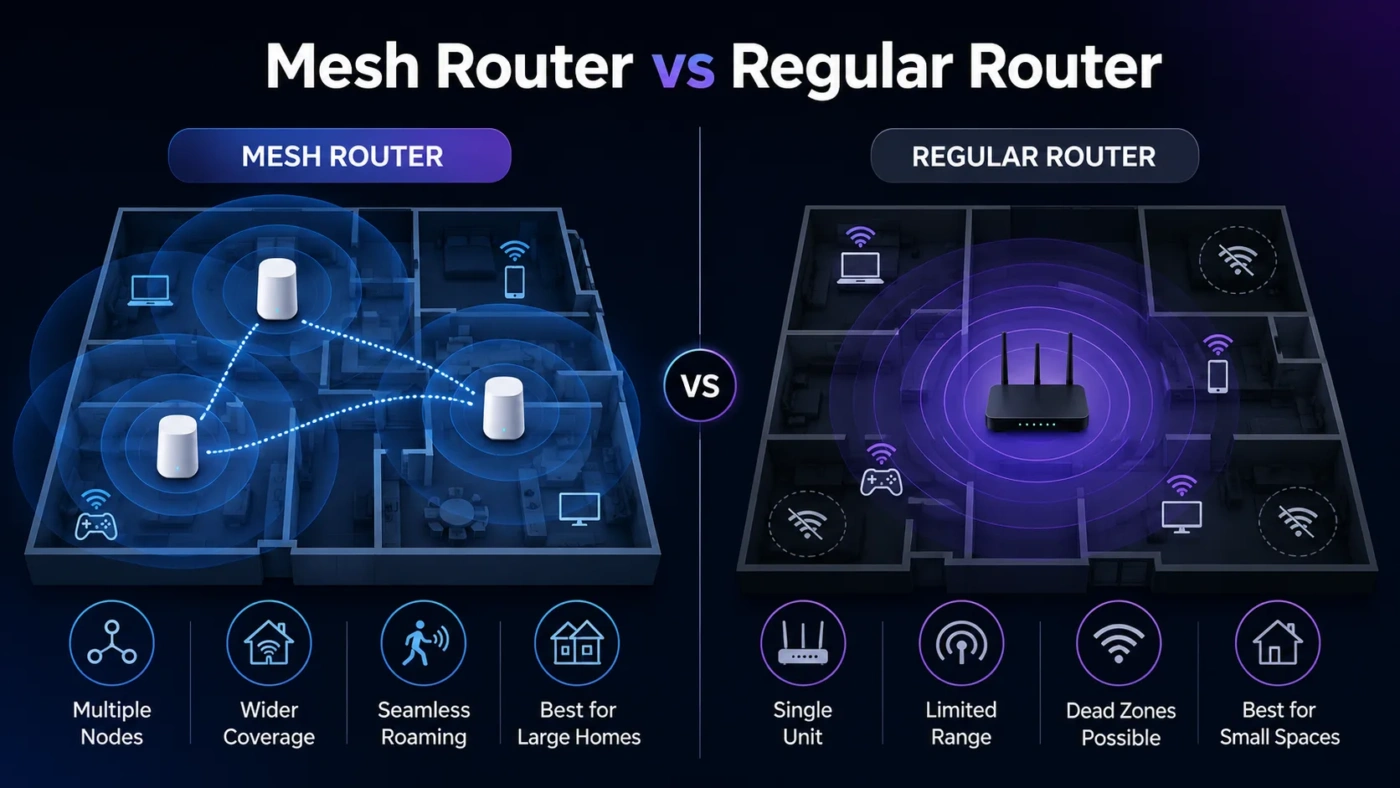
A mesh router is a multi-node Wi-Fi system designed to cover a larger area than a single router. Instead of forcing every device to connect to one router in one corner of the house, mesh spreads the network through two, three, or more nodes.
Most mesh systems use one shared network name, so your phone or laptop does not need to be manually switched from one network to another. Better systems also handle roaming, band steering, app-based setup, guest networks, parental controls, device priority, and firmware updates.
The quality of a mesh system depends on three things:
- Node placement: nodes need a strong connection to each other, not just to the dead zone.
- Backhaul: Ethernet backhaul is best; dedicated wireless backhaul is usually better than shared wireless backhaul.
- Wi-Fi generation: Wi-Fi 6, Wi-Fi 6E, and Wi-Fi 7 systems can handle more devices and higher speeds than older Wi-Fi 5 systems.
A mesh router is not magic. If a node is placed too far from the main router, it may repeat a weak signal. The result can look like “full bars” on your phone but still feel slow. Good placement matters more than the number of nodes.
Powerline Adapter vs Mesh Router: Speed
Mesh routers are usually faster for general home use, especially with modern Wi-Fi 6 or Wi-Fi 6E systems. They are better suited for fast broadband plans, multiple users, 4K streaming, video calls, cloud backups, and many connected devices.
Powerline speed is less predictable. In one home, a powerline kit may provide a steady and usable connection. In another home, the same kit may deliver much lower speeds because the electrical wiring is older, the outlets are on awkward circuits, or nearby devices create interference.
For raw speed, the usual order is:
- Ethernet cable — best when available.
- Mesh with Ethernet backhaul — very strong for whole-home coverage.
- High-quality mesh with good wireless backhaul — strong for most homes.
- Powerline adapter — useful, but wiring-dependent.
- Basic Wi-Fi extender — often the weakest option for speed and roaming.
If your internet plan is modest, powerline may feel perfectly fine. If you have gigabit internet and expect near-gigabit speed in distant rooms, a standard powerline kit is unlikely to satisfy you.
Powerline Adapter vs Mesh Router: Latency And Stability
Latency is the delay between your device and the network. For video streaming, a small delay is usually not a problem. For online gaming, video calls, remote desktop work, and live collaboration, stable latency matters more.
A powerline adapter can be a good choice for latency when the wiring is clean. It may give a gaming PC or work desktop a steadier connection than weak Wi-Fi. This is one reason powerline still has a place, even though mesh is better for broad wireless coverage.
Mesh routers can also provide low latency, especially when nodes are close enough and the system has strong backhaul. Problems appear when a mesh node has to communicate through thick walls, across too much distance, or through crowded wireless channels. In those cases, the connection may still work, but jitter can affect gaming or calls.
For a fixed gaming setup, test both if possible. For a household full of wireless devices, mesh usually gives the better everyday result.
Powerline Adapter vs Mesh Router: Coverage
This is where mesh routers usually win. A mesh system is built to improve Wi-Fi coverage across the home. It helps in bedrooms, kitchens, hallways, home offices, garages, and upstairs areas where the original router signal drops.
A powerline adapter is not a whole-home Wi-Fi system unless you buy a powerline kit with Wi-Fi access points. Even then, roaming and network management may not feel as smooth as a proper mesh setup. Powerline is better understood as a targeted fix: “I need internet in this room.”
Choose mesh when the problem is coverage across multiple rooms. Choose powerline when the problem is one device in one difficult spot.
Powerline Adapter vs Mesh Router: Setup And Placement
Powerline Adapter Setup
Powerline setup looks easier at first:
- Plug the first adapter into the wall near the router.
- Connect it to the router with Ethernet.
- Plug the second adapter into the wall near the device.
- Pair the adapters if needed.
- Connect your device with Ethernet.
The hidden challenge is outlet selection. A bad outlet can cut performance sharply. For best results, plug adapters directly into wall sockets and avoid extension strips. If the connection is weak, try different outlets in the same room before giving up.
Mesh Router Setup
Mesh setup usually happens through a mobile app. You connect the main node, name the network, add the satellite nodes, and let the app test placement. The process is friendly, but placement takes judgment.
A common mistake is putting the mesh node inside the dead zone. The node should sit between the main router and the weak area, where it can still receive a strong signal. If the node starts with a poor signal, it cannot create a good one.
When Should You Choose a Powerline Adapter?
Choose a powerline adapter when your goal is narrow and practical. It is not the best answer for every home, but it can be the right tool for a specific job.
A powerline adapter makes sense if:
- You need a wired connection for a desktop PC, smart TV, console, or streaming box.
- Your Wi-Fi is weak in one room, but you do not need better Wi-Fi everywhere.
- You cannot run Ethernet cable through the house.
- You want a lower-cost fix before buying a full mesh system.
- Your home wiring is fairly modern and both outlets are on a compatible electrical path.
- You care more about steady latency than maximum speed.
Powerline is also useful in rooms where walls block Wi-Fi badly. Brick, concrete, metal-backed insulation, and floor heating systems can reduce wireless performance. In those cases, electrical wiring may provide a more usable route.
When Should You Choose a Mesh Router?
Choose a mesh router when the problem is not one device, but the whole Wi-Fi experience. Mesh is the better fit for homes where people move around with phones and laptops, stream in different rooms, or use many smart devices.
A mesh router makes sense if:
- You want stronger Wi-Fi across multiple rooms or floors.
- Your current router leaves dead zones around the house.
- You have many wireless devices connected at the same time.
- You want one network name with smoother roaming.
- You use video calls, streaming, smart speakers, cameras, tablets, and laptops in different rooms.
- You are willing to pay more for cleaner coverage and easier network management.
Mesh is especially useful for medium and large homes, long floor plans, multi-story houses, and homes where the modem is stuck in a poor location.
Price And Value Comparison
Powerline adapters are usually cheaper. A basic two-adapter kit may cost around $40–$80, while higher-end kits with passthrough outlets, multiple Ethernet ports, or Wi-Fi support may reach $100–$150 or more.
Mesh routers cost more. Entry-level two-node systems can start around $100–$150, while better three-node Wi-Fi 6 systems often sit around $200–$350. Premium Wi-Fi 6E and Wi-Fi 7 mesh systems can cost $400, $700, or more depending on speed class and node count.
Value depends on the problem:
- Best value for one wired device: powerline adapter.
- Best value for whole-home Wi-Fi: mesh router.
- Best value for high-speed wired performance: Ethernet cable, if installation is realistic.
- Best value for homes with coax wiring: MoCA may be worth considering.
MoCA is a useful third option in some homes. It uses coaxial TV wiring rather than electrical wiring and can be faster and steadier than powerline. It is not available in every setup, but it is worth checking if your home has coax outlets near the router and the target room.
Biggest Misunderstandings About Powerline Adapters And Mesh Routers
“Powerline Speed Labels Show Real Speed”
They do not. Labels such as AV1000 or AV2000 are theoretical. Real speed depends on wiring and electrical conditions. A kit with a higher number can still perform poorly in a difficult home.
“Mesh Always Fixes Bad Wi-Fi”
Mesh helps when nodes are placed well. It does not fix poor placement, heavy interference, or a weak signal path between nodes. A mesh node needs a good connection before it can share a good connection.
“More Mesh Nodes Always Mean Better Wi-Fi”
Too many nodes can create overlap and unnecessary handoffs. A well-placed two-node system can beat a poorly placed four-node system.
“Powerline Is The Same As Ethernet”
Powerline uses Ethernet ports, but the middle of the connection is electrical wiring. That makes it less predictable than a true Ethernet cable.
“Mesh Is Only For Large Houses”
Not always. A smaller apartment with thick walls, a bad router location, or many neighboring Wi-Fi networks may also benefit from mesh. A small open-plan home may not need it.
Best Choice By Situation
| Situation | Better Choice | Why |
|---|---|---|
| One gaming PC in a room with weak Wi-Fi | Powerline Adapter | Can provide steadier latency if wiring is good |
| Whole house has Wi-Fi dead zones | Mesh Router | Designed for wide wireless coverage |
| Smart TV buffers in one room | Powerline Adapter | A wired connection can be enough for stable streaming |
| Many phones, laptops, tablets, and smart devices | Mesh Router | Handles roaming and multiple wireless devices better |
| Old electrical wiring | Mesh Router | Powerline performance may be unreliable |
| Thick walls blocking Wi-Fi | Depends | Powerline may help one room; mesh may help if nodes can be placed well |
| Gigabit internet in several rooms | Mesh With Ethernet Backhaul | Better chance of preserving high speeds across the home |
| Lowest-cost fix | Powerline Adapter | Usually cheaper than a multi-node mesh system |
Which One Is Better For Gaming?
For gaming, the answer depends on whether you care more about stable latency or higher wireless speed.
A good powerline connection can work well for a gaming PC or console because online gaming usually does not require huge bandwidth. It needs low ping, low jitter, and low packet loss. If your electrical wiring supports a clean powerline link, it may feel steadier than a weak wireless mesh node.
A good mesh system can also work well for gaming, especially with Ethernet backhaul or a strong dedicated wireless backhaul. If the mesh node is close enough and the signal path is clean, gaming performance can be smooth.
For the safest gaming setup, use this order:
- Ethernet cable directly to the router.
- Ethernet to a mesh node with wired backhaul.
- Powerline adapter, if your wiring performs well.
- Wireless mesh node with strong placement.
- Weak Wi-Fi extender or distant router connection.
Which One Is Better For Streaming And Smart TVs?
For one smart TV, a powerline adapter is often enough. Streaming needs steady throughput more than extremely low latency. If the TV sits in a room where Wi-Fi drops often, connecting it through a powerline adapter can reduce buffering.
For several streaming devices across the home, mesh is usually the better choice. It improves Wi-Fi for TVs, tablets, phones, speakers, and streaming boxes at the same time. A modern mesh system also makes it easier to manage many devices without creating separate network names.
Which One Is Better For Working From Home?
For a fixed desk setup, powerline can be a practical option. It may improve video calls, remote desktop sessions, and file uploads when the office room has weak Wi-Fi.
For a household with multiple people working, studying, calling, and moving between rooms, mesh is the better fit. It improves the overall wireless environment rather than helping only one workstation.
If your work depends on large uploads, cloud storage, or stable calls, also check whether your mesh nodes support Ethernet ports. A laptop or dock connected by Ethernet to a well-placed mesh node can be better than standard Wi-Fi.
Technical Differences That Matter
Backhaul
Backhaul is the connection between network nodes. In mesh systems, backhaul can be wired or wireless. Wired Ethernet backhaul is best. Dedicated wireless backhaul is also useful because it keeps node-to-node traffic separate from device traffic.
Powerline uses electrical wiring as its backhaul. That can be helpful when wireless backhaul struggles, but it depends heavily on the home’s electrical layout.
Roaming
Mesh systems are built for roaming. Your phone can move from the living room to the bedroom while staying on the same network name. The handoff is not always perfect, but it is usually smoother than using separate extenders.
Standard powerline adapters do not improve roaming unless they include Wi-Fi access points. Even then, the roaming experience may be less polished than a dedicated mesh system.
Interference
Mesh routers deal with wireless interference from walls, neighboring networks, Bluetooth devices, and crowded channels. Powerline adapters deal with electrical interference from wiring, appliances, chargers, and power strips.
Neither option is immune to interference. They simply face different kinds of interference.
Scalability
Mesh systems scale better. You can add nodes to expand coverage, though more nodes should be placed carefully. Powerline can sometimes support extra adapters, but performance may drop as the network becomes more complex.
Who Should Choose A Powerline Adapter?
Choose a powerline adapter if you are the kind of user who says:
- “My Wi-Fi is fine except in one room.”
- “I need my desktop, console, or TV connected more steadily.”
- “I do not want to replace my whole router system.”
- “Running Ethernet cable is not realistic.”
- “I want to try a cheaper fix first.”
The best powerline buyer has a clear target device and realistic expectations. It is a practical fix, not a full home networking upgrade.
Who Should Choose A Mesh Router?
Choose a mesh router if you are the kind of user who says:
- “Wi-Fi is weak in several areas.”
- “Everyone in the house complains about the connection.”
- “We use many phones, laptops, TVs, and smart devices.”
- “I want one network name across the home.”
- “I am ready to replace my old router with a better system.”
Mesh is the better long-term choice for most homes because it improves the network experience for more devices and more people.
The Practical Decision
Choose a powerline adapter if you need to fix one room or one wired device, especially a gaming PC, desktop computer, console, or smart TV. It is usually cheaper, simple to install, and can be steady when the electrical wiring is friendly.
Choose a mesh router if you want better Wi-Fi throughout your home. It is the better choice for families, multi-room streaming, video calls, smart home devices, and people who move around with laptops or phones.
For many homes, the best setup is not strictly one or the other. A mesh router can handle whole-home Wi-Fi, while a powerline adapter can serve one stubborn device that still needs a wired-style link. If you have to buy only one, start with the problem: one fixed device means powerline; whole-home Wi-Fi means mesh.