A mesh router and a regular router can both connect your home to Wi-Fi, but they solve different problems. A regular router is often the better choice for a smaller home, a wired gaming setup, or a user who wants strong speed from one central spot. A mesh router is better when coverage matters more than raw single-room speed, especially in larger homes, multi-floor layouts, long apartments, thick-wall buildings, or spaces with Wi-Fi dead zones. The right choice depends less on the label on the box and more on your home layout, internet plan, device count, and how far your devices sit from the main router.
- Mesh Router vs Regular Router: The Main Difference
- What Is a Mesh Router?
- How a Mesh Router Works
- Where Mesh Routers Perform Well
- What Is a Regular Router?
- How a Regular Router Works
- Where Regular Routers Perform Well
- Coverage and Range
- Choose Mesh for Coverage Problems
- Choose a Regular Router for Simple Layouts
- Speed and Performance
- Wireless Backhaul Can Reduce Speed
- Wired Backhaul Changes the Result
- Latency, Gaming, and Video Calls
- Best Choice for Gaming
- Setup and Ease of Use
- Device Roaming and One Network Name
- Price and Value
- When Mesh Is Worth the Extra Cost
- When a Regular Router Is Better Value
- Wi-Fi 6, Wi-Fi 6E, and Wi-Fi 7 Considerations
- Common Misunderstandings
- “Mesh Is Always Faster”
- “A Strong Router Can Fix Any Dead Zone”
- “More Mesh Nodes Always Means Better Wi-Fi”
- “Extenders and Mesh Are the Same”
- “Ethernet No Longer Matters”
- When Should You Choose a Mesh Router?
- When Should You Choose a Regular Router?
- Best Choice by User Type
- For a Small Apartment
- For a Large Home
- For Online Gaming
- For Remote Work
- For Smart Homes
- For Budget Buyers
- For Thick Walls or Multiple Floors
- Practical Buying Advice
- Look For These Features in a Mesh Router
- Look For These Features in a Regular Router
- Mesh Router vs Regular Router: Which One Should You Choose?
| Feature | Mesh Router | Regular Router |
|---|---|---|
| Best For | Large homes, multiple floors, dead zones, many rooms | Small to medium homes, apartments, central router placement |
| Wi-Fi Coverage | Uses multiple nodes to spread coverage across the home | Broadcasts Wi-Fi from one main point |
| Speed Near The Router | Fast, but may vary between nodes depending on backhaul | Often very fast close to the router |
| Speed Far From The Router | Usually more stable because nearby nodes extend the network | Can drop sharply through walls, floors, and distance |
| Latency | Good with wired backhaul; wireless nodes may add delay | Often lower for wired devices and nearby wireless devices |
| Setup | Usually app-based, guided, and simple for whole-home placement | Simple basic setup, but advanced tuning can be more manual |
| Network Name | One network name across all nodes | One network name from the router; extenders may create separate names |
| Expansion | Easy to expand by adding more nodes | Expansion usually needs access points, extenders, or a new router |
| Wired Ethernet Ports | Often fewer ports per unit, though some systems include Ethernet on nodes | Usually has several Ethernet ports on the main router |
| Price | Usually costs more because it includes multiple units | Usually cheaper for the same Wi-Fi generation |
| Best Value | Best value when one router cannot cover the whole home | Best value when one well-placed router is enough |
Mesh Router vs Regular Router: The Main Difference
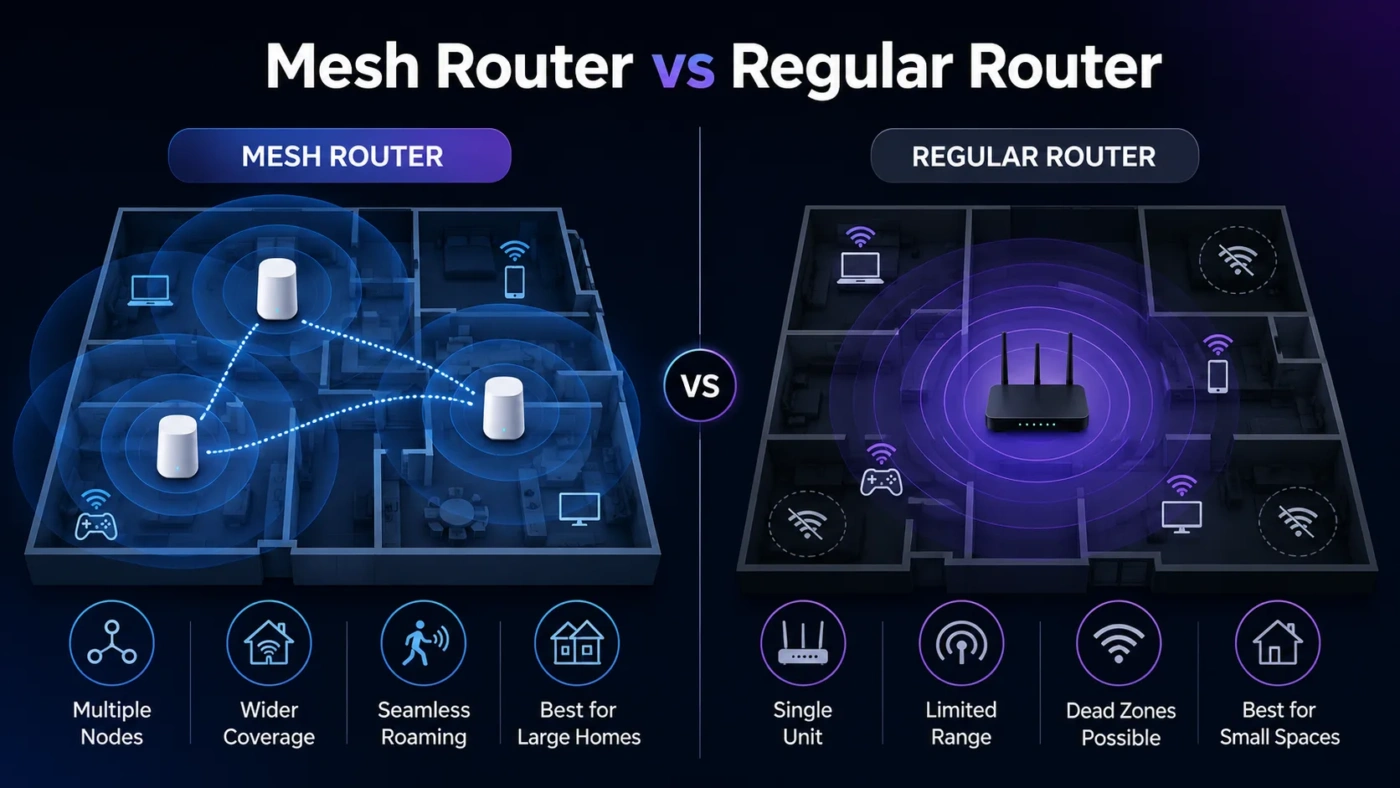
The main difference is coverage design. A regular router sends Wi-Fi from one device. A mesh router system uses a main router plus one or more satellite nodes to create wider coverage under one network name.
With a regular router, your phone, laptop, TV, or smart speaker connects to the same central source. The farther you move from that source, the weaker the signal usually becomes. Walls, floors, metal appliances, mirrors, concrete, and distance all reduce signal quality.
With a mesh router, you place extra nodes around the home. Your device connects to the node that gives it the best practical connection. This helps reduce dead zones and makes movement around the home smoother. You do not normally need to switch between different Wi-Fi names as you move from one room to another.
That does not mean mesh is always faster. A strong regular router in the right position can outperform a poorly placed mesh system. The better question is: Do you need more range, or do you need stronger performance from one location?
What Is a Mesh Router?
A mesh router is a Wi-Fi system made of multiple units. One unit connects to your modem and acts as the main router. The other units, often called nodes, points, or satellites, extend the same network to other parts of the home.
Mesh systems are designed for whole-home Wi-Fi. They are common in homes where a single router leaves weak signal areas, such as upstairs bedrooms, home offices, basements, garages, garden rooms, or rooms behind thick walls.
How a Mesh Router Works
A mesh system uses a connection between the main router and the nodes. This connection is called backhaul. It can work in two main ways:
- Wireless backhaul: Nodes communicate with each other using Wi-Fi. This is easy to install but can reduce available speed if the signal between nodes is weak.
- Wired Ethernet backhaul: Nodes connect through Ethernet cables. This gives better stability, lower latency, and stronger speeds across the home.
Some higher-end mesh systems use a dedicated wireless band for backhaul. Tri-band and Wi-Fi 6E or Wi-Fi 7 mesh systems may also use the 6 GHz band for cleaner short-range links, depending on device support and local conditions.
Where Mesh Routers Perform Well
Mesh routers are useful when your main issue is not your internet plan, but the way Wi-Fi spreads through the home. If your speed is good near the router but poor in bedrooms, upstairs areas, or the far end of the house, mesh can make a noticeable difference.
Mesh also works well for families with many connected devices: phones, tablets, laptops, smart TVs, speakers, cameras, thermostats, doorbells, game consoles, and smart home hubs. The system can spread connections across nodes instead of forcing every device to depend on one router location.
What Is a Regular Router?
A regular router is a single networking device that connects to your modem and broadcasts Wi-Fi from one location. It also manages wired Ethernet connections, local network traffic, security settings, parental controls, guest networks, and device access.
For many homes, a regular router is enough. A good Wi-Fi 6 or Wi-Fi 7 router placed in a central, open location can deliver strong speed, low latency, and reliable coverage in a smaller space.
How a Regular Router Works
A regular router sends Wi-Fi using antennas and radio bands, usually 2.4 GHz, 5 GHz, and sometimes 6 GHz. The 2.4 GHz band reaches farther but is slower and more crowded. The 5 GHz band is faster but has shorter range. The 6 GHz band can be very fast and clean, but it has less wall penetration and works best at shorter distances.
Most modern routers also include Ethernet ports. This matters if you want to connect a desktop PC, gaming console, smart TV, NAS drive, or streaming box with a cable. Wired connections usually offer better latency and steadier performance than Wi-Fi.
Where Regular Routers Perform Well
A regular router works best when it can sit near the center of the home, away from cabinets, thick walls, and interference. It is also a strong choice when your most demanding devices are close to the router or connected by Ethernet.
If you live in a studio, one-bedroom apartment, small house, dorm room, or open-plan space, a regular router often gives better value than a mesh system. You avoid paying for extra nodes you may not need.
Coverage and Range
Coverage is where mesh routers usually win. A mesh system can place Wi-Fi closer to the rooms where people actually use it. This reduces weak signal zones and helps devices stay connected while moving through the home.
A regular router depends heavily on placement. If your internet line enters the home in a corner, closet, basement, or utility room, a single router may struggle to reach the opposite side of the house. Even an expensive router cannot ignore physics. Walls and floors still weaken wireless signals.
Choose Mesh for Coverage Problems
Choose a mesh router if you notice these patterns:
- Fast internet near the router but poor speed in other rooms
- Video calls drop in one part of the home
- Smart TVs buffer far from the router
- Phones switch to mobile data indoors
- One floor has much weaker Wi-Fi than another
- You already tried moving the router and still have dead zones
Choose a Regular Router for Simple Layouts
Choose a regular router if your space is compact, open, or easy to cover from one location. A single powerful router can be cleaner, cheaper, and faster than a mesh system in the wrong home.
Speed and Performance
Speed depends on more than the words “mesh” or “router.” Wi-Fi generation, processor quality, antenna design, channel width, interference, device support, and backhaul all matter.
Near the main unit, a regular router often performs very well. A high-quality router can deliver strong speeds to nearby laptops, phones, and gaming devices. It may also offer better manual control over channels, Quality of Service settings, DNS, VPN features, port forwarding, and advanced network tools.
A mesh router may deliver more consistent speed across the home, even if the fastest single-room speed is not always higher. That consistency is the reason many people choose mesh. A slightly lower speed that works in every room is often better than a fast router that leaves half the home with weak signal.
Wireless Backhaul Can Reduce Speed
One common misunderstanding is that every mesh node gives full router speed. It does not always work that way. If a node connects wirelessly to the main router, it must use part of its wireless capacity to communicate with the router and part to serve your devices.
This can lower speed, especially when the node is too far away or blocked by walls. For best results, mesh nodes should be placed where they still receive a strong signal from the main unit, not inside the dead zone itself.
Wired Backhaul Changes the Result
If your home has Ethernet wiring, a mesh system with wired backhaul can be very strong. Each node gets a stable wired path back to the router, so Wi-Fi performance across the home becomes more even. This setup is often better than a simple wireless mesh layout.
For demanding homes, wired mesh can offer the best balance: broad coverage, one network name, good roaming, and stronger performance in distant rooms.
Latency, Gaming, and Video Calls
Latency is the delay between your device and the network. It matters for online gaming, video calls, remote desktop work, cloud gaming, and live collaboration tools.
A regular router can be excellent for latency when your gaming PC or console is connected by Ethernet. Even on Wi-Fi, a nearby device connected to a strong router signal can perform very well.
Mesh can also work well for gaming and calls, but placement matters. A wireless mesh node that sits too far from the main router may add delay or cause unstable performance. For gaming, the best mesh setup is usually one with Ethernet backhaul or a wired connection from the console or PC to a nearby mesh node.
Best Choice for Gaming
Choose a regular router if your gaming device is near the router or can use Ethernet directly. Choose mesh if the gaming room is far away and your current router cannot provide a stable signal there. For the smoothest setup, use wired backhaul or Ethernet wherever possible.
Setup and Ease of Use
Mesh systems are usually easier for non-technical users. Most include a mobile app that guides placement, setup, firmware updates, guest Wi-Fi, parental controls, and device names. Adding another node is often simple.
Regular routers vary more. Some are very easy to set up. Others expose many advanced settings, which is useful for experienced users but confusing for someone who only wants stable Wi-Fi.
If you prefer a guided setup and simple home coverage, mesh feels friendlier. If you like network control, custom settings, USB sharing, VPN options, static routes, or detailed wireless tuning, a regular router may give you more flexibility.
Device Roaming and One Network Name
Mesh systems are built to help devices move between nodes under one network name. This is useful when walking through the home during a video call or moving from the living room to the bedroom while streaming audio.
A regular router also uses one network name, but it has only one broadcast point. If you add a basic Wi-Fi extender, you may end up with a separate network name or less smooth handoff. Some extenders work better than older models, but a true mesh system is usually cleaner for roaming.
Still, roaming depends partly on your devices. Phones, laptops, and tablets decide when to switch access points. A mesh system can encourage a better connection, but it cannot force every older device to behave perfectly.
Price and Value
A regular router is usually cheaper than a mesh system with similar Wi-Fi generation and performance class. You buy one device instead of two or three. For smaller homes, that makes a regular router the better value.
Mesh costs more because you are paying for coverage hardware. A two-pack or three-pack mesh system can be worth the price if it fixes weak rooms without needing complicated wiring or separate access point setup.
When Mesh Is Worth the Extra Cost
- Your home is larger than one router can cover well
- You have multiple floors
- Your router must stay in a poor location
- You want one network name across the whole home
- You need stable Wi-Fi in bedrooms, office rooms, or outdoor-adjacent areas
- You prefer app-based setup over manual network configuration
When a Regular Router Is Better Value
- Your home is small or medium-sized
- Your router can sit in a central location
- Your main devices are close to the router
- You use Ethernet for gaming, TV, or desktop work
- You want strong performance without buying extra nodes
- You prefer more advanced router settings
Wi-Fi 6, Wi-Fi 6E, and Wi-Fi 7 Considerations
Both mesh routers and regular routers can support newer Wi-Fi standards. The standard matters, but it should not be the only reason you buy.
Wi-Fi 6 is still a practical choice for many homes. It handles many devices better than older Wi-Fi 5 equipment and is widely supported by phones, laptops, and tablets.
Wi-Fi 6E adds access to the 6 GHz band for compatible devices. This can reduce congestion, but range through walls is shorter than 2.4 GHz and often shorter than 5 GHz.
Wi-Fi 7 can offer higher theoretical speeds, wider channels, Multi-Link Operation, and better performance with supported devices. It is most useful when you have fast internet, newer devices, and a home network that can benefit from the upgrade.
For most users, coverage and placement matter more than chasing the newest label. A well-placed Wi-Fi 6 mesh system can feel better than a Wi-Fi 7 router trapped in a cabinet at the far end of the house.
Common Misunderstandings
“Mesh Is Always Faster”
Mesh is not automatically faster. It is usually better at spreading usable Wi-Fi across a larger area. Near the main router, a strong regular router may be faster than a mesh node, especially if that node uses weak wireless backhaul.
“A Strong Router Can Fix Any Dead Zone”
A stronger router can help, but it cannot fully overcome every wall, floor, or poor placement issue. Sometimes the better fix is moving the Wi-Fi source closer to the weak area, which is exactly what mesh nodes do.
“More Mesh Nodes Always Means Better Wi-Fi”
Too many nodes can create overlap and interference. A three-pack system is not always better than a two-pack system. Node placement matters more than node count.
“Extenders and Mesh Are the Same”
They are related, but not the same. Basic extenders often rebroadcast Wi-Fi and may create separate network names or weaker handoff behavior. Mesh systems are designed to work as one coordinated network.
“Ethernet No Longer Matters”
Ethernet still matters for stability. If you care about gaming, large file transfers, home office reliability, NAS access, or low-latency work, wired connections remain useful. Mesh with wired backhaul can be especially strong.
When Should You Choose a Mesh Router?
Choose a mesh router if your biggest problem is uneven Wi-Fi coverage. It is the better fit when a single router cannot reach all the places where you need stable internet.
A mesh router makes sense for:
- Large homes
- Two-story or three-story homes
- Long apartments with the router at one end
- Homes with concrete, brick, or thick internal walls
- Families with many wireless devices
- Users who want simple app-based setup
- Homes where people move around during calls or streaming
- Smart home setups spread across many rooms
Mesh is also useful when your modem or fiber box is installed in an inconvenient place. Instead of trying to make one router cover everything from that location, you can place nodes closer to the rooms that need better signal.
When Should You Choose a Regular Router?
Choose a regular router if your home is not hard to cover and you want the best value from one device. It is also the better fit if you rely on Ethernet or want more control over network settings.
A regular router makes sense for:
- Small apartments
- Open-plan homes
- Users with a central router location
- Gaming setups near the router
- Wired desktop PCs, TVs, or consoles
- Users who want lower cost
- Users who prefer advanced router controls
- Homes where the current issue is speed from the internet provider, not Wi-Fi range
If your Wi-Fi is strong in every room but your internet still feels slow, mesh may not fix the problem. In that case, check your internet plan, modem, router age, Ethernet speed, device limits, DNS settings, or service quality before buying a multi-node system.
Best Choice by User Type
For a Small Apartment
Choose a regular router. One good router placed in the open should cover the space well. Mesh may be unnecessary unless the apartment has thick walls or an awkward layout.
For a Large Home
Choose a mesh router. Multiple nodes can spread coverage better than one router. If possible, use wired backhaul for stronger performance.
For Online Gaming
Choose a regular router with Ethernet if your gaming device is nearby. Choose mesh only if the gaming room is far from the router and you need better signal there. For best results, connect the gaming device by Ethernet to the router or to a wired mesh node.
For Remote Work
Choose mesh if your office is far from the router or on another floor. Choose a regular router if your desk is close to the router and you can use Ethernet. Stable video calls matter more than peak speed.
For Smart Homes
Choose mesh if smart devices are spread across many rooms, hallways, outdoor-adjacent areas, or garages. A regular router can still work well in smaller homes with fewer smart devices.
For Budget Buyers
Choose a regular router unless you clearly need wider coverage. A good single router often gives better value than a cheap mesh system with weak backhaul.
For Thick Walls or Multiple Floors
Choose mesh, but place nodes carefully. A node must still receive a good signal from the main router or another node. If it sits inside a dead zone, it may only repeat a poor connection.
Practical Buying Advice
Before buying either option, check the real problem. Stand near your router and run a speed test. Then test the far rooms. If speed is strong near the router but poor far away, you have a coverage problem. Mesh is likely the better fix.
If speed is poor even beside the router, the issue may be your internet plan, modem, old router hardware, crowded Wi-Fi channel, damaged cable, or service provider. A mesh system may not solve that.
Look For These Features in a Mesh Router
- Wi-Fi 6 or newer for modern device handling
- Ethernet backhaul support if your home is wired
- Enough nodes for your layout, not simply the largest pack
- At least one Ethernet port on nodes if you want wired devices in other rooms
- Simple app controls for guest Wi-Fi, updates, and device management
- WPA3 support for newer security
Look For These Features in a Regular Router
- Wi-Fi 6 or newer for most buyers
- Enough Ethernet ports for wired devices
- Strong processor and memory if many devices connect at once
- Good parental controls or guest network options if needed
- WPA3 support
- Multi-gig WAN or LAN ports if you have very fast internet
Mesh Router vs Regular Router: Which One Should You Choose?
Choose a mesh router if your Wi-Fi problem is coverage. It is the better choice for larger homes, multiple floors, hard-to-reach rooms, smart home coverage, and households where people use Wi-Fi in many places at once. Mesh is not about winning a speed test in the same room as the router. It is about making the connection usable across the home.
Choose a regular router if your space is easy to cover, your router can sit in a central location, or your most demanding devices use Ethernet. It is usually cheaper, simpler as a single-device setup, and often faster for nearby devices.
The simplest decision is this: if one router already reaches every room well, buy a better regular router. If one router leaves weak spots no matter where you place it, buy a mesh system. For the best mesh result, use wired backhaul when possible and place each node where it can receive a strong signal, not where Wi-Fi is already failing.