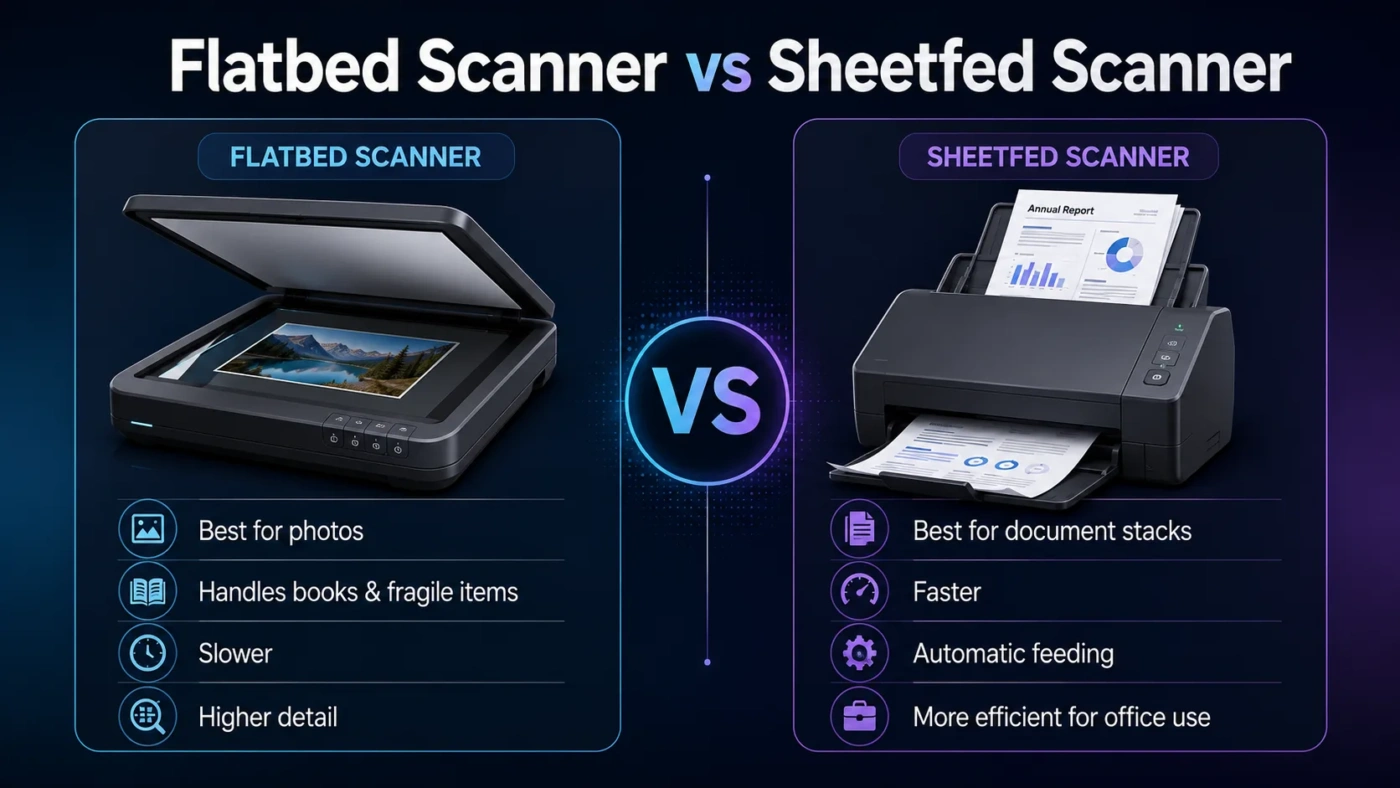
Choosing between a flatbed scanner and a sheetfed scanner is mostly a choice between careful scanning and fast document processing. A flatbed scanner is better when the item matters more than speed: photos, books, passports, fragile papers, artwork, certificates, and anything that should stay perfectly flat on glass. A sheetfed scanner is better when speed matters more: invoices, contracts, receipts, forms, tax papers, office records, and multi-page documents. If you know what you scan most often, the decision becomes much easier.
- Flatbed Scanner vs Sheetfed Scanner: The Main Difference
- What Is a Flatbed Scanner?
- Where a Flatbed Scanner Feels Better in Real Use
- What Is a Sheetfed Scanner?
- Where a Sheetfed Scanner Feels Better in Real Use
- Scanning Speed And Workflow
- Image Quality, Photos, And Detail
- Duplex Scanning And ADF Details
- OCR, Searchable PDFs, And File Organization
- Space, Portability, And Desk Setup
- Cost And Value
- Choose a Flatbed Scanner If…
- Choose a Sheetfed Scanner If…
- The Hybrid Option: Flatbed With ADF
- Common Misunderstandings
- A Sheetfed Scanner Is Not Automatically Better Because It Is Faster
- A Flatbed Scanner Is Not Only for Photos
- Duplex Scanning Needs Careful Checking
- OCR Quality Depends on More Than the Scanner Type
- Flatbed Scanner vs Sheetfed Scanner for Different Users
- Final Decision: Which One Should You Buy?
| Feature | Flatbed Scanner | Sheetfed Scanner |
|---|---|---|
| Best For | Photos, books, fragile papers, artwork, IDs, passports, single pages | Loose paper stacks, invoices, forms, receipts, office documents, batch scanning |
| Scanning Method | The item sits still on a glass surface while the scanner captures it | Pages are pulled through rollers and scanned as they pass the sensor |
| Speed | Slower because each item is placed and removed manually | Much faster for multi-page jobs, especially with an automatic document feeder |
| Document Safety | Safer for delicate, old, thick, folded, or valuable items | Better for modern loose sheets; not ideal for fragile originals |
| Photo Quality | Usually better for careful photo and artwork scans | Good for document images, but less ideal for delicate photo handling |
| Books And Magazines | Works well because pages can be placed directly on the glass | Not suitable unless pages are loose or removed from the binding |
| Duplex Scanning | Usually manual unless paired with an ADF in an all-in-one device | Often available, but check whether it is single-pass, reversing, or manual |
| OCR Workflow | Works well for occasional searchable PDFs, but requires more manual handling | Better for turning many pages into searchable PDFs quickly |
| Desk Space | Wider body because of the glass bed | Often narrower and more vertical, though feeders need paper clearance |
| Best Choice If You Scan… | Mixed physical items where condition, thickness, or image detail matters | Many similar paper pages where speed and organization matter |
Flatbed Scanner vs Sheetfed Scanner: The Main Difference
The main difference is how each scanner handles the original item. A flatbed scanner uses a glass surface. You lift the lid, place the item on the glass, close the lid, and scan. The item does not move during scanning. This makes flatbed models better for items that are thick, delicate, uneven, or difficult to feed through rollers.
A sheetfed scanner works more like a paper-handling machine. You place loose sheets into a feeder, and the scanner pulls them through. Many models include an automatic document feeder, often called an ADF, so a stack of pages can be scanned with much less manual work.
So the practical difference is simple: flatbed scanners protect variety; sheetfed scanners save time.
What Is a Flatbed Scanner?
A flatbed scanner is a scanner with a flat glass panel and a lid. The scanning mechanism moves underneath the glass while the original stays still. This design is familiar because many all-in-one printers include a flatbed scanner on top.
Flatbed scanners are useful when the object is not a normal loose sheet of paper. A family photo, a page from a book, a passport, a certificate, a drawing, a magazine page, or an old letter can sit on the glass without being bent or pulled through a feeding path.
This is why flatbed scanners are often preferred for photo scanning, archival scanning, artwork, personal records, school projects, ID documents, and occasional home use. They are not always fast, but they give you control.
Where a Flatbed Scanner Feels Better in Real Use
- You need to scan a book page without removing it from the book.
- You have old photos that should not pass through rollers.
- You scan passports, ID cards, envelopes, certificates, or odd-size papers.
- You care more about alignment, detail, and careful handling than speed.
- You scan only a few pages at a time.
The tradeoff is manual work. If you have 200 loose pages, placing each page on the glass one by one becomes tiring quickly. A flatbed scanner can do it, but it will not feel efficient.
What Is a Sheetfed Scanner?
A sheetfed scanner pulls paper through the scanner instead of using a flat glass bed. Most people buy this type when they want to scan many loose pages into PDFs with less effort. The scanner feeds, captures, and ejects each page into an output tray.
Many sheetfed scanners are built for office-style scanning: contracts, receipts, invoices, medical forms, tax papers, school records, signed documents, shipping papers, and business cards. Some compact models scan one sheet at a time, while higher-end document scanners use an ADF to process a stack.
The big benefit is speed. A sheetfed scanner can turn a pile of paper into organized digital files while you focus on naming, sorting, OCR, or cloud storage. For someone trying to go paper-light at home or in a small office, that matters.
Where a Sheetfed Scanner Feels Better in Real Use
- You scan stacks of loose documents every week.
- You want searchable PDFs from bills, forms, contracts, and receipts.
- You need duplex scanning for two-sided paperwork.
- You value speed, file organization, and workflow automation.
- You do not often scan books, framed items, delicate photos, or thick originals.
The tradeoff is media handling. Sheetfed scanners are designed around paper movement. That is great for standard sheets, but less friendly to fragile, curled, stapled, glossy, torn, or unusually thick items.
Scanning Speed And Workflow
Speed is where the sheetfed scanner usually wins. With a flatbed scanner, every page needs a small routine: lift the lid, place the page, align it, scan it, remove it, repeat. That is fine for five pages. It is not fun for a full filing cabinet.
A sheetfed scanner with an ADF can scan many pages in one run. If the model supports automatic duplex scanning, it can also capture both sides of each page without requiring you to flip every sheet by hand. For paper-heavy tasks, that can change the whole scanning experience.
But the fastest option is not always the best option. If the original is a fragile photo, a birth certificate, an old handwritten page, or a valuable document, saving a few minutes is not worth a jam, bend, scratch, or misfeed.
Image Quality, Photos, And Detail
For photos and artwork, a flatbed scanner is usually the safer and more flexible choice. The item lies flat, does not pass through rollers, and can be positioned carefully. Many photo-focused flatbed scanners also offer higher optical resolution settings and better control for color, cropping, and detail.
Sheetfed scanners can scan images, and some are designed to handle photo batches. Still, the usual sheetfed strength is document capture, not careful preservation. If your goal is to scan family photos for long-term storage, a flatbed scanner usually feels more reassuring.
For everyday documents, the quality gap is less dramatic. A clean sheetfed scan at a sensible resolution can produce readable PDFs, good OCR results, and clear digital records. The question is not “Which one has better quality?” It is which one gives the right quality for the item you are scanning.
Duplex Scanning And ADF Details
Duplex scanning means scanning both sides of a page. This feature matters if you work with contracts, forms, statements, school packets, medical papers, or any document where information appears on both sides.
Sheetfed scanners are more likely to offer automatic duplex scanning, but the exact method matters. Some models scan both sides in one pass. Others scan one side, reverse the paper, and scan the other side. Some cheaper devices still require manual flipping.
When comparing models, look for these terms:
- ADF: Automatic document feeder for scanning multiple pages.
- Duplex Scanning: Ability to scan both sides of a page.
- Single-Pass Duplex: Both sides are captured in one movement through the scanner.
- Reversing ADF: The scanner flips the page internally to scan the second side.
- Duty Cycle: The suggested scanning volume a device is built to handle.
A flatbed scanner can still scan two-sided pages, but you usually flip the page yourself. For low-volume scanning, that is fine. For hundreds of pages, it gets old fast.
OCR, Searchable PDFs, And File Organization
OCR stands for optical character recognition. It lets scanner software turn printed text into searchable, selectable digital text. Both flatbed and sheetfed scanners can support OCR through included software or third-party apps.
The difference is workflow. A flatbed scanner can create searchable PDFs, but it takes more hands-on time because each page must be placed manually. A sheetfed scanner fits OCR better when you have many similar documents. You can scan a stack, apply OCR, name the files, and store them in folders or cloud storage.
If your goal is a clean digital archive of bills, client forms, invoices, receipts, or office paperwork, a sheetfed scanner is usually the smoother tool. If your goal is a careful digital copy of a photo album page, notebook page, or certificate, a flatbed scanner makes more sense.
Space, Portability, And Desk Setup
Flatbed scanners need a wider footprint because the glass bed has to support full pages or larger media. They also need enough room above the lid, especially if you scan books or thick items. This is not a problem on a permanent desk, but it can be annoying in a small workspace.
Sheetfed scanners are often narrower and more vertical. Many fit nicely beside a laptop or on a shelf. Portable sheetfed models can be useful for travel, field work, mobile offices, or occasional scanning away from a desk. However, you still need space for the input and output path, so the paper can feed smoothly.
For a home office, either can work. For a drawer-friendly setup, sheetfed models usually win. For a creative desk where you scan books, sketches, and photos, the flatbed shape is easier to live with.
Cost And Value
Price depends on brand, resolution, speed, feeder capacity, software, network features, and whether the scanner is a standalone device or part of an all-in-one printer. In general, simple flatbed scanners are often a better value for low-volume home use, while dedicated sheetfed scanners cost more because they add feeding mechanics, higher page-per-minute speeds, duplex features, and office workflow tools.
The better value is not always the cheaper device. A low-cost flatbed scanner is poor value if you regularly scan stacks of paperwork. A fast sheetfed scanner is poor value if most of your scanning involves photos, books, and fragile keepsakes.
Think of value this way:
- Flatbed value: Better when one careful scan is more important than scanning many pages quickly.
- Sheetfed value: Better when time saved across repeated document batches matters.
- Hybrid value: Best when you need both a glass bed and an ADF in one device.
Choose a Flatbed Scanner If…
Choose a flatbed scanner if your scanning needs are mixed, careful, or photo-focused. It is the better match when you scan physical items that should not bend or travel through rollers.
| Use Case | Why Flatbed Works Better |
|---|---|
| Family Photos | Photos stay flat on glass and avoid roller contact. |
| Books And Magazines | You can scan pages without removing them from the binding. |
| Artwork And Sketches | Better control over placement, cropping, and detail. |
| Passports And ID Cards | Thick or rigid items can be placed directly on the glass. |
| Fragile Documents | No feeding rollers means less bending and pulling. |
| Occasional Scanning | Manual scanning is not a burden when the volume is low. |
A flatbed scanner is the safer pick if you often think, “I do not want this item to get damaged.” It is slower, yes, but it handles more types of originals.
Choose a Sheetfed Scanner If…
Choose a sheetfed scanner if your main goal is speed, volume, and document organization. It is the better match when most of your scanning involves loose sheets in good condition.
| Use Case | Why Sheetfed Works Better |
|---|---|
| Office Paperwork | Stacks of forms, contracts, and records can be processed quickly. |
| Receipt And Invoice Scanning | Batch scanning saves time when organizing expenses. |
| Two-Sided Documents | Duplex models reduce manual flipping. |
| Searchable PDF Archives | ADF plus OCR creates a faster paper-to-digital workflow. |
| Small Business Use | Better for repeated document intake and daily filing tasks. |
| Limited Desk Width | Many sheetfed models have a compact vertical design. |
A sheetfed scanner is the better pick if you often think, “I need these pages scanned and filed with as little effort as possible.” It is built for movement, repetition, and workflow speed.
The Hybrid Option: Flatbed With ADF
Some devices combine a flatbed glass surface with an automatic document feeder. This can be the most practical choice for home offices, teachers, small businesses, and families that scan both delicate items and regular paperwork.
A hybrid scanner gives you two paths: use the flatbed for books, photos, IDs, and delicate pages; use the ADF for loose document stacks. The compromise is size and sometimes speed. Hybrid models may not be as fast as dedicated sheetfed document scanners, and they may not offer the same photo quality as a photo-focused flatbed scanner.
Still, for many people, a flatbed plus ADF design is the easiest “one device” answer. It avoids the biggest weakness of each type.
Common Misunderstandings
A Sheetfed Scanner Is Not Automatically Better Because It Is Faster
Speed helps only when the pages are suitable for feeding. A fragile photo, an old letter, or a thick booklet may be safer on a flatbed scanner. Faster scanning is useful, but not if the original item is the wrong fit.
A Flatbed Scanner Is Not Only for Photos
Flatbed scanners also work well for documents that are folded, stapled, bound, laminated, thick, or oddly shaped. They are useful any time the scanner needs to adapt to the item instead of forcing the item through a paper path.
Duplex Scanning Needs Careful Checking
Not every scanner with an ADF handles two-sided pages the same way. Some scan both sides in one pass, some reverse the paper, and some still need manual flipping. If you scan double-sided paperwork often, read the duplex details before choosing.
OCR Quality Depends on More Than the Scanner Type
OCR depends on scan clarity, document condition, software, language support, page alignment, and text quality. A sheetfed scanner can make OCR faster for batches, but a flatbed scanner can produce cleaner captures for difficult originals.
Flatbed Scanner vs Sheetfed Scanner for Different Users
| User Type | Better Choice | Reason |
|---|---|---|
| Home User With Occasional Documents | Flatbed Scanner | Flexible enough for papers, photos, IDs, and mixed household items. |
| Small Business With Daily Paperwork | Sheetfed Scanner | Faster for invoices, contracts, forms, receipts, and client files. |
| Family Photo Organizer | Flatbed Scanner | Safer for photo surfaces and better for careful image placement. |
| Book Or Magazine Scanner | Flatbed Scanner | Bound pages can be scanned without removing them. |
| Tax And Receipt Organizer | Sheetfed Scanner | Batch scanning and OCR make filing much faster. |
| Mixed Home Office | Flatbed With ADF | Handles both delicate items and page stacks in one device. |
| Mobile Worker | Portable Sheetfed Scanner | Compact design works better for scanning loose documents away from a desk. |
| Artist Or Designer | Flatbed Scanner | Better control for drawings, texture, alignment, and image detail. |
Final Decision: Which One Should You Buy?
Buy a flatbed scanner if you scan many different types of physical items and want safer handling. It is the better choice for photos, books, artwork, passports, certificates, old papers, and occasional household scanning. It asks for more patience, but it gives you more control.
Buy a sheetfed scanner if most of your scanning is loose paper and you want speed. It is the better choice for office documents, invoices, receipts, contracts, forms, and searchable PDF workflows. It saves time when scanning becomes a repeated task instead of a once-in-a-while job.
Choose a flatbed scanner with an ADF if you genuinely need both. That combination is often the best fit for a home office because it handles everyday paperwork without giving up the safety of a glass bed.
The simplest rule is this: choose flatbed for careful scanning, choose sheetfed for fast document batches, and choose a hybrid model when your scanning life includes both.