Screen finish is one of those specs that gets skipped during a monitor or laptop purchase — until you’re sitting in front of a washed-out display in a bright room and wondering what went wrong. Matte and glossy panels handle light completely differently, and the right choice depends on where you use your screen, what you do on it, and how sensitive you are to reflections versus color saturation.
- How These Two Finishes Actually Differ
- What Is a Matte Screen?
- What Is a Glossy Screen?
- When a Matte Screen Is the Better Fit
- When a Glossy Screen Is the Better Fit
- The PPI Factor — Why Matte Looks Better on High-Resolution Screens
- Common Misconceptions
- “Matte Screens Ruin Color Accuracy”
- “Glossy Is Always Sharper”
- “Higher Brightness Solves Glossy’s Reflection Problem”
- “Matte Is Always the Safe Default”
- Who Should Choose Which
| Feature | Matte | Glossy |
|---|---|---|
| Surface Coating | Anti-glare (AG) layer applied over panel | No coating or optical bonding only |
| Reflection Handling | Diffuses reflections — no mirror effect | Reflects ambient light directly |
| Color Vibrancy | Slightly reduced saturation and contrast | Deeper blacks, more vivid colors |
| Sharpness Perception | Mild haze effect at lower PPI | Crisper, cleaner image appearance |
| Brightness Requirement | Works well at moderate brightness | Needs higher nits in lit environments |
| Best Environment | Offices, bright rooms, outdoor use | Dim rooms, home theaters, studios |
| Fingerprints and Smudges | Less visible | Very visible, requires frequent cleaning |
| Eye Fatigue Over Time | Generally lower in bright conditions | Higher if ambient light is uncontrolled |
| Common Use Cases | Office work, coding, gaming, outdoor laptops | Photo/video editing, media consumption, design |
| Typical Price Difference | No consistent premium | Sometimes higher on professional displays |
How These Two Finishes Actually Differ
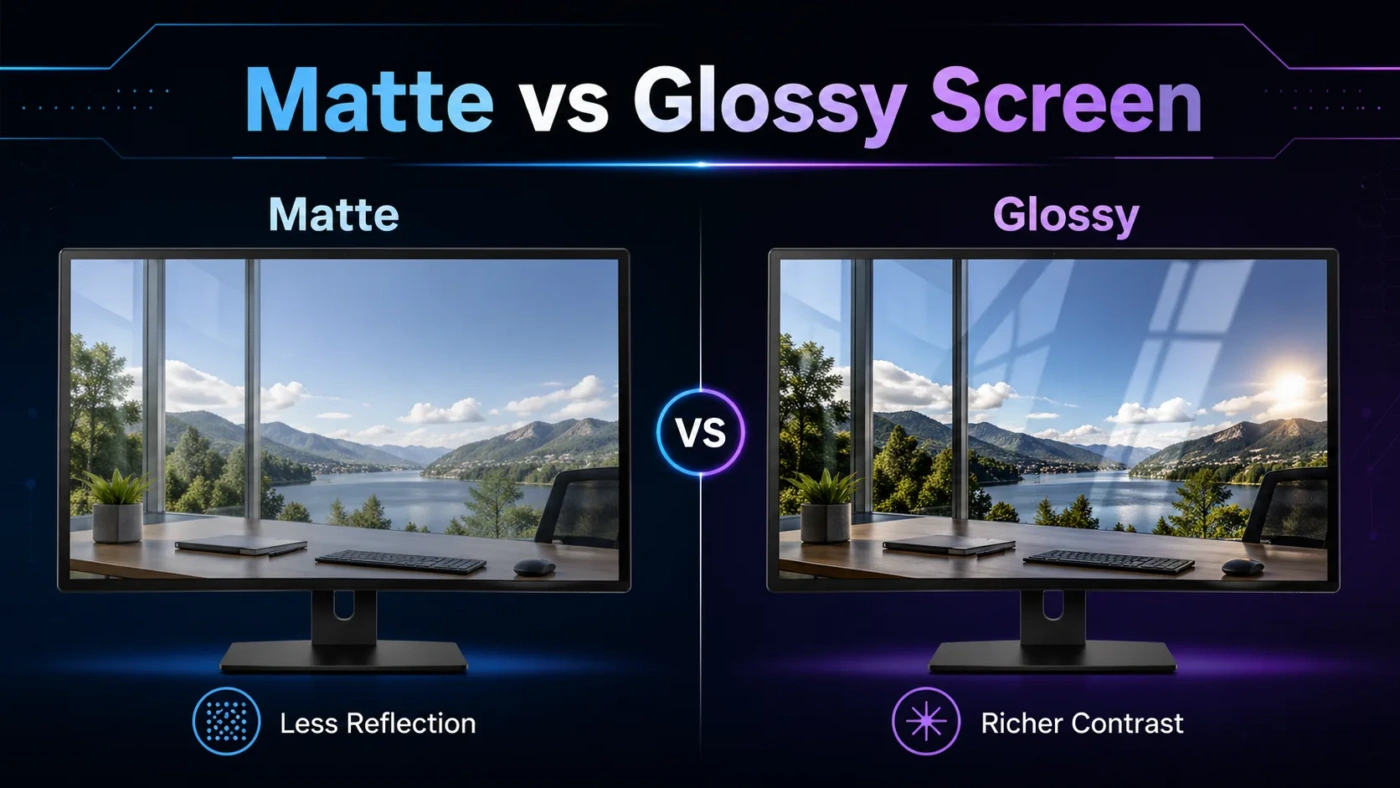
The distinction comes down to what happens when light hits the screen surface. A glossy panel has no diffusion layer — light bounces straight back toward you, which is great for image contrast but turns the display into a mirror whenever a light source is behind you. A matte panel has an anti-glare coating that scatters incoming light in multiple directions, eliminating sharp reflections at the cost of slightly softening the image.
Neither coating changes the underlying panel technology. An IPS, OLED, or VA panel can be produced with either finish. So the debate isn’t about display quality — it’s purely about how that display interacts with its environment.
What Is a Matte Screen?
A matte screen has a micro-textured anti-glare (AG) coating applied to the front surface of the panel. This texture scatters ambient light before it can form a coherent reflection, which means you won’t see a clear image of the window or ceiling light behind you when looking at the display.
The tradeoff is a phenomenon sometimes called “AG sparkle” or “grain” — a faint texture visible over the image, most noticeable on solid colors or gradients. Its visibility depends heavily on the coating quality and the panel’s pixel density. On a high-PPI display (like a 4K 27-inch monitor at 163 PPI), the grain is much less noticeable than on a lower-density screen. Budget monitors with aggressive matte coatings tend to look hazier than premium panels with more refined AG treatments.
Matte screens also tend to show slightly lower contrast and color saturation compared to glossy equivalents. The coating absorbs a small percentage of backlight, which lifts the perceived black level. For office work, web browsing, coding, and gaming in a lit room, this is a negligible trade-off. For color-critical work where Delta E accuracy matters, it becomes relevant.
What Is a Glossy Screen?
A glossy screen has no diffusing layer between the viewer and the panel surface. The result is a visually “cleaner” image — blacks appear deeper, colors look more saturated, and fine detail looks sharper because there’s no coating texture to soften edges.
Apple’s MacBook and iMac displays are a well-known example of glossy done well. In a controlled lighting environment, they produce images that look distinctly more vivid than matte alternatives of comparable specs. Many professional color grading monitors and consumer televisions also use glossy or near-glossy surfaces for this reason.
The problem appears the moment ambient light is introduced. A glossy panel in a room with a window behind you will show a clear mirror image of that window. Working around reflections typically means adjusting your position, adding blackout curtains, or simply increasing screen brightness — which increases power consumption and can contribute to eye fatigue over long sessions.
Some premium displays use optical bonding — laminating the panel directly to the cover glass without an air gap — which reduces internal reflections between layers. This improves contrast and reduces a specific type of ghosting under direct light, but the screen still remains reflective from external sources without an AG coating.
When a Matte Screen Is the Better Fit
- You work in an office with overhead fluorescent or LED lighting
- Your desk faces a window, or natural light enters from the sides
- You use a laptop in varied environments — cafes, outdoors, airports
- Long daily usage where reflection-related eye strain adds up over time
- Gaming in a room with ambient light you can’t fully control
- Reading-heavy tasks like coding, writing, or document review
For most people working in typical home or office environments, matte is the default practical choice. Reflections on a glossy screen in bright conditions aren’t a minor nuisance — they actively compete with the content on the display, forcing your visual system to filter them out constantly.
When a Glossy Screen Is the Better Fit
- You work in a controlled lighting environment (studio, darkened editing suite, home theater room)
- Color accuracy and vibrancy matter — photo editing, video grading, graphic design
- You primarily use the display for media consumption in the evenings
- You value a “premium” visual feel and can manage ambient light
- Your display has enough peak brightness (500+ nits) to overpower most reflections
On a high-brightness display in a managed environment, glossy genuinely looks better. The added depth in blacks and saturation is visible, and for creative professionals doing color work, the absence of an AG coating means the panel’s color volume reaches the viewer without attenuation. OLED displays — which have near-infinite contrast ratios — benefit especially from a glossy or low-haze surface because their deep blacks are their defining feature, and matte coatings can lift apparent black levels in ways that undercut the advantage.
The PPI Factor — Why Matte Looks Better on High-Resolution Screens
One aspect that rarely gets discussed: matte coating quality scales with pixel density. On a 1080p 24-inch monitor (94 PPI), the AG texture is often visible as a faint grain over the image, particularly on solid white backgrounds. On a 4K 27-inch display (163 PPI), the same coating is far less noticeable because the pixels are small enough to sit beneath the grain’s perceptible threshold.
This means matte looks better as resolution increases — not worse. If you’re on a 4K display or a high-DPI laptop screen (like a 14-inch 2560×1600 panel), matte is a much easier recommendation than it would be on a 1080p budget monitor with an aggressive AG treatment.
Common Misconceptions
“Matte Screens Ruin Color Accuracy”
A quality matte coating reduces peak color saturation by a measurable but small amount — typically a 3–7% reduction in gamut volume, depending on the coating. For photography or video work at the professional level, this matters. For everything else, it’s not perceptible in normal use. Many professional reference monitors (including calibration-grade IPS panels used in broadcast) ship with matte surfaces because the anti-reflection benefit outweighs the minor saturation trade-off in real production environments.
“Glossy Is Always Sharper”
At equivalent resolutions and pixel densities, the perceived sharpness advantage of glossy exists but is less than most people expect. The clarity difference is most visible on lower-PPI displays. On a 4K or QHD monitor, the practical sharpness gap between a quality matte and a glossy panel is small enough that most users wouldn’t identify it in a blind test.
“Higher Brightness Solves Glossy’s Reflection Problem”
Not entirely. Increasing brightness does reduce the relative impact of reflections by making your content brighter than the reflected image. But at high brightness levels for extended use, eye fatigue increases — and the energy cost goes up. It’s a workaround, not a fix. If your environment has strong, direct ambient light, matte is the structural solution.
“Matte Is Always the Safe Default”
For most people in most environments, yes. But if you’re buying an OLED monitor or TV and planning to use it in a dim room, choosing a matte coating specifically can work against the panel’s greatest strength — its contrast ratio. Several OLED monitors now offer low-haze coatings (around 25–28% haze) that split the difference, reducing gloss without fully suppressing color volume.
Who Should Choose Which
Go matte if you use your screen during the day, can’t fully control the lighting in your space, or spend long hours on tasks that require sustained focus. The reflection-free experience reduces a background cognitive load you might not even notice until it’s gone. For office workers, students, coders, and general-purpose users, matte is the practical default.
Go glossy if you’re a creative professional who manages your lighting environment intentionally, or if you’re buying a TV or large display for media use in the evenings. If color accuracy and contrast depth are your priorities and you can keep the room dark, glossy gives you more of what those panel types were designed to deliver.
If you’re genuinely undecided, look at your current screen setup. Do you notice reflections regularly? That’s your answer. If your current display bothers you with glare, matte will feel like an immediate improvement. If reflections have never crossed your mind, glossy is probably fine for your environment.