If you’ve been shopping for a monitor or TV lately, you’ve almost certainly hit this wall: OLED or IPS? Both are excellent display technologies, and both have devoted fans who will argue passionately for their pick. But they solve different problems — and choosing the wrong one is an easy mistake to make when spec sheets look deceptively similar.
- The Core Difference That Everything Else Follows From
- What Is OLED?
- What Is IPS?
- Picture Quality: How the Two Technologies Actually Compare
- Contrast and Black Levels
- Brightness and HDR
- Color and Accuracy
- Motion Handling
- When to Choose OLED
- When to Choose IPS
- The Biggest Misconceptions
- “OLED Always Looks Better”
- “IPS Glow Ruins Dark Scenes”
- “Burn-In Makes OLED Unusable for PC Use”
- “IPS Is the Budget Option”
- Who Should Get Which
| Feature | OLED | IPS |
|---|---|---|
| Panel Technology | Self-emissive organic pixels | Liquid crystal with backlight |
| Black Levels | True black (pixel off) | Dark gray (backlight bleed) |
| Contrast Ratio | Infinite (theoretically) | Typically 1,000:1 – 2,000:1 |
| Color Accuracy | Excellent, wide color gamut | Excellent, consistent across angles |
| Viewing Angles | Near-perfect | Very good (slight shift possible) |
| Brightness (Peak) | Up to 2,000+ nits (HDR bursts) | Up to 600–1,600 nits (sustained) |
| Sustained Brightness | Lower than peak; dims over large bright areas | More consistent across the screen |
| Response Time | 0.1 ms or less | 1–5 ms (GtG) |
| Burn-In Risk | Yes, with static content over time | No burn-in |
| Price Range | $400–$3,000+ (monitors/TVs) | $100–$1,500+ (monitors/TVs) |
| Lifespan | ~30,000–100,000 hours | ~50,000–80,000 hours |
| Best For | Gaming, movies, HDR content | Professional work, productivity, office |
The Core Difference That Everything Else Follows From
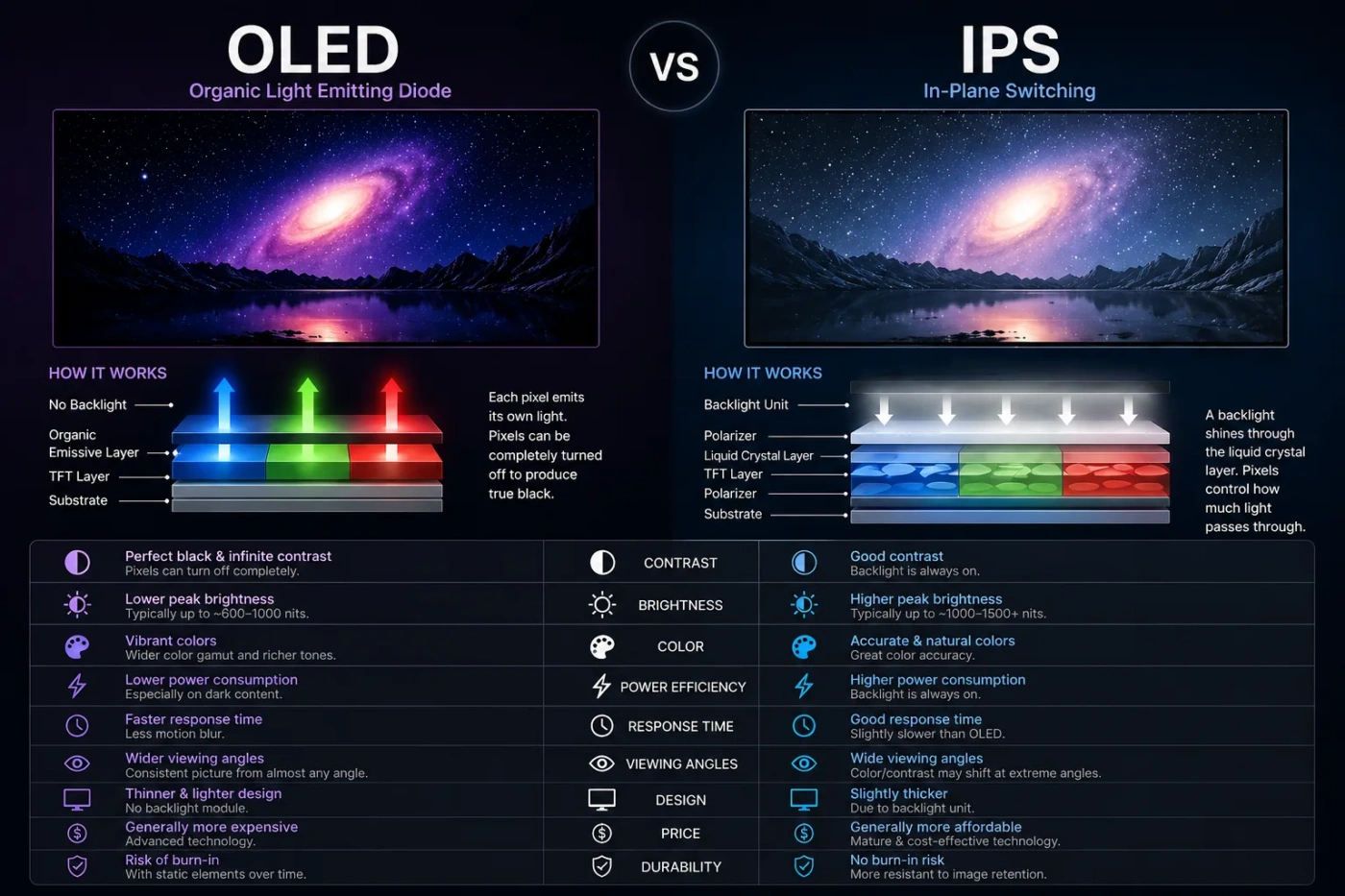
OLED stands for Organic Light-Emitting Diode. Each pixel generates its own light and can switch completely off — which is why OLED blacks look black, not dark gray. IPS (In-Plane Switching) is a type of LCD panel. It uses a fluorescent or LED backlight that stays on continuously, and liquid crystals in each pixel tilt to control how much of that light passes through.
That single structural difference — self-emissive vs. backlit — drives nearly every practical distinction between the two technologies. Contrast, color rendering in dark rooms, burn-in susceptibility, power consumption: all of it traces back here.
What Is OLED?
OLED panels use organic compounds that emit light when current passes through them. Because there’s no backlight, each pixel operates independently. Turn a pixel off and it produces zero light — resulting in perfect blacks and an effectively infinite contrast ratio.
Modern OLED displays, whether WOLED (white OLED with color filters, used in LG TVs and many monitors) or QD-OLED (quantum dot OLED, used by Samsung and Sony), can hit peak brightness levels above 2,000 nits in HDR mode. However, that peak brightness applies to small highlighted areas. When the entire screen displays a bright image — think a spreadsheet on a white background — OLED panels automatically dim to protect the organic compounds from degradation.
Response times on OLED are essentially unmatched. Sub-millisecond pixel transitions mean motion blur is nearly eliminated, making OLED a favorite among competitive gamers and anyone watching fast-moving content. The color volume is also exceptional: OLED handles deep reds, vibrant greens, and saturated blues without the color shift you can sometimes see on other panel types.
The two legitimate concerns with OLED are burn-in and price. Permanent image retention can occur when the same static elements (taskbars, HUD overlays, news tickers) display for thousands of hours. Manufacturers have added pixel-shifting, ABL (Automatic Brightness Limiting), and screensavers to mitigate this — and modern OLEDs are considerably more resistant than early units — but the risk doesn’t disappear entirely.
What Is IPS?
IPS is a refinement of standard LCD technology developed to fix the color-shifting and narrow viewing angles that plagued older TN (Twisted Nematic) panels. In an IPS panel, liquid crystal molecules align horizontally and rotate in-plane, which produces far more consistent color reproduction as viewing angle changes.
The backlight in a modern IPS monitor — typically an edge-lit or full-array LED backlight — stays on at all times. Some higher-end IPS panels use Mini-LED backlighting, which divides the backlight into hundreds or thousands of dimming zones. This dramatically improves local contrast and brings the technology closer to OLED in dark-room performance, though a complete pixel-level shutoff is still not possible.
IPS panels generally offer more consistent sustained brightness than OLED. Because there are no organic compounds degrading under sustained load, the panel can maintain high brightness uniformly across the entire screen for extended periods — an advantage in brightly lit offices or for tasks involving mostly white/light-colored interfaces.
Color accuracy on IPS is excellent. Professional monitors in the IPS category regularly achieve 99% sRGB or DCI-P3 coverage, making them a go-to choice for photographers, video editors, and designers working in color-managed workflows. And there is no burn-in risk whatsoever — a static UI running 24/7 will not damage an IPS panel.
Picture Quality: How the Two Technologies Actually Compare
Contrast and Black Levels
This is OLED’s clearest advantage. In a darkened room, OLED’s true blacks create a sense of depth and dimensionality that no backlit panel can replicate. IPS panels, even Mini-LED ones, produce a noticeable glow around bright objects on dark backgrounds — commonly called the “halo effect.” If you watch a lot of movies at night or play dark atmospheric games, this difference is immediately visible.
Brightness and HDR
It’s more nuanced than it first appears. OLED panels can burst to extremely high peak brightness for small highlights — a glinting sword edge, a specular reflection — which makes HDR content look spectacular. But that same OLED display may appear dimmer than a comparable IPS panel when showing a bright, mostly-white page. High-end IPS monitors with Mini-LED (like certain professional displays) sustain over 1,000 nits across the full panel, which OLED generally cannot match in typical desktop use.
Color and Accuracy
Both technologies are genuinely excellent here. OLED tends to have a wider color volume and more vivid saturation, while high-quality IPS panels are prized for their predictable, stable color output under calibration. For critical color work, IPS with factory calibration and a stable backlight is often preferred. For immersive entertainment, OLED’s color saturation is hard to beat.
Motion Handling
OLED wins without much contest. The sub-millisecond response time means trailing edges on moving objects — what gamers call ghosting — are essentially eliminated. IPS panels have improved significantly (some claim 1ms GtG), but most independent measurements show real-world response times in the 3–6ms range, which is still very good but not at OLED’s level.
When to Choose OLED
OLED makes the most sense when picture quality in varied lighting is your primary concern and you’re willing to pay a premium for it. Specific scenarios where OLED is the stronger choice:
- Gaming in a dim or dark room, especially with HDR-enabled titles
- Movie and streaming content consumption on a TV or large monitor
- Competitive gaming where motion clarity and response time are priorities
- Any context where deep blacks and high contrast matter more than sustained brightness
- Laptop displays — OLED laptops offer battery efficiency gains because dark pixels consume almost no power
One thing worth noting: if you plan to use an OLED monitor as a primary work display showing a static operating system interface for 8–10 hours a day, take burn-in risk seriously. It’s manageable with precautions (varied content, screen savers, brightness management), but it requires more attention than an IPS setup.
When to Choose IPS
IPS is the smarter choice when long-term reliability, consistent brightness, and budget efficiency matter more than peak image quality. Situations where IPS is the practical answer:
- Office and productivity use — spreadsheets, documents, coding, writing
- Professional color grading, photo editing, or print work where calibration stability matters
- Bright room environments where ambient light washes out contrast anyway
- Multi-monitor setups where matching brightness across screens is important
- Environments where static content runs continuously (digital signage, reception displays)
- Budget-conscious buyers — good IPS panels at $150–$300 offer genuinely strong performance
The Biggest Misconceptions
“OLED Always Looks Better”
In a showroom with dark lighting and colorful demo content — sure, OLED is dazzling. But in a bright office showing a white document all day, a good IPS panel will often look more comfortable and usable. Context changes everything. OLED’s strengths are most visible in controlled, darker viewing conditions.
“IPS Glow Ruins Dark Scenes”
Standard IPS glow is a real phenomenon, but it’s often overstated. Most users in typical lighting conditions — moderate ambient light, not pitch-black viewing — won’t find it significantly distracting. Mini-LED IPS panels have reduced this issue considerably. The difference becomes apparent mainly in dark-room viewing comparisons.
“Burn-In Makes OLED Unusable for PC Use”
Modern OLEDs are genuinely more resistant than they used to be. Plenty of users run OLED monitors as daily workstations without issues for years. The risk is real but not inevitable — it depends heavily on usage habits, brightness settings, and content variety. It’s a consideration, not a dealbreaker for most people.
“IPS Is the Budget Option”
There are budget IPS panels, yes — but there are also IPS professional monitors that cost $2,000 or more. High-end IPS displays with wide color gamuts, Mini-LED zones, and factory calibration compete at the top of the market. IPS isn’t a compromise; it’s a different set of trade-offs.
Who Should Get Which
Choose OLED if: you prioritize image quality above everything else, you watch a lot of HDR content or play immersive games, your viewing environment is controllable (dim room, not a sun-flooded office), and your budget allows for it.
Choose IPS if: you need reliable, consistent performance across varied conditions, your work involves static interfaces or critical color accuracy, you want zero burn-in risk, or you need more value per dollar without sacrificing much in real-world quality.
For most people who game and work on the same display: this is genuinely the hardest case. A gaming-oriented OLED (27–32 inch, 1440p or 4K) with healthy screen habits works well for mixed use. But if your job involves static content for most of the day, a high-quality IPS or Mini-LED IPS panel sidesteps the burn-in concern entirely and may serve you better long-term.
Neither technology is objectively superior. OLED has a ceiling that IPS can’t reach in the right conditions — and IPS has a consistency and longevity profile that OLED is still working to match. The right display is the one that fits your actual usage, not the one with the most impressive spec sheet.