Choosing between a smart lock and a traditional lock is not only about “new technology versus old hardware.” It is about how you enter your home, how many people need access, how much control you want, and how much maintenance you are willing to accept. A smart lock is usually better for convenience, guest access, rental properties, and app-based control. A traditional lock is usually better for simple reliability, lower cost, and people who do not want batteries, apps, Wi-Fi, or software updates involved in their front door.
- Smart Lock vs Traditional Lock: The Main Difference
- What Is a Smart Lock?
- What Is a Traditional Lock?
- Security Comparison: Which One Is Safer?
- Physical Security
- Digital Security
- Key Control
- Convenience Comparison
- Cost And Value Comparison
- Installation And Door Compatibility
- When Should You Choose a Smart Lock?
- Choose a Smart Lock If You Want Keyless Entry
- Choose a Smart Lock If You Share Access Often
- Choose a Smart Lock If You Want Remote Control
- Choose a Smart Lock If You Like Smart Home Routines
- When Should You Choose a Traditional Lock?
- Choose a Traditional Lock If You Want No Batteries
- Choose a Traditional Lock If You Want Lower Upfront Cost
- Choose a Traditional Lock If You Prefer Offline Security
- Choose a Traditional Lock If Access Rarely Changes
- Common Misunderstandings About Smart Locks And Traditional Locks
- “Smart Locks Are Always More Secure”
- “Traditional Locks Are Always Safer Because They Are Offline”
- “A Smart Lock Stops Working When The Internet Goes Down”
- “A Traditional Lock Is Maintenance-Free Forever”
- “Fingerprint Entry Is Always The Best Smart Lock Feature”
- Smart Lock vs Traditional Lock For Different Users
- The Best Middle Option: Hybrid Access
- How To Choose Between Smart Lock And Traditional Lock
- Final Buying Decision
| Feature | Smart Lock | Traditional Lock |
|---|---|---|
| Best For | People who want keyless entry, remote access, temporary codes, access logs, or smart home control. | People who want a simple, mechanical, low-maintenance lock with no app or battery dependency. |
| Main Entry Method | PIN code, phone app, fingerprint, card, voice assistant, Bluetooth, Wi-Fi, or sometimes a physical key. | Physical key, thumb turn, cylinder, deadbolt, knob lock, lever lock, or mortise lock. |
| Convenience | Higher for daily use, especially when sharing access with family, cleaners, guests, or tenants. | Lower for shared access because keys must be copied, collected, replaced, or rekeyed. |
| Security Strength | Depends on the physical lock grade, door frame, installation quality, account security, firmware, and connection setup. | Depends on the cylinder, deadbolt grade, strike plate, door frame, key control, and installation quality. |
| Power Needs | Usually battery powered. Some models offer backup key access, USB power, or 9V emergency terminals. | No battery or electrical power needed. |
| Remote Control | Available on Wi-Fi, hub-based, or cloud-connected models. | Not available unless paired with a separate access-control system. |
| Access Tracking | Many models can show when a code, user, or device unlocked the door. | No built-in access history. |
| Privacy | May involve apps, cloud accounts, device permissions, location access, voice assistants, or activity logs. | No digital activity data unless used with cameras, alarms, or access-control add-ons. |
| Typical Upfront Cost | Often around $100–$300 for common home models; premium biometric, video, or integrated models can cost more. | Often around $30–$100 for common residential deadbolts; higher-security models can cost more. |
| Maintenance | Battery replacement, app updates, firmware updates, code management, and occasional connectivity checks. | Lubrication when needed, key management, possible rekeying, and hardware replacement after wear. |
| Best Decision | Choose it if convenience and controlled access matter more than avoiding tech maintenance. | Choose it if simplicity, price, and mechanical dependability matter more than digital features. |
Smart Lock vs Traditional Lock: The Main Difference
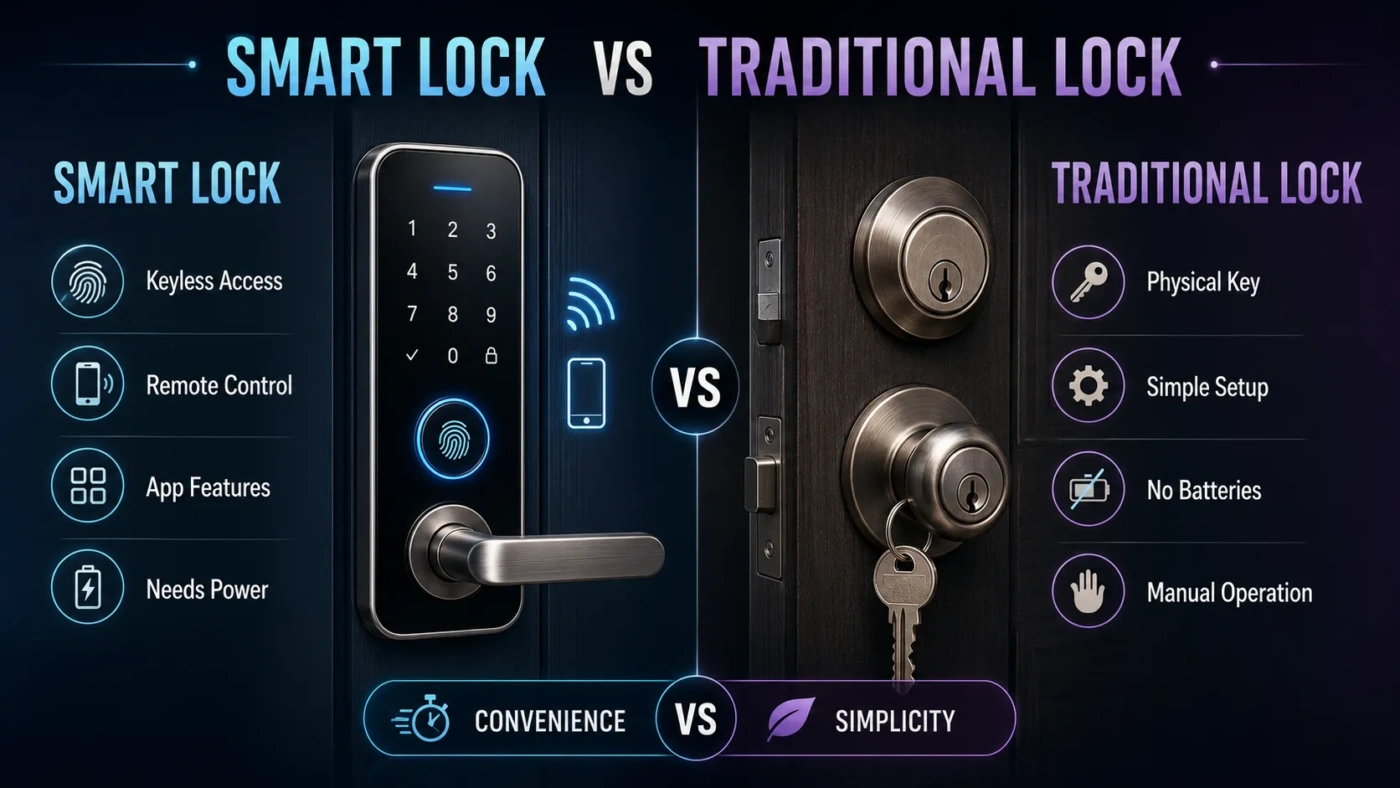
The main difference is control. A traditional lock controls access through a physical key. A smart lock controls access through digital credentials, such as a PIN code, phone app, fingerprint, Bluetooth connection, Wi-Fi connection, or smart home platform.
That sounds simple, but it changes daily use in a real way. With a traditional lock, the person who has the key has access. With a smart lock, you can often create, remove, schedule, or limit access without changing the whole lock. That is the reason smart locks feel so useful for busy households, short-term rentals, offices, cleaners, dog walkers, elderly family support, and anyone who regularly shares entry.
The trade-off is just as clear. A smart lock adds electronics to a job that used to be fully mechanical. That means batteries, apps, account passwords, wireless connections, and software updates become part of the security picture. A traditional lock avoids those digital layers, but it also gives you less flexibility.
What Is a Smart Lock?
A smart lock is an electronic door lock that can unlock without a normal physical key. Depending on the model, it may use a keypad, mobile app, fingerprint reader, card, fob, Bluetooth, Wi-Fi, Z-Wave, Zigbee, Matter support, or a smart home hub.
Some smart locks replace the full deadbolt. Others are retrofit models that attach to the inside of the door and turn the existing deadbolt from behind. Retrofit models can be useful for renters or people who want to keep the outside of the door looking unchanged.
Common smart lock features include:
- Keyless entry with PIN codes or fingerprint access.
- Temporary codes for guests, cleaners, contractors, or family members.
- Remote locking and unlocking on Wi-Fi or hub-connected models.
- Auto-lock after a set time.
- Activity logs showing who unlocked the door and when.
- Door status alerts when the lock is left open or unlocked.
- Voice assistant or smart home routine support on compatible models.
The best smart lock is not simply the one with the longest feature list. For a front door, the physical lock body, deadbolt strength, strike plate, door alignment, and installation quality still matter. A weak door frame with a fancy app is still a weak entry point.
What Is a Traditional Lock?
A traditional lock is a mechanical lock operated by a physical key, thumb turn, latch, cylinder, or deadbolt mechanism. It does not need an app, battery, Wi-Fi signal, cloud account, or firmware update.
Traditional locks include standard deadbolts, knob locks, lever locks, mortise locks, rim locks, and cylinder locks. For most home exterior doors, the deadbolt is the part people care about most because it provides stronger resistance than a basic spring latch.
The appeal is easy to understand. You insert a key, turn it, and the lock works. There are no notifications, no device pairing, no phone battery worries, and no account recovery process. For many homes, that simplicity is not outdated. It is the point.
The weak side is access management. Keys can be lost, copied, borrowed, forgotten, or kept by someone who no longer needs entry. If you move into a new home, lose track of spare keys, or change tenants, rekeying becomes part of the cost.
Security Comparison: Which One Is Safer?
Neither option is automatically safer. A well-made traditional deadbolt can be more secure than a cheap smart lock. A high-quality smart deadbolt with strong physical hardware can be more practical than a basic lock with poor key control. The real question is not “smart or traditional?” It is how well the lock is built, installed, and managed.
Physical Security
Physical security depends on the parts that resist forced entry: the bolt, cylinder, strike plate, screws, door material, hinges, and frame. This applies to both smart and traditional locks. A smart keypad does not make a short bolt stronger. A traditional keyway does not make a weak strike plate better.
When comparing models, look for independent lock ratings, residential hardware certification, deadbolt quality, reinforced strike plates, longer screws, and a clean door fit. If the door does not close smoothly, even a good lock can behave badly.
Digital Security
Smart locks add digital security questions. You need strong account passwords, two-factor authentication when offered, app updates, firmware updates, and a secure home Wi-Fi setup. If remote access is enabled, the lock is no longer only a piece of door hardware. It is also part of your connected home.
That does not mean smart locks are unsafe. It means they need the same careful setup as other connected devices. Use unique passwords, remove old users, avoid sharing master codes, update the app, and disable features you do not use.
Key Control
Traditional locks can be very secure, but key control is their weak spot. Once a physical key is copied, you may not know where the copy goes. Smart locks solve this with individual codes and digital user removal. You can give someone a code for Friday afternoon and delete it later.
For families, rentals, and shared homes, this is one of the strongest reasons to choose a smart lock. For a single-person household with few visitors, the benefit may feel less important.
Convenience Comparison
This is where smart locks usually win. Walking up to the door with groceries, entering a PIN, using a fingerprint, or letting a family member in from your phone can feel easier than searching for a key. If you often forget whether you locked the door, remote status checks can reduce that small daily worry.
Traditional locks are convenient in a different way. They are predictable. No phone? No problem. No Wi-Fi? Still works. No battery? There is no battery. For people who dislike apps controlling basic home functions, that kind of convenience matters.
Simple Rule: If your daily problem is “I hate carrying and sharing keys,” a smart lock solves more. If your daily preference is “I want the door to work without any tech layer,” a traditional lock fits better.
Cost And Value Comparison
A traditional lock is usually cheaper upfront. Many common residential deadbolts are available in the $30–$100 range, with higher-security or premium hardware costing more. Rekeying, locksmith service, and full replacement can add to the total over time.
A smart lock usually costs more. Many common home smart locks fall around $100–$300, while premium models with video, fingerprint access, built-in Wi-Fi, advanced sensors, or smart home integrations can cost more. Installation may be easy for a standard deadbolt replacement, but unusual doors, mortise locks, metal doors, tight alignment, or rental restrictions can raise the real cost.
Value depends on use. A smart lock can be worth the higher price if it saves time, reduces spare-key issues, helps manage guests, or supports a rental workflow. A traditional lock is better value if you only need a reliable front-door deadbolt and do not need digital access features.
Installation And Door Compatibility
Traditional deadbolts are usually easier to understand during installation, especially when replacing a similar lock on a standard door. Smart locks can also be simple to install, but they are less forgiving when the door is misaligned. The motor needs to turn the bolt smoothly. If the bolt rubs against the strike plate, the smart lock may drain batteries faster or fail to lock properly.
Before choosing a smart lock, check:
- Door thickness and backset measurement.
- Whether the door uses a standard deadbolt, mortise lock, lever handle, or multipoint locking system.
- Whether you need a full replacement or a retrofit interior unit.
- Whether your Wi-Fi signal reaches the door.
- Whether the model supports your smart home platform, if you use one.
- Whether the lock has a backup entry method for battery failure.
If the door already sticks, drags, or needs force to lock, fix that first. Smart locks work best when the door and bolt already move cleanly.
When Should You Choose a Smart Lock?
Choose a smart lock if your home life benefits from flexible access. The more people who need entry, the more sense it makes.
Choose a Smart Lock If You Want Keyless Entry
If you dislike carrying keys, a keypad or fingerprint smart lock can be a daily upgrade. It is also useful for children, elderly relatives, or family members who often forget keys.
Choose a Smart Lock If You Share Access Often
Smart locks are strong for homes with cleaners, babysitters, pet sitters, visiting relatives, roommates, or short-term guests. You can create separate codes and remove them later. That is cleaner than handing out spare keys and hoping they return.
Choose a Smart Lock If You Want Remote Control
A Wi-Fi or hub-connected smart lock lets you lock, unlock, or check status from away from home. This is useful when a delivery needs to be placed inside, a family member arrives early, or you cannot remember whether you locked the door.
Choose a Smart Lock If You Like Smart Home Routines
Some smart locks can work with lights, cameras, alarms, thermostats, and voice assistants. For example, unlocking the door can trigger entry lighting, or locking the door can become part of a “leaving home” routine. This is useful, but only if you already use smart home devices or plan to.
When Should You Choose a Traditional Lock?
Choose a traditional lock if you value simple operation, low cost, and fewer things to manage. A good mechanical deadbolt is still a practical choice for many homes.
Choose a Traditional Lock If You Want No Batteries
Traditional locks do not run out of power. You do not need battery alerts, emergency terminals, backup keys, or app notifications. For a side gate, storage room, low-use door, or a household that avoids connected devices, this is a clear advantage.
Choose a Traditional Lock If You Want Lower Upfront Cost
A solid traditional deadbolt often costs less than a smart lock. If your main goal is basic door security on a tight budget, put money into the lock grade, strike plate, long screws, door frame, and professional installation if needed.
Choose a Traditional Lock If You Prefer Offline Security
Some people do not want a door lock connected to an app, account, phone, router, hub, or cloud service. That preference is reasonable. A traditional lock keeps the access system local and mechanical.
Choose a Traditional Lock If Access Rarely Changes
If the same few people use the door every day and you rarely give access to others, a traditional lock may be enough. Smart features are only valuable when they match a real use case.
Common Misunderstandings About Smart Locks And Traditional Locks
“Smart Locks Are Always More Secure”
Not always. Some smart locks have strong physical hardware; others focus more on convenience. Always compare the deadbolt, cylinder, hardware rating, strike plate, and installation quality. The app is only one part of the product.
“Traditional Locks Are Always Safer Because They Are Offline”
Offline operation removes digital risks, but it does not remove physical risks. A poor cylinder, weak door frame, short screws, copied keys, or bad installation can still create problems. Mechanical does not automatically mean strong.
“A Smart Lock Stops Working When The Internet Goes Down”
Remote features may stop during an internet outage, but many smart locks can still unlock by PIN, fingerprint, Bluetooth, physical key, or local operation. This depends on the model. Before buying, check what works without Wi-Fi.
“A Traditional Lock Is Maintenance-Free Forever”
Traditional locks need less routine attention, but they still wear. Keys bend, cylinders get rough, latches misalign, finishes corrode, and doors shift. Simple does not mean permanent.
“Fingerprint Entry Is Always The Best Smart Lock Feature”
Fingerprint access is fast, but it is not always the best choice for every home. Wet hands, gloves, dirt, sensor placement, and user age can affect daily use. A keypad may be more practical for guests and family sharing.
Smart Lock vs Traditional Lock For Different Users
| User Or Situation | Better Choice | Why It Fits |
|---|---|---|
| Busy Family | Smart Lock | PIN codes, auto-lock, and user access make daily entry easier for multiple people. |
| Single Person Living Alone | Traditional Lock Or Simple Smart Lock | A traditional lock is enough if access rarely changes; a keypad model helps if keys are often forgotten. |
| Rental Property | Smart Lock | Temporary codes reduce key handoffs and make guest turnover easier. |
| Low-Budget Upgrade | Traditional Lock | Money can go toward a better deadbolt, reinforced strike plate, and proper installation. |
| Tech-Avoiding Household | Traditional Lock | No app, battery, Wi-Fi, account, or software update is needed. |
| Smart Home User | Smart Lock | Works well with routines, alerts, cameras, lights, and home automation systems. |
| Elderly Family Support | Smart Lock With Backup Key | Family members can help remotely, while backup access protects against phone or battery issues. |
| Back Door Or Storage Door | Traditional Lock | Simple mechanical access is often enough for lower-use doors. |
The Best Middle Option: Hybrid Access
Many people do not need to choose a fully digital or fully mechanical setup. A smart lock with a physical keyway gives you keyless convenience and backup access. A keypad deadbolt without Wi-Fi gives you codes without cloud features. A retrofit smart lock lets you keep the outside key cylinder while adding app control inside.
This middle option is often the most balanced choice. You get easier access management without giving up every familiar backup method. For a main entry door, that balance can feel safer than going all-in on one style.
How To Choose Between Smart Lock And Traditional Lock
Use these decision points before buying:
- Choose a smart lock if you want keyless entry, guest codes, remote access, activity logs, or smart home control.
- Choose a traditional lock if you want low cost, offline operation, fewer maintenance tasks, and simple mechanical reliability.
- Choose a keypad lock without Wi-Fi if you want keyless entry but do not want cloud access or app dependency.
- Choose a smart lock with a backup key if you want convenience but still want a familiar fallback.
- Choose higher-quality hardware first if security is your main concern. The lock body, door frame, strike plate, and installation matter more than the label “smart” or “traditional.”
Final Buying Decision
If you want the easiest answer: choose a smart lock if access control is your real problem. It is the better fit when you share entry, manage guests, forget keys, want remote status checks, or already use smart home devices.
Choose a traditional lock if reliability and simplicity are your real priority. It is the better fit when the same people use the same door every day, you dislike connected devices, or you want the lowest-cost path to a solid deadbolt.
For many homes, the best practical choice is a quality smart deadbolt with local keypad access, a physical backup key, strong installation, and careful account security. For others, a high-grade traditional deadbolt with a reinforced strike plate is the cleaner choice. The right lock is the one that matches how your home actually works, not the one with the longest feature list.