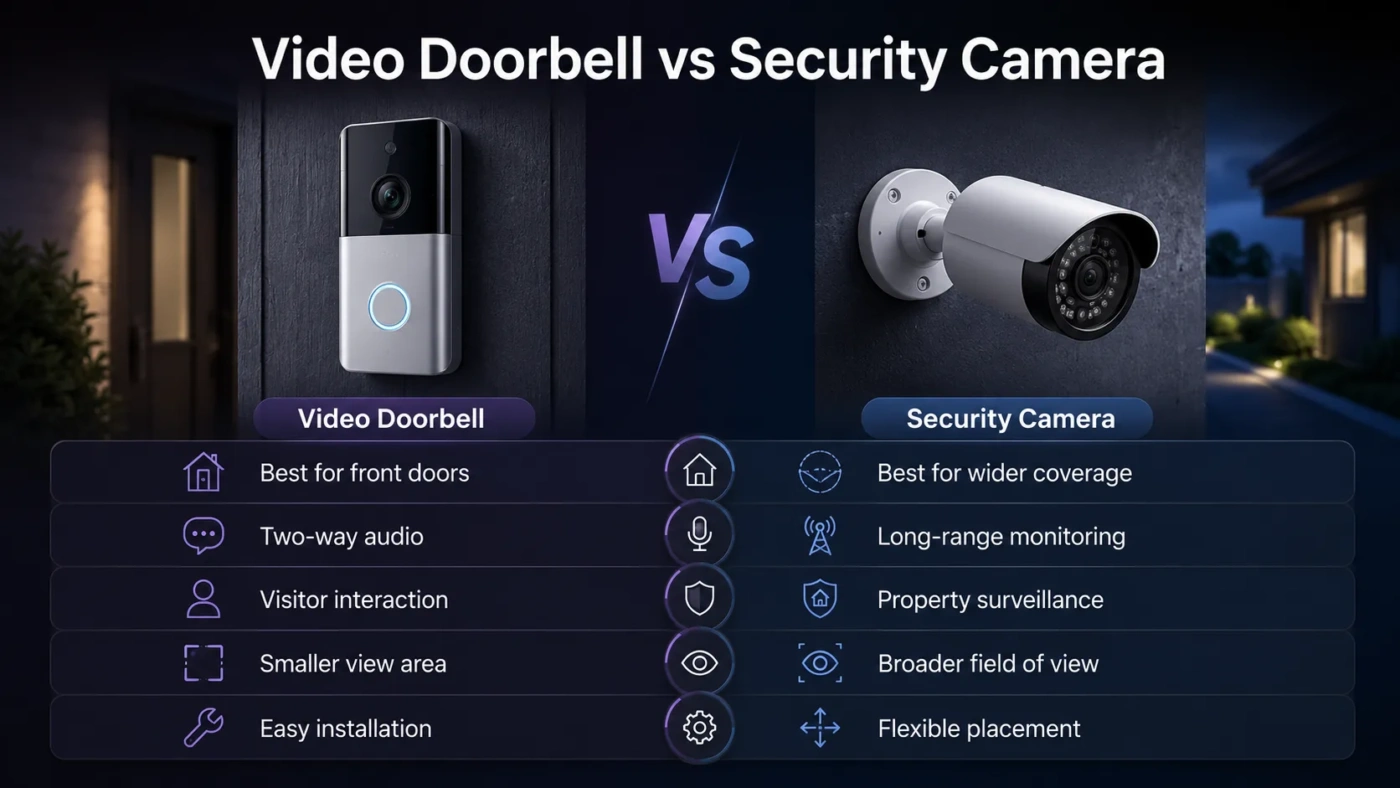
Choosing between a video doorbell and a security camera sounds simple until you think about what you actually want to see. Do you mainly care about visitors, deliveries, and the front door? Or do you need wider coverage for a driveway, backyard, side gate, garage, or full property view? A video doorbell is usually the better front-entry tool. A security camera is usually the better surveillance tool. The right choice depends on location, viewing angle, power, recording needs, privacy, and how much ongoing cost you are willing to accept.
- Video Doorbell vs Security Camera: The Main Difference
- What Is a Video Doorbell?
- Common Video Doorbell Features
- What Is a Security Camera?
- Common Security Camera Features
- Coverage and Field of View
- Installation: Which One Is Easier?
- Installation Difficulty by Setup
- Recording and Storage Differences
- Cloud Storage vs Local Storage
- Alerts and Smart Detection
- False Alerts Matter More Than People Expect
- Privacy and Security Considerations
- When Should You Choose a Video Doorbell?
- A Video Doorbell Makes More Sense If:
- When Should You Choose a Security Camera?
- A Security Camera Makes More Sense If:
- Price and Value: What Costs More Over Time?
- Cost Questions to Ask Before Buying
- Biggest Misunderstandings About Video Doorbells and Security Cameras
- A Video Doorbell Is Not a Full Security System
- A Security Camera Is Not Always Better Than a Doorbell
- Higher Resolution Does Not Always Mean Better Footage
- Wireless Does Not Always Mean No Maintenance
- Subscription-Free Does Not Always Mean Feature-Free
- Best Choice by Use Case
- Should You Use Both?
- Final Buying Advice: Which One Should You Choose?
| Feature | Video Doorbell | Security Camera |
|---|---|---|
| Main Purpose | Front-door visitors, deliveries, porch activity, and doorbell alerts. | Wider monitoring of outdoor or indoor areas such as driveways, yards, garages, hallways, and entrances. |
| Best Location | Mounted beside or near the main entrance. | Mounted wherever coverage is needed: wall, ceiling, eaves, fence, garage, or indoors. |
| Viewing Angle | Often designed for a tall or square “head-to-toe” view of people and packages. | Can offer wide-angle, fixed, zoom, pan-tilt, floodlight, turret, dome, or bullet-style coverage. |
| Visitor Interaction | Usually stronger because it combines a doorbell button, phone alert, two-way audio, and visitor view. | May include two-way audio, but it is not centered around ringing, answering, or greeting visitors. |
| Package Monitoring | Better for porch deliveries when the camera angle can see the ground near the door. | Useful for wider delivery zones, but may miss packages placed directly under the camera. |
| Continuous Recording | Often clip-based unless paired with a plan, local storage, or a wired model that supports longer recording. | More likely to support continuous recording, local storage, NVR systems, PoE wiring, or 24/7 monitoring. |
| Installation | Simple if replacing an existing wired doorbell; battery models are easier for renters. | Can be simple for Wi-Fi battery cameras or more involved for wired, PoE, or multi-camera systems. |
| Power Options | Battery, existing doorbell wiring, plug-in adapter, or low-voltage transformer. | Battery, solar, plug-in power, Ethernet with PoE, or wired electrical power. |
| Storage Options | Cloud storage is common; some models support local storage through a hub, microSD card, or base station. | More flexible: cloud, microSD, local hub, NVR, NAS, or hybrid storage depending on the system. |
| Typical Cost | Often around $50–$250 for consumer models, with some advanced models costing more. | Often around $30–$300 per camera; multi-camera wired kits or NVR systems can cost several hundred dollars or more. |
| Best For | People who want to know who is at the door, answer visitors remotely, and watch deliveries. | People who need broader property coverage, stronger placement control, or a fuller security setup. |
Video Doorbell vs Security Camera: The Main Difference
The main difference is purpose. A video doorbell is a smart doorbell with a camera. It is built around one location: the front door. It lets you see who rang, talk to visitors, receive motion alerts, and check whether a delivery arrived.
A security camera is built around coverage. It can watch a driveway, side yard, back door, garage, hallway, living room, shop entrance, or any other area where you need visibility. It may be battery-powered and simple, or it may be part of a wired PoE system with local recording.
So the choice is not really “which one is better?” The better question is: what area are you trying to watch?
- Choose a video doorbell if the front door is your main concern.
- Choose a security camera if you need wider or more flexible coverage.
- Choose both if you want front-door interaction plus broader property monitoring.
What Is a Video Doorbell?
A video doorbell is a doorbell, camera, microphone, speaker, motion sensor, and app-connected alert system in one device. When someone presses the button, your phone can show a live view and let you speak through two-way audio. Many models also alert you when motion is detected before anyone rings.
Most video doorbells are designed for entryway use. That affects their shape, lens, app notifications, and detection features. Many modern models focus on person detection, package detection, visitor alerts, porch monitoring, and a vertical or square field of view that can show more of the person standing close to the door.
Common Video Doorbell Features
- Doorbell button with phone notification
- Live video feed through a mobile app
- Two-way talk for visitors, couriers, and guests
- Motion detection near the front entrance
- Night vision or low-light mode
- Package alerts on some models
- Battery or wired power options
- Cloud storage, local storage, or both depending on the product
- Smart speaker or smart display integration on selected models
The strength of a video doorbell is convenience. You do not need to open the door to see who is there. You can also respond when you are away from home, which is useful for deliveries, guests, or service appointments.
What Is a Security Camera?
A security camera is a camera built to monitor a chosen area. It can be indoor, outdoor, wired, wireless, battery-powered, solar-powered, plug-in, or powered over Ethernet. Unlike a video doorbell, it does not need to sit near a doorbell button. You place it where the view matters most.
That flexibility is the biggest advantage. A security camera can watch a driveway from a higher angle, cover a side gate, monitor a detached garage, keep an eye on pets indoors, or record a backyard entrance. Some cameras are simple Wi-Fi models. Others are part of a multi-camera system with an NVR, local storage, continuous recording, and higher-resolution video.
Common Security Camera Features
- Indoor or outdoor monitoring
- Wide-angle, zoom, pan-tilt, turret, dome, bullet, or floodlight designs
- Person, vehicle, animal, or motion detection on many models
- Continuous recording on wired or NVR-based systems
- Local recording through microSD card, hub, NVR, or NAS
- Cloud storage on many consumer cameras
- Infrared night vision or color night vision
- Spotlight, siren, or floodlight options
- PoE support on some wired systems
The strength of a security camera is control. You can choose the angle, height, viewing area, recording setup, and power type more freely than with a doorbell camera.
Coverage and Field of View
Coverage is where the two devices start to feel very different in daily use.
A video doorbell usually sits low and close to the door. This is good for faces, visitors, and packages, but it can be weak for driveways or wide yard views. If a delivery driver leaves a parcel too close to the wall, a narrow-angle doorbell may miss it. If the lens has a taller field of view, it may handle packages better.
A security camera can be mounted higher and aimed at the exact area you want. That makes it better for:
- Driveways
- Side gates
- Backyards
- Garages
- Patios
- Long walkways
- Shared building entrances
- Interior rooms or hallways
There is a trade-off. A camera mounted high may capture more area, but faces can be harder to see if the angle is too steep. A doorbell is closer to face height for visitors, but it is locked into one entry point. For many homes, the cleanest setup is a video doorbell for the front entrance and one outdoor camera for the driveway or side approach.
Installation: Which One Is Easier?
A battery video doorbell is usually the easiest option if you want front-door coverage without wiring. You charge it, mount it near the door, connect it to Wi-Fi, and set up the app. A wired video doorbell can be cleaner because it does not need regular charging, but it depends on your existing doorbell wiring and transformer compatibility.
Security cameras vary more. A small battery Wi-Fi camera can be easier than a wired doorbell. A PoE camera system, however, takes more planning because Ethernet cable must run from the recorder or switch to each camera location.
Installation Difficulty by Setup
| Setup Type | Typical Difficulty | Best Match |
|---|---|---|
| Battery Video Doorbell | Easy | Renters, apartments, and simple front-door monitoring. |
| Wired Video Doorbell | Easy to medium | Homes with working doorbell wiring. |
| Battery Wi-Fi Security Camera | Easy | Flexible outdoor coverage without cable runs. |
| Plug-In Security Camera | Easy to medium | Indoor rooms, covered outdoor spots, garages, and areas near outlets. |
| PoE or NVR Security Camera | Medium to hard | Reliable multi-camera recording with local control. |
If you want the lowest effort, a battery video doorbell or battery Wi-Fi camera is the easier path. If you want stable long-term recording, a wired camera or PoE system is usually stronger.
Recording and Storage Differences
Storage can change the real cost of both devices. Many video doorbells and consumer security cameras work best when paired with a cloud plan. Without a plan, some models may still show live view and alerts but limit saved clips, event history, familiar face detection, or package alerts.
Local storage can reduce monthly costs. It may use a microSD card, home hub, base station, NVR, or network storage. The trade-off is that local footage can be harder to access remotely, and if a thief takes the device or recorder, footage may be lost unless there is a backup.
Cloud Storage vs Local Storage
| Storage Type | Strengths | Trade-Offs |
|---|---|---|
| Cloud Storage | Easy remote access, off-site backup, simple app playback. | Usually needs a monthly plan and depends on internet access. |
| MicroSD Card | No monthly fee, simple local recording, common in many cameras. | Storage space is limited and the card stays inside the device. |
| Home Hub or Base Station | Local storage with easier app access than a single microSD card. | Works best within one brand ecosystem and may add upfront cost. |
| NVR or NAS | Better for multi-camera recording, longer history, and local control. | Needs more setup, wiring, and basic network planning. |
For one front door, cloud storage or a doorbell with local hub storage may be enough. For several cameras around a property, a local security camera system often makes more sense because monthly fees can stack up fast.
Alerts and Smart Detection
Both device types can send motion alerts, but the useful alerts are different.
A video doorbell should be judged by how well it handles visitor alerts, person detection, package detection, and fast ring notifications. Speed matters. If the app takes too long to open after someone rings, the main benefit of the doorbell is weakened.
A security camera should be judged by how well it handles the area it watches. For a driveway, vehicle detection may matter. For a side yard, person detection and motion zones may matter more. For a backyard, animal detection might reduce false alerts. For a floodlight camera, light control and motion sensitivity are part of the experience.
False Alerts Matter More Than People Expect
A camera that sends too many alerts becomes background noise. Passing cars, moving branches, shadows, insects, rain, and pets can all trigger basic motion detection. Better motion zones, AI detection, sensitivity controls, and privacy zones make a real difference.
For a front door, package and person detection are often more useful than generic motion alerts. For a driveway, vehicle detection and a wider camera angle may be more useful.
Privacy and Security Considerations
Any connected camera deserves careful setup. A video doorbell often faces a public-facing area such as a porch, sidewalk, hallway, or shared entry. A security camera may face private areas inside or outside the home. In both cases, privacy settings matter.
Before choosing either device, check for:
- Two-factor authentication
- End-to-end encryption or clear encryption settings where available
- Privacy zones to block areas that should not be recorded
- Separate user permissions for family members or shared access
- Regular firmware and app updates
- Clear storage settings for video history
- Strong Wi-Fi security such as WPA2 or WPA3
For outdoor use, avoid pointing cameras more widely than needed. A front door camera should focus on your entrance, not a neighbor’s window. A driveway camera should cover your driveway, not the whole street. This is not only polite; it also keeps your recordings more relevant.
When Should You Choose a Video Doorbell?
Choose a video doorbell if your main question is: “Who is at my door?”
A video doorbell is the better pick when you want easy front-door awareness without building a full camera setup. It is also useful when you receive deliveries, miss visitors, or want to answer the door while away from home.
A Video Doorbell Makes More Sense If:
- You mainly care about the front entrance.
- You want to talk to visitors without opening the door.
- You receive packages often.
- You want phone alerts when someone rings.
- You live in a rental and need a simple battery option.
- You prefer one compact device over a larger camera setup.
- Your porch layout allows the camera to see both faces and packages.
A video doorbell is also a good first smart security device. It gives quick value because the front door is where visitors, couriers, and many daily interactions happen.
When Should You Choose a Security Camera?
Choose a security camera if your main question is: “What is happening in this area?”
A security camera is better when the front door is not the only concern. It gives more placement freedom and stronger coverage options. You can aim it at a driveway, garage, backyard, side path, office entrance, shop counter, or indoor hallway.
A Security Camera Makes More Sense If:
- You need to monitor more than the front door.
- You want a wider view of your property.
- You need continuous recording.
- You prefer local storage or an NVR system.
- You want a floodlight, siren, zoom, pan-tilt, or PoE camera.
- You need multiple cameras in different areas.
- You want better control over mounting height and angle.
If you are covering a driveway or backyard, a video doorbell is usually not enough. A dedicated outdoor camera will give you a cleaner angle and fewer blind spots.
Price and Value: What Costs More Over Time?
The device price is only one part of the cost. A $79 camera can become more expensive than expected if the useful recording features require a monthly plan. A $200 local-storage model can be cheaper over several years if it avoids subscription fees.
Video doorbells often push cloud recording because front-door events are short and app-based. Security cameras offer more paths: cloud plans, microSD cards, hubs, NVRs, or mixed storage. This makes security cameras more flexible for long-term value, especially when you need several devices.
Cost Questions to Ask Before Buying
- Does it save video without a paid plan?
- How many days of history do you get?
- Are person, package, or vehicle alerts free or paid?
- Can you use local storage?
- Does local storage still allow easy phone playback?
- Will you need one device or several?
- Does the battery need replacing over time?
For one front door, a video doorbell can be the better value. For full property coverage, security cameras usually scale better, especially if you choose local recording.
Biggest Misunderstandings About Video Doorbells and Security Cameras
A Video Doorbell Is Not a Full Security System
A video doorbell can be helpful, but it does not cover every approach to a home. It may miss a side gate, garage door, backyard, driveway, or window. It is best seen as a front-door device, not a complete property monitoring setup.
A Security Camera Is Not Always Better Than a Doorbell
A security camera may have better placement options, but it may not handle visitor interaction as smoothly. If you want doorbell rings, quick visitor replies, and porch delivery alerts, a dedicated video doorbell is usually more natural.
Higher Resolution Does Not Always Mean Better Footage
Resolution matters, but lens quality, lighting, compression, HDR, night vision, Wi-Fi strength, and placement can matter just as much. A poorly placed 4K camera can be less useful than a well-placed 1080p or 2K camera.
Wireless Does Not Always Mean No Maintenance
Wireless usually means no data cable, not zero work. Battery devices still need charging unless they use solar power or very efficient battery management. If the camera is mounted high, charging can become annoying.
Subscription-Free Does Not Always Mean Feature-Free
Some devices offer strong local recording without a cloud plan. Others remove useful features unless you subscribe. Always check exactly what works without payment before buying.
Best Choice by Use Case
| Use Case | Better Choice | Why It Fits |
|---|---|---|
| Answering Visitors Remotely | Video Doorbell | It is designed for rings, visitor alerts, and two-way door communication. |
| Watching Packages | Video Doorbell | A good doorbell angle can show the porch floor and delivery area. |
| Monitoring a Driveway | Security Camera | You can mount it higher and aim it at vehicles, gates, or wider movement zones. |
| Covering a Backyard | Security Camera | A doorbell cannot cover rear entrances or outdoor living areas. |
| Apartment Front Door | Video Doorbell | Battery models are compact and focused on entryway activity. |
| Large Home or Property | Security Camera | Multiple cameras can cover several angles and blind spots. |
| No Monthly Fee Preference | Security Camera | More models support microSD, hub, NVR, or local recording options. |
| Simple First Purchase | Video Doorbell | It solves a clear problem at the most-used entrance. |
Should You Use Both?
For many homes, the best answer is not one or the other. A video doorbell and a security camera can solve different problems together.
A strong two-device setup might look like this:
- Video doorbell: front door, visitors, packages, two-way audio.
- Outdoor security camera: driveway, side gate, garage, or backyard.
This setup avoids asking one device to do too much. The doorbell handles close-range entry activity. The security camera handles wider movement and property coverage.
Final Buying Advice: Which One Should You Choose?
Choose a video doorbell if your main goal is front-door awareness. It is the better match for visitors, deliveries, porch alerts, doorbell rings, and quick two-way communication. It is also easier to understand as a first device because the purpose is clear.
Choose a security camera if your main goal is wider monitoring. It is the better match for driveways, backyards, garages, side entrances, indoor rooms, long recording history, flexible mounting, local storage, and multi-camera setups.
If you still feel split, use this simple rule:
- One entrance, visitors, and packages: buy a video doorbell.
- One area that is not the front door: buy a security camera.
- Front door plus property coverage: use both.
The smartest choice is the one that matches the spot you need to watch. A video doorbell helps you manage the door. A security camera helps you monitor the area. Once you separate those jobs, the decision becomes much easier.