Choosing between Wi-Fi 5, Wi-Fi 6, and Wi-Fi 7 is not only about picking the newest wireless standard. The better question is how many devices you use, how fast your internet plan is, how crowded your home network feels, and whether your phones, laptops, game consoles, smart TVs, and smart home devices can actually use the newer features. Wi-Fi 5 is still usable for light homes, Wi-Fi 6 is the safest value choice for most people, and Wi-Fi 7 is best for users who want the fastest wireless performance available today.
- Wi-Fi 5 vs Wi-Fi 6 vs Wi-Fi 7: The Main Difference
- What Is Wi-Fi 5?
- Where Wi-Fi 5 Still Makes Sense
- What Is Wi-Fi 6?
- Why Wi-Fi 6 Feels Better Than Wi-Fi 5
- Wi-Fi 6 vs Wi-Fi 6E
- What Is Wi-Fi 7?
- Where Wi-Fi 7 Stands Out
- Speed Comparison: Which One Is Faster?
- Range And Coverage: Which One Reaches Farther?
- Latency And Gaming: Which One Feels More Responsive?
- Device Support: Your Router Is Only Half The Story
- Price And Value: Which One Gives More For The Money?
- When Should You Choose Wi-Fi 5?
- Wi-Fi 5 Makes Sense If:
- When Should You Choose Wi-Fi 6?
- Wi-Fi 6 Makes Sense If:
- When Should You Choose Wi-Fi 7?
- Wi-Fi 7 Makes Sense If:
- Common Misunderstandings About Wi-Fi 5, Wi-Fi 6, And Wi-Fi 7
- Newer Wi-Fi Does Not Make Your Internet Plan Faster
- A Wi-Fi 7 Router Does Not Make Every Device Wi-Fi 7
- 6 GHz Is Not Always Better Than 5 GHz
- Mesh Can Matter More Than Wi-Fi Generation
- Advertised Speed Is Not The Same As Real Speed
- Real-World Scenarios: Which One Should You Pick?
- If You Live Alone And Mostly Stream Video
- If You Work From Home
- If You Have A Family With Many Devices
- If You Live In A Crowded Apartment
- If You Have A Large House
- If You Are A Gamer
- If You Have Multi-Gig Internet
- Buying Checklist Before You Upgrade
- Final Choice: Wi-Fi 5, Wi-Fi 6, Or Wi-Fi 7?
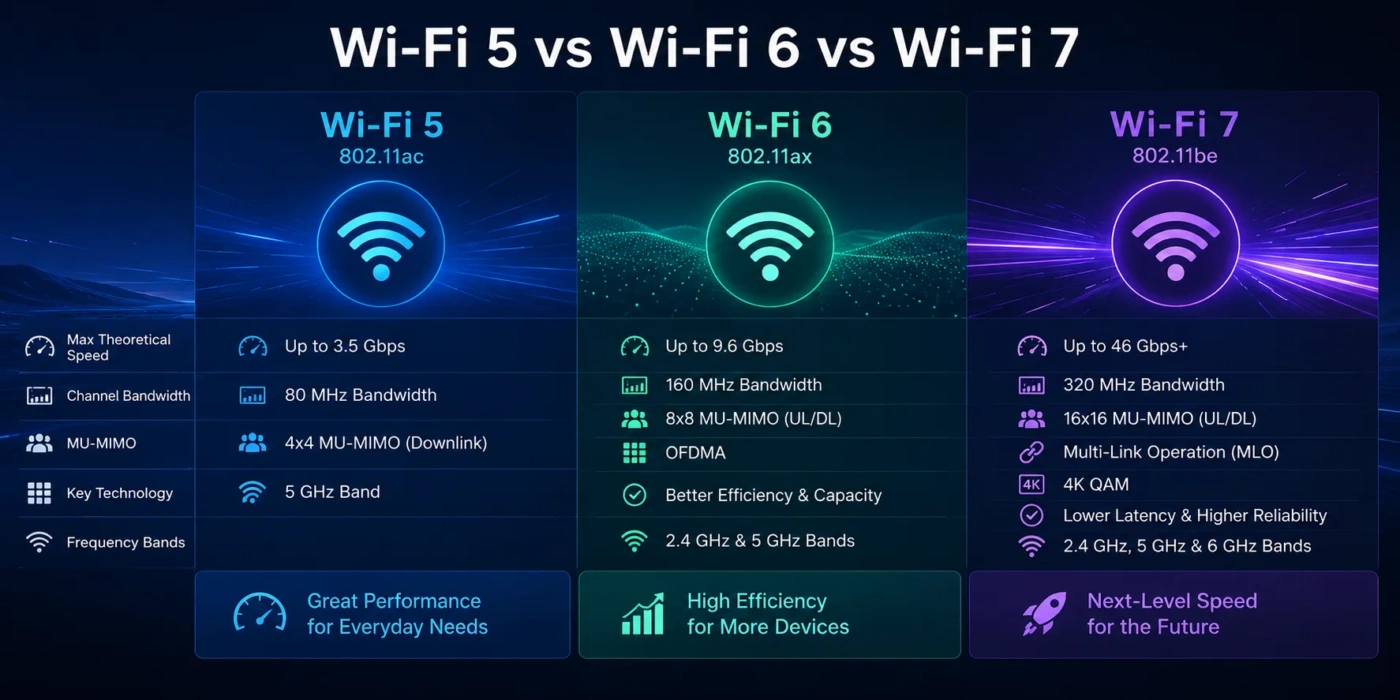
| Feature | Wi-Fi 5 | Wi-Fi 6 | Wi-Fi 7 |
|---|---|---|---|
| IEEE Standard | 802.11ac | 802.11ax | 802.11be |
| Best For | Basic browsing, HD streaming, small homes, older devices | Busy homes, 4K streaming, gaming, work-from-home setups, many devices | Multi-gig internet, high-end gaming, VR/AR, large file transfers, future-ready networks |
| Main Frequency Bands | Mostly 5 GHz | 2.4 GHz and 5 GHz; Wi-Fi 6E adds 6 GHz | 2.4 GHz, 5 GHz, and 6 GHz on supported hardware |
| Maximum Channel Width | Up to 160 MHz, though 80 MHz is more common | Up to 160 MHz | Up to 320 MHz on 6 GHz |
| Modulation | 256-QAM | 1024-QAM | 4096-QAM |
| Multi-Device Efficiency | Limited compared with newer standards | Much better through OFDMA, MU-MIMO, and BSS Coloring | Better again through Multi-Link Operation, Multi-RU, and wider channels |
| Latency | Fine for normal use, weaker in busy networks | Lower and more stable in crowded homes | Lowest potential latency, especially with compatible devices and Multi-Link Operation |
| Device Compatibility | Works with many older devices | Widely supported by modern phones, laptops, routers, TVs, and consoles | Growing support, but many devices still cannot use all Wi-Fi 7 features |
| Real-World Value | Good only if your needs are light or your router is already reliable | Best balance of speed, stability, cost, and compatibility | Best for high-end users who can benefit from newer hardware |
| Typical Router Cost | Usually budget-friendly, often under $100 for basic models | Often around $80–$250 depending on mesh support and speed class | Often $250+ for strong models; premium mesh kits can cost much more |
| Upgrade Priority | Upgrade if the network feels slow, crowded, or unstable | Choose this for most normal upgrades | Choose this for multi-gig plans, new premium devices, or long-term buying |
Wi-Fi 5 vs Wi-Fi 6 vs Wi-Fi 7: The Main Difference
The main difference is how each generation handles speed, device traffic, and network congestion. Wi-Fi 5 was built for faster 5 GHz wireless connections. Wi-Fi 6 improved the way routers manage many devices at the same time. Wi-Fi 7 goes further by using wider channels, higher data encoding, and the ability to use more than one wireless link at once.
That means the newest option is not automatically the best choice for every home. A small apartment with a 300 Mbps internet plan and a few devices may not need Wi-Fi 7. A large home with multi-gig fiber, gaming PCs, 4K TVs, phones, tablets, smart speakers, cameras, and a mesh network may benefit from Wi-Fi 6 or Wi-Fi 7 much more.
Simple rule: Wi-Fi 5 is acceptable, Wi-Fi 6 is the practical upgrade, and Wi-Fi 7 is the performance-first option.
What Is Wi-Fi 5?
Wi-Fi 5 is the consumer name for 802.11ac. It mainly improved wireless speeds over the 5 GHz band and became common in routers, laptops, phones, smart TVs, and streaming devices for many years.
Wi-Fi 5 can still work well for everyday tasks such as:
- Web browsing
- HD video streaming
- Light 4K streaming on a strong signal
- Basic online gaming
- Older phones, laptops, and smart TVs
The weakness of Wi-Fi 5 appears when many devices compete for wireless airtime. In a home with multiple people streaming, gaming, joining video calls, downloading updates, and using smart home devices at the same time, Wi-Fi 5 can feel inconsistent. The internet plan may be fast, but the wireless network may not distribute that speed smoothly.
Where Wi-Fi 5 Still Makes Sense
Wi-Fi 5 is still fine if your router is stable, your home is small, your internet plan is modest, and you do not have many connected devices. It can also be enough for a guest network, a spare access point, or a low-cost setup where top speed is not the goal.
It becomes less attractive when you are buying a new router. Even if a Wi-Fi 5 router is cheap, a Wi-Fi 6 router often gives better device handling, better security options, and better long-term value.
What Is Wi-Fi 6?
Wi-Fi 6 is the consumer name for 802.11ax. It was designed not just to raise peak speed, but to make wireless networks work better when many devices are active. That is why Wi-Fi 6 is often the best choice for normal homes, apartments, offices, dorm rooms, and shared living spaces.
Wi-Fi 6 adds features such as OFDMA, MU-MIMO, BSS Coloring, 1024-QAM, and Target Wake Time. These terms sound technical, but the real-world effect is simple: the router can manage traffic more efficiently, reduce waiting time, and keep connected devices from slowing each other down as much.
Why Wi-Fi 6 Feels Better Than Wi-Fi 5
Wi-Fi 6 helps most when your network is busy. A phone may be scrolling social media, a TV may be streaming 4K video, a laptop may be in a video meeting, a game console may be downloading an update, and smart cameras may be uploading clips. Wi-Fi 6 is better at organizing that traffic.
It also supports 2.4 GHz and 5 GHz, while Wi-Fi 6E extends the same generation into the 6 GHz band. That 6 GHz band can be very useful because it is usually less crowded, but both the router and the device must support it.
Wi-Fi 6 vs Wi-Fi 6E
Wi-Fi 6 and Wi-Fi 6E are closely related, but they are not the same in daily use.
- Wi-Fi 6 usually means 2.4 GHz and 5 GHz support.
- Wi-Fi 6E adds access to the 6 GHz band on supported devices.
- Wi-Fi 6E can reduce congestion, but 6 GHz has shorter range and weaker wall penetration than 2.4 GHz.
If you see a Wi-Fi 6E router at a good price, it can be a smart buy for laptops, phones, and devices that support 6 GHz. Still, for most people comparing Wi-Fi 5 vs Wi-Fi 6 vs Wi-Fi 7, regular Wi-Fi 6 remains the practical middle option.
What Is Wi-Fi 7?
Wi-Fi 7 is the consumer name for 802.11be. It is built for much faster wireless throughput, lower latency, and better handling of demanding devices. It uses technologies such as 320 MHz channels, 4096-QAM, Multi-Link Operation, Multi-RU, and improved channel use.
The most important real-world Wi-Fi 7 feature is Multi-Link Operation, often shortened to MLO. Instead of relying on only one band or channel, compatible Wi-Fi 7 devices can use multiple wireless links more flexibly. This can improve speed, reduce delay, and make the connection feel more stable when conditions change.
Where Wi-Fi 7 Stands Out
Wi-Fi 7 is strongest when the whole setup supports it: router, client device, internet plan, and local network hardware. It is most useful for:
- Multi-gig internet plans
- Fast NAS or home server transfers
- Gaming where low latency matters
- VR and AR devices
- 8K or very high-bitrate local streaming
- Large households with many high-bandwidth devices
- Premium mesh systems with wireless backhaul
Wi-Fi 7 can be excellent, but it is not magic. If your internet plan is 300 Mbps and your devices are mostly Wi-Fi 5 or Wi-Fi 6, a Wi-Fi 7 router may not feel very different in normal browsing. The speed ceiling is higher, but your devices must be able to climb toward it.
Speed Comparison: Which One Is Faster?
Wi-Fi 7 is the fastest of the three. Wi-Fi 6 is faster and more efficient than Wi-Fi 5 in busy networks. Wi-Fi 5 can still be quick on a clean 5 GHz signal, but it lacks many of the traffic-management improvements found in newer generations.
| Performance Area | Wi-Fi 5 | Wi-Fi 6 | Wi-Fi 7 |
|---|---|---|---|
| Peak Speed Potential | Good | Better | Best |
| Crowded Network Handling | Basic by current standards | Strong | Very strong on compatible hardware |
| Gaming Latency | Good when signal is clean | Better under load | Best potential with MLO and 6 GHz |
| 4K Streaming | Usually fine | Very good | Excellent, but often more than needed |
| Local File Transfers | Good on 5 GHz | Faster and more stable | Best with multi-gig wired ports and Wi-Fi 7 clients |
Be careful with advertised speeds on router boxes. Those numbers are theoretical totals across bands and streams. Real speed depends on distance, walls, interference, channel width, router quality, device antenna design, firmware, and whether the device supports the same Wi-Fi generation.
Range And Coverage: Which One Reaches Farther?
Wi-Fi generation alone does not decide range. Antenna design, router placement, transmit power limits, walls, floors, and interference often matter more. A well-placed Wi-Fi 6 router can outperform a poorly placed Wi-Fi 7 router in another room.
The frequency band matters too:
- 2.4 GHz reaches farther and passes through walls better, but it is slower and more crowded.
- 5 GHz is faster and cleaner than 2.4 GHz in many homes, but range is shorter.
- 6 GHz can be very fast and less congested, but it has the shortest range and weaker wall penetration.
This is why Wi-Fi 7 does not automatically mean better whole-home coverage. It may deliver amazing speed in the same room, but a mesh system or extra access point may still be needed in a large house.
Latency And Gaming: Which One Feels More Responsive?
For gaming, video calls, cloud gaming, and VR, latency matters as much as download speed. Wi-Fi 5 can be fine when the network is quiet. The problem starts when other devices begin uploading, streaming, or downloading large files.
Wi-Fi 6 usually feels more stable than Wi-Fi 5 in a busy home because it manages airtime better. Wi-Fi 7 can go further with Multi-Link Operation and wider 6 GHz channels, but only when both the router and client device support the needed features.
Best gaming choice: wired Ethernet is still the most reliable. If you must use wireless, Wi-Fi 6 is the practical baseline, and Wi-Fi 7 is the premium option for new gaming laptops, high-end phones, and future VR devices.
Device Support: Your Router Is Only Half The Story
A newer router cannot force older devices to use newer Wi-Fi features. A Wi-Fi 5 phone connected to a Wi-Fi 7 router still behaves like a Wi-Fi 5 device. It may benefit from a better router CPU, cleaner firmware, stronger antennas, or improved mesh design, but it will not suddenly use Wi-Fi 7 features.
Before upgrading, check the devices you use most:
- Your main laptop
- Your phone
- Your game console or gaming PC
- Your smart TV or streaming box
- Your work computer
- Your VR headset, if you use one
- Your NAS, media server, or desktop if you move large files locally
If most of these devices support Wi-Fi 6, a Wi-Fi 6 router makes sense. If several devices support Wi-Fi 7 and you have a fast internet plan, Wi-Fi 7 becomes easier to justify.
Price And Value: Which One Gives More For The Money?
Wi-Fi 5 routers are cheap, but cheap does not always mean good value. Many older Wi-Fi 5 routers have weaker processors, older security defaults, fewer firmware updates, and less efficient traffic handling. They may cost less upfront but feel worse in a modern connected home.
Wi-Fi 6 usually gives the best value. It is mature, widely supported, and available across budget, mid-range, and mesh categories. For many homes, it gives the biggest real improvement per dollar.
Wi-Fi 7 costs more because it targets newer hardware and higher performance. It is worth paying for if you have multi-gig internet, Wi-Fi 7 devices, a premium mesh setup, or a plan to keep the router for several years.
| User Type | Best Choice | Why |
|---|---|---|
| Light User | Wi-Fi 5 or Wi-Fi 6 | Basic browsing and streaming do not need Wi-Fi 7. |
| Average Home | Wi-Fi 6 | Best balance of price, device support, and stability. |
| Apartment With Many Nearby Networks | Wi-Fi 6E or Wi-Fi 7 | 6 GHz can help reduce congestion if your devices support it. |
| Large Home | Wi-Fi 6 Mesh or Wi-Fi 7 Mesh | Coverage matters more than the generation alone. |
| Gamer | Wi-Fi 6 or Wi-Fi 7 | Lower latency and better handling under load are more useful than Wi-Fi 5. |
| Power User | Wi-Fi 7 | Best match for multi-gig speeds, fast local transfers, and newer devices. |
When Should You Choose Wi-Fi 5?
Choose Wi-Fi 5 only when your needs are light or you already own a router that works well. It is not the best new-router choice for most people, but it can still be enough in simple setups.
Wi-Fi 5 Makes Sense If:
- You have a small home or apartment.
- Your internet plan is not very fast.
- You use only a few connected devices.
- You mostly browse, stream HD video, and check email.
- Your current router is stable and covers your space well.
- You are using older devices that do not support Wi-Fi 6 or Wi-Fi 7.
Do not choose Wi-Fi 5 if you are buying a router for a busy household. The price saving may be small compared with the smoother experience of Wi-Fi 6.
When Should You Choose Wi-Fi 6?
Choose Wi-Fi 6 if you want the safest upgrade for normal home use. It is fast, widely supported, and much better than Wi-Fi 5 when several devices are active at the same time.
Wi-Fi 6 Makes Sense If:
- You want better performance without paying Wi-Fi 7 prices.
- You have many phones, laptops, TVs, tablets, and smart home devices.
- You stream 4K video or join video calls often.
- You game online but do not need the newest wireless hardware.
- Your internet plan is in the common home broadband range.
- You want a router that will still feel modern for the next few years.
For most readers, Wi-Fi 6 is the best answer. It fixes many of the practical problems people notice: slowdowns during busy hours, unstable video calls, weak performance when many devices are connected, and older routers that cannot keep up.
When Should You Choose Wi-Fi 7?
Choose Wi-Fi 7 when you are building a high-performance network or buying for the long term. It is the best option if you have the devices and internet plan to use it.
Wi-Fi 7 Makes Sense If:
- You have a multi-gig internet plan.
- You own or plan to buy Wi-Fi 7 phones, laptops, or gaming devices.
- You move large files over your local network.
- You use a NAS, media server, or high-end desktop setup.
- You want a premium mesh system with faster wireless backhaul.
- You want the newest wireless features and plan to keep the router for years.
Wi-Fi 7 is also a strong choice for advanced apartments or homes where the 5 GHz band feels crowded and 6 GHz support can help. Just remember that 6 GHz works best at shorter distances and with fewer walls in the way.
Common Misunderstandings About Wi-Fi 5, Wi-Fi 6, And Wi-Fi 7
Newer Wi-Fi Does Not Make Your Internet Plan Faster
If your internet plan is 500 Mbps, a Wi-Fi 7 router will not turn it into a 2 Gbps plan. It can improve local wireless speed, reduce congestion, and make the network feel smoother, but your internet provider still sets the outside connection speed.
A Wi-Fi 7 Router Does Not Make Every Device Wi-Fi 7
Older devices connect using their own supported standard. A Wi-Fi 5 laptop remains a Wi-Fi 5 laptop even on a Wi-Fi 7 router. The router may still help with overall network quality, but the device will not gain 320 MHz channels or Multi-Link Operation.
6 GHz Is Not Always Better Than 5 GHz
The 6 GHz band can be faster and cleaner, but it has shorter reach. In the same room, it can be excellent. Through several walls, 5 GHz or even 2.4 GHz may be more reliable.
Mesh Can Matter More Than Wi-Fi Generation
In a large home, one powerful router may not cover every room well. A Wi-Fi 6 mesh system can beat a single Wi-Fi 7 router if the real issue is coverage. Place access points carefully and avoid hiding routers inside cabinets or behind large metal objects.
Advertised Speed Is Not The Same As Real Speed
Router labels often combine speeds across multiple bands. Your phone or laptop connects to one band or link setup at a time, depending on the device and standard. Real speeds are lower than lab numbers, especially through walls or at long range.
Real-World Scenarios: Which One Should You Pick?
If You Live Alone And Mostly Stream Video
Wi-Fi 5 may still be fine if your current router is stable. If you are buying new, choose Wi-Fi 6. It gives better value and more room for future devices.
If You Work From Home
Choose Wi-Fi 6 at minimum. Video calls, cloud apps, file sync, and multiple devices benefit from the better traffic handling. If you also have multi-gig internet or a newer laptop with Wi-Fi 7, consider Wi-Fi 7.
If You Have A Family With Many Devices
Choose Wi-Fi 6 or Wi-Fi 7. Wi-Fi 6 is enough for most families. Wi-Fi 7 is better if the home has heavy gaming, 4K streaming in several rooms, fast internet, and newer client devices.
If You Live In A Crowded Apartment
Choose Wi-Fi 6E or Wi-Fi 7 if your devices support 6 GHz. Apartment buildings often have many overlapping 2.4 GHz and 5 GHz networks. The 6 GHz band can help reduce wireless congestion, especially at shorter distances.
If You Have A Large House
Focus on coverage first. A Wi-Fi 6 mesh system is often better than one high-end router placed far away. Choose Wi-Fi 7 mesh if you want faster wireless backhaul, newer features, and a premium long-term setup.
If You Are A Gamer
Use Ethernet when possible. For wireless gaming, choose Wi-Fi 6 or Wi-Fi 7. Wi-Fi 6 is enough for most gamers, while Wi-Fi 7 is better for high-end gaming laptops, low-latency wireless setups, and homes where many devices are active at once.
If You Have Multi-Gig Internet
Choose Wi-Fi 7 if your budget allows it. Also check for 2.5 GbE, 5 GbE, or 10 GbE ports on the router. A fast Wi-Fi standard does not help much if the router’s wired ports limit the connection.
Buying Checklist Before You Upgrade
Before choosing a router, check these points. They often matter more than the label on the box.
- Internet speed: Match the router to your actual plan, not only future hopes.
- Device support: Check whether your main devices use Wi-Fi 5, Wi-Fi 6, Wi-Fi 6E, or Wi-Fi 7.
- Home size: Large homes may need mesh or wired access points.
- Ethernet ports: Multi-gig internet needs multi-gig WAN and LAN ports.
- Security: Look for WPA3 support when possible.
- Firmware updates: Choose a router brand and model line with regular software support.
- Mesh backhaul: If using mesh, a dedicated or high-speed backhaul can improve performance.
- 6 GHz need: Wi-Fi 6E and Wi-Fi 7 can use 6 GHz, but only supported devices benefit.
Final Choice: Wi-Fi 5, Wi-Fi 6, Or Wi-Fi 7?
Choose Wi-Fi 5 if you already own a stable router, your internet plan is modest, your home is small, and your needs are basic. It is acceptable, but it is not the best new purchase for most people.
Choose Wi-Fi 6 if you want the best overall value. It is the right pick for most homes because it improves speed, stability, and device handling without requiring the newest and most expensive hardware.
Choose Wi-Fi 7 if you want the fastest wireless standard, have newer devices, use a multi-gig connection, or plan to keep your router for a long time. It is the strongest option, but it only shows its full value when the rest of your setup can use it.
Best overall pick: Wi-Fi 6 for most people.
Best performance pick: Wi-Fi 7.
Best budget holdover: Wi-Fi 5, but only if it already meets your needs.
If you are buying today and want a simple answer, choose Wi-Fi 6 for normal home use, Wi-Fi 7 for high-end performance, and keep Wi-Fi 5 only when your current network is still doing its job without slowdowns.