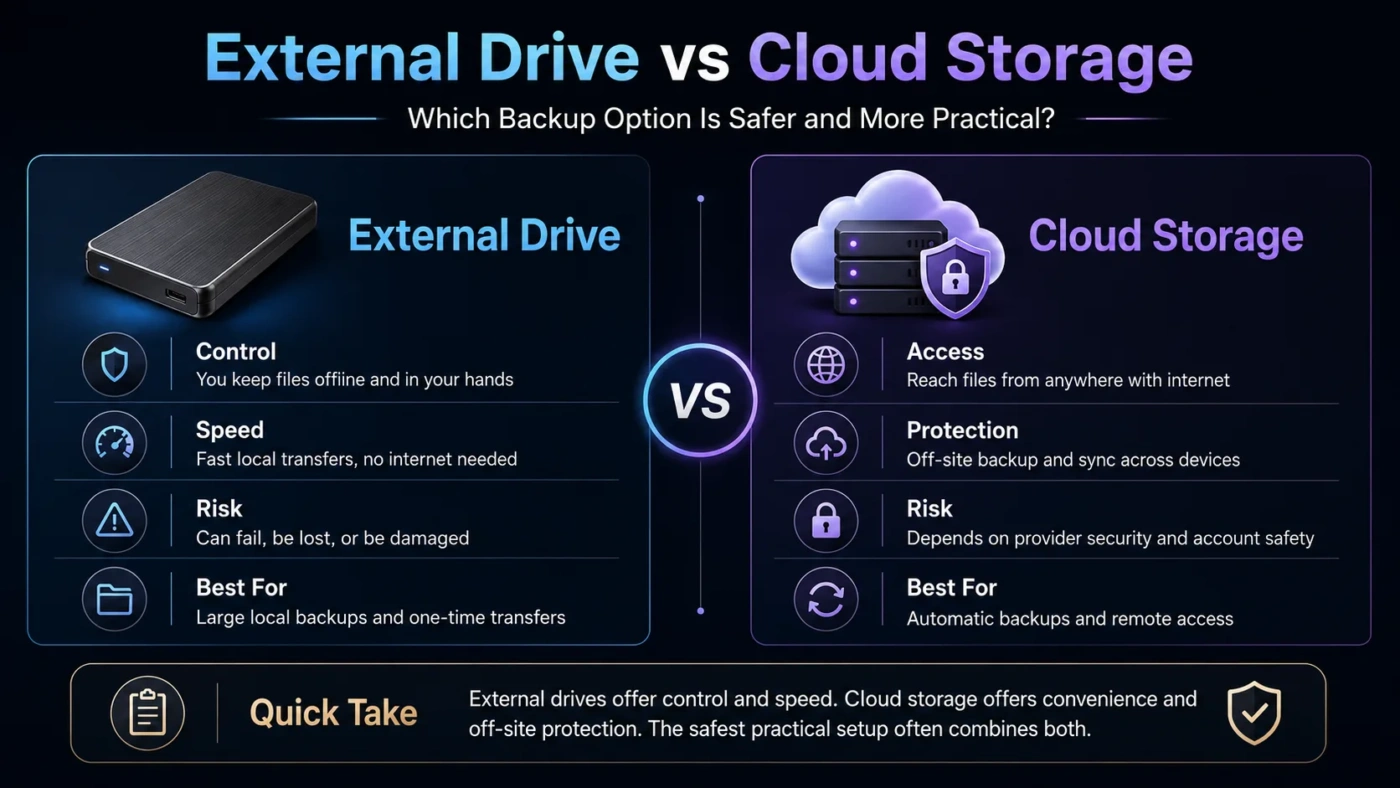
External drives and cloud storage solve the same basic problem—keeping files outside your main device—but they fit different habits. An external drive is better when you want fast local access, one-time hardware ownership, large media backups, or offline control. Cloud storage is better when you want automatic syncing, access from multiple devices, easier sharing, and protection when a laptop, phone, or drive is lost. For many people, the best answer is not one or the other, but using an external drive for large backups and cloud storage for active files.
- Main Differences
- External Drive
- Cloud Storage
- Where Each Option Fits Best
- Speed And Access
- Cost And Long-Term Value
- Privacy And Security
- Backup Reliability
- Choose An External Drive If
- Choose Cloud Storage If
- Decision Tree
- Common Misunderstandings
- Cloud Storage Is Not Always A Full Backup
- An External Drive Is Not Permanent
- More Storage Does Not Always Mean Better Storage
- Physical Control And Remote Access Pull In Different Directions
- Best Choice By User Type
- External HDD, External SSD, And Cloud Plans
- Best Setup For Important Files
- FAQ
- Is An External Drive Better Than Cloud Storage?
- Is Cloud Storage Safer Than An External Drive?
- Should I Use An External Drive For Photos?
- Can Cloud Storage Replace A Backup Drive?
- Which Is Better For Long-Term Storage?
- Compare More Options
| Feature | External Drive | Cloud Storage |
|---|---|---|
| Best For | Large local backups, photos, videos, project archives | Syncing, sharing, remote access, active documents |
| Internet Requirement | Not needed after setup | Needed for upload, sync, restore, and sharing |
| Speed | Often faster for large files, especially with SSDs | Depends on internet speed and service limits |
| Cost Model | One-time purchase | Usually monthly or yearly subscription for larger plans |
| Device Failure Risk | Can fail, be damaged, or be misplaced | Files remain available if your device is lost or broken |
| Sharing | Manual transfer or physical handoff | Easy links, folders, permissions, and collaboration |
| Privacy Control | More direct physical control | Depends on account security, provider policies, and settings |
| Backup Automation | Possible, but the drive must be connected | Usually automatic after setup |
| Best Overall Choice | Best for offline storage and large local archives | Best for convenience, access, and file syncing |
Main Differences
External drives keep your files on hardware you own. Cloud storage keeps your files on remote servers managed by a provider. That difference changes almost everything: speed, access, cost, risk, sharing, privacy, and backup habits.
External Drive
An external drive works like extra storage attached to your computer. It may be a portable HDD, a faster external SSD, or a larger desktop backup drive. It is simple, direct, and useful when you want to move or store a lot of data without depending on the internet.
Cloud Storage
Cloud storage saves files online through a service account. The main benefit is access: the same files can appear on a laptop, phone, tablet, or web browser. It also makes sharing and collaboration easier than passing files through a physical device.
Where Each Option Fits Best
Speed And Access
An external SSD can feel much faster than cloud storage when copying large videos, game files, design projects, or full computer backups. Even a basic external HDD may be practical for large archives because it avoids upload limits and internet delays.
Cloud storage wins when the file is small, shared often, or needed on several devices. A spreadsheet, PDF, presentation, contract, or school file can be edited on one device and opened later on another without manual transfer.
Practical note: speed depends on the weakest part of the chain. For external drives, that may be the drive type, cable, USB port, or computer. For cloud storage, it is usually upload speed, download speed, file size, provider limits, and sync behavior.
Cost And Long-Term Value
External drives usually make more sense when you need a lot of storage and do not want another subscription. A large drive can hold backups, media libraries, old projects, and device images with no recurring storage bill.
Cloud storage can be cheaper at first because many services include a small free tier. It may cost more over time when you need more space, family sharing, version history, advanced security, or business features. The value is not only storage size; it is also convenience, sync, sharing, and recovery.
Privacy And Security
An external drive gives you physical control. Files are not uploaded to a provider by default, and you can disconnect the drive when it is not being used. That can be a better fit for private archives, sensitive work files, or users who do not want personal data synced online.
Cloud storage depends on account security and service settings. Strong passwords, two-factor authentication, careful sharing permissions, and device lock protection matter. Cloud storage can be safe for everyday use, but weak account habits can create problems that an unplugged external drive does not have.
Do not treat either option as risk-free. External drives can fail or be stolen. Cloud accounts can be locked, misconfigured, or accessed from lost devices. Important files should not live in only one place.
Backup Reliability
An external drive is reliable only if you actually use it. Many people buy a drive, back up once, then forget to connect it again. It also remains vulnerable to fire, water damage, theft, or simple hardware failure if it is stored near the main computer.
Cloud storage is easier to automate. Once installed, it can keep selected folders synced in the background. That convenience helps with everyday files, but syncing is not the same as a perfect backup. If a file is deleted or changed, that change may sync across devices unless version history or recovery options are available.
Choose An External Drive If
An external drive is the better choice if you want direct ownership, fast local transfers, and large storage without depending on a subscription. It is especially useful for people who handle large files or work in places where internet speed is not reliable.
- You back up a laptop or desktop computer.
- You store large photo, video, music, or design archives.
- You want offline access to your files.
- You prefer a one-time purchase over a recurring plan.
- You need to move large files between devices in the same room.
- You want a separate copy that is not always connected to the internet.
Choose Cloud Storage If
Cloud storage is the better choice if convenience matters more than raw storage cost. It is ideal for people who move between devices, share files often, or want automatic syncing without remembering to connect a drive.
- You use a laptop, phone, and tablet for the same files.
- You share folders with coworkers, classmates, clients, or family.
- You travel and do not want to carry extra hardware.
- You want automatic backup for phone photos or daily documents.
- You need access through a browser from different locations.
- You want file recovery features such as version history, when available.
Decision Tree
Common Misunderstandings
Cloud Storage Is Not Always A Full Backup
Cloud sync copies changes between devices. That is useful, but it can also sync mistakes. If a file is deleted, overwritten, or damaged, recovery depends on the service’s version history and retention rules.
An External Drive Is Not Permanent
External drives can fail like any other hardware. They should be treated as one copy, not the only copy. A drive that holds your only version of important files is a storage risk.
More Storage Does Not Always Mean Better Storage
A huge external drive is not helpful if you forget to use it. A large cloud plan is not helpful if your internet connection makes uploads slow. The better option is the one that matches your real habits.
Physical Control And Remote Access Pull In Different Directions
An unplugged drive gives more direct control, but it is not available from another city. Cloud storage is available almost anywhere, but that convenience depends on account access and internet connection.
Best Choice By User Type
| User Type | Better Choice | Reason |
|---|---|---|
| Student | Cloud Storage | Easy access to documents, assignments, and shared folders from different devices. |
| Photographer | External Drive + Cloud Backup | Large files need local capacity, while finished work benefits from a second copy. |
| Office Worker | Cloud Storage | Syncing, sharing, and version access are often more useful than raw storage size. |
| Video Editor | External SSD | Large project files usually need fast local transfer and editing performance. |
| Family Photo Backup | Both | Cloud storage helps with phone photos, while an external drive adds a local archive. |
| Budget User | External Drive | A one-time purchase can be better for storing many files without a long subscription. |
| Frequent Traveler | Cloud Storage | Files are easier to reach without carrying or risking a physical drive. |
External HDD, External SSD, And Cloud Plans
Not all external drives are the same. External HDDs usually offer more storage for less money, but they are slower and more sensitive to drops. External SSDs are faster, smaller, quieter, and better for active work, but they often cost more per gigabyte.
Cloud plans also vary. Some are built for simple file syncing, while others focus on collaboration, business controls, photo backup, or device backup. Before choosing, check storage limits, file size limits, sharing controls, recovery options, and how well the service works with your devices.
Best Setup For Important Files
For files you cannot replace, the safest practical setup is layered. Keep one copy on your main device, one copy on an external drive, and one copy away from the main device. The off-site copy can be cloud storage or another drive stored somewhere else.
Simple rule: if a file exists in only one place, it is not truly backed up. External drive vs cloud storage is a useful choice, but important files deserve more than one storage method.
FAQ
Is An External Drive Better Than Cloud Storage?
An external drive is better for large local backups, offline access, and one-time cost. Cloud storage is better for syncing, sharing, remote access, and convenience. The better choice depends on how you use your files.
Is Cloud Storage Safer Than An External Drive?
Cloud storage protects files from local device loss, but it depends on account security and provider settings. An external drive gives physical control, but it can fail, break, or be stolen. Using both is safer than relying on one.
Should I Use An External Drive For Photos?
Yes, an external drive is a strong choice for large photo libraries, especially if you shoot high-resolution images. For family photos or professional work, adding cloud backup gives another layer of protection.
Can Cloud Storage Replace A Backup Drive?
It can replace a backup drive for some light users, but it is not always ideal for very large files or full computer backups. Cloud storage works best when paired with clear recovery settings and careful account security.
Which Is Better For Long-Term Storage?
For long-term archives, an external drive can be cost-effective, but it should be checked and refreshed over time. Cloud storage is convenient for ongoing access, but subscriptions and account access must be maintained.
Compare More Options
Choose an external drive when you care most about local speed, large capacity, offline access, and one-time ownership. Choose cloud storage when you care most about automatic syncing, easy sharing, remote access, and everyday convenience. For valuable files, the strongest choice is usually both: cloud storage for active access and an external drive for a separate local backup.