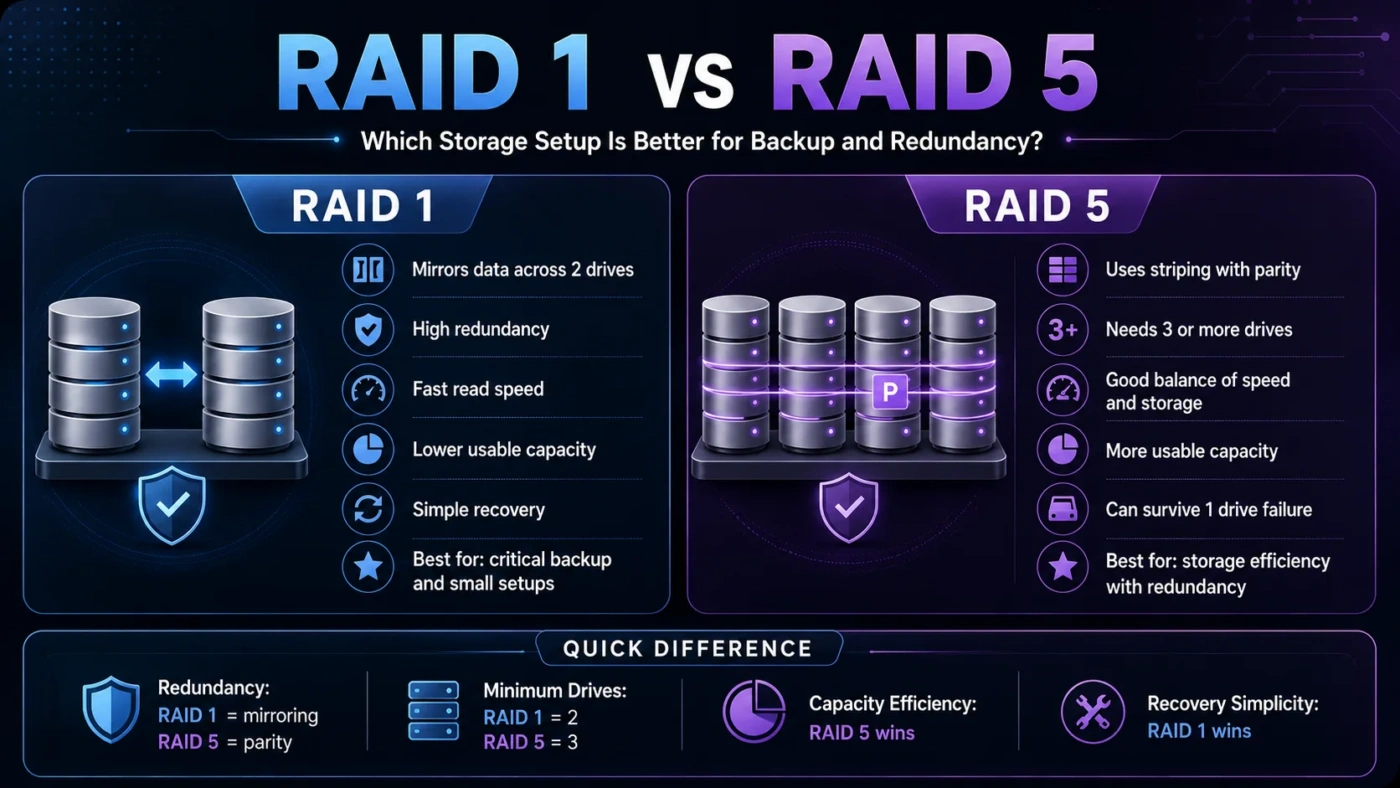
RAID 1 and RAID 5 both protect data from a single drive failure, but they solve the problem in different ways. RAID 1 is simpler, faster to rebuild, and easier to understand because it mirrors the same data on another drive. RAID 5 uses striping with parity, giving more usable storage from three or more drives, but it adds more rebuild risk and setup complexity. Choose RAID 1 if you want simple protection for a small system. Choose RAID 5 if you need more usable capacity across several drives and can manage the extra risk properly.
- Main Differences
- RAID 1 In Plain Terms
- RAID 5 In Plain Terms
- Storage Capacity And Drive Count
- Performance And Speed
- Failure Protection And Rebuild Risk
- How RAID 1 Works
- How RAID 5 Works
- Choose RAID 1 If
- Choose RAID 5 If
- Decision Tree
- RAID 1 Vs RAID 5 For NAS Storage
- Common Misunderstandings
- Best Choice By User Type
- Glossary
- Setup And Maintenance
- Compare More Options
- FAQ
- Is RAID 1 Safer Than RAID 5?
- Does RAID 5 Need Three Drives?
- Which RAID Is Better For A Two-Bay NAS?
- Which RAID Gives More Usable Storage?
- Can RAID 1 Or RAID 5 Replace Backup?
| Feature | RAID 1 | RAID 5 |
|---|---|---|
| Basic Method | Mirrors the same data on two or more drives | Stripes data across drives and stores parity information |
| Minimum Drives | 2 drives | 3 drives |
| Usable Capacity | Usually 50% with two matching drives | Total capacity minus one drive |
| Drive Failure Tolerance | Usually 1 drive in a two-drive mirror | 1 drive |
| Read Performance | Good, often faster than a single drive | Good, especially for reads across several drives |
| Write Performance | Simple and steady | Can be slower because parity must be calculated |
| Rebuild Process | Usually simpler and faster | Can take longer and places stress on remaining drives |
| Best For | Small servers, NAS boxes, workstations, simple redundancy | Multi-drive storage where capacity efficiency matters |
| Main Weakness | Uses more raw storage for the same usable space | Long rebuilds and only one-drive fault tolerance |
Main Differences
RAID 1 copies the same data to another drive. If one drive fails, the system can keep running from the remaining drive. This makes RAID 1 easy to understand, easy to monitor, and easier to recover from when something goes wrong.
RAID 5 spreads data across multiple drives and adds parity information. Parity lets the array rebuild missing data after one drive fails. This gives better capacity efficiency than RAID 1, but the tradeoff is more complex writes and a more demanding rebuild process.
RAID 1 In Plain Terms
RAID 1 is a mirror. Two drives hold the same data. You lose half of the raw capacity, but recovery is straightforward because one drive still has a full copy.
RAID 5 In Plain Terms
RAID 5 is a striped array with parity. It uses storage more efficiently, but the system must calculate and manage parity whenever data changes.
Storage Capacity And Drive Count
Capacity is one of the biggest practical differences. With two 4 TB drives in RAID 1, usable space is usually about 4 TB because the second drive mirrors the first. With three 4 TB drives in RAID 5, usable space is usually about 8 TB because one drive’s worth of capacity is used for parity.
| Drive Setup | RAID 1 Usable Capacity | RAID 5 Usable Capacity |
|---|---|---|
| 2 × 4 TB | About 4 TB | Not supported |
| 3 × 4 TB | Depends on mirror layout | About 8 TB |
| 4 × 4 TB | Depends on mirror layout | About 12 TB |
| 5 × 4 TB | Depends on mirror layout | About 16 TB |
Performance And Speed
RAID 1 can improve read speed because the system may read from either mirrored drive. Write speed is usually close to a single drive because the same data must be written to both drives. The main benefit is not raw speed; it is simple redundancy.
RAID 5 can offer strong read performance because data is striped across multiple drives. Write performance is more complicated. Every write may require parity work, so small random writes can be slower than expected, especially on low-end controllers or software RAID setups.
Failure Protection And Rebuild Risk
Both RAID 1 and RAID 5 can usually survive one drive failure. The difference is what happens after the failure.
In RAID 1, the remaining drive still contains a full copy of the data. Rebuilding the mirror onto a replacement drive is usually direct. In RAID 5, the array must reconstruct missing data using parity while reading all remaining drives. This can take a long time on large disks and may put extra stress on older drives.
How RAID 1 Works
RAID 1 is often the better fit for people who want a low-maintenance setup. It is common in two-bay NAS devices, small office servers, home media storage, and workstations where uptime matters but storage needs are not huge.
How RAID 5 Works
RAID 5 works best when capacity efficiency matters and the system has enough drive bays. It can be useful for file storage, read-heavy workloads, archives with active backups, and small business storage where one-drive redundancy is acceptable.
Choose RAID 1 If
Choose RAID 5 If
Decision Tree
RAID 1 Vs RAID 5 For NAS Storage
For a two-bay NAS, RAID 1 is usually the better choice because it matches the hardware layout. It gives one-drive fault tolerance, simple replacement, and easy setup.
For a four-bay or larger NAS, RAID 5 can be tempting because usable capacity is higher. However, RAID 5 should not be selected only because it gives more space. Backup quality, rebuild time, drive age, and alert settings matter just as much.
Common Misunderstandings
| Misunderstanding | Better Way To Think About It |
|---|---|
| RAID 1 is a backup | It is redundancy. Deleted or corrupted files can be mirrored too. |
| RAID 5 is always better because it gives more space | More usable space comes with longer rebuilds and parity complexity. |
| A RAID array means drives can be ignored | RAID needs monitoring, drive health checks, alerts, and planned replacement. |
| RAID 5 protects against two drive failures | Standard RAID 5 tolerates one failed drive. RAID 6 is designed for two-drive fault tolerance. |
| All RAID controllers behave the same | Hardware RAID, software RAID, cache settings, and file systems can change performance and recovery behavior. |
Best Choice By User Type
| User Type | Better Fit | Reason |
|---|---|---|
| Home User With Two Drives | RAID 1 | Simple setup, simple recovery, and no need for three drives. |
| Small Office NAS | RAID 1 or RAID 5 | RAID 1 fits smaller systems; RAID 5 may fit larger read-heavy storage with backups. |
| Media Storage | RAID 5 | Large read-heavy libraries can benefit from better usable capacity. |
| Beginner | RAID 1 | It is easier to understand, troubleshoot, and rebuild. |
| Capacity-Focused User | RAID 5 | It gives more usable capacity from three or more drives. |
| User With No Backup Plan | Neither | Set up backup first. RAID should not be the only protection layer. |
Glossary
Setup And Maintenance
RAID 1 is easier to set up and maintain because the storage logic is simple. In many systems, replacing a failed drive and rebuilding the mirror is a routine process.
RAID 5 needs more planning. Drive matching, controller quality, rebuild alerts, parity handling, cache protection, and backup timing all matter. It can work well, but it should not be treated as a casual “more storage” button.
Compare More Options
FAQ
Is RAID 1 Safer Than RAID 5?
RAID 1 is often safer in small setups because it is simpler and easier to rebuild. RAID 5 also protects against one drive failure, but rebuilds can be longer and more stressful for the remaining drives.
Does RAID 5 Need Three Drives?
Yes. RAID 5 needs at least three drives because it uses striping with distributed parity.
Which RAID Is Better For A Two-Bay NAS?
RAID 1 is usually the better fit for a two-bay NAS. RAID 5 is not available with only two drives.
Which RAID Gives More Usable Storage?
RAID 5 usually gives more usable storage when three or more drives are used. RAID 1 sacrifices more raw capacity because it mirrors data.
Can RAID 1 Or RAID 5 Replace Backup?
No. RAID helps with drive failure, but it does not protect against deleted files, malware, corruption, theft, fire, or user mistakes. A separate backup is still needed.
RAID 1 is the better choice for simple, small, and easy-to-recover storage. RAID 5 is the better choice when usable capacity matters across three or more drives and the system is monitored well. For most beginners and two-drive NAS users, RAID 1 is the safer practical answer. For larger arrays, RAID 5 can make sense, but only with a real backup plan and a clear rebuild strategy.