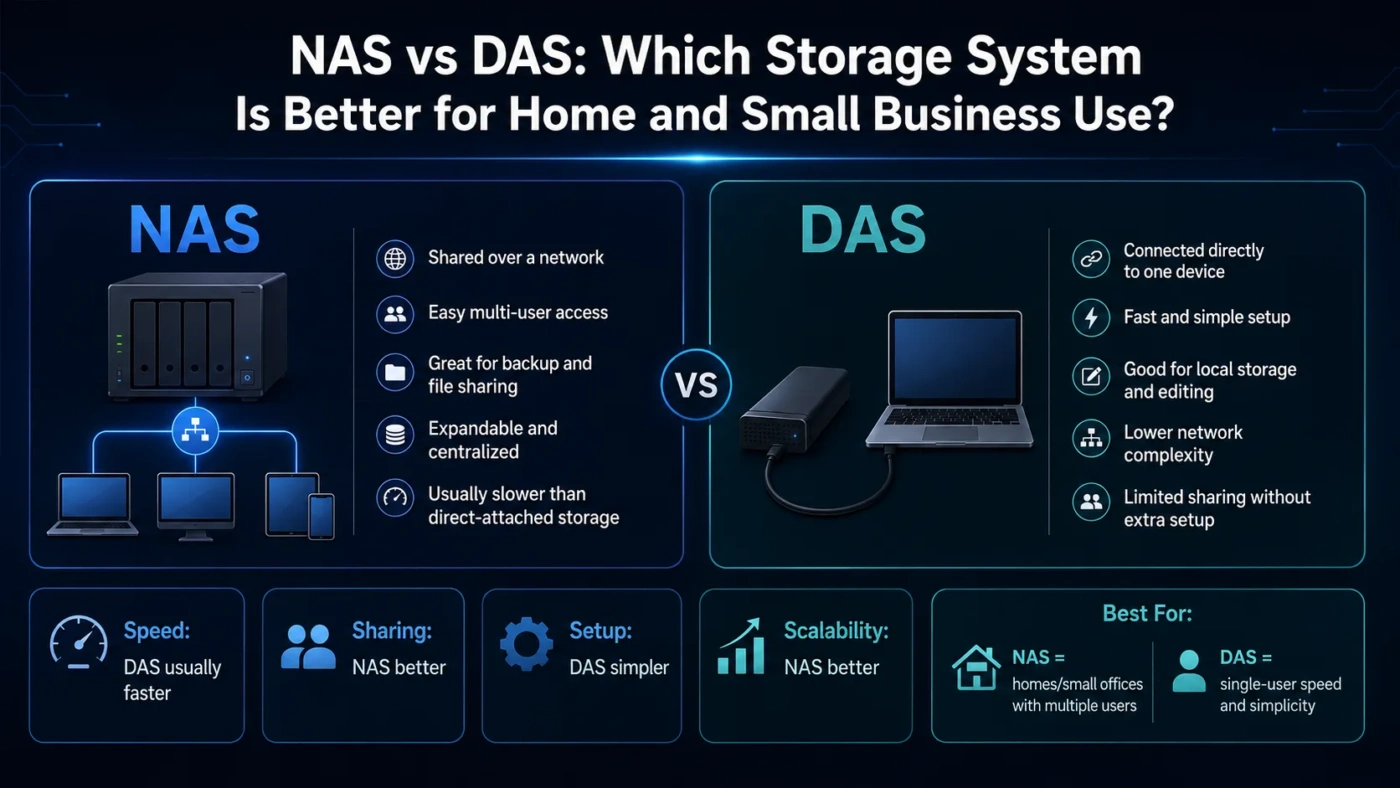
NAS and DAS both store files, but they solve different problems. Choose NAS if you want shared storage that multiple devices can access over a network. Choose DAS if you want simple, direct, fast storage attached to one computer. For a home office, small team, media library, or shared backup setup, NAS usually makes more sense. For video editing, local project files, gaming storage, or a single workstation, DAS is often the cleaner choice.
- Main Differences
- NAS Works Like A Small File Server
- DAS Works Like A Direct Drive
- What NAS Offers
- What DAS Offers
- Speed And Performance
- Setup And Daily Use
- Choose NAS If
- Choose DAS If
- Best Choice By User Type
- Decision Tree
- Score Cards
- Cost And Long-Term Value
- Backup And Data Safety
- Real Use Differences
- For Home Storage
- For Creative Work
- For Small Business
- For Travel And Portability
- Common Misunderstandings
- Glossary
- Compare More Options
- FAQ
- Is NAS Better Than DAS?
- Is DAS Faster Than NAS?
- Can NAS Be Used Like DAS?
- Can DAS Be Used By Multiple Users?
- Should I Buy NAS Or DAS For Backups?
- Which Is Better For Video Editing?
| Feature | NAS | DAS |
|---|---|---|
| Full Name | Network Attached Storage | Direct Attached Storage |
| Connection Type | Connects through Ethernet or Wi-Fi over a network | Connects directly by USB, Thunderbolt, eSATA, or internal interface |
| Best For | Shared files, backups, media libraries, small teams, remote access | Single-user speed, editing drives, local backup, extra computer storage |
| Access | Multiple users and devices can access it at the same time | Usually one computer at a time |
| Setup Difficulty | More setup: users, folders, network settings, permissions | Usually plug in, format if needed, and use |
| Speed | Limited by network speed, drive setup, and NAS hardware | Often faster for one computer, especially with Thunderbolt or fast USB |
| Remote Access | Possible with proper configuration | Not practical unless the connected computer shares it |
| Scalability | Better for growing storage and adding users | Better for adding storage to one workstation |
| Long-Term Role | Central storage hub | Local storage expansion |
| Simple Verdict | Choose it when storage must be shared | Choose it when storage must be fast and local |
Main Differences
The main difference is where the storage lives. NAS sits on your network as its own storage device. DAS sits next to your computer and connects directly to it. That difference affects speed, setup, access, backups, permissions, and long-term value.
NAS Works Like A Small File Server
NAS has its own operating system, network connection, storage bays, user accounts, shared folders, and often app support. It is built to be reached by more than one device.
DAS Works Like A Direct Drive
DAS behaves more like an external hard drive, SSD enclosure, RAID box, or storage dock. It is built to serve the computer it is plugged into.
What NAS Offers
NAS is a storage device connected to your local network. Instead of plugging the storage directly into one computer, you connect the NAS to your router or switch. Computers, phones, tablets, smart TVs, backup tools, and media apps can then access it through the network.
NAS is useful when storage needs to be centralized. A family can store photos in one place. A small office can share documents. A creator can keep finished projects on a central archive. A home user can run automatic backups from several machines.
What DAS Offers
DAS is storage connected directly to a computer. Common examples include external hard drives, portable SSDs, USB drive enclosures, Thunderbolt RAID units, and desktop expansion drives. The computer sees DAS as a local drive, so the setup is usually simple.
DAS is useful when one person or one workstation needs more space or faster local access. It is often the better fit for editing large files, keeping active projects nearby, expanding laptop storage, or making a simple backup without building a shared network system.
Speed And Performance
DAS often wins for one-computer performance because it avoids network limits. A fast SSD over Thunderbolt or a high-speed USB connection can feel very close to internal storage for many tasks. This matters when working with large video files, photo catalogs, audio sessions, virtual machines, or big project folders.
NAS speed depends on several parts working together: drive type, RAID setup, NAS processor, memory, Ethernet speed, network switch, cable quality, and client device. A basic NAS on a 1GbE network can be fine for documents, photos, backups, and media streaming. Heavier work may need faster networking, such as 2.5GbE, 5GbE, 10GbE, or SSD caching, depending on the workload.
Performance Note: DAS is not always faster in every setup, and NAS is not automatically slow. A high-end NAS on fast Ethernet can outperform a cheap external hard drive. A fast DAS SSD can outperform a basic NAS. The real result depends on the drives, connection, network, and workload.
Setup And Daily Use
DAS is easier to start with. You plug it in, format it if necessary, and store files. It does not need user accounts, network permissions, shared folders, IP settings, or remote-access configuration. That simplicity is a major advantage for beginners and for users who only need storage on one computer.
NAS takes more time at the beginning. You usually need to create storage pools, shared folders, user accounts, access rules, backup jobs, and update settings. The benefit comes later: once configured, NAS can serve many devices without moving cables or passing drives around.
| Area | NAS | DAS |
|---|---|---|
| First Setup | Moderate; requires network and storage configuration | Simple; usually plug-and-use after formatting |
| User Access | Can manage different users and permissions | Mostly controlled by the connected computer |
| Updates | Needs firmware and app updates | Usually little or no software maintenance |
| Backup Planning | Good for automated backups from many devices | Good for direct local backups from one device |
| Troubleshooting | May involve network, permissions, drives, or software | Usually cable, port, drive, or file system issues |
Choose NAS If
Choose NAS if your storage needs to serve more than one device or user. It is the better fit when the goal is shared access rather than only raw direct speed.
- You want a central storage location for a home, office, studio, or small team.
- You want automatic backups from several computers.
- You want to access files from laptops, desktops, phones, or media players.
- You want user permissions, shared folders, and organized file access.
- You want a storage system that can grow over time.
- You are comfortable spending more time on setup and maintenance.
NAS is often the smarter long-term choice when files are shared, repeated, backed up, archived, and accessed by different people or devices.
Choose DAS If
Choose DAS if you mainly need storage for one computer. It is the better fit when simplicity, direct speed, and local control matter more than shared access.
- You want extra storage for a desktop or laptop.
- You edit large files on one workstation.
- You want a simple backup drive without network setup.
- You need portable storage you can move between locations.
- You prefer fewer settings and fewer things to maintain.
- You do not need several users accessing the same files at once.
DAS is often the better personal storage choice when the drive stays close to one machine and performance needs are local.
Best Choice By User Type
| User Type | Better Choice | Reason |
|---|---|---|
| Home User With Several Devices | NAS | One shared place for photos, documents, backups, and media |
| Single Laptop User | DAS | Simple storage expansion without network setup |
| Video Editor | DAS or High-Speed NAS | DAS is simpler for active editing; fast NAS can work in multi-user studios |
| Small Office | NAS | Shared folders, permissions, and centralized backups are useful |
| Gamer | DAS | Local game storage benefits from direct access and low setup effort |
| Photographer | Both | DAS for active catalogs; NAS for archive and backup storage |
| Family Media Library | NAS | Several devices can access the same media collection |
| Beginner Who Wants Simple Backup | DAS | Less configuration and easier day-one use |
Decision Tree
Score Cards
The scores below are practical fit scores, not lab measurements. They show which option usually feels better for common use cases.
Cost And Long-Term Value
DAS usually costs less at the start. A basic external hard drive or SSD can be enough for backups, file transfer, or extra laptop space. Even larger DAS enclosures tend to stay simpler because they do not need a separate network storage operating system, user management, or server-like features.
NAS often costs more because the device is more than a drive enclosure. You may be paying for processor power, memory, drive bays, network ports, software features, app support, backup tools, and remote-access options. Drives may also be purchased separately, depending on the model.
The better value depends on the job. DAS is better value when one computer needs storage. NAS is better value when several devices would otherwise need separate drives, manual file transfers, or repeated backup setups.
Backup And Data Safety
NAS and DAS can both be part of a good backup plan, but neither one is a complete backup strategy by itself. RAID, if used, can help protect against some drive failures, but it does not replace separate backups. Accidental deletion, theft, fire, malware, and file corruption can still affect stored data.
Important: Do not treat NAS or DAS as automatically safe just because it has multiple drives. Keep another backup copy in a separate location or cloud backup service if the data matters.
Real Use Differences
For Home Storage
NAS is usually better if several people need access to photos, videos, shared documents, and backups. DAS is better if one person simply wants more storage for a laptop or desktop.
For Creative Work
DAS is often preferred for active editing because it is direct and predictable. NAS can be useful for storing finished projects, sharing files with a team, or keeping a studio archive. High-speed NAS setups can handle demanding creative workflows, but they require better networking and more planning.
For Small Business
NAS is usually the better fit because shared folders, permissions, user accounts, and centralized backup jobs matter more than simple local expansion. DAS may still work for one-person businesses or single-workstation use.
For Travel And Portability
DAS wins. Portable SSDs and external drives are easy to carry, connect, and disconnect. NAS is usually meant to stay in one place and remain connected to a network.
Common Misunderstandings
NAS is closer to a small storage server. It has network access, users, permissions, and system settings.
DAS is often faster for one computer, but a slow external drive can be beaten by a well-built NAS on a fast network.
NAS can store backups, but it still needs a separate backup plan for important files.
It can be shared through the connected computer, but that is not as clean or reliable as using NAS for shared access.
Glossary
Compare More Options
FAQ
Is NAS Better Than DAS?
NAS is better for shared storage, central backups, and multi-device access. DAS is better for simple direct storage on one computer. Neither is better for every situation.
Is DAS Faster Than NAS?
DAS is often faster for a single computer, especially with a fast SSD and a high-speed connection. NAS performance depends on the network, drives, NAS hardware, and configuration.
Can NAS Be Used Like DAS?
NAS can feel similar because it appears as shared storage on your computer, but it still works through the network. DAS is physically attached to the computer and behaves more like a local drive.
Can DAS Be Used By Multiple Users?
It can be shared through the connected computer, but that computer must stay on and handle the sharing. For regular multi-user access, NAS is usually a cleaner choice.
Should I Buy NAS Or DAS For Backups?
Choose NAS if several devices need automated backups to one central place. Choose DAS if you only need a simple backup drive for one computer.
Which Is Better For Video Editing?
DAS is usually easier and faster for one editor working on active projects. NAS can work well for teams, shared media libraries, and archives, especially with faster networking.
For most buyers, the choice is simple: pick NAS when storage should be shared and managed across devices; pick DAS when storage should be fast, direct, portable, and attached to one computer.