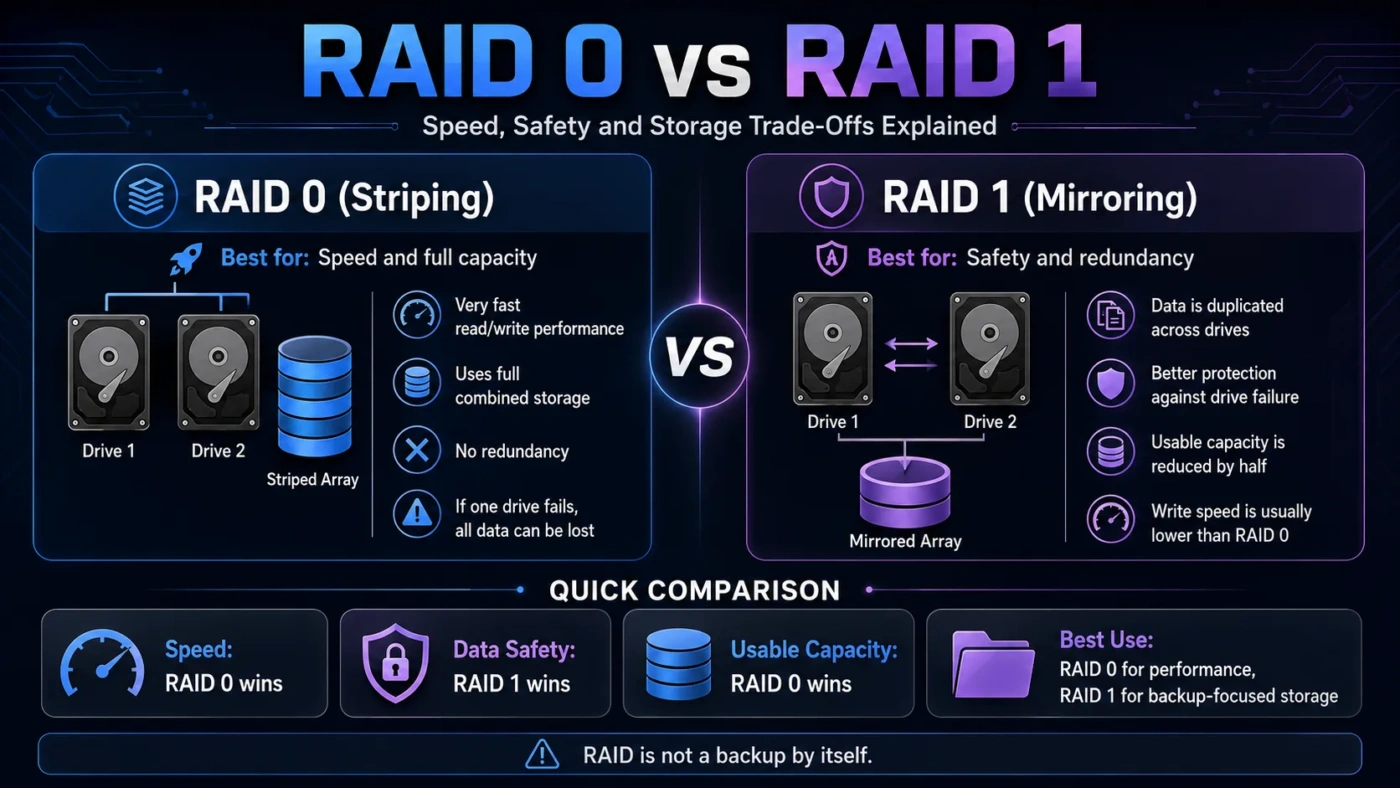
RAID 0 is built for speed and full usable capacity, while RAID 1 is built for data protection through mirroring. Choose RAID 0 only when performance matters more than safety and the data is backed up somewhere else. Choose RAID 1 when drive failure protection matters more than maximum capacity or raw write speed.
- Main Differences
- RAID 0: Speed First
- RAID 1: Safety First
- How Each RAID Type Stores Data
- Capacity Difference
- Performance and Speed
- Data Protection
- Choose RAID 0 If
- Choose RAID 1 If
- Which One Fits Your Setup?
- Real Use Differences
- For Gaming
- For Photo And Video Work
- For A Home NAS
- For A Small Business
- Setup And Maintenance
- Common Misunderstandings
- Best Choice By User Type
- RAID Terms Worth Knowing
- FAQ
- Is RAID 0 Faster Than RAID 1?
- Is RAID 1 Safer Than RAID 0?
- Does RAID 1 Replace Backup?
- Should I Use RAID 0 With SSDs?
- Which Is Better For A Two-Bay NAS?
- Compare More Options
| Feature | RAID 0 | RAID 1 |
|---|---|---|
| Main Purpose | Higher speed and full combined storage | Drive failure protection through mirroring |
| How It Works | Splits data across two or more drives | Copies the same data to two or more drives |
| Usable Capacity With Two 2 TB Drives | 4 TB usable | 2 TB usable |
| Drive Failure Tolerance | None | Usually survives one drive failure in a two-drive mirror |
| Read Speed | Often faster than a single drive | Can improve read performance in some setups |
| Write Speed | Usually faster because data is striped | Usually similar to a single drive |
| Best For | Scratch disks, temporary work files, gaming storage, speed-focused workloads | Personal files, business documents, small servers, NAS storage |
| Main Risk | If one drive fails, the whole array can be lost | Not a replacement for backup |
Main Differences
RAID 0 and RAID 1 solve different problems. RAID 0 focuses on speed and capacity. RAID 1 focuses on availability and drive failure protection. The right choice depends on whether losing the data would be a minor inconvenience or a serious problem.
RAID 0: Speed First
RAID 0 uses striping. Data is divided into blocks and written across multiple drives. This can improve read and write performance because the drives work together.
The trade-off is risk. If one drive in a RAID 0 array fails, the array usually fails with it. That makes RAID 0 a poor choice for important files unless there is a separate backup.
RAID 1: Safety First
RAID 1 uses mirroring. The same data is written to each drive in the array. If one drive fails, the system can usually keep running from the remaining drive.
The trade-off is capacity. With two equal-size drives, only the capacity of one drive is usable because the second drive stores the mirror copy.
How Each RAID Type Stores Data
Capacity Difference
Capacity is one of the easiest RAID 0 vs RAID 1 differences to understand. RAID 0 combines drive space. RAID 1 duplicates data, so usable space is reduced.
| Drive Setup | RAID 0 Usable Capacity | RAID 1 Usable Capacity |
|---|---|---|
| 2 × 1 TB drives | 2 TB | 1 TB |
| 2 × 2 TB drives | 4 TB | 2 TB |
| 2 × 4 TB drives | 8 TB | 4 TB |
Performance and Speed
RAID 0 is usually faster than RAID 1 for write-heavy work because data is split across drives. This can help with large file transfers, temporary editing files, game libraries, and workloads where speed matters more than protection.
RAID 1 is not mainly a speed setup. Write performance is often close to a single drive because the same data must be written to both drives. Read speed can improve in some systems, but this depends on the RAID controller, operating system, workload, and drive type.
Data Protection
The biggest practical difference is what happens when a drive fails. RAID 0 has no redundancy. A single failed drive can make the whole array unusable. RAID 1 keeps a mirrored copy, so a two-drive mirror can usually keep working after one drive fails.
Choose RAID 0 If
RAID 0 makes sense when performance and full capacity matter more than fault tolerance. It is best for data that is temporary, easy to replace, or already backed up elsewhere.
Avoid RAID 0 for family photos, business files, school documents, client work, or any data that would be painful to recreate.
Choose RAID 1 If
RAID 1 is the safer choice when uptime and drive failure protection matter. It is easier to recommend for normal users because it reduces the chance that one failed drive will immediately cause data loss.
RAID 1 costs more per usable terabyte because half of the storage is used for mirroring in a two-drive setup. That extra cost buys drive failure protection, not a full backup plan.
Which One Fits Your Setup?
Real Use Differences
For Gaming
RAID 0 can be useful for large game libraries if the games can be reinstalled. However, modern SSDs are already fast, so RAID 0 may not feel as dramatic in everyday loading as it once did with hard drives.
For Photo And Video Work
RAID 0 can help as a fast scratch disk, but it should not be the only place where projects are stored. RAID 1 is safer for storing finished work, client files, and archives.
For A Home NAS
RAID 1 is usually the better choice for a two-bay NAS. It protects against one drive failure and is easier to manage for shared household files.
For A Small Business
RAID 1 is safer than RAID 0 for documents, accounting files, shared folders, and small server storage. A business setup should still include external, cloud, or off-site backups.
Setup And Maintenance
Both RAID 0 and RAID 1 can be created through motherboard RAID, a dedicated RAID controller, a NAS device, or software RAID. The best method depends on the hardware, operating system, and recovery needs.
| Area | RAID 0 | RAID 1 |
|---|---|---|
| Setup Difficulty | Usually simple | Usually simple |
| After Drive Failure | Data is usually lost unless restored from backup | Replace failed drive and rebuild the mirror |
| Monitoring Need | Important because failure risk affects the whole array | Important because a second failure during rebuild can still cause loss |
| Backup Need | Very high | Still high |
Common Misunderstandings
No. RAID 0 can be riskier than a single drive because the array depends on every drive working.
No. RAID 1 mirrors mistakes too. If a file is deleted, corrupted, or encrypted by malware, that change may also appear on the mirror.
No. In a two-drive RAID 1 setup, usable capacity is usually equal to one drive, not both combined.
No. RAID 0 usually improves speed. RAID 1 is mainly about redundancy, although some systems may improve read performance.
Best Choice By User Type
| User Type | Better Choice | Reason |
|---|---|---|
| Beginner | RAID 1 | Safer and easier to justify for important files |
| Gamer | RAID 0 | Can offer more usable space and speed for replaceable game files |
| Home NAS User | RAID 1 | Better protection against one failed drive |
| Video Editor | Depends | RAID 0 can work for scratch storage; RAID 1 is safer for stored projects |
| Small Business | RAID 1 | Downtime and file loss are usually bigger concerns than maximum speed |
| Performance Tester | RAID 0 | Useful when measuring throughput and the data is not important |
RAID Terms Worth Knowing
Data is split across multiple drives to improve speed and combine capacity. RAID 0 uses striping.
The same data is copied to more than one drive. RAID 1 uses mirroring.
A storage design that allows the system to keep working after certain hardware failures.
The process of restoring a RAID 1 mirror after replacing a failed drive.
FAQ
Is RAID 0 Faster Than RAID 1?
Usually, yes. RAID 0 is designed for speed because it stripes data across drives. RAID 1 is designed for mirroring, so write speed is often closer to a single drive.
Is RAID 1 Safer Than RAID 0?
Yes, for drive failure protection. RAID 1 can usually survive one failed drive in a two-drive mirror. RAID 0 has no drive failure tolerance.
Does RAID 1 Replace Backup?
No. RAID 1 protects against some hardware failure, but it does not protect against accidental deletion, malware, theft, fire, or corrupted files.
Should I Use RAID 0 With SSDs?
RAID 0 with SSDs can increase throughput in some workloads, but many everyday users may not notice a large improvement. It also increases data loss risk if the array fails.
Which Is Better For A Two-Bay NAS?
RAID 1 is usually the better choice for a two-bay NAS because it gives protection against one drive failure. RAID 0 is better only when capacity and speed matter more than safety.
Compare More Options
For most people storing important files, RAID 1 is the safer choice. For temporary, replaceable, or performance-focused storage, RAID 0 can be useful, but only when the data is backed up or easy to recreate.