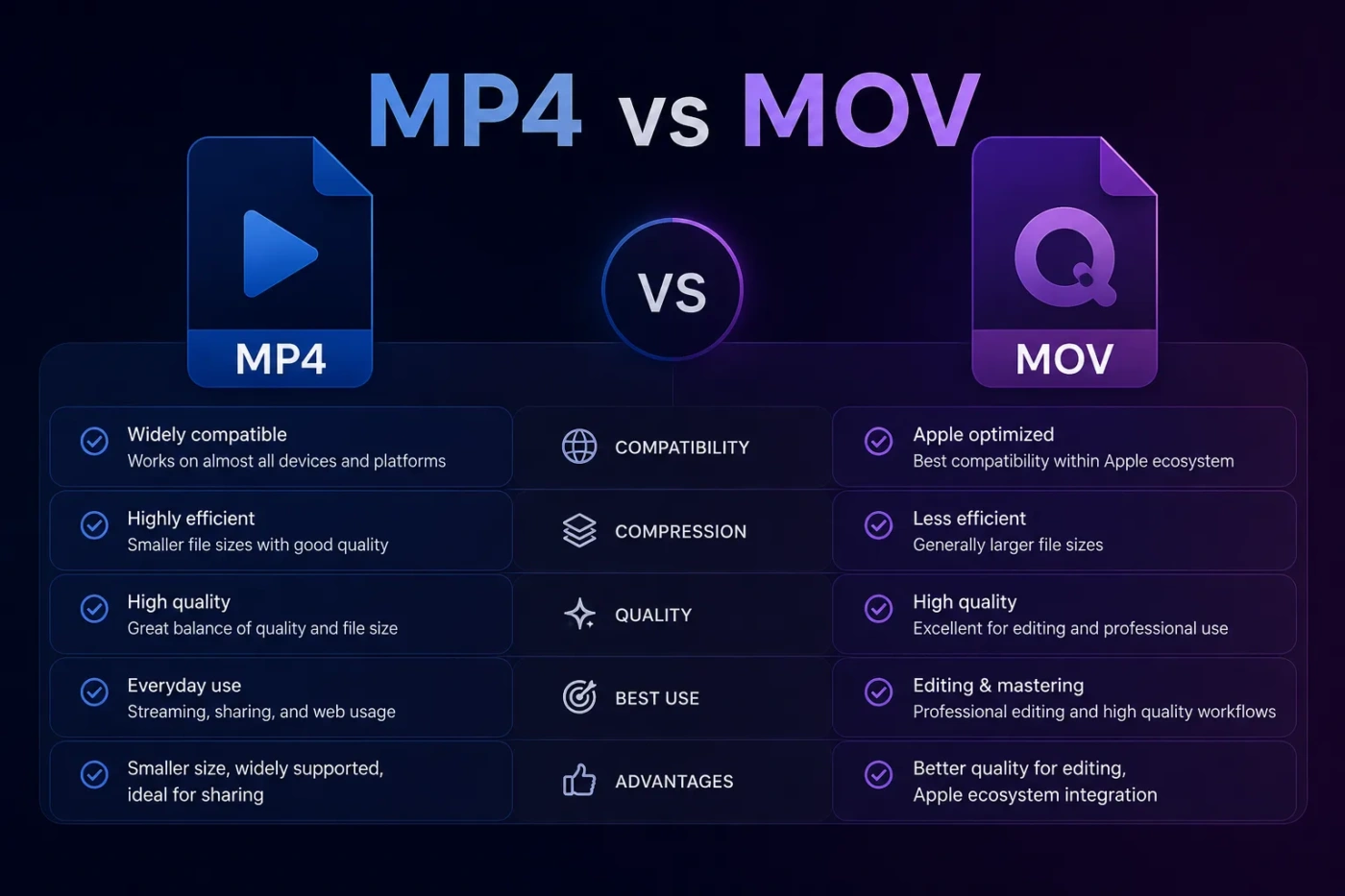
MP4 and MOV are two of the most common video container formats, but they are not the same choice for every situation. If you want the safer everyday option for sharing, uploading, streaming, storing, and playing videos across devices, MP4 is usually the better pick. If you edit video in an Apple-focused workflow, work with ProRes, or need high-quality intermediate files before export, MOV can be the better working format.
- MP4 vs MOV: The Main Difference
- What Is MP4?
- Where MP4 Works Best
- What Is MOV?
- Where MOV Works Best
- MP4 vs MOV For Compatibility
- MP4 vs MOV For File Size
- Simple File Size Rule
- MP4 vs MOV For Video Quality
- MP4 vs MOV For Editing
- Editing Performance In Real Use
- MP4 vs MOV For Uploading And Streaming
- Best Export For Social Media
- MP4 vs MOV For Apple Devices
- MP4 vs MOV For Windows And Android
- MP4 vs MOV For Professional Video Work
- When You Should Choose MP4
- MP4 Is The Better Choice If You Want To:
- When You Should Choose MOV
- MOV Is The Better Choice If You Want To:
- MP4 vs MOV: Common Misunderstandings
- Misunderstanding 1: MOV Always Has Better Quality
- Misunderstanding 2: MP4 Is Only For Low-Quality Video
- Misunderstanding 3: Changing The File Extension Converts The Video
- Misunderstanding 4: Bigger File Means Better Final Video
- Misunderstanding 5: MOV Is Only For Macs
- MP4 vs MOV For Different User Types
- Should You Convert MOV To MP4?
- Use This Simple Conversion Rule
- Should You Convert MP4 To MOV?
- Best Settings For Most People
- MP4 vs MOV: Which One Should You Choose?
- Final Decision By Situation
| Feature | MP4 | MOV |
|---|---|---|
| Best For | Sharing, streaming, social media, websites, phones, TVs, and general playback | Editing, Apple workflows, high-quality masters, ProRes files, and production use |
| Compatibility | Very broad support across Windows, macOS, Android, iOS, browsers, smart TVs, and media players | Strong support on Apple devices and editing apps; may need extra support on some non-Apple systems |
| Typical File Size | Usually smaller when encoded with common codecs such as H.264 or H.265 | Can be larger, especially with editing-friendly codecs like ProRes or less compressed video |
| Video Quality | Can be very high, but often optimized for delivery and smaller files | Often used when preserving editing quality matters more than small file size |
| Editing Workflow | Works well for basic editing and final exports | Often better for professional editing, especially in Final Cut Pro, iMovie, and Apple-based pipelines |
| Streaming And Web Use | Usually the preferred format for online video and browser playback | Less ideal for general web delivery unless the platform specifically supports it |
| Common Codecs | H.264, H.265/HEVC, AAC audio, sometimes AV1 depending on platform support | ProRes, H.264, H.265/HEVC, PCM audio, AAC, and other production-friendly codecs |
| Best Final Export Choice | Yes, in most cases | Only when the recipient, editor, or platform specifically needs MOV |
| Ease Of Sharing | Very easy: email, cloud storage, YouTube, Instagram, TikTok, websites, and messaging apps | Good in Apple workflows, but less predictable for everyday sharing |
| Main Trade-Off | Better compatibility and smaller delivery files | Better editing flexibility, but often larger files and narrower playback support |
MP4 vs MOV: The Main Difference
The main difference between MP4 and MOV is how they are usually used. MP4 is a delivery format. It is made for easy playback, smaller file sizes, online uploads, streaming, and broad device support. MOV is often a working or editing format, especially in Apple software and video production workflows.
Both MP4 and MOV are container formats. That means they can hold video, audio, subtitles, timecode, metadata, and other media information inside one file. The container is not the same thing as the codec. A file can be “.mp4” or “.mov” while still using the same video codec, such as H.264 or H.265.
This is why two files can look almost identical in quality but behave differently in editing software, upload platforms, or media players.
What Is MP4?
MP4, short for MPEG-4 Part 14, is a widely supported multimedia container format used for video, audio, subtitles, images, and metadata. Most people meet MP4 as a regular video file: a phone recording, a YouTube export, a screen recording, a downloaded clip, or a file shared through cloud storage.
MP4 is popular because it gives a good balance of quality, file size, and playback support. It works on nearly every major operating system, browser, phone, tablet, game console, smart TV, media player, and video platform.
Where MP4 Works Best
- Uploading videos to YouTube, Instagram, TikTok, Facebook, LinkedIn, or X
- Sharing files with people who may use different devices
- Embedding video on websites
- Exporting final videos from editing software
- Saving phone videos in a format that stays easy to play later
- Reducing file size without making the video look poor
For most users, MP4 is the format that causes the fewest problems. If you do not know what device, app, or platform the viewer will use, MP4 is the safer choice.
What Is MOV?
MOV is a video container format strongly associated with Apple’s QuickTime technology. It is common in macOS, iOS, Final Cut Pro, iMovie, QuickTime Player, professional cameras, and editing workflows that use codecs such as Apple ProRes.
MOV files can store high-quality video and production metadata in a way that works well during editing. A MOV file may be small if it uses H.264 or H.265, but it can also become very large when it uses editing-friendly codecs with less compression.
Where MOV Works Best
- Editing video on macOS
- Working with Final Cut Pro, iMovie, Motion, or QuickTime-based workflows
- Handling Apple ProRes files
- Keeping higher-quality intermediate files before final export
- Sending footage to an editor who specifically asks for MOV
- Preserving production metadata, timecode, and editing details in some workflows
MOV is not “better” just because the file can be larger. It is better when the workflow needs what MOV offers. For everyday viewing and sharing, that extra flexibility may not matter.
MP4 vs MOV For Compatibility
MP4 wins for compatibility. It is the format most users expect when they download, upload, stream, or share video. A well-encoded MP4 file usually plays without extra setup on Windows, macOS, Android, iPhone, iPad, smart TVs, web browsers, and most media apps.
MOV also works on many systems, especially modern devices and editing tools. Still, MOV can be less predictable outside Apple environments. Some Windows users may need a compatible media player or codec support, depending on how the MOV file was encoded.
Choose MP4 for mixed-device audiences. Choose MOV when everyone in the workflow knows they need MOV.
MP4 vs MOV For File Size
MP4 files are usually smaller when exported for normal viewing. This is one reason MP4 is preferred for web video, social media, and cloud sharing. A smaller file is easier to upload, easier to download, and less likely to cause storage problems.
MOV files can be small too, but many MOV files are created for editing quality rather than delivery size. A ProRes MOV file, for example, can be much larger than an MP4 export of the same video. That larger size can help during editing, color grading, and repeated exports, but it is not ideal for sending a final video to a viewer.
Simple File Size Rule
- MP4: Better when storage, upload speed, and playback convenience matter.
- MOV: Better when editing quality matters more than file size.
MP4 vs MOV For Video Quality
Neither MP4 nor MOV automatically means better video quality. Quality depends on the codec, bitrate, resolution, frame rate, color settings, compression level, and export settings.
An MP4 and a MOV file can both use H.264 and look almost the same. A MOV file can also use ProRes and preserve more image data for editing. An MP4 can use H.265 and keep high quality at a smaller size. The container alone does not tell the full story.
For final viewing, a properly exported MP4 can look excellent. For editing, a high-bitrate MOV or ProRes MOV may hold up better when you trim, color correct, add effects, or export multiple versions.
MP4 vs MOV For Editing
MOV is often the better editing format, especially in Apple-based workflows. Editors may prefer MOV because it can handle production codecs, timecode, high-bitrate media, and editing-friendly audio formats more comfortably.
MP4 still works for editing, especially for simple cuts, social videos, screen recordings, tutorials, and lightweight projects. The issue is that MP4 files are often more compressed. Highly compressed video can be harder for editing software to process smoothly, even if the file size is smaller.
Editing Performance In Real Use
- MP4: Smaller and easy to import, but may be more demanding to decode during editing.
- MOV: Often smoother in professional workflows when paired with editing codecs such as ProRes.
If your computer struggles with MP4 footage, converting the footage to an editing-friendly MOV format may improve timeline performance. The file may become larger, but editing can feel smoother.
MP4 vs MOV For Uploading And Streaming
MP4 is usually the better choice for uploading and streaming. Most online platforms accept MP4, and many recommend it because it works well with common video codecs, adaptive streaming systems, and browser playback.
MOV can be accepted by many upload platforms, but it is not always the most efficient final format. A large MOV file may take longer to upload and may be processed by the platform before viewers can watch it. If the final audience is online, MP4 is usually the cleaner export choice.
Best Export For Social Media
Use MP4 with H.264 video and AAC audio for most social media posts. This combination is widely supported, easy to upload, and usually keeps a strong balance between quality and file size.
MP4 vs MOV For Apple Devices
MOV feels more natural inside Apple’s media ecosystem. QuickTime Player, Final Cut Pro, iMovie, macOS, iPhone, and iPad can handle many MOV files well, especially when the codec is supported by Apple software.
That does not mean Apple users should always choose MOV. iPhones, iPads, and Macs also play MP4 very well. If you plan to send the video to non-Apple users, upload it online, or store it for general use, MP4 is often still the better final format.
MP4 vs MOV For Windows And Android
MP4 is usually easier on Windows and Android. Most built-in players, browsers, apps, and cloud services support MP4 without extra steps.
MOV can work on Windows and Android, but the experience depends on the codec inside the file. A MOV file using a common codec may open normally. A MOV file using ProRes or another production codec may need special software or may not play smoothly on every device.
If the viewer is not an editor and only needs to watch the video, send MP4.
MP4 vs MOV For Professional Video Work
MOV has a stronger place in professional video production. Many cameras, recorders, and editing systems use MOV containers for high-bitrate footage, ProRes recording, timecode, and production metadata.
MP4 is still widely used in professional work, especially for client previews, web exports, social cuts, online ads, training videos, and final delivery files. The practical workflow is often simple:
- Use MOV or another editing-friendly format while working.
- Export MP4 when the video is ready for viewers.
This gives editors quality during production and gives viewers a file that is easy to play.
When You Should Choose MP4
Choose MP4 if your main goal is easy playback, fast sharing, or a final video that works almost anywhere.
MP4 Is The Better Choice If You Want To:
- Upload a video to YouTube, Instagram, TikTok, Facebook, or a website
- Send a video to someone using an unknown device
- Keep file sizes smaller
- Store videos without using too much space
- Play videos on smart TVs, phones, tablets, browsers, and computers
- Create a final export after editing
- Avoid playback issues for a general audience
MP4 is the better default for most people because it is practical. It does not require the viewer to know anything about codecs, editing software, or Apple-specific workflows.
When You Should Choose MOV
Choose MOV if your main goal is editing flexibility, Apple workflow support, or high-quality production handling before final export.
MOV Is The Better Choice If You Want To:
- Edit video in Final Cut Pro, iMovie, or other Apple-friendly tools
- Work with ProRes or high-bitrate footage
- Preserve more editing quality before compression
- Send footage to an editor who requests MOV
- Keep a production master before making smaller versions
- Use timecode or metadata in a professional workflow
MOV is best treated as a working format, not always as the final viewing format. It can be the right choice during production and still not be the best file to send to regular viewers.
MP4 vs MOV: Common Misunderstandings
Misunderstanding 1: MOV Always Has Better Quality
MOV does not automatically mean better quality. A low-bitrate MOV can look worse than a high-quality MP4. The codec and export settings matter more than the file extension.
Misunderstanding 2: MP4 Is Only For Low-Quality Video
MP4 can store high-resolution video, including 1080p, 4K, and higher, depending on codec support and export settings. Many high-quality online videos are delivered as MP4 or MP4-based streams.
Misunderstanding 3: Changing The File Extension Converts The Video
Renaming a file from .mov to .mp4 does not properly convert it. It only changes the name. Real conversion requires rewrapping or transcoding with video software.
Misunderstanding 4: Bigger File Means Better Final Video
A bigger file may contain more data, but that does not always help the viewer. A large MOV file may be useful for editing, while a smaller MP4 may look nearly identical when watched on a phone, laptop, or TV.
Misunderstanding 5: MOV Is Only For Macs
MOV is closely tied to Apple workflows, but it is not limited to Macs. Many Windows editing programs can open MOV files. The real issue is codec support, not only the container.
MP4 vs MOV For Different User Types
| User Type | Better Choice | Why |
|---|---|---|
| Casual User | MP4 | Easy to play, send, upload, and store |
| Social Media Creator | MP4 | Best fit for platforms, smaller files, and fast uploads |
| YouTube Creator | MP4 | Good final export format with broad support |
| Mac-Based Video Editor | MOV | Works well with Apple editing tools and ProRes workflows |
| Professional Editor | MOV For Editing, MP4 For Delivery | MOV helps during production; MP4 is easier for final viewing |
| Business Presenter | MP4 | More reliable across meeting software, laptops, and projectors |
| Archivist Or Media Manager | Depends On Codec | Use MOV for high-quality masters; use MP4 for access copies |
| Someone Sending Files To A Client | MP4 Unless MOV Is Requested | Clients usually need playback convenience, not editing flexibility |
Should You Convert MOV To MP4?
Convert MOV to MP4 when the video is finished and needs to be shared, uploaded, embedded, or watched on many devices. This is one of the most common and practical conversions.
Keep the MOV file if it is your original footage, editing master, or production copy. Export a separate MP4 for viewing instead of replacing the MOV. That way, you keep the better working file and still get an easy-to-use final version.
Use This Simple Conversion Rule
- Editing or preserving a master file: Keep MOV.
- Sharing or uploading the final video: Export MP4.
- Sending to an editor: Ask what format they prefer.
- Sending to a normal viewer: Send MP4.
Should You Convert MP4 To MOV?
Convert MP4 to MOV only when your editing software, production workflow, or client specifically benefits from it. Converting an MP4 to MOV does not magically improve the original quality. If the MP4 is already compressed, putting it inside a MOV container cannot restore lost detail.
However, converting MP4 footage into an editing-friendly MOV codec can make editing smoother in some workflows. This is useful when performance matters more than saving storage space.
Best Settings For Most People
For a final video that will be uploaded or shared, use:
- Container: MP4
- Video Codec: H.264 for the broadest support, or H.265/HEVC for smaller files when supported
- Audio Codec: AAC
- Resolution: Match your project, such as 1080p or 4K
- Frame Rate: Match your source footage when possible
For editing or keeping a high-quality master, use:
- Container: MOV
- Video Codec: ProRes or another editing-friendly codec if your workflow supports it
- Audio: High-quality PCM or AAC depending on the project
- Storage Plan: Expect larger files
MP4 vs MOV: Which One Should You Choose?
Choose MP4 if you want the format that works for the largest number of people, devices, websites, and platforms. It is the better everyday format for final exports, online uploads, social media, cloud sharing, presentations, and personal video libraries.
Choose MOV if you are editing video, working in an Apple-based setup, using ProRes, preserving a high-quality master, or sending footage to someone who specifically requested a MOV file.
The cleanest choice for many workflows is not one format forever. Use MOV while editing when quality and workflow matter, then export MP4 for delivery when the video is ready to watch, upload, or share.
Final Decision By Situation
- For YouTube, social media, websites, and messaging: Choose MP4.
- For Apple editing workflows: Choose MOV.
- For smaller files: Choose MP4.
- For ProRes footage: Choose MOV.
- For sending to clients or friends: Choose MP4 unless they request MOV.
- For keeping a master file: Keep MOV if it was created as a high-quality editing file.
- For long-term easy playback: Choose MP4 with a widely supported codec.
If you only want one answer, choose MP4 for the final file. Choose MOV only when your editing workflow, camera, software, or recipient gives you a clear reason to use it.