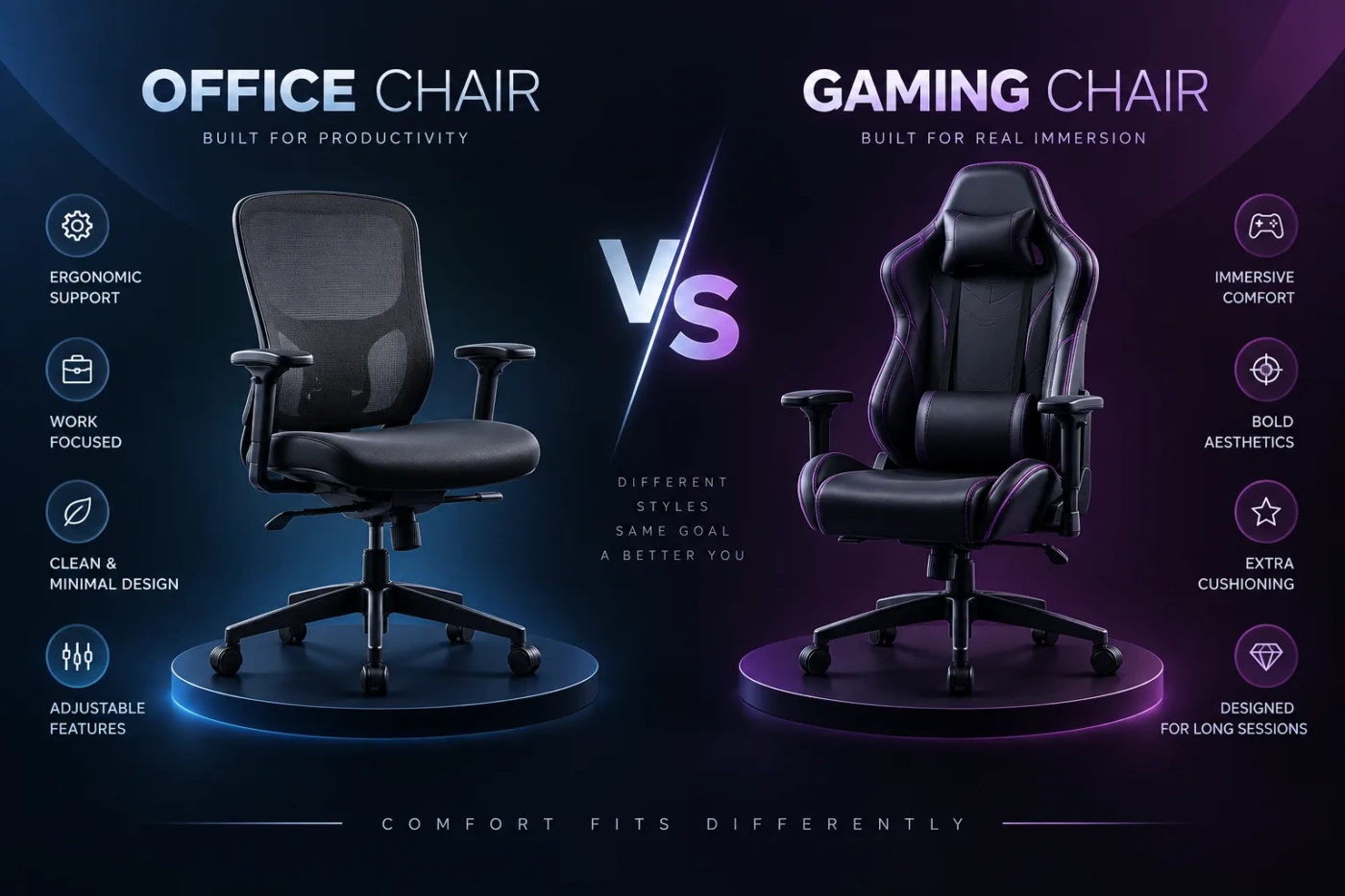
The biggest difference between an office chair and a gaming chair is usually not how soft the seat feels on day one. It is how the chair supports repeated posture changes after several hours. A well-adjustable office chair is generally the stronger fit for long workdays, while a gaming chair may suit users who want a higher back, pronounced recline, head support, and gaming-oriented styling. The category name alone is not enough, though: a poorly designed office chair can be less comfortable than a well-designed gaming chair.
- The Seat Shape Can Matter More Than the Padding
- Eight Hours at a Desk Changes the Priority
- Working Upright
- Leaning Back Between Tasks
- Lumbar Support Is Useful Only When It Meets Your Back
- Armrests Can Decide Whether the Chair Works With Your Desk
- Mesh, Fabric, and Upholstery Change the Ownership Experience
- Body Size Can Reverse the Recommendation
- A Gaming Setup Does Not Require a Gaming Chair
- Price Does Not Tell You Which Category Is Better
- What to Check Before Buying Either Chair
- The Better Chair Is the One That Lets You Keep Moving
| Decision Point | Office Chair | Gaming Chair |
|---|---|---|
| Long desk sessions | Often designed around adjustable working posture and movement | Can work well, but comfort depends heavily on the seat shape and adjustment range |
| Lumbar support | Commonly built into the backrest or adjustable independently | May use an adjustable system or a separate lumbar cushion |
| Seat shape | Usually open and relatively flat | Often deeper with side bolsters or a bucket-seat influence |
| Reclining | Usually emphasizes controlled tilt while working | Often provides a wider backrest recline range |
| Appearance | Usually subdued and workplace-oriented | Often taller, more sculpted, and visually prominent |
| Best fit | Typing, office work, study, and long mixed-use desk sessions | Gaming setups, frequent reclining, and users who prefer a high-backed seat |
The Seat Shape Can Matter More Than the Padding
Gaming chairs often look heavily padded, which can make them appear more comfortable before you sit in one. Cushion thickness does not determine long-session comfort by itself. Seat width, depth, edge shape, foam firmness, and the position of any side bolsters can matter more.
Many office chairs use a relatively flat seat pan. That gives the legs more freedom to change position and can accommodate a wider range of sitting styles. Some models also provide seat-depth adjustment, allowing you to move the seat forward or backward relative to the backrest.
Traditional racing-style gaming chairs may use raised edges inspired by automotive bucket seats. Those bolsters make sense in a vehicle where the seat helps hold the body during cornering. A desk chair does not need to restrain you laterally. For users with broad hips, large thighs, or a preference for changing leg position, pronounced bolsters can feel restrictive.
Not every gaming chair uses that design. Newer models may have wide, flatter seats and fewer restrictive edges. Likewise, inexpensive office chairs can have short, narrow, or poorly cushioned seats. Measurements matter more than the label printed on the product page.
Fit check: Sit fully against the backrest and look for a small gap between the front edge of the seat and the back of your knees. Your thighs should not be squeezed between raised side sections, and your feet should be able to rest securely on the floor or a footrest.
Eight Hours at a Desk Changes the Priority
During a long workday, remaining in one supposedly perfect posture is not the goal. People naturally shift, lean, sit upright, recline slightly, reposition their arms, and move their legs. A chair that accommodates those changes can be easier to live with than one that feels supportive only in a single position.
This is where task-focused office chairs often have an advantage. Depending on the model, useful adjustments may include seat height, seat depth, lumbar position, armrest height, armrest width, backrest tension, and synchronized tilt. You do not need every possible control, but the important ones should match your body and desk.
A gaming chair may provide seat height adjustment, armrests, tilt, and a backrest that can recline much farther. That wide recline range is attractive for watching videos, using a controller, or resting between games. It does not automatically improve typing posture. Working at a keyboard while deeply reclined can pull you away from the desk and encourage you to reach forward with your shoulders.
Working Upright
For typing, spreadsheets, coding, studying, or other keyboard-heavy tasks, the useful range is usually around an upright to modestly reclined posture. The backrest should support you without forcing your shoulders forward, while the armrests should allow your elbows to remain near the desk rather than pushing them outward.
Leaning Back Between Tasks
Gaming chairs often make a stronger case when reclining is part of the routine rather than an occasional break. A tall backrest and head support can feel natural when using a controller or consuming media away from the keyboard. Some office chairs also provide excellent recline mechanisms, but their movement may be designed more around active seated work than near-flat lounging.
Lumbar Support Is Useful Only When It Meets Your Back
The word “lumbar” appears on both office and gaming chair specifications, yet the implementation varies widely.
Many gaming chairs traditionally rely on a loose lumbar pillow placed between the lower back and the chair. The pillow can be moved or removed, but its thickness and shape may not match every user. If it pushes the pelvis too far forward, the chair can become less comfortable rather than more supportive.
Office chairs more often integrate lumbar support into the backrest. On simpler models, the curve may be fixed. Better-adjustable designs can allow the support to move vertically, change depth, or flex with the user. Some newer gaming chairs also use integrated adjustable lumbar systems, reducing the distinction between the categories.
The practical test is straightforward: support should meet the lower back without feeling like a hard object pressing into it. More pressure is not automatically better.
Armrests Can Decide Whether the Chair Works With Your Desk
Armrests receive less attention than backrests, yet they can make an otherwise comfortable chair awkward at a workstation.
If the armrests sit too high, they may lift your shoulders. Too low, and they provide little support. Fixed armrests can also prevent the chair from moving close enough to the desk, particularly when the desk has a low apron, drawer, or keyboard tray.
Both chair categories can offer adjustable armrests. Gaming models frequently advertise multiple directional adjustments, while ergonomic office chairs may provide similar movement depending on price and design. Check the actual adjustment range rather than assuming one category has better armrests.
Width matters too. Broadly spaced armrests may suit a larger user but force a smaller person to hold the elbows away from the torso. Ideally, the pads can sit beneath the forearms without determining where your shoulders have to go.
Mesh, Fabric, and Upholstery Change the Ownership Experience
Chair type and upholstery type are separate decisions. Office chairs commonly use mesh backs, fabric seats, or combinations of the two. Gaming chairs often use fabric or synthetic leather, although mesh gaming chairs and fabric gaming chairs are now easy to find.
Mesh allows more airflow and can be appealing in warm rooms or during long sessions. Its comfort depends heavily on tension and frame placement. A poorly shaped mesh seat can create pressure near the thighs, so “mesh” should not be treated as a quality grade.
Fabric tends to feel less temperature-sensitive than synthetic leather and usually avoids the peeling appearance that can occur when some coated materials age. It can, however, absorb spills and be harder to wipe clean.
Synthetic leather offers a smooth surface and is easy to wipe, but heat buildup may be more noticeable. Its durability varies by material quality, usage, humidity, friction, and care. Surface deterioration can matter more on a chair you expect to keep for many years.
A chair that feels fine during a ten-minute showroom test may behave differently through a summer afternoon or several years of daily use. Upholstery deserves almost as much attention as the backrest shape.
Body Size Can Reverse the Recommendation
Neither “office chair” nor “gaming chair” describes a universal body fit. A model built around a small seat pan and fixed lumbar curve may be uncomfortable for a tall user even if its ergonomic design is otherwise good. An oversized gaming chair may create the opposite problem for a shorter person.
Weight capacity also deserves verification, but a high published capacity does not tell you whether the chair’s dimensions will be comfortable. Structural capacity and ergonomic fit are different questions.
A Gaming Setup Does Not Require a Gaming Chair
The computer on the desk does not determine the correct seat. A person who plays games for several hours with a mouse and keyboard may benefit from the same type of adjustable office chair used for professional desk work. The posture demands are similar: the screen is ahead, the hands remain near the desk, and the body stays seated for extended periods.
Gaming chairs become more distinctive when the use pattern changes. A player who frequently leans back with a controller, watches content from the same chair, or prefers a tall seat around the shoulders and head may value features that are less common on basic office chairs.
Style is also a valid preference. A chair is a large piece of furniture, and some users want it to match a gaming-focused room. Others need something visually neutral for a shared office or video-call background. Appearance should come after fit, but it does not have to be ignored.
Price Does Not Tell You Which Category Is Better
Both categories stretch from low-cost chairs with limited adjustment to expensive models with sophisticated mechanisms and stronger materials. Comparing an entry-level office chair with a premium gaming chair—or the reverse—says more about the individual products than the categories.
Spend money on adjustments that solve a real fit problem. Seat-depth adjustment can be valuable when fixed seats are consistently too long or short for you. Adjustable lumbar support matters if fixed curves rarely align with your lower back. Multi-directional armrests become useful when desk height or shoulder width makes fixed pads awkward.
Features that sound impressive but remain unused add little value. A very deep recline mechanism is unnecessary if the chair will remain upright beside a keyboard all day. Extensive head pillows and detachable cushions are not automatically worth paying for if the backrest already fits you without them.
Durability also affects value. Examine the base, casters, adjustment mechanism, upholstery, armrest construction, warranty terms, and availability of replacement parts where that information is provided. A chair used five days a week experiences far more mechanical movement than one used occasionally.
What to Check Before Buying Either Chair
The Better Chair Is the One That Lets You Keep Moving
For someone spending most of the day typing, studying, working with a mouse, or switching between desk tasks, a properly fitted office chair is usually the more practical starting point. Its typical advantage is not an “office” label but greater emphasis on working posture, unobstructed seat shapes, and adjustment while remaining close to a desk.
A gaming chair can still be the right purchase when its dimensions fit your body, the lumbar system works for you, and you genuinely value the taller backrest or wider recline range. Modern designs also blur the old boundary between the categories, so individual construction deserves more weight than styling.
Measure the seat, check the adjustment ranges, and match the chair to how you sit for hours—not to whether the product is marketed for spreadsheets or games.