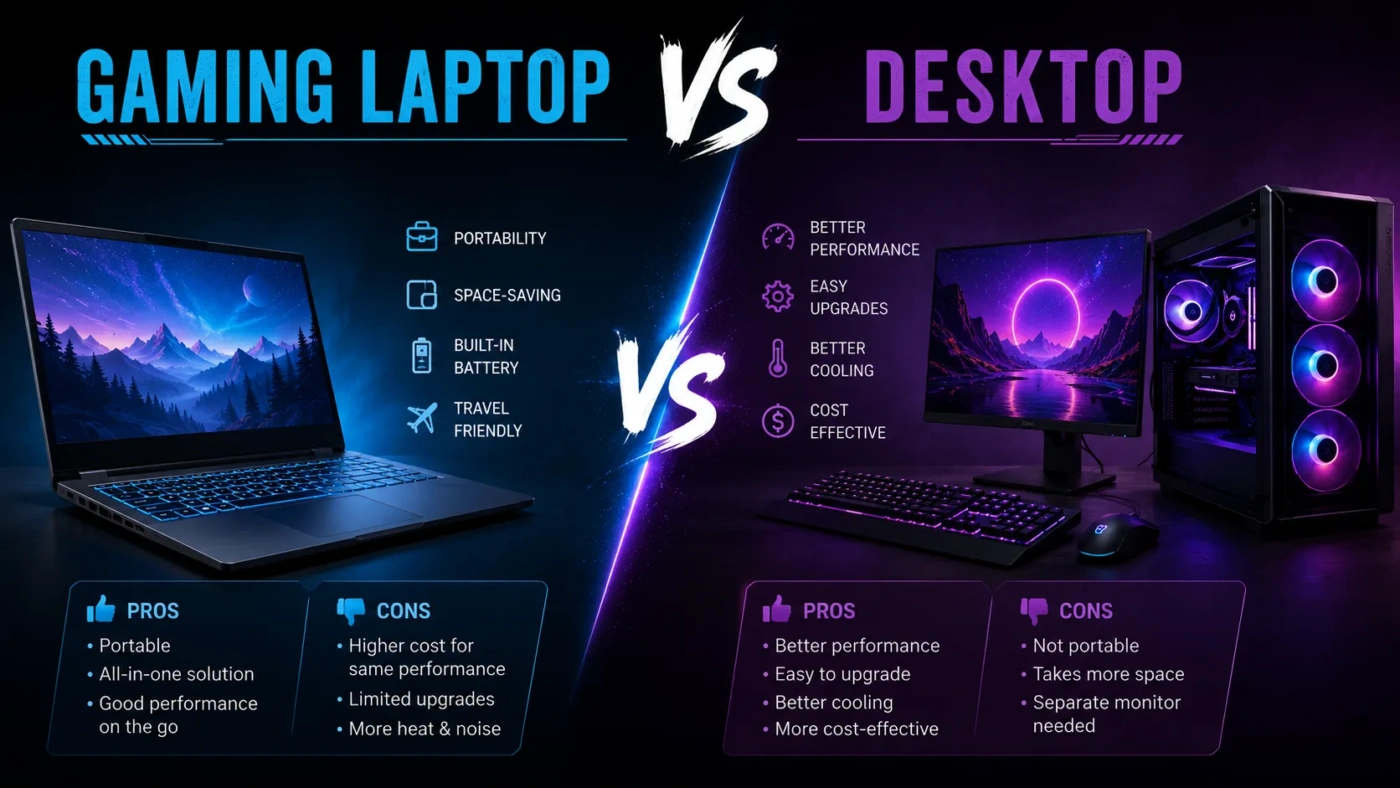
Choosing between a gaming laptop and a desktop is not just about raw frame rates. It is a decision about where you play, how long you want the machine to last, how much space you have, how often you travel, and whether you prefer a ready-made setup or a system you can upgrade piece by piece. A gaming laptop gives you one compact machine with a screen, keyboard, battery, webcam, Wi-Fi, and speakers built in. A desktop gives you more room for cooling, easier upgrades, and usually better gaming performance for the same money.
- Gaming Laptop vs Desktop: The Main Difference
- What Is a Gaming Laptop?
- How Gaming Laptop Performance Works
- What Is a Desktop Gaming PC?
- How Desktop Performance Works
- Performance: Which One Runs Games Better?
- Real Gaming Difference
- Portability: Where the Gaming Laptop Wins
- Upgradeability: Where the Desktop Wins
- Long-Term Cost Difference
- Price and Value: Which Costs Less?
- Cooling, Noise, and Comfort
- Thermal Throttling Explained
- Display and Setup Experience
- When Should You Choose a Gaming Laptop?
- Choose a Gaming Laptop If You Need One Machine for Everything
- Choose a Gaming Laptop If You Have Limited Space
- Choose a Gaming Laptop If You Travel Often
- Choose a Gaming Laptop If You Prefer a Ready-Made Setup
- When Should You Choose a Desktop?
- Choose a Desktop If You Want More Performance for Your Budget
- Choose a Desktop If You Want to Upgrade Later
- Choose a Desktop If You Play Demanding Games
- Choose a Desktop If You Care About Repairability
- Common Misunderstandings About Gaming Laptops and Desktops
- Same GPU Name Does Not Always Mean Same Performance
- A Gaming Laptop Is Not Always Cheaper Because It Includes Everything
- A Desktop Is Not Always More Expensive Once Peripherals Are Counted
- A Gaming Laptop Is Portable, But Not Fully Free From the Charger
- A Desktop Does Not Have to Be Huge
- Gaming Laptop vs Desktop for Different Users
- For Students
- For Remote Workers
- For Streamers
- For Casual Gamers
- For Competitive Gamers
- For Creators Who Also Game
- Decision Guide: Which One Should You Pick?
- Buying Checklist Before You Decide
- If You Are Buying a Gaming Laptop
- If You Are Buying a Desktop
- Final Choice: Gaming Laptop or Desktop?
| Feature | Gaming Laptop | Desktop |
|---|---|---|
| Best For | Players who need portability, an all-in-one setup, or one machine for school, work, travel, and gaming. | Players who want stronger performance, better cooling, easier upgrades, and longer hardware flexibility. |
| Performance | Strong for 1080p and 1440p gaming, but limited by heat, power limits, and thinner cooling systems. | Usually faster at the same GPU tier because desktop parts can use more power and larger coolers. |
| Portability | Easy to move between rooms, school, work, trips, dorms, and shared homes. | Made for a fixed desk setup. Moving it often is possible, but not convenient. |
| Upgrade Options | RAM and storage may be upgradeable, but the CPU and GPU are usually not replaceable. | CPU, GPU, RAM, storage, cooling, case fans, power supply, and monitor can usually be replaced over time. |
| Cooling and Noise | Runs hotter and louder under heavy gaming loads, especially in thin models. | Better airflow, larger heatsinks, and quieter fan curves are easier to achieve. |
| Price and Value | Higher cost for the same gaming performance, but includes display, keyboard, trackpad, battery, webcam, and speakers. | Better performance per dollar, but monitor, keyboard, mouse, speakers, desk space, and other extras may add cost. |
| Display | Built-in screen, often 144Hz to 240Hz on gaming models, with limited size compared with a monitor. | Works with any compatible monitor, including larger 1440p, ultrawide, OLED, or high-refresh displays. |
| Repair and Maintenance | More compact parts can make repairs harder and more expensive. | Easier to clean, diagnose, repair, and replace individual parts. |
| Battery Use | Can run unplugged for light work, but serious gaming usually needs the charger connected. | No battery. It needs a wall outlet at all times. |
| Long-Term Ownership | Best when you plan to replace the whole machine after several years. | Best when you want to upgrade gradually instead of replacing everything at once. |
Gaming Laptop vs Desktop: The Main Difference
The main difference is simple: a gaming laptop trades some performance, cooling, and upgrade freedom for portability, while a desktop trades portability for stronger performance, repairability, and long-term value.
This matters because gaming hardware is not judged by the name of the CPU or GPU alone. A laptop and a desktop can both advertise an RTX-class graphics card, a Core or Ryzen processor, fast DDR5 memory, and NVMe SSD storage, but they may not behave the same in real games. The desktop version usually has more physical space, a larger power supply, and more airflow. The laptop version must fit inside a thinner body with stricter heat and power limits.
That does not make gaming laptops weak. Many can run modern games smoothly, especially at 1080p and 1440p. The point is that a laptop’s performance depends heavily on cooling design, GPU wattage, chassis thickness, fan behavior, and power mode. With desktops, performance is usually more predictable because the parts have more room to breathe.
What Is a Gaming Laptop?
A gaming laptop is a portable computer built with gaming-focused hardware inside a notebook body. It usually includes a dedicated GPU, a high-refresh display, a stronger cooling system than a normal laptop, and performance modes that let the CPU and GPU run harder when plugged in.
Most gaming laptops include:
- A dedicated graphics chip from NVIDIA, AMD, or Intel
- A high-refresh display, often 144Hz, 165Hz, 240Hz, or higher
- A gaming-grade CPU, such as Intel Core, Intel Core Ultra, AMD Ryzen, or AMD Ryzen AI models
- Fast NVMe SSD storage
- Wi-Fi, Bluetooth, keyboard, speakers, webcam, and battery built in
- Software controls for fan speed, power mode, keyboard lighting, and display settings
The biggest benefit is convenience. You can close the lid, put the machine in a bag, and take your games, files, apps, and settings with you. For students, travelers, remote workers, military families, apartment renters, and people with limited desk space, that can matter more than having the highest possible frame rate.
How Gaming Laptop Performance Works
A gaming laptop does not perform like a desktop just because the GPU name looks similar. Laptop GPUs are tuned for mobile power limits. Two laptops with the same GPU name can also perform differently if one model gives the GPU more wattage and better cooling.
When comparing gaming laptops, look beyond the headline specs. Pay attention to:
- GPU wattage or TGP: Higher wattage often means better graphics performance, if cooling can handle it.
- Cooling design: Thicker gaming laptops often cool better than ultra-thin models.
- RAM configuration: Dual-channel memory can help gaming performance in many systems.
- Storage slots: A second SSD slot makes future storage upgrades easier.
- Display resolution: A 1080p screen is easier to drive than 1440p or 4K.
- Power mode: Many laptops perform best only when plugged in and set to a performance profile.
A gaming laptop is best judged as a complete machine, not as a list of part names.
What Is a Desktop Gaming PC?
A desktop gaming PC is a non-portable computer built around separate, replaceable components. It usually sits on or under a desk and connects to an external monitor, keyboard, mouse, headset, speakers, and other accessories.
A desktop can be bought prebuilt or assembled from individual parts. Common parts include:
- Desktop CPU
- Desktop graphics card
- Motherboard
- RAM
- NVMe SSD or SATA storage
- Power supply
- Case
- Air or liquid cooling
- External monitor and peripherals
The biggest advantage is flexibility. You can start with a modest system and upgrade the graphics card later. You can add more storage, change the case, replace fans, upgrade the monitor, or rebuild the system around a new motherboard when needed.
How Desktop Performance Works
Desktops have more room for larger graphics cards, bigger coolers, stronger power delivery, and better airflow. This lets the CPU and GPU hold higher performance for longer gaming sessions.
That difference becomes easier to notice when you play demanding games, use ray tracing, stream while gaming, edit video, run mods, use VR, or play at higher resolutions. A desktop is also easier to match with the right monitor. For example, a strong GPU can be paired with a 1440p high-refresh display, an ultrawide monitor, or a 4K screen without being locked to one built-in laptop panel.
Performance: Which One Runs Games Better?
For pure gaming performance, the desktop usually wins. It can use desktop-grade GPUs, more power, larger cooling hardware, and better case airflow. That helps it deliver higher frame rates, steadier performance, and lower temperatures under load.
A gaming laptop can still be very fast. A well-cooled 16-inch or 18-inch laptop with a high-wattage GPU can handle esports games, AAA titles, streaming, and creative software. But it is doing that inside a much smaller thermal space. Heat, fan noise, and power draw become part of the experience.
Real Gaming Difference
In daily use, the difference depends on the games you play:
- Esports games: Both can perform very well in games like competitive shooters, MOBAs, and battle royale titles.
- AAA games: Desktops usually offer more stable high settings, especially at 1440p or 4K.
- Ray tracing: Desktops have more thermal and power headroom, which helps with demanding visual settings.
- VR gaming: Desktops are often the safer choice for steady performance and port flexibility.
- Modded games: Desktops are better when heavy mods need more RAM, storage, and GPU power.
If you mostly play lightweight or competitive games, a gaming laptop may feel fast enough. If you want high settings, high resolution, and longer upgrade life, a desktop is the better fit.
Portability: Where the Gaming Laptop Wins
Portability is the strongest reason to buy a gaming laptop. You can use one machine in different places without carrying a monitor, keyboard, desktop tower, and cables.
A gaming laptop makes sense if you:
- Move between home, school, work, and travel
- Live in a dorm, shared apartment, or small room
- Need one machine for gaming and productivity
- Do not want a permanent desk setup
- Visit friends or family often and want to bring your games
- Need a computer that can be stored away when not in use
There is one catch: a gaming laptop is portable, but serious gaming still works best plugged in. Battery gaming often lowers performance and drains power quickly. The battery is useful for browsing, documents, streaming, and light work, not long AAA gaming sessions.
Upgradeability: Where the Desktop Wins
Upgradeability is the clearest desktop advantage. A desktop lets you replace parts over time, which can stretch the life of the system and reduce the need for a full replacement.
With a desktop, you can usually upgrade:
- Graphics card
- Processor, depending on motherboard support
- RAM
- SSD and hard drive storage
- Power supply
- Cooling fans or CPU cooler
- Case
- Monitor, keyboard, mouse, and audio setup
With a gaming laptop, upgrades are more limited. Many models allow RAM and SSD upgrades, but the CPU and GPU are usually soldered or built into the mainboard. Some thin laptops also have soldered RAM, which means you are locked into the memory amount you bought.
Long-Term Cost Difference
A desktop can be cheaper over several years because you can upgrade only what needs replacing. For example, you might keep the case, storage, power supply, and monitor while replacing the graphics card. With a laptop, a major performance upgrade usually means buying a new machine.
That does not mean a laptop is poor value. It includes many parts a desktop buyer must purchase separately. But if your main goal is long-term gaming performance, a desktop gives you more control.
Price and Value: Which Costs Less?
Desktops usually offer better gaming performance per dollar, especially above the entry level. A gaming laptop costs more to deliver similar performance because it must fit a screen, keyboard, battery, compact cooling, speakers, webcam, and mobile parts into one small chassis.
Still, the value comparison is not always one-sided. A desktop may need several extras before it becomes a full setup:
- Monitor
- Keyboard
- Mouse
- Headset or speakers
- Webcam
- Desk space
- Surge protector or UPS
Typical gaming laptop prices can range from around $800 to $3,000+, depending on GPU, screen, build quality, storage, and brand. Desktop gaming PCs can also range from around $700 to $3,000+, but the desktop usually gives more performance at the same budget once the core PC is compared directly.
If you already own a good monitor and peripherals, the desktop value becomes stronger. If you need a complete portable setup in one purchase, the laptop value becomes easier to justify.
Cooling, Noise, and Comfort
Cooling affects more than benchmark numbers. It changes fan noise, keyboard temperature, performance stability, and comfort during long gaming sessions.
Gaming laptops often run hot because powerful parts are packed into a slim body. The fans may become loud when the GPU and CPU are both working hard. The keyboard deck can also feel warm during long sessions.
Desktops have more space for airflow. Larger fans can move more air at lower speeds, and bigger coolers can keep temperatures under control with less noise. A desktop also keeps the heat away from your hands because the keyboard is separate from the main system.
Thermal Throttling Explained
Thermal throttling happens when a component lowers its speed to stay within safe temperature limits. It can happen in both laptops and desktops, but laptops are more exposed to it because they have less cooling space.
This is why a thicker gaming laptop may outperform a thinner one with similar specs. It is also why a desktop with good airflow can feel smoother over long sessions, even when short benchmark runs look close.
Display and Setup Experience
A gaming laptop gives you a built-in display, which is convenient. Many gaming laptops now offer fast refresh rates, good color coverage, and sharp panels. For many players, a 15-inch, 16-inch, 17-inch, or 18-inch laptop display is enough.
A desktop gives you more display freedom. You can choose a larger screen, a curved monitor, an ultrawide panel, a 1440p high-refresh display, a 4K monitor, or a dual-monitor setup. This matters for gaming, streaming, video editing, coding, trading dashboards, and multitasking.
You can also connect a gaming laptop to an external monitor, keyboard, and mouse. That gives you a desk-like setup when you are home and portability when you leave. The downside is cost: once you add a monitor and peripherals to a laptop, the total price can rise quickly.
When Should You Choose a Gaming Laptop?
Choose a gaming laptop if portability is part of your real life, not just a nice idea. It is the better choice when your gaming setup needs to move with you.
Choose a Gaming Laptop If You Need One Machine for Everything
A gaming laptop works well when you want one device for gaming, school, office work, video calls, creative apps, streaming, and travel. You do not need to manage a separate desktop and laptop.
Choose a Gaming Laptop If You Have Limited Space
If you live in a dorm, studio apartment, shared room, or small home, a laptop keeps your setup simple. You can store it in a drawer or backpack instead of dedicating a desk to a tower and monitor.
Choose a Gaming Laptop If You Travel Often
For people who move often, a desktop can become annoying. A laptop lets you keep your files, games, and settings in one portable device.
Choose a Gaming Laptop If You Prefer a Ready-Made Setup
A laptop is simpler to buy. You choose a model, plug it in, install your games, and start playing. You do not need to choose a motherboard, power supply, case, cooler, and monitor separately.
When Should You Choose a Desktop?
Choose a desktop if you mostly game in one place and want the best mix of performance, cooling, upgrade freedom, and long-term value.
Choose a Desktop If You Want More Performance for Your Budget
If frame rate, resolution, and graphics settings matter most, a desktop is usually the better purchase. It can use stronger desktop GPUs and keep them cooler for longer.
Choose a Desktop If You Want to Upgrade Later
A desktop is ideal if you want to replace the GPU in two or three years, add more storage, change the CPU cooler, or move to a better monitor. You are not locked into one sealed machine.
Choose a Desktop If You Play Demanding Games
For 1440p, 4K, ray tracing, heavy mods, simulation games, VR, and high-refresh gaming, a desktop gives more room to grow.
Choose a Desktop If You Care About Repairability
Desktop parts are easier to access, clean, test, and replace. If a fan fails, a cable comes loose, or a storage drive needs changing, the repair path is usually simpler.
Common Misunderstandings About Gaming Laptops and Desktops
Same GPU Name Does Not Always Mean Same Performance
A laptop GPU and a desktop GPU with similar branding can perform differently. The laptop version is designed for a smaller body, lower power limits, and tighter cooling. Always check real gaming performance, GPU wattage, and cooling reviews when buying a laptop.
A Gaming Laptop Is Not Always Cheaper Because It Includes Everything
A laptop includes the screen, keyboard, speakers, webcam, and battery. That helps value. But if your goal is the highest gaming performance for the money, a desktop still usually wins.
A Desktop Is Not Always More Expensive Once Peripherals Are Counted
Some buyers compare a laptop to a desktop tower only. That misses the cost of a monitor, keyboard, mouse, and headset. If you already own those items, the desktop value is stronger. If you do not, add them to the budget before deciding.
A Gaming Laptop Is Portable, But Not Fully Free From the Charger
Gaming on battery often reduces performance and drains the battery fast. A gaming laptop is best seen as easy to move, not as a full-speed unplugged gaming machine.
A Desktop Does Not Have to Be Huge
Not every desktop is a large tower. Small-form-factor PCs can save space, though they may cost more and need careful cooling choices. A compact desktop can be a good middle option if you want a fixed setup without a large case.
Gaming Laptop vs Desktop for Different Users
For Students
A gaming laptop is usually more practical for students who need one computer for classes, notes, projects, gaming, and travel. A desktop makes more sense if the student already has a separate lightweight laptop for class and wants a stronger gaming setup in the room.
For Remote Workers
A gaming laptop works well if you move between home, office, coworking spaces, and travel. A desktop is better if your work setup stays in one place and you want a larger monitor, better ergonomics, and quieter cooling.
For Streamers
A desktop is usually the safer pick for streaming because it has more performance headroom, better cooling, more USB ports, easier audio setup, and room for capture cards or extra storage. A gaming laptop can stream well, but fan noise and heat may need more attention.
For Casual Gamers
A gaming laptop can be enough if you play esports titles, older games, indie games, or mainstream titles at balanced settings. A desktop is better if you want to keep the system for longer and upgrade instead of replacing it.
For Competitive Gamers
A desktop is usually better for competitive players who want high frame rates, low input latency, a full-size keyboard, a gaming mouse, and a high-refresh external monitor. A laptop can still work well when paired with an external monitor and peripherals.
For Creators Who Also Game
Both can work for video editing, 3D work, music production, streaming, and design. A laptop gives mobility for client work and travel. A desktop gives more sustained performance, more storage options, and easier cooling for long rendering sessions.
Decision Guide: Which One Should You Pick?
Use this simple decision path:
- Pick a gaming laptop if you need portability, have limited space, travel often, or want one machine for both daily work and gaming.
- Pick a desktop if you mostly game at one desk and want better performance, quieter cooling, easier upgrades, and stronger long-term value.
- Pick a gaming laptop with an external monitor if you want a hybrid setup: portable when needed, more comfortable at home.
- Pick a desktop plus a basic laptop if gaming performance matters at home but you still need a simple portable computer for everyday tasks.
Buying Checklist Before You Decide
If You Are Buying a Gaming Laptop
- Check the GPU wattage, not only the GPU name.
- Look for reviews that test heat, fan noise, and real game performance.
- Choose enough RAM for your games and apps; 16GB is a common starting point, while 32GB is safer for heavier use.
- Make sure the SSD capacity fits your game library.
- Check whether RAM and storage can be upgraded.
- Pay attention to the charger size if you travel often.
- Choose a screen resolution your GPU can handle comfortably.
If You Are Buying a Desktop
- Balance the CPU and GPU so one does not hold the other back.
- Choose a quality power supply with enough headroom for future upgrades.
- Make sure the case has good airflow.
- Plan the monitor around the GPU: 1080p, 1440p, ultrawide, or 4K.
- Leave room in the budget for keyboard, mouse, headset, and speakers if needed.
- Check motherboard compatibility before planning future CPU upgrades.
- Choose enough storage for large game installs.
Final Choice: Gaming Laptop or Desktop?
For most players who want the best gaming performance for the money, the desktop is the better choice. It offers stronger cooling, easier upgrades, better repair options, and more flexibility with monitors and peripherals.
For players who need mobility, the gaming laptop is the better choice. It is practical, compact, easy to move, and powerful enough for many modern games when chosen carefully. The right laptop can replace a desktop for a user who values portability more than maximum performance.
The cleanest way to decide is to be honest about where you will play. If your computer will stay on one desk, choose a desktop. If your computer needs to follow you between places, choose a gaming laptop. If you want both, buy a strong gaming laptop and use it with an external monitor, keyboard, and mouse at home.