When you’re buying a TV, monitor, or streaming device, HDR and SDR come up constantly — but the actual difference between them is rarely explained in plain terms. This article lays out what each standard does, where the gap is visible, and which one actually matters for your setup.
- What Actually Separates HDR from SDR
- What Is HDR?
- What Is SDR?
- When HDR Makes a Visible Difference
- When SDR Is the Better Practical Choice
- The “Fake HDR” Problem
- HDR Formats Compared Briefly
- Common Misconceptions
- “HDR Just Means a Brighter Screen”
- “Any Screen That Says HDR Actually Delivers HDR”
- “SDR Content Looks Bad on HDR Displays”
- “HDR Is Always Better for Gaming”
- Who Should Prioritize Which
| Feature | HDR | SDR |
|---|---|---|
| Full Name | High Dynamic Range | Standard Dynamic Range |
| Peak Brightness | 400 – 10,000+ nits (display dependent) | ~100 nits (standardized) |
| Color Gamut | Wide Color Gamut (DCI-P3, Rec. 2020) | Rec. 709 (sRGB) |
| Bit Depth | 10-bit or 12-bit | 8-bit |
| Number of Colors | ~1.07 billion | ~16.7 million |
| Content Availability | Netflix, Disney+, YouTube, Blu-ray UHD | Universal — all devices and platforms |
| Display Requirement | HDR-capable panel required | Works on any screen |
| Common Standards | HDR10, HDR10+, Dolby Vision, HLG | Single global standard |
| Typical Entry Cost | $250+ for a monitor with real HDR | Available at all price points |
| Gaming Support | PS5, Xbox Series X, PC (DirectX 12) | All platforms |
What Actually Separates HDR from SDR
The difference isn’t just about brightness. HDR changes three things at once: the maximum luminance a display can output, the range of colors it can show, and the bit depth used to encode those colors. SDR operates within a fixed ceiling — 100 nits of peak brightness and the Rec. 709 color space, which has been the television broadcast standard since the late 1990s.
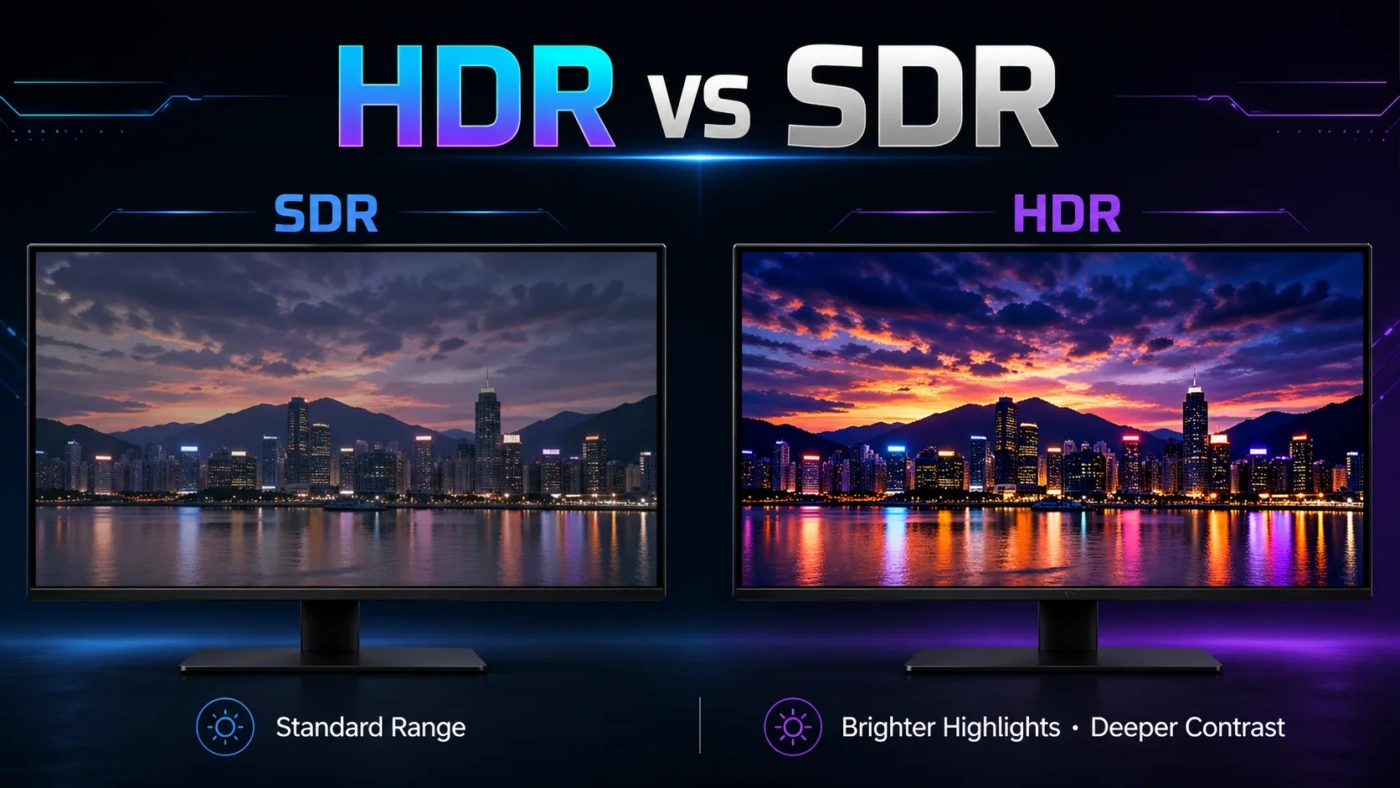
HDR expands all three of those limits simultaneously. A well-mastered HDR scene can show specular highlights (sunlight glinting off water, for example) at 1,000 nits while keeping shadow detail that SDR would clip to pure black. That simultaneous control over the brightest and darkest parts of an image is what makes HDR look different — not just brighter.
Bit depth matters here more than most people realize. SDR’s 8-bit encoding supports around 16.7 million colors. HDR’s 10-bit minimum allows over a billion distinct color values. In practice, this reduces visible banding in gradients — the smooth transitions in sky, skin tone, and fog that look slightly stepped on 8-bit displays.
What Is HDR?
HDR — High Dynamic Range — is a set of display and content standards that allows a much wider range of luminance and color to be captured, stored, and reproduced on screen. It’s not a single technology; it’s an umbrella term covering several competing formats.
HDR10 is the baseline open standard. It uses static metadata, meaning brightness and color mapping instructions are set once for the entire video file. Most HDR-capable devices support it. HDR10+ (developed by Samsung and Amazon) adds dynamic metadata — per-scene or per-frame tone mapping — without a licensing fee. Dolby Vision is the most sophisticated format, supporting up to 12-bit color depth and dynamic metadata, but it requires a licensing fee from display manufacturers, which is why not every HDR TV supports it. HLG (Hybrid Log-Gamma) is broadcast-focused and works without metadata, making it useful for live television and streaming.
For HDR to actually look like HDR, two things have to be true: the content must be mastered in HDR, and the display must be capable of reproducing it. A TV labeled “HDR compatible” that peaks at 300 nits will technically accept an HDR signal, but the visible improvement over SDR on that panel is minimal.
What Is SDR?
SDR — Standard Dynamic Range — is the baseline video standard that nearly all content was produced in before HDR became widespread. It targets 100 nits of peak brightness, uses the Rec. 709 color space (which maps closely to sRGB used in computing), and encodes images in 8 bits per channel.
SDR is not a flaw or an inferior version of HDR — it’s a deliberately defined standard that was calibrated to match the capabilities of CRT displays and early flat panels. Content mastered for SDR looks exactly as intended on a properly calibrated SDR display. The issue only arises when SDR content is displayed on a bright modern panel without proper gamma handling, or when HDR content is tone-mapped poorly for SDR output.
SDR remains the default for the vast majority of content online. Most YouTube videos, web-based video, live sports broadcasts, and older films are SDR. It works on every screen, every device, and every platform without compatibility questions.
When HDR Makes a Visible Difference
HDR’s impact depends heavily on the display. On a panel with genuine HDR performance — typically 600 nits or above for FALD (Full Array Local Dimming) or 1,000+ nits for OLED — the difference is immediately visible in:
- Outdoor scenes with bright sky and shadowed foreground detail visible simultaneously
- Fire, explosions, and light sources that appear to actually glow
- Skin tones with subtle gradient detail that SDR compresses into flat areas
- Neon or saturated colors (deep reds, vivid blues) that fall outside Rec. 709’s gamut
- Night scenes where shadow detail and highlight brightness coexist without clipping
For gaming, HDR can add genuine atmosphere to titles designed with it in mind. Games like Cyberpunk 2077, Horizon Forbidden West, and Red Dead Redemption 2 were tone-mapped with HDR as the target output. Playing them on a capable HDR display with a proper calibration is noticeably different from SDR — not just brighter, but more three-dimensional in how light behaves.
When SDR Is the Better Practical Choice
SDR is the right call in several common situations:
- Your display peaks below 400 nits — budget monitors and entry-level TVs often carry an “HDR” badge that doesn’t translate to real HDR performance
- You work in color-sensitive fields (photo editing, video grading) and need a calibrated, predictable Rec. 709 environment
- You watch mostly older films, live TV, or content produced before 2016
- Your viewing environment is brightly lit — HDR’s shadow detail advantage disappears in a room with strong ambient light
- You’re gaming on a monitor where response time and refresh rate matter more than image rendering (competitive play)
There’s also the tone mapping issue. When HDR content plays on an SDR display, the player or TV must compress the full HDR luminance range into SDR’s narrower window. Done well, the result is acceptable. Done poorly — which is common on budget hardware — HDR content can actually look worse than properly mastered SDR: washed out, with crushed shadows or blown-out highlights.
The “Fake HDR” Problem
This is the most under-discussed issue in the HDR vs SDR conversation. Most budget TVs sold at $200–$400 carry an HDR logo on the box, but their panels are physically incapable of producing HDR-grade results. A 300-nit peak brightness panel labeled “HDR10 compatible” will accept the signal but tone-map the image to fit its limited output range. The result is often a slightly over-saturated, contrast-boosted image that looks artificially processed rather than genuinely high dynamic range.
Real HDR performance requires either:
- An OLED panel (which achieves effective infinite contrast through per-pixel light control, compensating for lower peak brightness)
- A Mini-LED or FALD LCD panel with at least 600–1,000 local dimming zones and 600+ nits of peak brightness
- A high-end QLED or IPS panel with adequate zone count — not edge-lit panels that cause blooming around bright objects
If your display doesn’t meet those thresholds, leaving content in SDR and ensuring proper gamma calibration will often produce a more accurate, pleasant image than forcing HDR through underqualified hardware.
HDR Formats Compared Briefly
Since HDR isn’t a single format, it helps to know which ones actually matter for your device:
- HDR10: The minimum baseline. Static metadata, 10-bit, Rec. 2020 color space target. Supported on essentially every HDR device.
- Dolby Vision: Dynamic metadata, up to 12-bit, superior tone mapping. Requires licensing — check your TV or streaming device for support. Common on LG, Sony, and TCL sets.
- HDR10+: Dynamic metadata like Dolby Vision but without licensing fees. Supported on Samsung TVs and Amazon Prime Video content.
- HLG: Designed for broadcast. No metadata required. Your TV switches between SDR and HDR depending on the signal automatically.
Dolby Vision generally produces the best result when content is properly mastered for it and your display supports it natively. HDR10+ is a close alternative on compatible hardware. HDR10 is the universal floor.
Common Misconceptions
“HDR Just Means a Brighter Screen”
Brightness is one component, but HDR is really about simultaneous control over light and dark. A display that only increases peak brightness without improving black levels or color volume will look harsh and unnatural. The best HDR performance comes from controlling contrast ratio alongside peak luminance — which is why OLED panels often deliver a better HDR experience than brighter but less controlled LCD panels.
“Any Screen That Says HDR Actually Delivers HDR”
Marketing labels and actual performance are two different things. The VESA DisplayHDR certification is a more reliable indicator — DisplayHDR 600 and above generally indicates a panel that can produce a meaningful HDR experience. DisplayHDR 400 (the entry tier) shows minimal visible improvement over SDR in real viewing conditions.
“SDR Content Looks Bad on HDR Displays”
SDR content on a well-calibrated HDR display looks perfectly fine. The display applies an SDR tone curve and renders the content within Rec. 709 parameters. The issue only arises when a display applies HDR processing to SDR content without permission — something that can usually be disabled in the picture settings menu.
“HDR Is Always Better for Gaming”
Not universally. In competitive play, many experienced players actually disable HDR because some game engines implement it poorly, causing crushed blacks or inconsistent brightness that hurts visibility. HDR shines most in single-player, story-driven games with deliberate lighting design.
Who Should Prioritize Which
Choose HDR if you have — or plan to buy — a display that genuinely supports it (OLED, Mini-LED, or a high-nit FALD panel), you watch a lot of streaming content from Netflix, Disney+, or Apple TV+, and you play modern single-player games where visual fidelity is part of the experience. The investment pays off when the hardware and content align.
Stick with SDR if your display is a budget LCD under 400 nits, you work in color-grading or photo editing where a calibrated Rec. 709 environment is standard, or you mostly consume older content or live broadcasts. SDR on a well-calibrated display is a clean, accurate, and completely satisfying viewing experience for the right context.
The honest truth: HDR is worth caring about when you have a display that can deliver it. On panels that can’t, SDR handled properly will look better than poorly tone-mapped HDR every time.